When we develop and release a product here at CORSAIR, we have a pretty straightforward idea of how it’s going to be used. However, time and time again the community surprises us with their creativity, blowing past our vision for the product and coming up with novel uses, useful accessories, and creating functionality that didn’t even cross our minds.
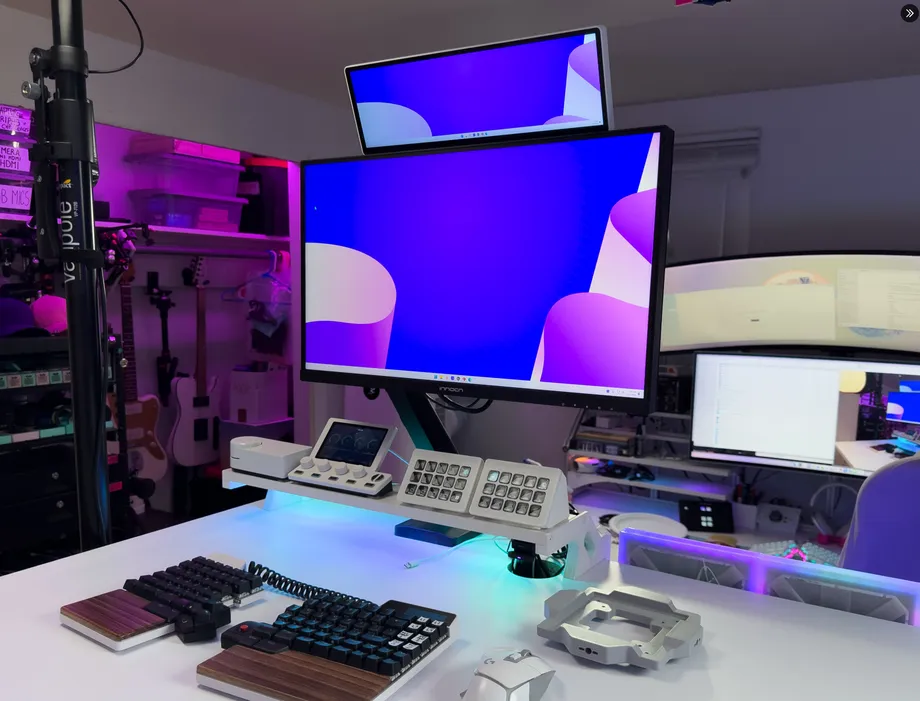
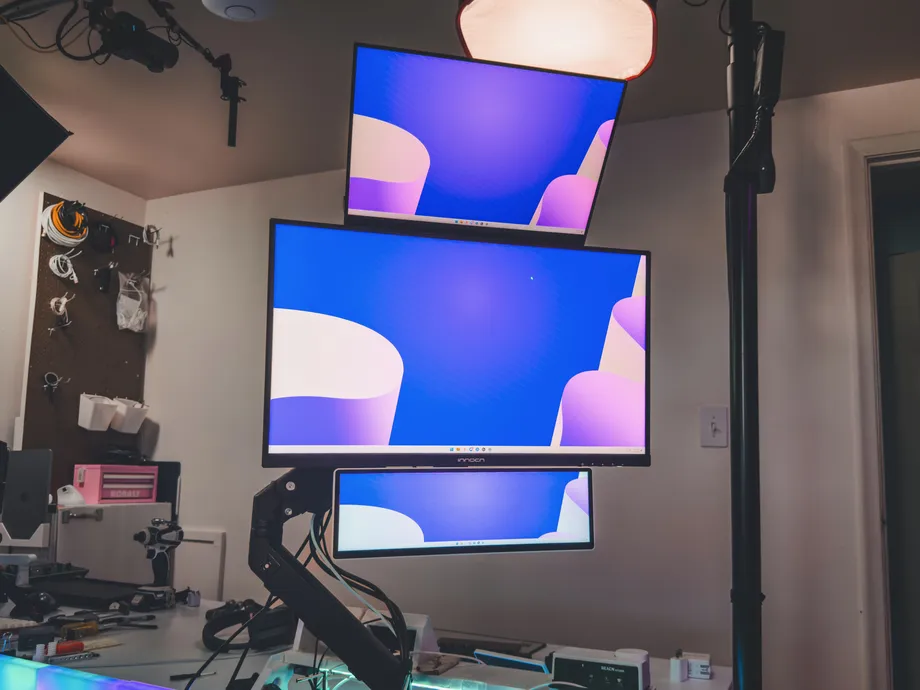
So, we’re going to start showing off what our community is capable of right here with the CORSAIR Creator Spotlight. We've decided to interview the creator in question to see who they are, where they got their inspiration, and how their creation came to be. We’re starting with Nick AKA @Naaackers. He made a very cool modular mount for the XENEON EDGE, allowing you to integrate it into your setup however you want.
“My name is Nick and I’ve made content online under the handle @Naaackers since 2014. I started my journey live streaming video games on Twitch, eventually transitioning into IRL, podcasting, tech, and just chatting content around 2018.”
“While I quit live streaming in 2022, I started making short form content on hardware and software in the content creation space in 2020, and still do that to this day. In 2024, I decided to split my interest and started designing modifications for Elgato hardware and making videos about it under a new account @NackHabitat. While making those and documenting the process, I started to get interest from other creators in the space.”
“That’s when I decided to make my first real product to print and sell, and now designing kits that solve people’s tech problems is what I love to do! So Naaackers is me the person and everything I do, while NackHabitat is my product development and design sub-company.”
“Whenever I use product, I think about different ways to use it to better fit my workflow. Sometimes a product is 90% and I try to just fill the gap of that last 10%. Since I’m creator myself, I live and breathe the tech in this space and understand the pain points. Sometimes this involves taking a product and using it for something it wasn’t designed for, which results in making discoveries or finding cool unique use cases for the product.”
“My first project was modding the Elgato Prompter to make it easier and more effective for vertical short form content, which really became popular long after the prompter has been designed.”
“Chaotic, obsessive, a little vulgar and lots of attempts at being funny.”
"They are modular adapters that allow the CORSAIR XENEON EDGE to be mounted on the desktop near your monitor. It adds both additional ¼” threads for any type of mounting orientation, as well as providing holes for ARRI anti-rotation pins commonly found on 7” and 11” magic arms like the SmallRig rosette which I think are important for mounting small displays.”
“I have two versions, one that screws into the XENEON EDGE and is much smaller (black in color below), or a larger magnet only version that is similar to the stand that comes with the XENEON EDGE, but again adds three ¼” mounting points (grey in color below).”
"A modular adapter for mounting the CORSAIR XENEON EDGE however you want."
“If you want to mount your CORSAIR XENEON EDGE at your desk and near your mouse/keyboard/monitors, it can be paired with something like the Spoosa, which is a VESA spacer I’m working on what lets you mount things off a single VESA monitor arm. These adapters are all part of an ecosystem that lets you mount mics, webcams, cameras, monitors, or anything with that can be mounted with a ¼” magic arm. This builds off the VESA mounting standard so all the hardware can move when the main monitor moves.”
"This entire journey started with me trying to reduce the footprint of my gaming setup, because it was on the same desk as my content creation setup. I still wanted to have multiple displays, but not 3 different mounting arms or something really bulky. Once I got the XENEON EDGE, I knew it would fit perfectly around my main monitor because it was skinny.”
"I didn’t see a whole lot of great ways to mount the XENEON EDGE in a floating fashion. Lots of magnet or desktop versions, but nothing that really fit what I was looking for.”
"Two things really, first was making a mount that was large enough to be sturdy and strong while not getting in the way of where the cables need to run to plug in. Next, getting all the magnets in the right physical location to match the ones in the XENEON EDGE already, as well as finding the correct angle and depth for the ¼” mount points."
"When I realized I could use a flexible filament to build cable management right into the adapter."
"I use this to mount my XENEON EDGE at my gaming setup"
"I feel like this could be really awesome as a sim racing control device, or at a POS type PC for stores."
"That it was made with love."
"Try every possible mount point and orientation possible until you find the one that works best for you."
"A dual mount point, both on the far right and left to improve stability for people that might be using it as a touch screen a lot and need it to be super sturdy."
PRODUCTS IN ARTICLE
Stay up to date with CORSAIR. Get our latest News, Guides, and Product Updates in your Google feeds.
Add CORSAIR as a preferred sourceThanks for helping us improve this article.
JOIN OUR OFFICIAL CORSAIR COMMUNITIES
Join our official CORSAIR Communities! Whether you're new or old to PC Building, have questions about our products, or want to chat about the latest PC, tech, and gaming trends, our community is the place for you.