BLOG
Final Fantasy Tactics – The Ivalice Chronicles: What’s New vs. Original
Final Fantasy Tactics is back and not just back, but rebuilt for two very different kinds of players. The Ivalice Chronicles lets you choose your adventure: a modernized ‘Enhanced’ version with full voice acting, slick UI updates, and a gentler Squire difficulty, or a faithful ‘Classic’ mode that preserves the 1997 feel with the War of the Lions script. It’s a double-release that asks you right at the start: do you want nostalgia, or do you want a new experience? Either way, day one is full of new systems, here are a couple of tips you’ll want to know before your first playthrough

Enhanced vs. Classic (at a glance)
|
Feature |
Enhanced |
Classic |
|---|---|---|
|
Presentation |
Updated visuals; modern UI with clearer combat timeline & prediction screen |
1997 presentation fidelity |
|
Voice |
Full English/Japanese voice acting (story, battle chatter, chants) |
Text only |
|
Difficulty |
Adds “Squire” (more accessible) and multiple difficulty modes you can change in Settings |
Original challenge curve; faithful to PS1 feel |
|
Speed & Flow |
Hold‑to‑speed‑up battles; retreat from random/multi‑phase fights; autosave + manual saves |
Original pacing |
|
Convenience |
Job tree viewer; save 3 loadout sets per unit; mark tiles; tactical overhead view; view shop stock from the world map |
Original feature set |
|
Script |
Revised to fit VO + added battle lines |
War of the Lions translation |
|
“Who’s it for?” |
First‑timers, lapsed fans, or anyone who wants modern comforts |
Purists and nostalgia runs |
Source: https://final-fantasy-tactics-the-ivalice-chronicles.square-enix-games.com/en-us
Should you switch to Squire difficulty?
Short answer: If you’re new to tactics RPGs or just new to FFT, yes. Squire is the more accessible option in the Enhanced version, designed to smooth early difficulty without changing the story. You can adjust difficulty later from the settings menu (Enhanced offers multiple modes), so there’s no long‑term lock‑in.
New here? Start with Enhanced.
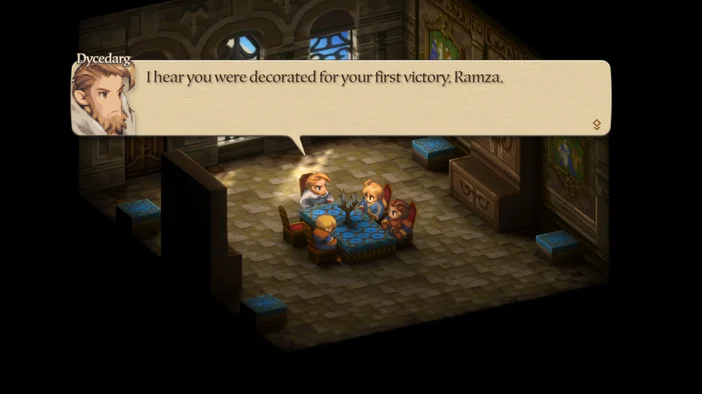
You'll experience narrated story scenes, a clearer turn order, quicker battles, and safety features such as autosave and retreats. You can always return for a nostalgic Classic run at a later time. The enhanced version offers a fully immersive experience. Please note that Classic mode does not allow for achievements, so if you're aiming for a 100% run, you should choose enhanced mode.
Everything to Know on Day 1: Editions, Notable Features & Must‑Change Settings
- Standard Edition: the game.
- Digital Deluxe (example on Switch): bonus gear (Akademy Blade/Beret/Tunic, Ring of Aptitude), 10× Phoenix Downs, and alternate color sets for Ramza; claim from Options after starting a new game.
- Switch → Switch 2 upgrade is free: purchase the Switch version first, then download the Upgrade Pack on Switch 2. Square Enix and Nintendo both call this out explicitly.
Notable new features you’ll actually use
- Hold to speed up battles; release to resume normal pace.
- Autosave + manual saves.
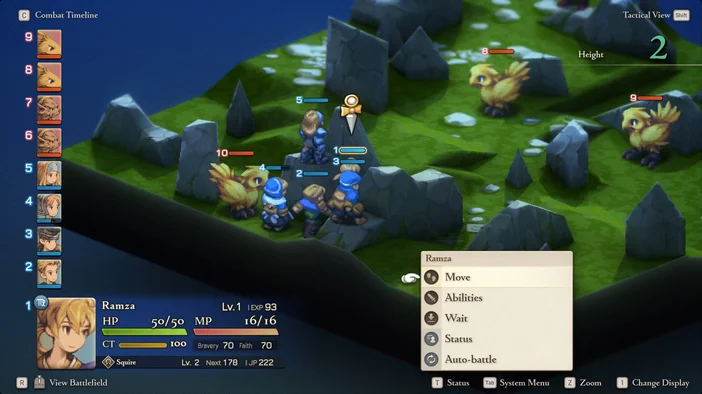
- Combat Timeline is clearer; Tactical View gives a bird’s‑eye read of elevation.
- Retreat options: back out of random encounters and regroup between multi‑phase fights.
- World map shop list: see who sells what, big quality of life improvement.
- Job Tree viewer and three saved loadout sets per unit for instant respecs.
All of the above are documented inSquare Enix’s feature rundown.
“Settings to change first” (2 minutes, spoiler‑free)
- Speed things up: Learn the “hold to fast-forward” button for your platform. It’s great for grinding repetitive battles, but turn it off when careful positioning matters.
- Saving smart: Make sure Autosave is on, and always set up a Manual Save before major story fights. (They’re stored in their own tab.)
- Cutscene settings: Turn on Autoplay so dialogue moves forward hands-free.
- Camera & visibility: Bind Tactical View to a comfy button and use it on vertical maps. Tile markers help measure enemy ranges.
- Difficulty tweaks: In Enhanced mode, start on Squire or Casual if you’re still learning. Bump it up once you’re consistently winning fights, you can change it anytime.
- UI & readability: If your screen’s far away, increase text/UI scale if your platform supports it. Otherwise, rely on Tactical View and markers for clarity.
Spoiler‑free tips
- Face the right way: Always end your turn looking away from enemies to avoid backstabs. The new timeline makes it easier to plan for turn trades.
- Spend JP wisely: Grab mobility and action-economy passives first they’ll pay off faster than early big-damage skills.
- Retreat when needed: If a fight spawns at the wrong time or you’re stuck in a long gauntlet, back out, re-kit, and come back better prepared.
- Shop with a plan: Check the world-map shop list before moving around, and restock once you unlock new jobs.
JOIN OUR OFFICIAL CORSAIR COMMUNITIES
Join our official CORSAIR Communities! Whether you're new or old to PC Building, have questions about our products, or want to chat the latest PC, tech, and gaming trends, our community is the place for you.