Much like Battlefield 6, Valorant, and League of Legends, Black Ops 7 requires Secure Boot and a TPM 2.0 to play. If Secure Boot is not enabled, you will not be able to play, as the RICOCHET anticheat system needs it to function properly.
So, if you're keen to experience the newest entry to the Black Ops franchise, you might as well get your PC ready. Here's how to enable Secure Boot for Black Ops 7.
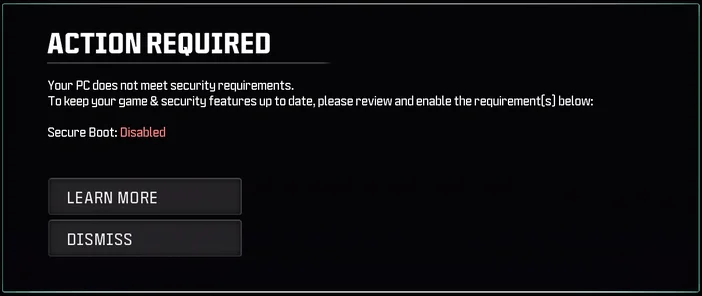
"Your PC does not meet security requirements."
"Secure Boot: Disabled."
Luckily, enabling Secure Boot is not too difficult, and can be done in a matter of minutes in the BIOS. We understand the BIOS can be a spooky place, but don’t worry, as we’re going to take you through it step by step. Afterwards we’ll give you a brief lesson on Secure Boot, TPM 2.0, and the relationship between the two. (It’s complicated).
How to Enable Secure Boot for Black Ops 7
Due to the increasing number of games that require Secure Boot, there’s a decent chance that Secure Boot is already enabled. For example, if you've been playing Battlefield 6 and haven't messed around in your BIOS since, Secure Boot will have remained on. Let’s check to make sure.
- Hold the Windows key and hit “R”. The “Run” window will now open.
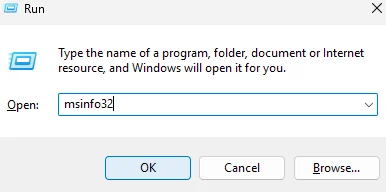
Type “msinfo32” into the text field and press enter. The System Information window will now open.
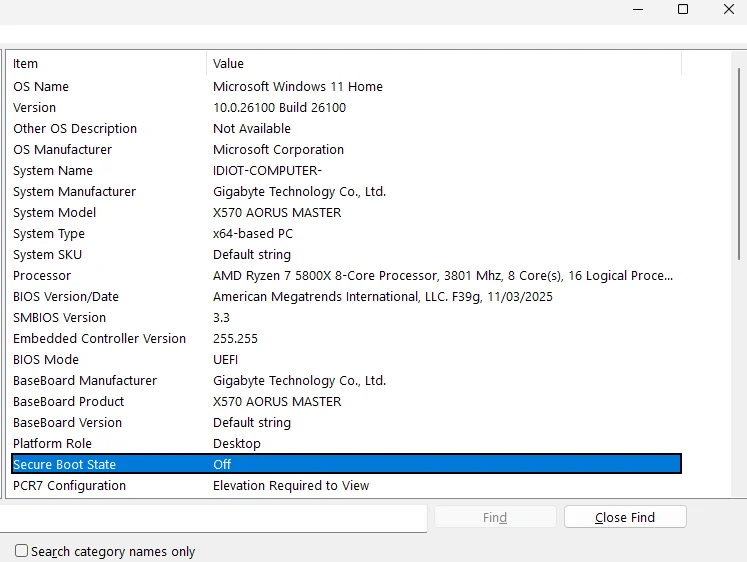
If “Secure Boot State” is “On”, congratulations, you can stop reading blog posts and play Black Ops 7 without issue. If it says “Off”, however, you have some additional work to be doing. Let’s go.
Enabling Secure Boot in BIOS
We did this on a GIGABYTE X570 AORUS MASTER Motherboard, but the steps will be very similar regardless of who made your motherboard. You just might have to click around a little more. (Don’t worry, though. You won’t accidentally make any changes, as the BIOS allows you to see and discard any changes you’ve made before saving.)
- Restart your PC and repeatedly hit Delete or F2 until the BIOS opens. It will look both complicated and visually outdated, with these two characteristics apparently being compulsory when it comes to BIOS design.
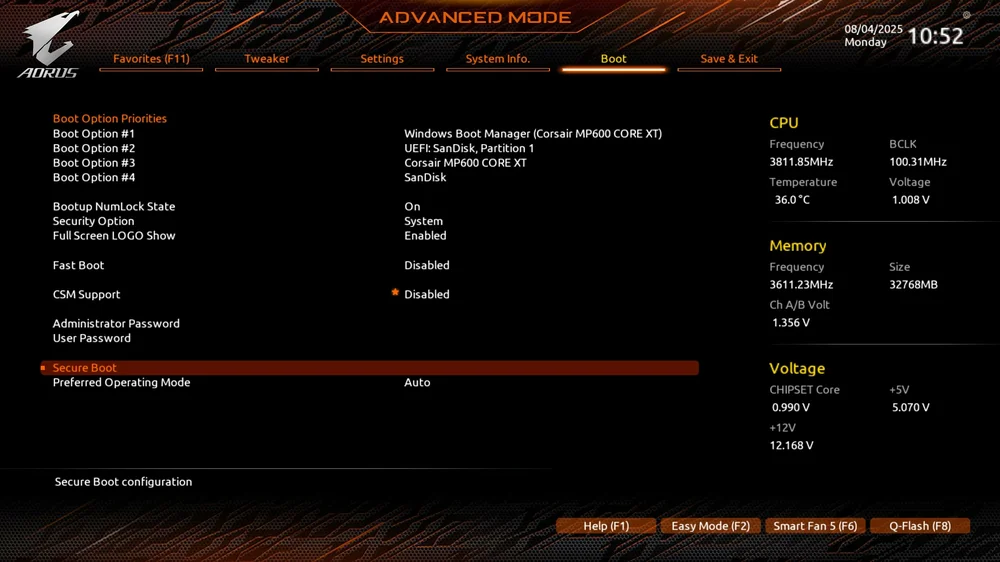
- Your BIOS will probably have an “Advanced” mode, which is where settings like Secure Boot are usually located. click this to see all the different settings you can adjust.
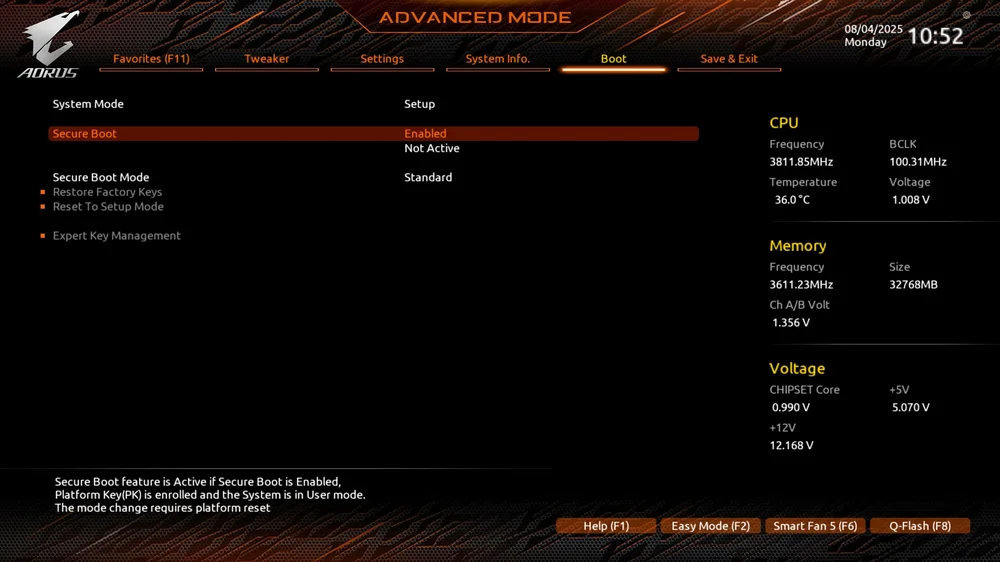
- Find the “Boot” settings and open it. In here you’ll find the “Secure Boot” setting. Now you can enable it.
(It might say both “Enabled” and “Not Active” which is confusing but will resolve itself as it requires a restart after enabling secure boot to then make it “active”)
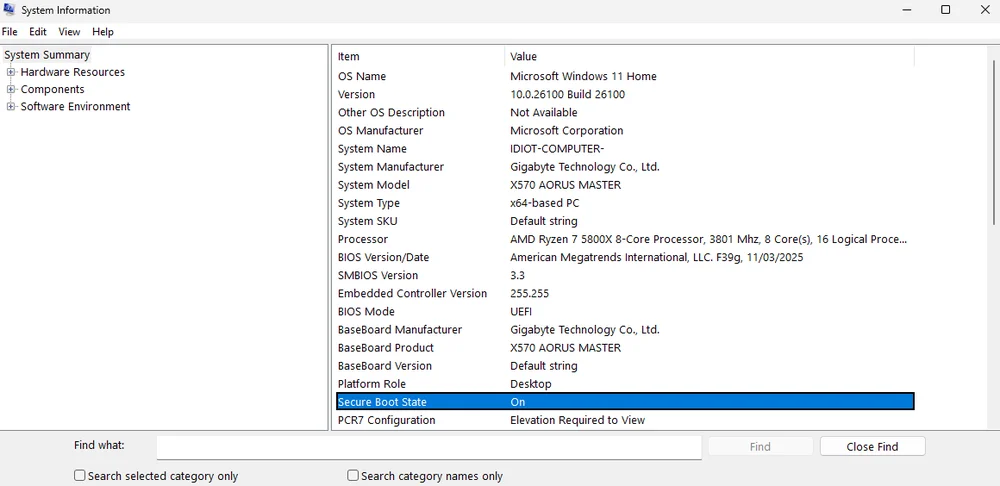
- Save your changes and restart your PC. When you get back to the desktop, repeat the steps at the beginning of this guide to check if Secure Boot is enabled. If it now says “On” next to “Secure Boot State”, you’re good to go and will now be able to play Black Ops 7.
Black Ops 7 "OS Firmware: Update Required" Message
Even with Secure Boot enabled, you might still get a peculiar message upon launching the game titled "OS FIRMWARE: UPDATE REQUIRED". Unfortunately, this message disappears pretty quickly, and even if you're johnny on the spot with the mouse and manage to click it, nothing happens.
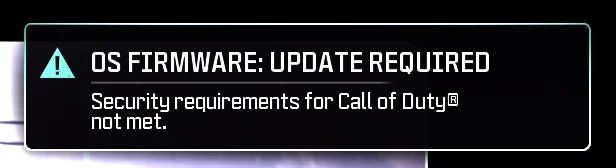
"OS Firmware" sounded like it might have been referencing the BIOS, and when we checked, the BIOS was indeed out of date. After updating the BIOS, we no longer got this message. We aren't 100% sure that this is what it was referencing, but it solved the issue in our case. (For what it's worth, the game doesn't make nearly as big of a deal about this as it does for Secure Boot, so it might not strictly be a requirement).
In any case, keeping your BIOS up to date is a good idea and we consider it to be a best practice. We've written a few guides on how to update your BIOS depending on your motherboard brand you can read for some help:
- How to Update the BIOS on an ASUS Motherboard
- How to Update the BIOS on an MSI Motherboard
- How to Update the BIOS on a GIGAGYTE Motherboard
- How to Update the BIOS on a CORSAIR Vengeance or CORSAIR ONE with an MSI motherboard
It's worth mentioning here that when we updated the BIOS, Secure Boot and XMP disabled themselves. This means you might have to re-do the steps above to enable Secure Boot again, and follow our guide on enabling XMP / EXPO to get your RAM running at it's optimum speed.
What about TPM 2.0?
TPM stands for Trusted Platform Module. This module is a physical chip on your motherboard, that is kind of required for Secure Boot, but not always. It is however, always required for Windows 11. This means that if your PC is using Windows 11, you have a TPM 2.0, and you will be able to enable Secure Boot without issue.
Why Does Black Ops 7 Need Secure Boot?
RICOCHET, the anticheat system for Black Ops 7 requires Secure Boot to be enabled because it prevents unauthorized programs from running during the start up process. Cheating programs obviously are not authorized, so this setting stops those from being able to function.
Of course, there are ways around this, but Secure Boot does help keep games largely cheater-free. There are some people who dislike running Secure Boot for various reasons, but the average PC gamer will be perfectly happy to keep Secure Boot enabled at all times.
JOIN OUR OFFICIAL CORSAIR COMMUNITIES
Join our official CORSAIR Communities! Whether you're new or old to PC Building, have questions about our products, or want to chat the latest PC, tech, and gaming trends, our community is the place for you.