MANUAL | QUICK START GUIDE
HS80 v2 MAX
WIRELESS GAMING HEADSET
In this Guide
PACKAGE CONTENTS
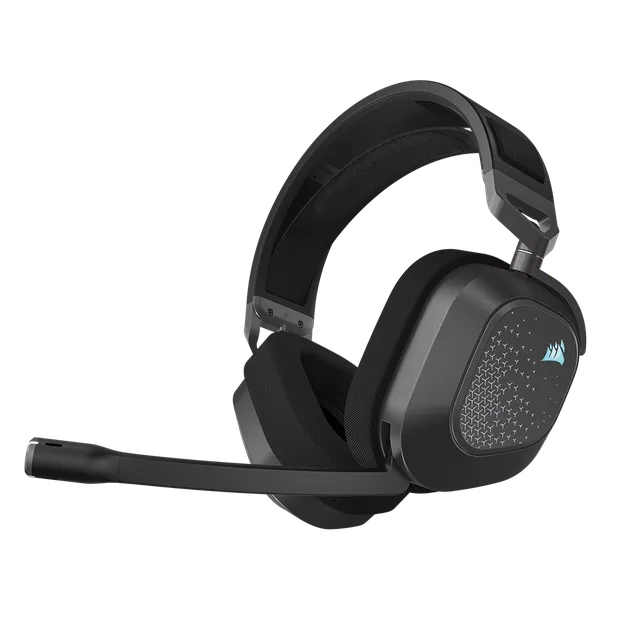


- POWER BUTTON / WIRELESS MODE
- RGB LED LIGHT
- VOLUME CONTROL / EQ SELECT / iCUE CONTROL
- HEADSET STATUS LED
- CHARGING PORT
- MICROPHONE STATUS LED
- BLUETOOTH / MULTI-FUNCTION BUTTON (MFB)
- PAIRING STATUS LED (WIRELESS USB RECEIVER)
2.4GHz MODE
PC - Connect the wireless USB transmitter to any USB (type-A) port on your PC. Press the power button on the headset. The headset powers on in 2.4GHz mode by default. The headset is designed to operate at a range of up to 50 feet (15.24m) from the transmitter, but other wireless devices, electronics and obstructions such as walls may impact performance.
NOTE: The first time you use the CORSAIR HS80 v2 MAX WIRELESS headset on a PC, the operating system will automatically install a device driver. After the device driver is installed, we recommend you reboot your PC before use.
PLAYSTATION - Connect the wireless USB transmitter to any USB port on your PS4 or PS5 console. Use the PlayStation UI to set “Output to Headphones” to “All Audio”. Adjust volume control (Headphones) to maximum level. Then adjust volume with the headset volume control.
BLUETOOTH MODE
The headset can connect to simultaneous 2.4GHz and Bluetooth.
The very first time you turn on your headset, Bluetooth pairing mode is automatically enabled for you to help you easily connect your Bluetooth device. If no device is connected after some time, the headset will exit Bluetooth pairing mode automatically.
To manually enable pairing mode for your Bluetooth device, turn on the headset and then hold the BT multifunction button for 2 seconds until the Microphone LED blinks red and blue. Upon pairing a Bluetooth device to your headset, powering on the headset will now also automatically turn on Bluetooth and connect to the paired device. Powering off the headset will turn off all wireless connections.
NOTE: Single-press call control is available only when connected to one Bluetooth device. When two devices are connected, please answer or end calls on the incoming-call device instead.
ANSWERING AND ENDING PHONE CALLS
To answer an incoming call, single press the MFB. To end the call, single press the MFB again.
LISTENING TO MUSIC (MEDIA PLAYBACK)
To play a track, single press the MFB. To pause playback, single press the MFB again. To skip forward, press the MFB twice quickly. To skip backwards, press the MFB three times quickly.
FOR OPTIMAL WIRELESS PERFORMANCE
- Place the wireless USB receiver in an open, unobstructed area.
- Make sure the battery is fully charged before initial use.
- Do not leave the battery fully discharged for long periods. Battery life is maximized by keeping the battery in a partially charged state.
- Keep the headset at room temperature (20–30°C or 68–86°F).
NOTE: Prolonged listening at high volumes may adversely affect your hearing. Take breaks between sessions and always begin with the volume at a low level before increasing.
iCUE
Go to corsair.com/support/downloads to download the iCUE Software. Using iCUE software will enable the full feature set of the HS80 v2 MAX WIRELESS headset. The USB Wireless Receiver must be connected to your PC to use iCUE software.
NOTE: If the headset is used without software, some features will be disabled.
- Install the iCUE software on a PC running Windows 10 or later, or on macOS.
- After installation is complete, reboot your PC, and launch iCUE.
iCUE SOFTWARE CAN BE USED TO:
- Select and customize audio equalizer (EQ) settings. You can also cycle through the different EQ settings by pressing the volume wheel on the headset.
The software’s built-in documentation explains how to use the HS80 v2 MAX WIRELESS’s features in greater detail.

MICROPHONE CONTROL
Flip-up microphone to mute. Flip-down microphone to unmute.
NOTE: iCUE software can also be used to control these features.
For best performance, bend the flexible microphone boom to best fit near the left corner of your mouth. A 30-degree bend is a good place to start, but you can adjust this if your mic is too loud or too soft.
VOLUME CONTROL
Use the volume control wheel to adjust volume up or down.
CHARGING
The CORSAIR HS80 v2 MAX WIRELESS Headset must be fully charged before its first use.
- Connect the USB charging cable to any working USB port on your PC.
- Connect the USB charging cable to the CORSAIR HS80 v2 MAX WIRELESS Headset.
The CORSAIR HS80 v2 MAX WIRELESS Headset battery has no “memory effect”, so there is no need to completely discharge it before recharging. Remember that the USB charging cable requires a high power (USB 2.0 or better) port. Some USB ports found on older devices do not support USB 2.0.
BATTERY STATUS LED INDICATIONS (ON HEADSET)
| LOW | MEDIUM | HIGH |
| RED | ORANGE | GREEN |
The status LED will pulse while being charged and turn solid green at full charge. When not being charged, the status LED will blink based on the power levels shown above.
WIRELESS STATUS LED INDICATIONS (ON WIRELESS USB RECEIVER)
- When the receiver is connected to the headset and operating normally, the LED will turn solid white.
- If the receiver cannot connect to the headset, the LED will blink red rapidly.
- If headset is turned on and the receiver is powered on and LED is still blinking red, please use iCUE software to re-pair the transmitter to the headset.
BATTERY REMOVAL INFORMATION
This product uses a rechargeable battery and safety guidelines must be followed in the event that the product is disabled for disposal and recycling. To safely remove the battery for disposal and recycling, follow the numbered steps with the below diagrams.
CORSAIR MEMORY, Inc. encourages customers to recycle used electronic hardware and rechargeable batteries in accordance with local laws and regulations.
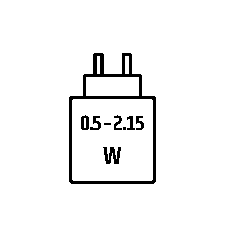
The power delivered by the charger must be between min 0.5 Watts required by the radio equipment, and max 2.15 Watts in order to achieve the maximum charging speed.
Battery information
M/N(型號): JHY554053
Capacity(電池容量):3.7V , 1500mAh, 5.55Wh
Scan QR code for battery details:
COPYRIGHT / LEGAL INFORMATION
DOLBY LABORATORIES
Manufactured under license from Dolby Laboratories. Dolby, Dolby Atmos and the double-D symbol are trademarks of Dolby Laboratories Licensing Corporation.

COMPLIANCE STATEMENT
M/N(型號): RDA0056
Rating(電壓電流): 5V
 1A
1AM/N(型號): RDA0057
Rating(電壓電流): 5V
0.1A

LEGAL / COPYRIGHT STATEMENT
© 2026 CORSAIR MEMORY, Inc. All rights reserved. CORSAIR and the sails logo are registered trademarks of CORSAIR in the United States and/or other countries. All other trademarks are the property of their respective owners. Product may vary slightly from those pictured.

CORSAIR ADRESS(WW and JP)
CORSAIR MEMORY, Inc. 115 North McCarthy Blvd, Milpitas, CA 95035, USA
CORSAIR GmbH, Landshuter Allee 10, 80637 Munich, Germany
CORSAIR COMPONENTS Ltd. 1020 Eskdale Road, Winnersh Triangle, Wokingham, RG41 5TS, UK
RELATED CONTENT