Rapid Trigger dynamically changes your keys’ actuation points and reset points, so you can move and reset your movements faster than ever. Rapid Trigger is available on the following CORSAIR keyboards with MGX Hall effect switches:
- K70 MAX

You can enable and customize Rapid Trigger in CORSAIR iCUE software and CORSAIR Web Hub.
Download and install the latest version of iCUE (and update your keyboard to the latest firmware).
On supported keyboards, CORSAIR Web Hub is a lightweight configuration tool that lets you adjust your keyboard settings, including Rapid Trigger and updating your firmware, through your browser.
From the home screen, click your CORSAIR rapid trigger keyboard and then navigate to the Key Actuations tab to get started.
How to Set Up Rapid Trigger in CORSAIR iCUE

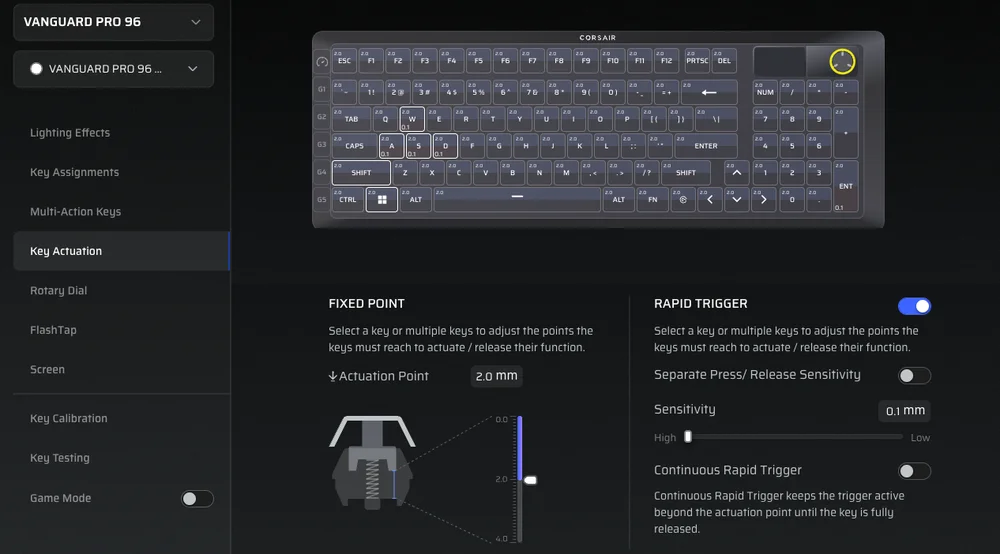
- Select the keys you want to modify. You can click and drag to select a grouping of keys.
- Enable / Disable Rapid Trigger using the toggle. (A)
- Select your desired actuation point. (B)
A. The actuation point is how far down you need to press a key before it registers a keypress. Hence, a smaller actuation value = a more sensitive keypress, while a bigger actuation value = a less sensitive keypress. - Optionally, you can customize the parameters of Rapid Trigger to separate the press/release sensitivity, and adjust the sensitivity value. (C)

How to Set Up Rapid Trigger in Corsair Web Hub
On supported keyboards, CORSAIR Web Hub is a lightweight configuration tool that lets you adjust your keyboard settings, including Rapid Trigger.
- Enable / Disable Rapid Trigger using the toggle.
- Select the keys you want to modify. You can click and drag to select a grouping of keys or press them on your keyboard.
- Select your desired actuation point.
- The actuation point is how far down you need to press a key before it registers a keypress. Hence, a smaller actuation value = a more sensitive keypress, while a bigger actuation value = a less sensitive keypress.
- Optionally, you can customize the parameters of Rapid Trigger to separate the press/release sensitivity, and adjust the sensitivity value.
You're set!
And that’s it! The beauty of CORSAIR MGX Hall effect switches and Rapid Trigger is that it gives you the power to easily adjust and tweak the settings until you find your ideal set up for all your personal use cases. If you’re not quite sure how to configure your settings, we’ll provide a few basic actuation point setup guidelines to get you started.
What are the best actuation points for a gaming keyboard?
|
Genre |
Rapid Trigger On/Off |
Actuation Point |
Explanation |
|
Shooters (CS2, Valorant, Apex Legends, CoD, Fortnite) |
ON |
1.0mm |
In competitive games where milliseconds matter, it is best to enable Rapid Trigger with a shorter actuation point. That way, your inputs will come out as fast as possible, ensuring you aren’t missing any strafes and movement techniques. |
|
MOBAs |
ON |
1.0mm |
Same as above. |
|
RPGs/MMORPGs |
ON |
1.5mm |
This configuration allows for quick inputs and resets, which means casting your in-game spells and abilities will feel more responsive than they would at a longer actuation point. |
|
General Purpose |
OFF |
2.0mm |
This is a good default configuration that mimics the experience of traditional mechanical keyboards. This provides a balanced experience for a variety of gaming and non-gaming tasks. |
|
Typing |
OFF |
3.0mm |
For heavy-handed typers, increasing the actuation point can help prevent typos and accidental presses. |
Hopefully, this article has helped you get a clear understanding of how you can customize and optimize CORSAIR’s Hall effect keyboard switches. Setting this up properly can help you merge peak performance with personal preferences, and that, my friend, is a very powerful advantage.
產品註冊
JOIN OUR OFFICIAL CORSAIR COMMUNITIES
Join our official CORSAIR Communities! Whether you're new or old to PC Building, have questions about our products, or want to chat about the latest PC, tech, and gaming trends, our community is the place for you.