MANUAL | QUICK START GUIDE
RMe with ThermalProtect
CORSAIR RMe with ThermalProtect Series RM850e/RM1000e
In this Guide
Congratulations on the purchase of your new CORSAIR RMe with ThermalProtect Series Power Supply!
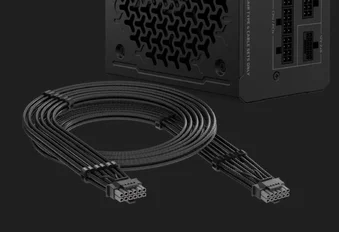
The RMe Series provides reliable Cybenetics Platinum-rated power and the ThermalProtect 12V-2x6 cable helps prevent damage to your GPU from overheating, giving you reliable performance and GPU protection.
SAFETY AND PROTECTION
OVER-VOLTAGE PROTECTION (OVP)
Over-voltage protection for the 12V, 5V, and 3.3V DC outputs is required to comply with the ATX specification. OVP shuts down the PSU in the event that the DC outputs exceed a set level, determined by the PSU manufacturer.
OVER-CURRENT PROTECTION (OCP)
OCP is featured on the 3.3V, 5V, and 12V rails. OCP ensures that the output of the DC voltage rails remains within safe operating limits.
OVER-TEMPERATURE PROTECTION (OTP)
OTP ensures that the PSU will shut down when the internal temperature reaches a set point. This is usually as a result of internal current overloading or a fan failure.
SHORT-CIRCUIT PROTECTION (SCP)
A short-circuit is defined as any output impedance of less than 0.1 ohms. Amongst other things, SCP ensures that the PSU shuts down should the 3.3V, 5V, and 12V rails short to any other rail, or to ground. It also ensures that no damage should occur to the unit, or your PC’s components in the event of a short.
OVER-POWER PROTECTION (OPP)
Over-power protection shuts off the PSU when the power drawn is between 115% and 135% of the rated power.
UNDER-VOLTAGE PROTECTION (UVP)
Under-voltage protection for the 12V, 5V and 3.3V DC outputs is required to comply with the ATX specification. UVP shuts down the PSU in the event that the DC outputs drop below a set level.
ThermalProtect FEATURE
- The included ThermalProtect 12V-2x6 cable monitors the temperature of the GPU power cable, if excessive temperatures is detected, it sends a signal to the GPU to turn itself off to prevent any potential damage.
- Please plug the end with the CORSAIR logo on the cable comb into the GPU, and plug the end with a "PSU" label on the connector into the PSU to ensure proper functionality.
INCLUDED CABLES
1x ATX Motherboard (24-pin)
610mm ± 10mm
2x ATX12V / EPS12V (4+4-pin)
750mm ± 10mm
1x ThermalProtect PCIe 5.1 600W 12V-2x6 Cable
650mm ± 10mm
1x 12V-2x6 to 2x 8-pin PCIe (6+2-pin)
650mm ± 10mm
8-pin PCIe (6+2-pin)
650mm ± 10mm
1x for RM850e, 2x for RM1000e
1x 4 SATA Cable
750mm ± 10mm
1x 2 SATA / 2 PATA Cable
750mm ± 10mm
INSTALLING THE RMe with ThermalProtect SERIES POWER SUPPLY
Step 1: Removing Your Existing PSU
Warning! To ensure proper function, only use the DC cables included with your new PSU, unless your old cables are genuine CORSAIR cables of the same type. Please confirm your existing cables’ type before using them!
If you are building a new system, skip to Step 2:
- Disconnect the AC power cord from your wall outlet or UPS and from the existing power supply.
- Disconnect all the power cables from your video card, motherboard and all other peripherals.
- Follow the directions in your chassis manual and uninstall your existing PSU.
- Proceed to Step 2.
Step 2: Installing the New Power Supply
- Make sure the power supply’s AC power cable is not connected.
- Follow the directions in your chassis manual and install the power supply with the screws provided.
- Connect the 24-pin (ATX) cable to the motherboard. Connect the 8-pin +12V (EPS12V) cable to the motherboard.
If your motherboard has an eight-pin +12V socket, connect the eight-pin cable directly to your motherboard.
If your motherboard has a four-pin socket, detach the four-pin from the eight-pin cable, and then plug this four-pin cable directly to your motherboard.
Some motherboards will require a mix of 8+4 pins, use as many EPS12V cables as necessary and do not mistake them for PCIe cables.
- Connect the peripheral cables, PCI-Express cables, and SATA cables.
- Connect the SATA cables to your SATA SSD or hard drive’s power sockets.
- Connect the PCI-Express cables to the power sockets of your PCI-Express video cards if required.
- Connect the 16-pin 12V-2x6 connector to the power socket of your GPU if required.
- Connect the peripheral cables to any peripherals requiring a 4-pin connector.
- Make sure all the cables are tightly connected. Be sure to save any unused modular cables for future component additions.
- Connect the AC power cord to the power supply and turn it on by pushing the switch to the ON position (marked with “I”).
This equipment requires a protective earth (ground) connection for safe installation and operation.
RM850e with ThermalProtect SPECIFICATIONS
Dimensions: 140mm(L) x 150mm(W) x 86mm(H)
Package Contents:
- Power Supply
- AC Cable
- DC Cables
- Cable Ties
- Mounting Screws
- Safety Leaflet
| Model | RPS0216 | |
| Part No. | 75-006461/75-006332 | |
| CORSAIR SKU No. |
CP-9020336/CP-9020338 |
|
| AC Input Rating | ||
| AC Input | 100V a.c.–240V a.c. | |
| Input Current | 10A–5A | |
| Frequency | 47–63Hz | |
| Max Load | Max Output | |
| +5V | 20A | 150W |
| +3.3V | 20A | |
| +12V | 70.8A | 850W |
| +5Vsb | 3A | 15W |
| Total Power | 850W | |
RM850e with ThermalProtect Efficiency
RM850e with ThermalProtect Fan Noise
RM1000e with ThermalProtect SPECIFICATIONS
Dimensions: 140mm(L) x 150mm(W) x 86mm(H)
Package Contents:
- Power Supply
- AC Cable
- DC Cables
- Cable Ties
- Mounting Screws
- Safety Leaflet
| Model | RPS0217 | |
| Part No. | 75-006462/75-006333 | |
| CORSAIR SKU No. |
CP-9020337/CP-9020339 |
|
| AC Input Rating | ||
| AC Input | 100V a.c.–240V a.c. | |
| Input Current | 12A–6A | |
| Frequency | 47–63Hz | |
| Max Load | Max Output | |
| +5V | 20A | 150W |
| +3.3V | 20A | |
| +12V | 83.3A | 1000W |
| +5Vsb | 3A | 15W |
| Total Power | 1000W | |
RM1000e with ThermalProtect Efficiency
RM1000e with ThermalProtect Fan Noise
WARRANTY


CORSAIR RMe with ThermalProtect PSUs have a 7-year warranty.
*KC Certification number is only Applicable to RM850e and RM1000e produced in China.
LEGAL
©2026 CORSAIR MEMORY, Inc. All rights reserved. CORSAIR and the sails logo are registered trademarks of CORSAIR in the United States and/or other countries. All other trademarks are the property of their respective owners. Product may vary slightly from those pictured.
RELATED CONTENT