VADOVAS | GREITAS PRADĖJIMO VADOVAS
SABRE v2 PRO WIRELESS CF
MOUSE PARA JUEGOS DE FIBRA DE CARBONO
The English version is available here - English
If you have any other problems please contact Servicio al cliente
CARGA DEL MOUSE
IMPORTANTE: El SABRE v2 PRO WIRELESS CF debe estar completamente cargado antes de su primer uso. Actualice el firmware a través del CORSAIR WEB HUB para obtener la mejor experiencia.
Conecte el mouse a un puerto USB 2.0 o 3.X disponible en su PC con el CABLE USB DE CARGA / DATOS (L).
Las luces debajo del CLIC MEDIO/RUEDA DE DESPLAZAMIENTO (C) del mouse se iluminarán según el estado de la batería y se volverán de color verde fijo cuando se complete la carga.
CONOZCA SU MOUSE
- BOTÓN IZQUIERDO DEL MOUSE
- BOTÓN DERECHO DEL MOUSE
- CLIC MEDIO/RUEDA DE DESPLAZAMIENTO
- BOTÓN ADELANTE
- BOTÓN ATRÁS
- SENSOR ÓPTICO MARKSMAN S
- PUERTO USB DE CARGA Y DATOS
- DESLIZADORES DE MOUSE DE MATERIAL UPE 100 % VIRGEN
- INTERRUPTOR DE ENCENDIDO/MODO INALÁMBRICO
- BOTÓN DE PPP Y DE EMPAREJAMIENTO CON BLUETOOTH (3 SEG)
- RECEPTOR INALÁMBRICO USB
- CABLE USB DE CARGA Y DATOS
CONFIGURACIÓN DE LA RED INALÁMBRICA DE 2.4 GHz
- Conecte el RECEPTOR INALÁMBRICO USB (K) al CABLE USB DE CARGA/DATOS (L), conecte el otro extremo del cable a un puerto USB 2.0 o 3.x disponible ubicado en el panel frontal de su PC o un puerto USB cercano.
- Encienda el mouse; para ello, cambie el INTERRUPTOR DE ENCENDIDO/MODO INALÁMBRICO (I) a 2.4 GHz inalámbrico.
- El indicador LED debajo del CLIC MEDIO/RUEDA DE DESPLAZAMIENTO (C) se volverá verde fijo cuando se conecte exitosamente al receptor.
CONFIGURACIÓN DEL BLUETOOTH
La conexión inalámbrica Bluetooth es ideal para realizar tareas informáticas habituales, así como para la productividad y usos de oficina.
- Inicie el emparejamiento Bluetooth en su dispositivo compatible con Bluetooth 4.0 o posterior.
- Encienda el mouse; para ello, cambie el INTERRUPTOR DE ENCENDIDO/MODO INALÁMBRICO (I) a Bluetooth.
- El indicador LED debajo del CLIC MEDIO/RUEDA DE DESPLAZAMIENTO (C) parpadeará en azul y se volverá azul fijo cuando esté conectado.
- Si el dispositivo de emparejamiento con BT necesita ser reparado o cambiado, cambie primero el modo BT. Mantenga pulsado el botón de PPP y Emparejamiento con Bluetooth (J) durante 3 segundos o hasta que el indicador LED comience a parpadear en azul para entrar en el modo de emparejamiento con BT.
* SABRE v2 PRO INALÁMBRICO CF se puede vincular únicamente con un dispositivo. Si necesita emparejarlo con otro dispositivo, ingrese al modo de reemparejamiento para inicializar el proceso de emparejamiento.
CICLO POR LOS PERFILES DE PPP
Los ciclos de PPP están disponibles para una configuración rápida.
- Presione el BOTÓN DE PPP Y EMPAREJAMIENTO CON BLUETOOTH (J) una vez para cambiar al siguiente nivel de PPP.
- Al cambiar al nivel de PPP correspondiente, la luz indicadora de la rueda del mouse parpadeará 3 veces en el color de PPP correspondiente y luego se apagará.
- Repita los pasos anteriores para pasar a la siguiente etapa de PPP. Pasará por 5 etapas de PPP y volverá a la Etapa 1.
Hay configuraciones avanzadas disponibles en CORSAIR WEB HUB.

INDICACIONES Y ESTADO DEL MOUSE
La conexión inalámbrica y el estado de la batería se comunican a través de las luces que se encuentran debajo del CLIC MEDIO/RUEDA DE DESPLAZAMIENTO (C).
| ESTADO PPP - PREDEFINIDO | INDICADOR LED |
| ETAPA N.° 1: 400 | ROJO |
| ETAPA N.° 2: 800 | AZUL |
| ETAPA N.° 3: 1200 | VERDE |
| ETAPA N.° 4: 1600 | AMARILLO |
| ETAPA N.° 5: 2000 | PÚRPURA |
| ESTADO DE LA BATERÍA | INDICADOR LED |
| CARGANDO BATERÍA CUANDO ESTÁ BAJA | ROJO INTERMITENTE |
| CARGANDO BATERÍA CUANDO ESTÁ A LA MITAD | VERDE INTERMITENTE |
| BATERÍA COMPLETA | VERDE SÓLIDO |
| BATERÍA EN ESTADO CRÍTICO, RECARGA REQUERIDA | ROJO INTERMITENTE |
GUÍA DETALLADA PARA LA CONFIGURACIÓN DEL RATÓN
Step 1 – Connect Your SABRE v2
- Plug in the SABRE v2 PRO WIRELESS CF’s receiver via Type-C.
- Make sure the power switch on the mouse is set to 2.4 GHz.
Step 2 – Open CORSAIR WEB HUB and Select the Mouse
- Go to http://www.corsair.com/web-hub/index.html
- Click [Authorize].
- Choose SABRE v2 PRO WIRELESS CF receiver.
Step 3 – Create or Select a Profile
- At the top-left, open the profile dropdown Menu.
- Click the profile you want to edit (for example: “Profile 1”).
- This profile will store your DPI, and button assignments.
Step 4 – Set DPI Levels
- Click [DPI] in the left sidebar.
- Choose how many DPI stages you want(1~5).
- Enable the DPI stages you want to use (for example, 800 / 1200 / 1600).
Recommended starting DPI:
-
- Desktop/general: 1200–1600 DPI
- FPS games: 800–1200 DPI
- MOBA/MMO: 1600–2400 DPI.
Step 5 – Remap Buttons (Actions / Key Assignments)
- Click [Key Assignments] in the left sidebar.
- Click the button on the mouse diagram you want to change.
- Choose the Assignment Type:
- Keyboard (remap to a key like R, E, or P)
- Macro (record multiple keystrokes)
- etc
- Confirm the assignment and test it.
Step 6 – Set Macro Manager
- Click [Macro manager] in the left sidebar.
- Click [ + ] to add a new Macro (For example: “Profile 1”).
- Click [Record Macro] on the right.
- Press the keyboard keys or mouse events you want to record.
- Click [Record Macro] again to stop recording.
Step 7 – Insert Macro events manually
- Click [Macro manager] in the left sidebar.
- Choose the Macro you want to edit.
- At the insert event bar, choose whether you want to insert keyboard or mouse events with the first dropdown menu.
- Choose the event you want to insert with the second dropdown menu.
- Click [Insert].
Step 8 – Device setting
- Click Device Setting at bottom left.
- Device Settings.
-
- Battery – Wireless connectivity or battery status.

- Polling Rate – Select [ 1000 Hz / 1 msec ] polling for 1000Hz polling.

- Sleep Time – Adjust time after mouse transitions to Sleep Mode.

- Motion Sync – Aligns mouse movement data with USB polling intervals to deliver more consistent and stable cursor tracking.
- Lift Height – Sensor cut off height.

- Angle Snapping – Smooths out mouse movement via sensor prediction when ON.
- Ripple Control – Smooths mouse movement by filtering out small, unintended jitter at the cost of slightly reduced raw input precision.
- Pair Wireless receiver – Pair or reset the wireless receiver.
- Reset Device Default – Reset your SABRE v2 PRO WIRELESS CF to default setting.
- Battery – Wireless connectivity or battery status.
Step 9 – Update firmware
- Click [Device Setting] at bottom left.
- Click [Check for Updates] to ensure you are running the latest device firmware.
- Follow the steps to update the firmware if needed.
Step 10 – Pair wireless receiver
- Click [Device Setting] at bottom left.
- Click [Pair].
- Follow the steps to pair the USB receiver.
INFORMACIÓN PARA EXTRAER LA BATERÍA
Este producto usa una batería recargable, y deberán seguirse las instrucciones de seguridad para su eliminación y reciclado en caso de que deje de utilizarse el producto. Para extraer la batería de forma segura para su eliminación y reciclado, realice los pasos descritos en los diagramas que se encuentran a continuación.
- Extraer las bases (x2)
- Retirar los tornillos (x4)
- Desmontar el módulo superior de la carcasa
- Extraer la batería
CORSAIR MEMORY, Inc. alienta a los clientes a reciclar el hardware electrónico usado y las baterías recargables, de conformidad con las leyes y normativas locales.
INFORMACIÓN SOBRE LA BATERÍA
- M/N (型號): TW 602030
- Capacidad (電池容量): 3.7 V, 300 mAh, 1.11 Wh
- Escanee el código QR para ver los detalles de la batería.

Mouse
M/N (型號): RGP0184
Clasificación (電壓電流): 5 V  400 mA
Receptor
M/N (型號): RGP0185
Clasificación (電壓電流): 5 V 50 mA
ID de la FCC: 2AAFM-RGP0184 (ratón)
ID de la FCC: 2AAFM-RGP0185 (receptor)
IC: 10954A-RGP0184 (ratón)
IC: 10954A-RGP0185 (receptor)
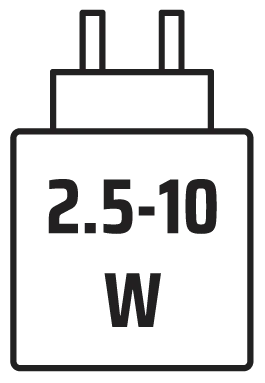
El cargador debe proporcionar una energía que vaya desde los 2,5 vatios, requerida por los equipos de radio, hasta los 10 vatios, para alcanzar la máxima velocidad de carga.
Se recomienda cargar a temperaturas de 5 °C a 40 °C (de 41 °F a 104 °F) para obtener el mejor rendimiento.
INFORMACIÓN LEGAL Y DE COPYRIGHT
©2026 CORSAIR MEMORY, Inc. Todos los derechos reservados. CORSAIR y el logotipo de las velas son marcas registradas de CORSAIR en Estados Unidos y/o en otros países. El resto de marcas comerciales son propiedad de sus respectivos titulares. El producto puede diferir ligeramente del que aparece en la imagen.


CONTENIDO RELACIONADO