UPDATE: 30th October 2025: We have revised the total thickness of the radiator and fan combination permissible in the AIO chamber to 70mm. Detailed compatibility considerations can be found in the "Will My AIO Fit in the AIR 5400?" section of this page.
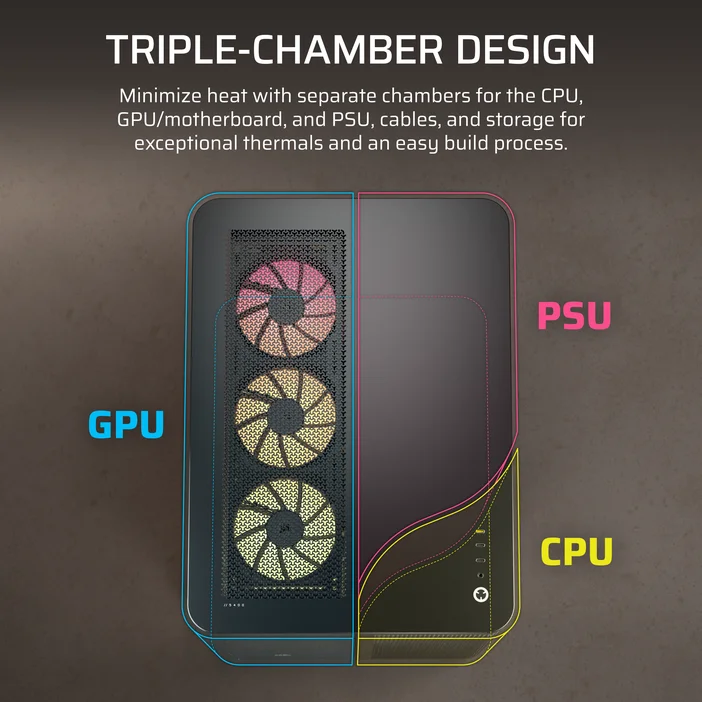
The CORSAIR AIR 5400 offers outstanding CPU cooling thanks to the dedicated cooling chamber. It takes fresh air from outside, through the AIO radiator, then vents it back out, so the inside of the case doesn't get pre-warmed air from the CPU cooling process. This also prevents hot air from the GPU going through the AIO radiator, which reduces cooling performance.
In order to take advantage of this design, you should be using an AIO (All-in-one) cooler. A 360mm AIO will get you the best performance, but the AIR 5400 is compatible with 240mm and 120mm AIOs, too. (though it's unlikely that 120mm AIOs will have long enough tubes.)

Will My AIO Fit in the AIR 5400?
To make sure your AIO will fit in the AIR 5400, there are three things to verify:
- Ensure the tubes are at least 380mm long, preferably 400mm or more.
- Make sure that the thickness of the fans and radiator combined is 70mm or less. (physically measuring this yourself is the best way to guarantee fitment)
- Make sure that you're using a 360mm, 240mm, or 120mm AIO. AIOs in other sizes are not compatible.
If all three of these requirements are met, then your AIO will work with the AIR 5400.
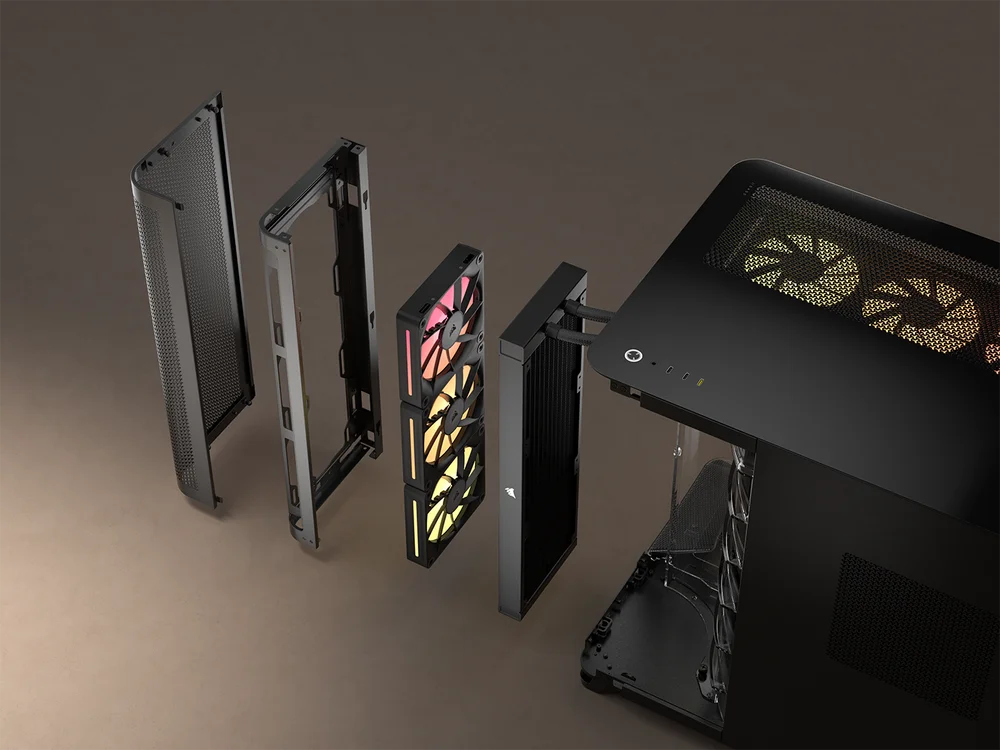
As an example, the radiators on our AIOs (and many AIOs from other brands) are 27mm thick. Combine that with the 25mm thickness of standard fans and you get 52mm. This easily clears the 70mm maximum radiator and fan combo thickness for the AIR 5400's AIO chamber.
This also means that replacing the regular AIO fans with 30mm thick fans like our iCUE LINK RX120 MAX works too, as the additional 5mm still allows the total thickness of the fans and radiator to come in below the 70mm limit.
- For those with an existing CORSAIR AIO, we have verified that all our 360mm AIOs are compatible with the AIR 5400. This includes iCUE LINK H100i and H150i AIOs with the built-in iCUE LINK passthrough on the radiator. You might find cable management for these AIOs a bit tighter, but they are compatible.
If your AIO radiator and fans combine to be 70mm or less, then this combination is compatible with the AIR 5400. Going beyond this may bring your cooling solution into conflict with the air guide that routes the exhaust out of the case.
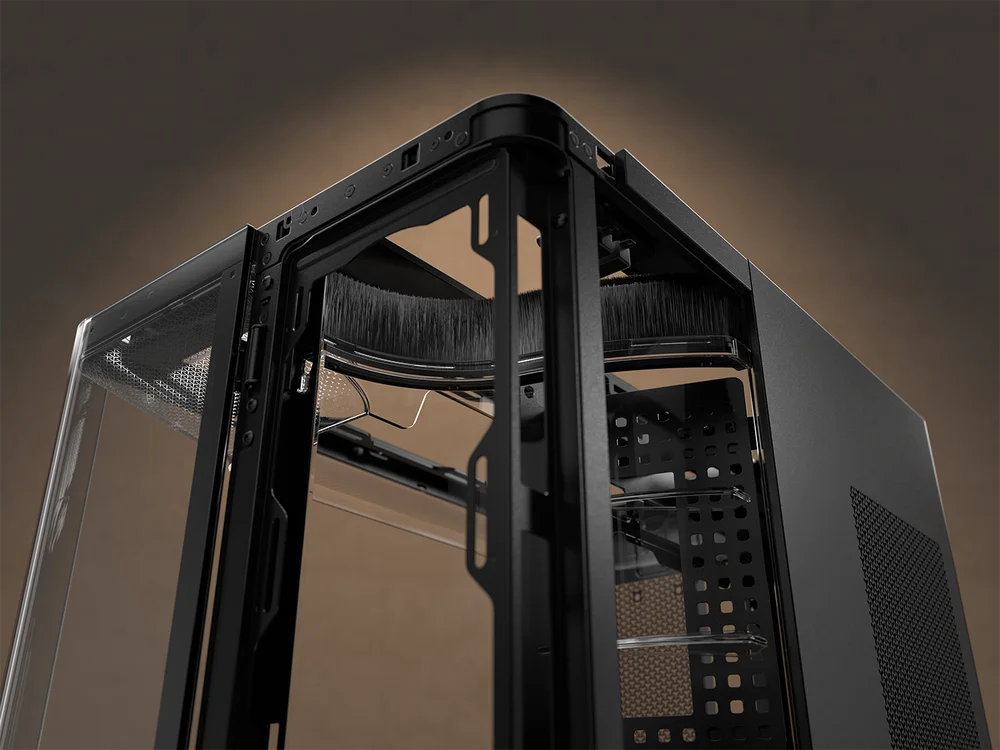
- AIOs smaller than 360mm should be mounted high enough to easily route the tubes through the brushes. This also maintains the golden rule for AIOs which is to ensure the radiator, (or more specifically the inlet and outlets ports,) is mounted higher up than the pump.
What About Tube Length?
Another important aspect of verifying AIO compatibility is tubing length. So, if you're going for a non-CORSAIR AIO. make sure the tubes are at least 380mm long. However, 400mm or longer is preferred as it makes installation easier. If your AIO allows for the pump head to be rotated, then rotating it to make the tubes come out of the right side will give you a little more length to work with.
It's worth mentioning here that some brands are now making AIOs with significantly shorter tubes, with the assumption that you're going to mount it at the top in a traditional case and therefore only need short tubes. This unfortunately means that these AIOs are incompatible with the AIR 5400.
If you're planning on using a non-CORSAIR AIO for the AIR 5400. Make sure to measure the length of the tubes. If they're 380mm or longer, you should be good to go.
What if my AIO Has a Really Thick Radiator?
It's become increasingly common over the last few years for some brands to make AIOs with significantly thicker radiators. These extra thick AIOs still mount in the same way, meaning that they are not inherently incompatible with the AIR 5400.
So, the same limit applies: As long as the combined thickness of the radiator and fans is 70mm or less, this will work in the AIR 5400.
Can I Use a Push/pull Configuration in the AIO Chamber?
We decided against designing the AIR 5400's AIO chamber for push/pull configs for a few reasons.
Firstly, push/pull setups are fairly niche, and they can fall victim to diminishing returns quite quickly. Any performance gains can be eroded quite quickly by the additional cost, noise, and space considerations.
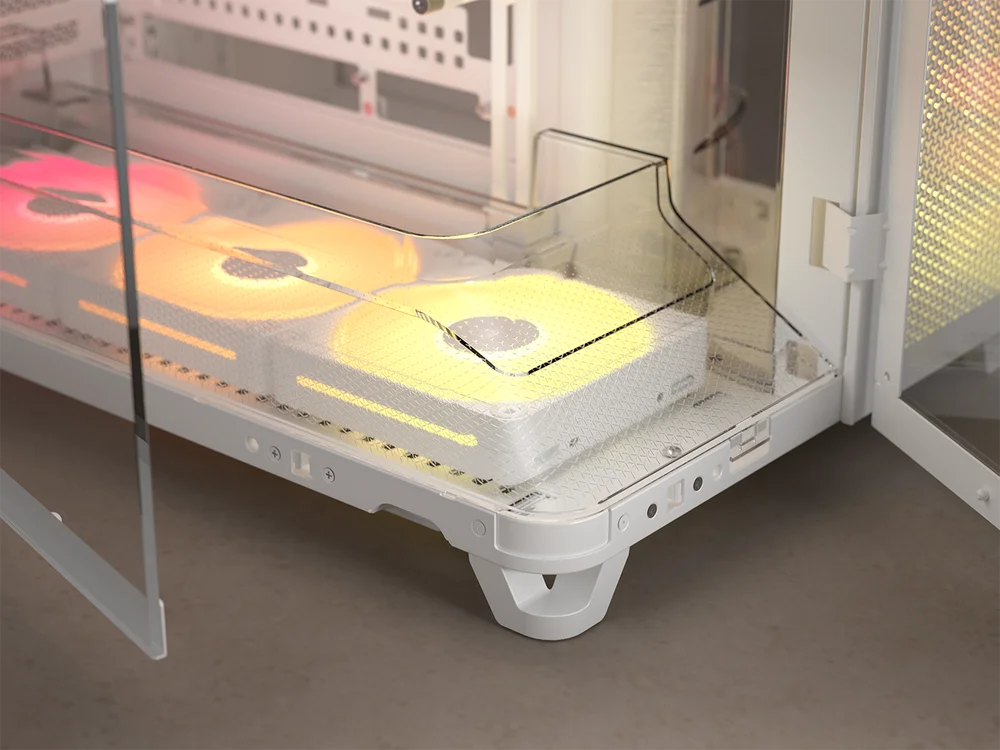
Additionally, when we tried an airguide (the curved piece of transparent plastic in the AIO chamber), that was shaped to accommodate a push/pull config, we ran into some issues, as the tighter radius curved necessary to allow enough space for push/pull asked the exhausted air to make an almost 90-degree turn as it hit the airguide to make it out of the case. This resulted in some of the air curling back, instead of being cleanly exhausted. The wider, more gentle curve of the current air guide allows the exhausted air an easier route out of the case.
Can I Do Custom Cooling in the AIR 5400?
This case is designed quite specifically for air cooling in the main chamber with a 360mm AIO in the cooling chamber. But yes, you certainly can custom cool in the AIR 5400, but the same restrictions for the AIO chamber apply. Additionally, certain radiator and fan configurations in the main chamber may require the removal of the air ducts at the top and the bottom of the case.
This won't be a problem though, as custom cooling people are well aware that taking precise measurements to ensure their components fit is part of the custom cooling game.
ПРОДУКТИ В СТАТИЯ
JOIN OUR OFFICIAL CORSAIR COMMUNITIES
Join our official CORSAIR Communities! Whether you're new or old to PC Building, have questions about our products, or want to chat about the latest PC, tech, and gaming trends, our community is the place for you.