HOW TO
What to do if your headset is incompatible with Discord’s latest audio subsystem
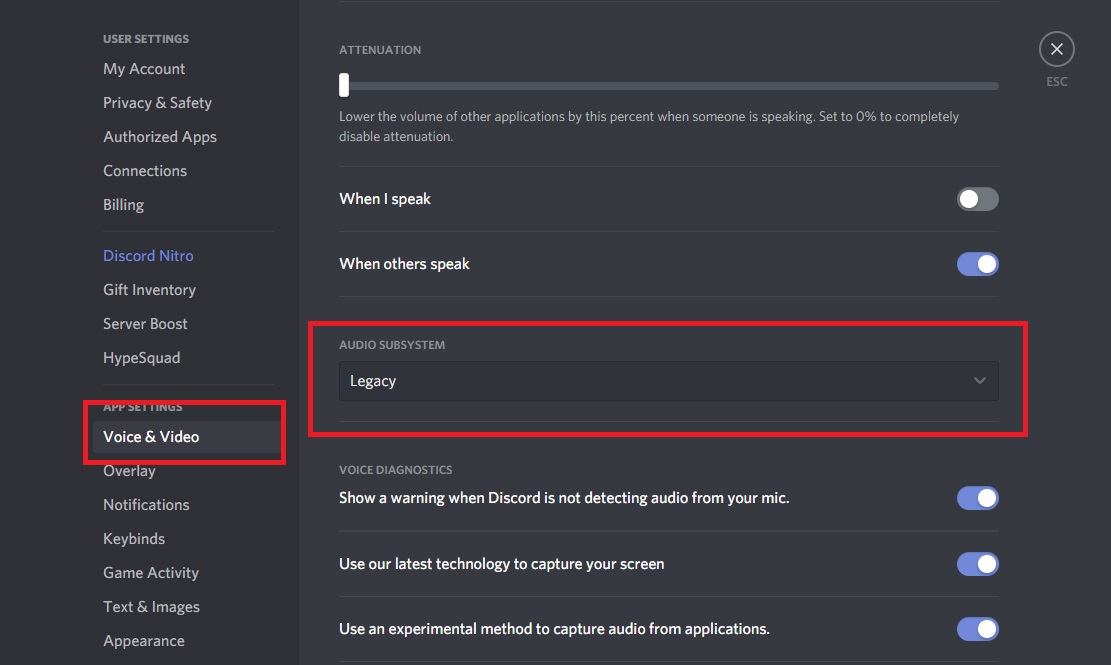
If your hardware becomes incompatible with Discord’s latest audio subsystem, you can fix this issue by using a legacy audio subsystem.
To use a legacy audio subsystem:
- Open Discord.
- Click the User Settings button.
- Click Voice & Video.
- Select the AUDIO SUBSYSTEM dropdown menu and select Legacy.
If you continue to experience issues with your headset, contact Customer Support.
JOIN OUR OFFICIAL CORSAIR COMMUNITIES
Join our official CORSAIR Communities! Whether you're new or old to PC Building, have questions about our products, or want to chat about the latest PC, tech, and gaming trends, our community is the place for you.