As we’ve covered in our switch guide as well as our comprehensive guide on the history of gaming keyboards, magnetic key switches are not just a 1-to-1 swap for mechanical switches. They offer a lot of tech that isn’t found on mechanical or even optical switches. Let’s do some Exploring and learn how CORSAIR’s first generation of magnetic switches, the MGX Hyperdrive, harness the awesome power of magnets to let your keyboard do things that you might have never thought were possible.
How do the CORSAIR MGX Hyperdrive Hall Effect key switches work?
In a normal mechanical keyswitch, there are two conductive metal contacts that are held apart when the switch is at idle. When the switch is pressed down, one plate moves towards the other until they contact. The point at which they touch is called the actuation point. When the actuation point is reached, and the conductive plates touch, an electrical circuit is completed, which registers the keypress.
Magnetic switches work completely differently. Instead of needing metal plates to complete an electric circuit, the Hall Effect property of magnets is used to detect a keypress. The very simple explanation for this is that there’s a sensor at the bottom of the switch that can tell how far away the magnet is very accurately. Once the magnet reaches a pre-determined distance, the keypress actuation is registered.
Because the actuation point is determined by a moving magnet and not a physical mechanism, you can decide on a per-key basis where you want the actuation point to be. This is the main differentiating feature between MGX Hyperdrive switches and mechanical ones, but it’s far from the only one.
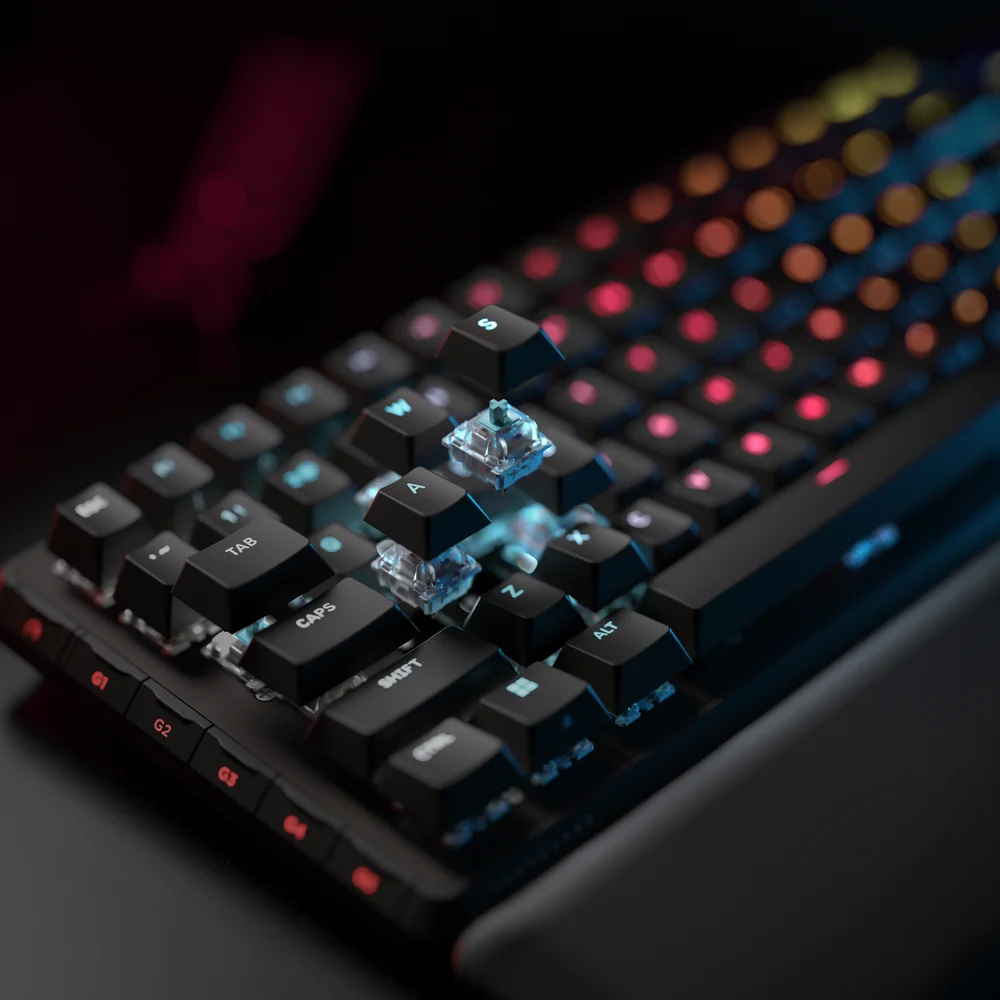
CORSAIR MGX Hyperdrive Hall Effect switch specs and features
For the custom mechanical keyboard fans out there, the specs are paramount, so here’s what you can look forward to from the MGX switches, tactility-wise.
- Switch style: Linear
- Actuation force: 30g - 55g. (If the actuation point is set to 0.1mm, it takes 30g of force to reach it. At 4.0mm, it takes 55g of force. Basically, the deeper the actuation point, the more force is needed.)
- Pre-travel/Action point: 0.1mm – 4.0mm, adjustable in 0.1mm increments. (Out of the box actuation point is 2.0mm)
For optimal accuracy the recommended range is 0.4mm-3.6mm. Setting the actuation outside the recommended range may result in higher sensitivity and affect consistency. - Total travel: 4.0mm
- Durability: 150 million keystrokes
So, out of the box, these feel just like regular linear key switches, but they are hiding some fun stuff. You can adjust the actuation point in 0.1mm increments per key via iCUE, but another benefit of the magnetic design is that you can have more than one actuation point.
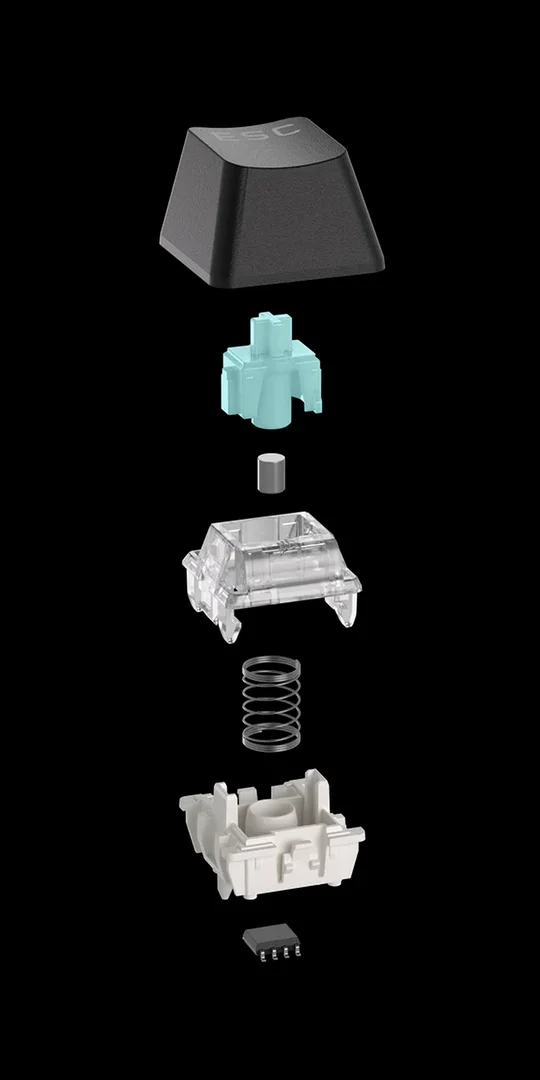
These will basically feel like the smoothest linear key switches you’ve ever used because there’s no physical actuation point. We’ve already told you that you can easily adjust the actuation point in 0.1mm increments per key, but another benefit of the magnetic design is that you can have more than one actuation point.
With normal key switches, you press them until they actuate, and aside from RGB, that’s all the functionality they can really have. CORSAIR MGX switches all you to set another actuation point, which can bind to another function entirely.
That’s right folks, now instead of walking with W, and holding down Shift at the same time to run, dual actuation means you can set the first activation of W to be walk, and the second to be sprint. The same goes for crouching and going full prone. This is cool for newer PC gamers who come from the console world, as most controllers work similarly.
How to set the actuation point of MGX Hyperdrive switches in CORSAIR Web Hub on support devices
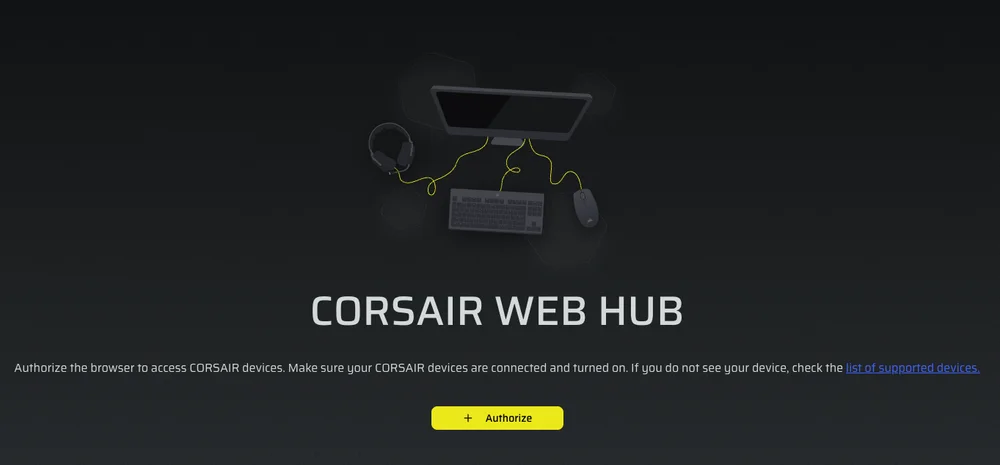
- Ensure that your supported keyboard is connected to your device via USB cable. · Navigate to CORSAIR Web Hub.
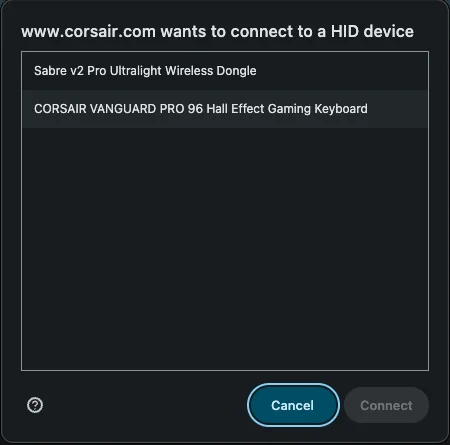
- Click Authorize, and then select the VANGUARD 96 PRO or other compatible keyboard from the list of HID devices.
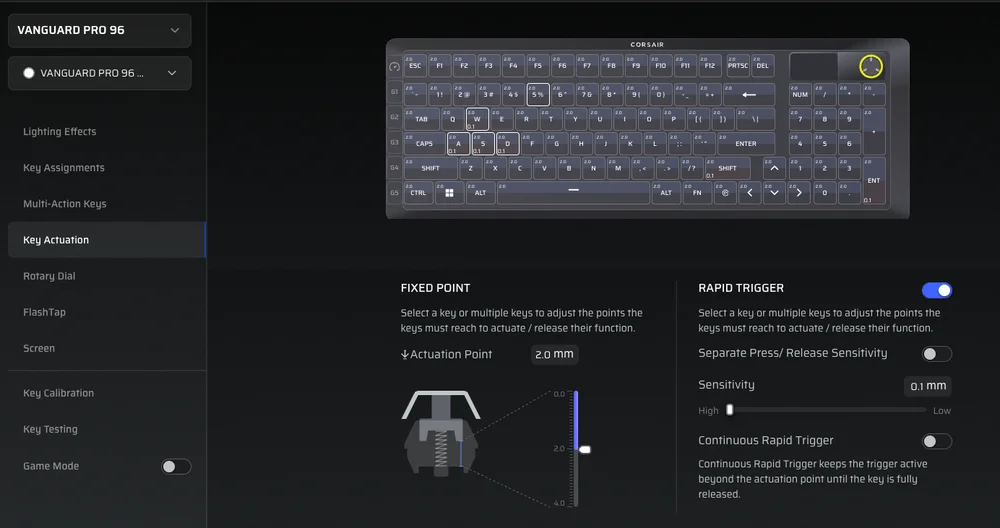
- Select Key Actuation and the individual keys whose actuation you want to change, or click and drag to set actuation for many keys at once.
- Choose your desired actuation point, 2.0mm is default. (Choose a setting between 0.4mm-3.6mm for optimal performance.)
Setting the actuation outside the recommended range may result in higher sensitivity and affect consistency. - Click the “Device Settings” button in the bottom left corner and then Save your settings.
If you'd like to reset all of your settings, including your custom actuations, back to default you can perform a factory reset within Web Hub.
How to set the actuation point of MGX Hyperdrive switches on the VANGUARD PRO 96 in Hardware Mode
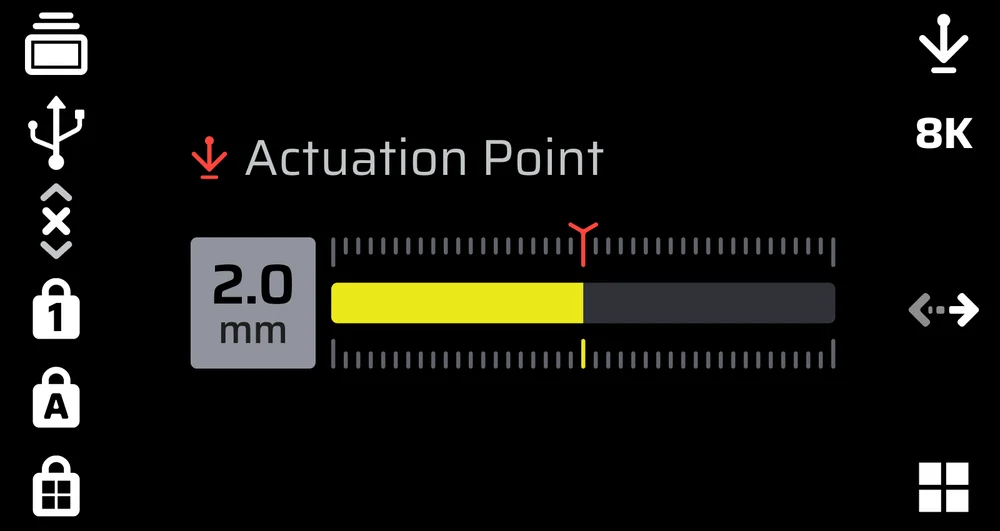
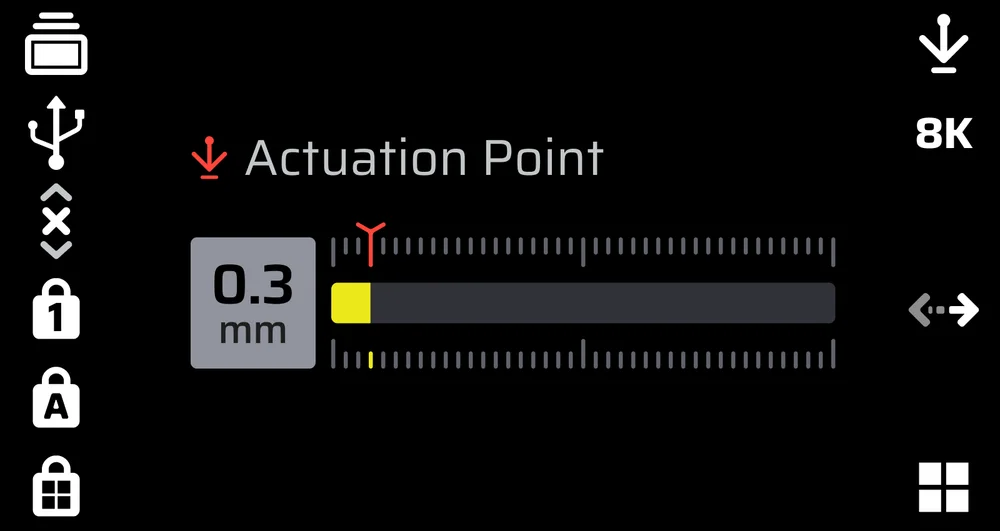
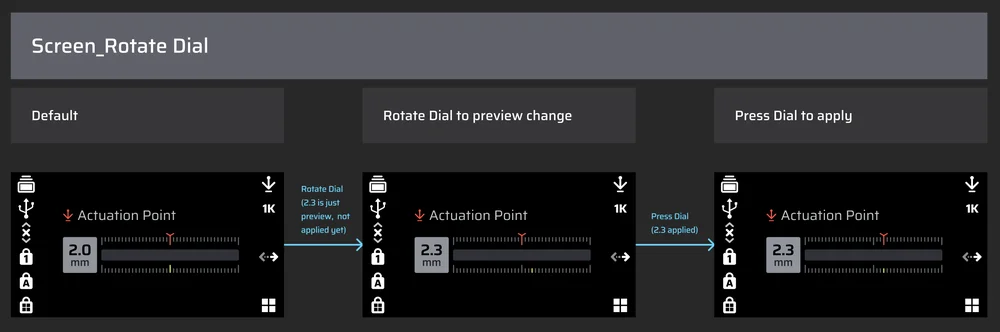
- Press FN + F12 until the screen indicates that you have entered Actuation Adjustment Mode. The screen will display the current actuation setting in millimeters.
- Rotate the dial to adjust the Actuation Point 0.1mm at a time.
- Press the dial to save the setting. Press FN + F12 to change the dial function if you wish to exit Actuation Adjustment Mode and use the dial for another action.
Manual Calibration Mode
- Hold FN + Game Mode for 2 seconds to enter Manual Actuation Calibration mode. The screen will display 'Actuation Calibration Mode' until you exit.
- Start pressing the key you want to calibrate until it bottoms out. The key’s RGB light will display the following colors for the corresponding states:
- Red: Calibrates the press-down value
- Blue: Press-down value calibration complete. Release the button to calibrate the release value
- Green: Calibration complete
Hold the Game Mode button for 2 seconds to exit Actuation Calibration Mode.
How to set the actuation point of MGX Hyperdrive switches in iCUE for supported devices

Use the slider located to the right of switch image or the text box above to choose the actuation point. You have 40 potential actuation points from 0.1mm to 4.0mm, so experiment and find your perfect point.
You can also set the reset point in 0.1mm increments, just as long as it's above the actuation point, so you really can tailor this keyboard until it’s perfectly customized to your own preferences. But what about that second actuation point?

- Open iCUE and make sure your keyboard’s firmware and iCUE are both up to date.
- Click on your keyboard in iCUE and locate the 'Key Actuations' setting.
- Select the key you want to change (Or drag a box over the whole keyboard if you don’t want to have different per-key actuations.)

- Setting the second actuation isn't required, but can create some fun additional functionality. Simply check the 'Secondary Actuation Point' option, then repeat the same steps for setting the first one. Using the secondary actuation point can take some practice, and we'd recommend setting it significantly further down the switch unless you have the dexterity of a professional pianist.
CORSAIR MGX magnetic key switch FAQs
For those of you short on time, here’s some quick-fire queries about the MGX switches.
Which keyboards come with MGX switches?
MGX switches are available on the following keyboards:
- VANGUARD PRO 96
- K70 PRO TKL
- K70 MAX
Are MGX switches compatible with 3rd party keycaps?
Yes. The switches themselves have the same dimensions as traditional Cherry MX-style keyswitches, including the crucible section. So, if you’ve got a set of fancy custom PBT keycaps that you’re particularly keen on, they will fit on the CORSAIR MGX switches.
Do I need software to change the actuation point?
Yes. The ability to have two separate actuation points and the capability to change them is controlled by software. You can't physically adjust them. So, if you want to take advantage of the MGX switches to their full extent, you’ll need to download iCUE.
Are the MGX switches RGB?
CORSAIR MGX switches don’t contain their own LED like some switches do, however, the housing is translucent. Additionally, there is a gap going straight through the switch covered by a transparent panel. This allows the RGB LEDs mounted to the circuit board of the keyboard to shine through unimpeded.
ПРОДУКТИ В СТАТИЯ
JOIN OUR OFFICIAL CORSAIR COMMUNITIES
Join our official CORSAIR Communities! Whether you're new or old to PC Building, have questions about our products, or want to chat about the latest PC, tech, and gaming trends, our community is the place for you.