BLOG
Pump Speed vs Fan Speed: Which Makes the Biggest Difference for AIO Performance?
The answer to this query is fan speed, and we’ll go into the details about why lower down on this page. If you're not familiar with this topic, the main thing to know is an AIO is an all-in-one liquid CPU cooler. It’s called “all in one” as it includes all the parts a liquid cooling setup needs to operate and they are all connected to each other in a closed system, making it a bolt-on solution as opposed to needing to install separate parts and connect them.
The more advanced version of this type of setup is a custom cooling kit which includes a separate reservoir for the liquid, a separate pump, tubing, water blocks, and fans. It can be complicated picking the right parts and connecting them, which is why the AIO reigns supreme for liquid cooling on a PC; it’s just a simple bolt-on kit with everything you need all in one, pardon the pun.
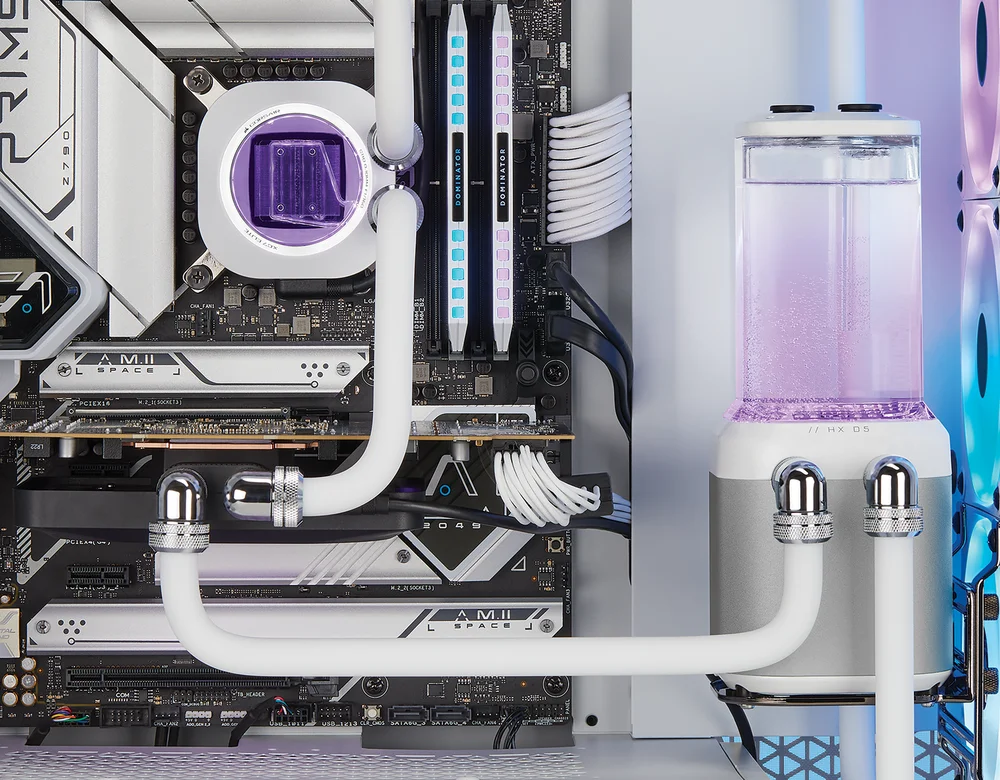
In a custom cooling kit the parts are all separate from one another as demonstrated in this XD5 RGB Elite reservoir/pump with hardline tubing.
How does an AIO operate?
The goal of an AIO is to remove heat generated by the CPU from the system. It does that with several components, the first of which is a cold plate or water block that sits on top of the CPU. As the CPU gets hot that heat is transferred from the CPU into the metal cold plate pressing down on top of it. As the cold plate absorbs heat from the CPU with its metal body, it then transfers that heat to liquid that is rushing around inside of it via channels and water pressure from the pump, shown below on your Titan cooler with Flowdrive pump.
That warmed liquid is then sent to a radiator via a tube, and the warm liquid circulates through the radiator and transfers its heat to tiny fins throughout the radiator. From there the fans attached to the radiator blow air through the fins, transferring the heat away from the fins and into the air and finally out of the system entirely. From there the freshly-cooled liquid goes back to where it began, on the CPU cold plate, and the cycle repeats.
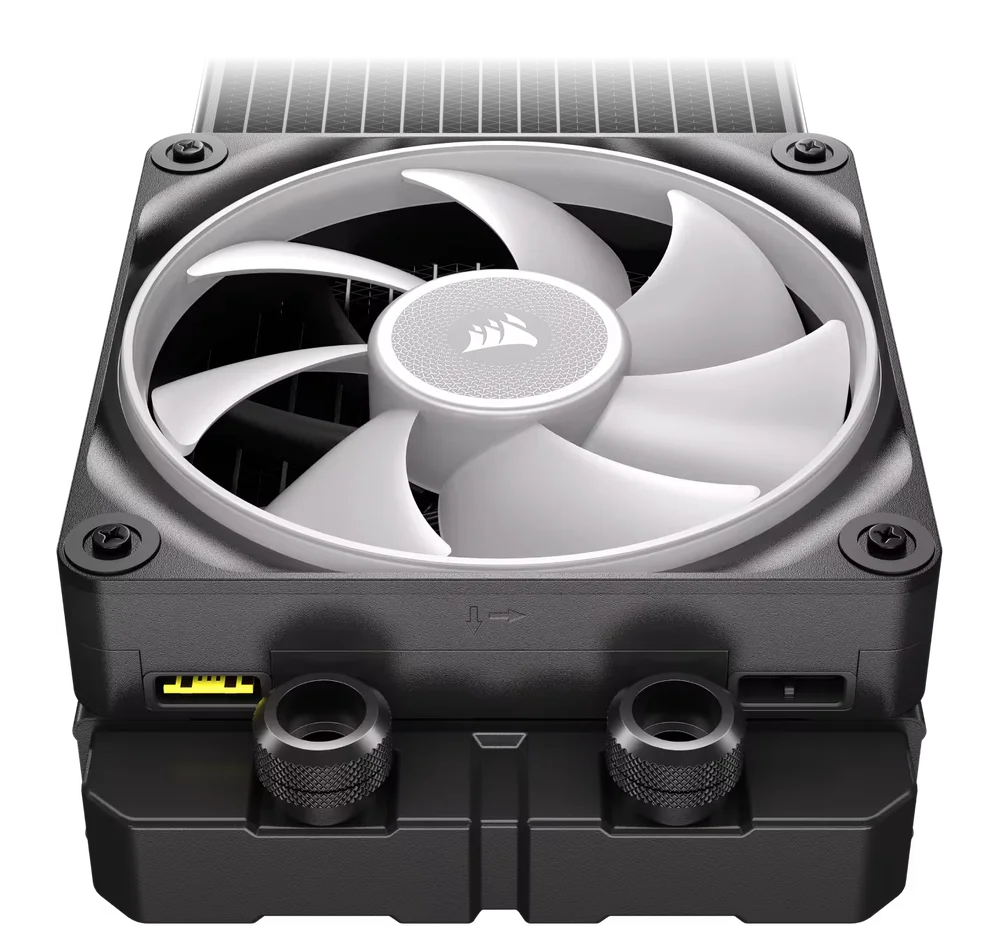
The fan sits on top of the freshly-warmed radiator and blows cool air through the fins, removing heat from the system and cooling the liquid inside the radiator.
What’s moving all the liquid?
The pump is responsible for moving liquid through the system, and it typically sits on top of the cold plate. It’s usually an impeller, meaning it rotates and has vanes on it to create flow in one direction, so it looks like a windmill laying flat. As the pump spins it moves the liquid through the system.
Pump speed can be adjusted by the user usually via software, so one would think a faster pump speed would lead to better cooling performance. After all, if the water is moving through the system faster that means more volume is being sent through the cycle, so more heat is being removed. After all, if your pump can be moving at a higher rate, why leave it at a lower setting?
What About Pump Speed?
Operating your pump at 100% compared to 80% (or thereabouts) might make a difference in CPU temperature for an extreme workload of 1-2C, if that. In general, the pump is usually fairly small in an AIO and it’s responsible for moving a lot of liquid, and once that liquid heats up it takes a lot of energy to dissipate it, and the same is true in reverse, so adjusting the pump speed up or down will take some time to actually get all the liquid in the system moving at that rate.
Fan Speed Makes a Big Difference
If you really want to lower your CPU temperatures with an AIO you’ll have to pay attention to fan speeds. How fast the fans are spinning has a direct and noticeable impact on the temperature of the coolant and the CPU, with the drawback that it might introduce a bit of noise to your system depending on what kind of temperatures you can live with. The fans are what actually removes heat from the system, so fan speed is critical to cooling performance.
We did some testing with a Titan 240 AIO with the pump at maximum speed – 2800rpm – and fans at 25%, which was 420rpm, and our liquid coolant hit 49C, which is quite hot for coolant. When we adjusted the fan speeds to “extreme” with fans spinning at 1400rpm our coolant temp dropped by 10C after 20 minutes, showing how dramatically fan speed affects cooling performance.
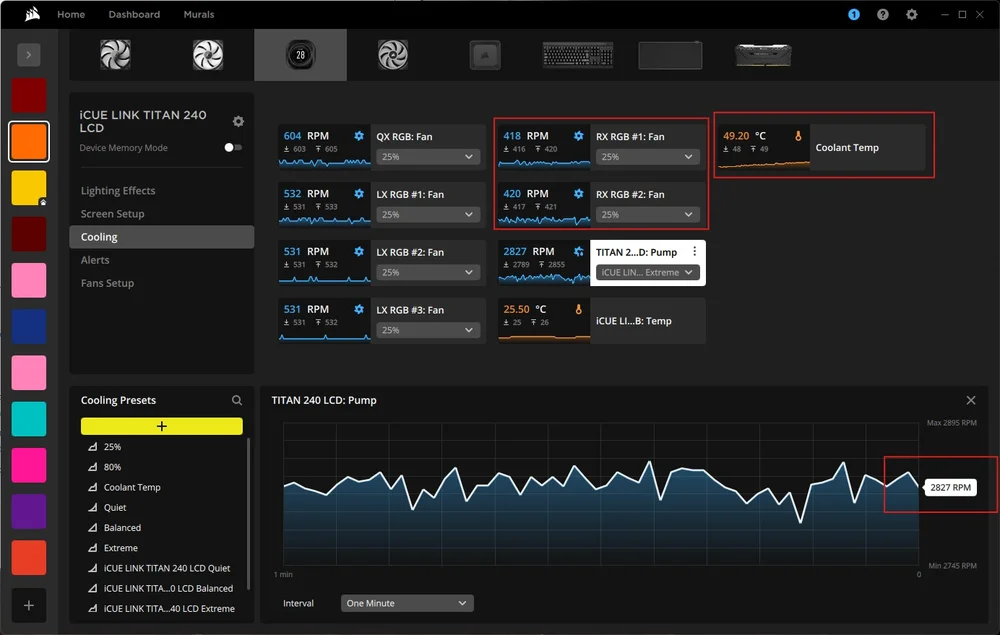
Under full load and the fans attached to our radiator running at just 25%, the coolant got up to 49C as shown in iCUE.
Ultimately, you’ll have to find a balance between fan speed between, temps, and tolerable noise, and it also depends on what kind of CPU you have and how you have it configured since a 32-core CPU will require a more cooling than one with 12 or 16 cores.
The Bottom Line
It’s a good practice to set your pump to a fixed speed that is less than 100%, so around 70 or 80% typically, and have your fan speed controlled by AIO coolant temperature, so they only spin up when the liquid gets hot. You can also experiment with different settings to see what you prefer as some people use a custom fan curve, and others like to use presets since it makes things very simple. On CORSAIR AIOs you can use a preset so we recommend “balanced” as it is a good middle ground between Quiet and Extreme, as it balances performance and fan speed for quiet operation and great cooling performance.
ENREGISTREMENT DU PRODUIT
JOIN OUR OFFICIAL CORSAIR COMMUNITIES
Join our official CORSAIR Communities! Whether you're new or old to PC Building, have questions about our products, or want to chat about the latest PC, tech, and gaming trends, our community is the place for you.