The most recent CORSAIR RMx Series power supplies—and the upcoming RMx SHIFT—include a large knob on the rear that is labeled a “Manual Fan Override Knob,” but what does it actually do? The knob's existence is related to Zero RPM Mode, which we will describe below.
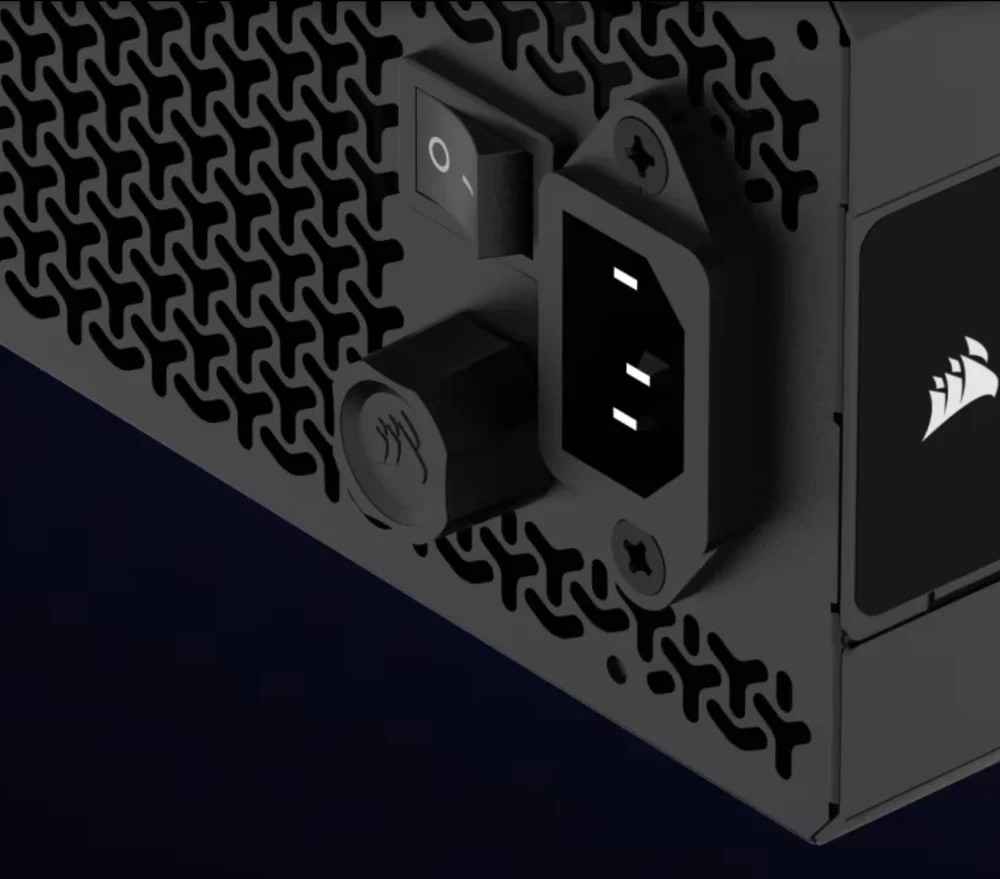
RMx power supplies feature an "override" knob on the back of the PSU.
Zero RPM Mode
A lot of CORSAIR power supplies include a feature called Zero RPM Mode. The power supplies that offer this feature include:
- AXi and AX series
- HXi and HX series
- RMx and RM series
- SF series
- Select TX and TXm series
This is a feature designed for quiet computing and is enabled by default on every PSU that offers it. The way it works is the built-in fan inside the PSU will not spin at idle or under low and medium workloads, so you can expect total silence from the PSU for day-to-day tasks and light work. Once there is a load placed on the power supply and it begins to warm up, and once it reaches a specific amount of power draw or internal temperature the fan kicks on to cool the PSU down.
The specifics around when the fan will turn on vary according to the power supply in question, but as an example, on the RM1000x, the fan is turned off until the load reaches 500W. According to its Fan Noise Curve, once the fan turns on it runs at 5db until around 600W, then it begins to spin up until the power supply cools down.
For some PSUs the fan will turn on when the internal temperature crosses a specific threshold, but that number varies with higher-end PSUs being able to stay cool longer whereas entry-level and midrange PSUs will generally get warm quicker. If a PSU hits a certain load, or reaches a certain temperature, the fan will turn on.
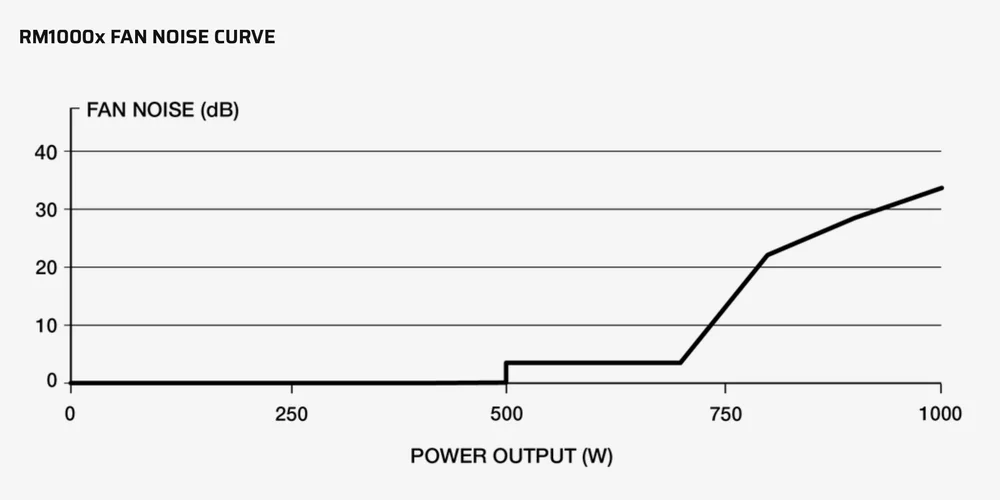
The fan noise curve for the RM1000X shows the fan won't spin until there's a load on the PSU equivalent to 500W.
The Point of the Knob
The knob is an override for Zero RPM Mode.
It doesn’t turn the feature off and turn the fan on immediately, as if it were a manual control knob, but instead it lets you dictate the RPM of the fan when it does turn on.
For some people with certain CORSAIR power supplies, when the fan suddenly turns on after being completely silent, it is audible to them. Therefore, the knob lets that person override this setting so that the fan starts at a lower RPM, which could be less audible. At the same time, a person could turn the knob up a bit to ensure the PSU fan kicks in at a higher RPM to ensure the PSU stays very cool.
The Benefit of the Knob
The benefit of the knob is threefold:
- It lets the fan start at a lower RPM than it would otherwise.
- It allows for a longer period of quiet computing.
- It gives the owner more control over how the PSU operates.
Whether or not this feature is useful to you depends on your own preferences, and it’s a subjective consideration. Anecdotally we know a lot of people never touch the knob as they prefer to use Zero RPM Mode as it is designed.
However, if you want more control over how the fan behaves under load, the knob was made specifically for you.
PRODUKTY V ČLÁNKU
JOIN OUR OFFICIAL CORSAIR COMMUNITIES
Join our official CORSAIR Communities! Whether you're new or old to PC Building, have questions about our products, or want to chat the latest PC, tech, and gaming trends, our community is the place for you.