BLOG
What is a CUDA Core and How Do they Work?
A CUDA core is one of the tiny math units inside an NVIDIA GPU that does the grunt work for graphics and parallel compute. Each core lives inside a larger block called a Streaming Multiprocessor (SM), and on modern GeForce “Blackwell” GPUs each SM contains 128 CUDA cores. That’s why you’ll see total counts like 21,760 CUDA cores on an RTX 5090. The chip simply has many SMs, each packed with those cores.
CUDA (NVIDIA’s parallel computing platform) is the software side of the story: it lets apps and frameworks send massively parallel work rendering, AI, simulation to those cores efficiently
How Do CUDA Cores Work?
Think of a GPU like a factory designed for bulk jobs. CUDA cores handle work in warps groups of 32 threads that execute the same instruction on different data (a model NVIDIA calls SIMT). This is how GPUs chew through thousands of operations at once. Each SM has schedulers that keep many warps in flight to hide memory latency and keep those cores busy.
A useful mental picture:
- CUDA core = an individual worker (does arithmetic like adds, multiplies).
- SM = a shop floor with its own schedulers, caches, special-function units, Tensor Core(s), etc.
- GPU = the whole factory, with many SMs operating in parallel.
CUDA Cores vs. CPU Cores (and Other GPU Cores)
- Not CPU cores: A CUDA core is a simpler arithmetic lane optimized for throughput, not a big, latency‑tuned general-purpose CPU core. GPUs scale by having lots of these small lanes working together. (CUDA’s programming guide explains this throughput-oriented design.)
- Different from specialized GPU cores:
- Tensor Cores are matrix‑math engines that supercharge AI/ML and features like DLSS;
- RT Cores accelerate ray tracing (BVH traversal, ray/triangle tests).
These offload specific tasks so CUDA cores can focus on shading/compute
Image Credit: NVIDIA
Do More CUDA Cores Always Mean More Performance?
Usually but not by themselves. Architecture matters a lot. For example, NVIDIA’s Ampere generation doubled FP32 throughput per SM versus Turing, so “per-core” power changed between generations. Ada also greatly expanded caches (notably L2), which boosts many workloads without changing core counts. In short: comparing CUDA-core counts across different generations isn’t apples-to-apples.
Other big swing factors:
- Clock speeds and power headroom (how fast cores run).
- Memory bandwidth and cache sizes (feeding the cores).
- Use of Tensor/RT Cores (AI and ray tracing shift work off CUDA cores).
- Drivers & software (how well an app uses the GPU via CUDA).
What Do CUDA Cores Actually Do in Practice?
- Gaming/graphics: They run shader programs (vertex, pixel, compute) under the hood. RT Cores handle the heavy ray‑tracing steps; CUDA cores still do lots of shading and compute around them.
- Content creation & simulation: Physics solvers, denoisers, render kernels, video effects many are written to take advantage of CUDA’s parallel model.
- AI/ML: Tensor operations go to Tensor Cores, but plenty of preprocessing, postprocessing, and non‑matrix work still runs on CUDA cores.
How Many CUDA Cores Do I Need?
A friendly rule of thumb:
- High‑FPS 1080p–1440p gaming: Look at the whole GPU (architecture, clocks, memory, RT/Tensor features), not just core count. Benchmarks matter more than the raw number.
- 4K or heavy ray tracing: You’ll benefit from more SMs/CUDA cores and strong RT/Tensor blocks, plus bandwidth and cache.
- AI/compute: Core count helps, but Tensor Core capability, VRAM size, and memory bandwidth frequently dictate throughput.
If you want a quick sanity check on scale, RTX 5090 lists 21,760 CUDA cores, showing how NVIDIA tallies per-SM cores across many SMs. But again, performance gains come from the total design, not the count alone.
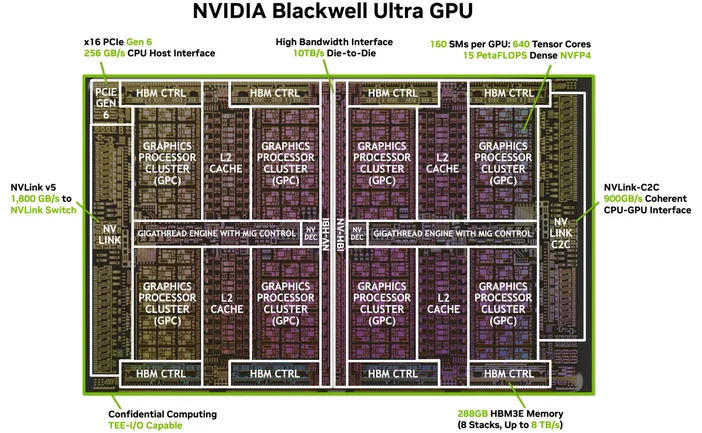
Image Credit: NVIDIA
Do I Need Special Software or Cables? (The “HDMI for 4K” of CUDA)
You don’t need a special cable, but you do need the right software stack. CUDA is NVIDIA’s platform; apps use it through drivers, toolkits, and libraries. Many popular applications and frameworks are already built to tap CUDA acceleration once your NVIDIA drivers and (when needed) the CUDA Toolkit are installed, supported apps just…use it
What GPUs Support CUDA?
CUDA runs on CUDA‑enabled NVIDIA GPUs across product lines (GeForce/RTX for gaming and creation, professional RTX, and data‑center GPUs). The programming guide notes the model scales across many GPU generations and SKUs; NVIDIA maintains a list of CUDA‑enabled GPUs and their compute capabilities.
Is a CUDA core the same as a “shader core”?
In everyday GPU talk, yes on NVIDIA GPUs, “CUDA cores” refer to the programmable FP32/INT32 ALUs used for shading and general compute inside each SM.
Why are CUDA-core numbers so different across generations?
Because architectures evolve. Ampere changed FP32 datapaths (more work per clock), and Ada overhauled caches so performance doesn’t scale linearly with core count.
What’s a warp again?
A group of 32 threads that execute in lock‑step on the SM. Apps launch thousands of threads; the GPU schedules them as warps to keep hardware busy.
Do CUDA cores help with AI?
Yes, but the big accelerators for modern AI are Tensor Cores. CUDA cores still handle lots of surrounding work in those pipelines.