With PCs improving and getting faster with time, it is only natural that software keeps up with hardware. NVIDIA Reflex is one of many technologies that integrate with your PC’s hardware to deliver a fast gameplay experience.

What is NVIDIA Reflex?
NVIDIA Reflex is a proprietary software technology by NVIDIA that aims to lower system latency in games by allowing your GPU to render your game constantly. It is available for NVIDIA cards only, compatible only with GTX 900 cards and newer. Game developers can choose to integrate this software into their games to optimize your gameplay, especially in competitive games like Counter-Strike 2, where system latency is crucial to winning.
How does NVIDIA Reflex Work?
Traditionally, the game gives the CPU frames to process before sending them to the GPU to render and display them on your monitor. Often, the CPU will process more frames than the GPU can render, displaying previously recognized frames while rendering new frames, and therefore increasing system latency.
With Reflex, the game forces the CPU to process just enough frames for the GPU to render them at nearly the same time, preventing the GPU from having to catch up on rendering frames. By processing and rendering frames with a Just-In-Time framework, your PC can lower its system latency and allow for more frames to display on your screen. This in turn will allow you to react with more expedience, so the movements you make with your gaming mouse are in response to more up-to-date frames. In short, you can click heads quicker.
Different Modes of Reflex

VALORANT's NVIDIA Reflex options
Supported games offer two options for using Reflex: On and On + Boost. The "On" option performs the Just-In-Time framework with your CPU and GPU processing and rendering at the same pace. The "On + Boost" option is a variant of the On option that disables your GPU’s power-saving capabilities when at hotter temperatures.
Rather than slow down your GPU’s clock speed to decrease temperatures, the Boost feature overrides its power-saving mode to keep your GPU running at its highest clocks when the CPU begins to run with a heavy load.
Alternatives to Reflex
For games that do not support Reflex, there are similar options in the NVIDIA Control Panel that simulate similar behavior. Although they are not optimized for all games, they generally work with any application and can provide lower latency.
The "Reflex On" option in games is like NVIDIA’s Low Latency/Ultra Low Latency mode, located in Manage 3D Settings > Low Latency Mode/Ultra Low Latency.
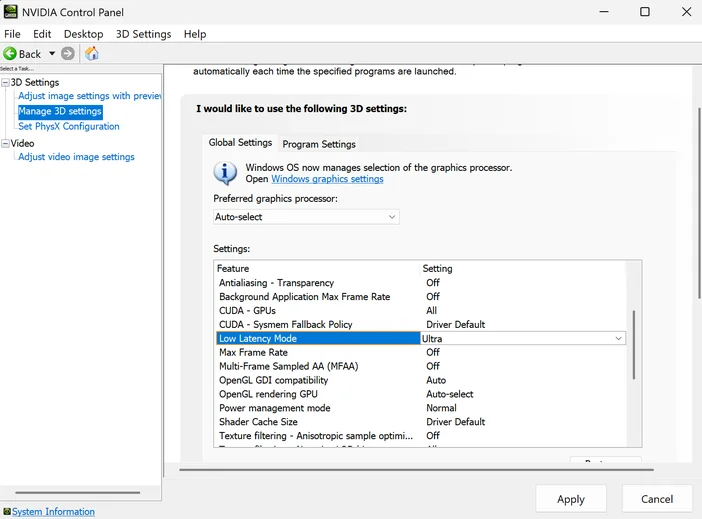
Low Latency Mode set to "Ultra" in NVIDIA Control Panel
The Reflex On + Boost option in games resembles NVIDIA’s Power Management Mode, located in Manage 3D Settings > Power Management Mode.
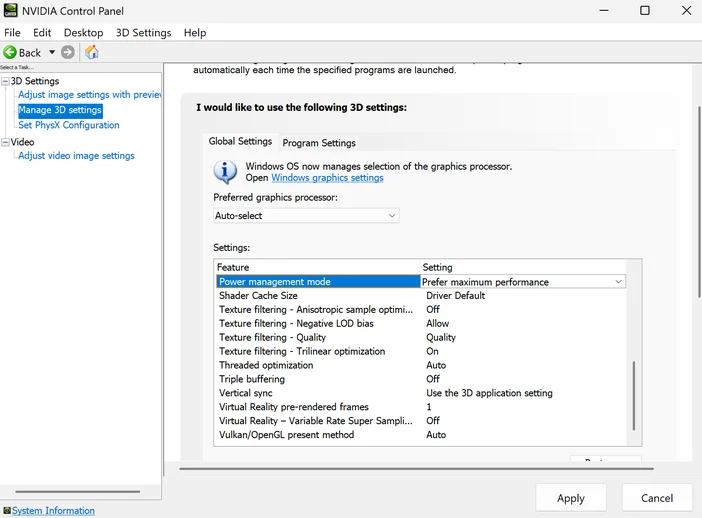
Power Management Mode set to "Prefer maximum performance" in NVIDIA Control Mode
Should I Enable NVIDIA Reflex?
With modern cards like the RTX 50 Series, enabling it may not achieve any significant or noticeable changes in system latency; it is important to know that your system latency will vary between each game that supports Reflex based on video settings. Though, you may receive lower system latency during gameplay with little to no compromises, so it is recommended that you enable this feature to get the most out of your gameplay. That being said, it's worth testing it across a few of your most frequently-played games to see if it's right for you on a case-by-case basis.
For laptop users who want to lower system latency while retaining battery-saving features, Reflex’s On mode will provide all the benefits that come with it. For users who are not concerned about or do not have battery life, Reflex’s On + Boost mode will ensure performant gameplay and maximize your GPU’s computing power.
PRODUKTY V ČLÁNKU
JOIN OUR OFFICIAL CORSAIR COMMUNITIES
Join our official CORSAIR Communities! Whether you're new or old to PC Building, have questions about our products, or want to chat about the latest PC, tech, and gaming trends, our community is the place for you.