MANUÁL | STRUČNÝ PRŮVODCE
SABRE v2 PRO BEZDRÁTOVÝ MG
Herní myš ze slitiny hořčíku
Anglická verze je k dispozici zde - English
Pokud máte nějaké další problémy, kontaktujte zákaznickou podporu
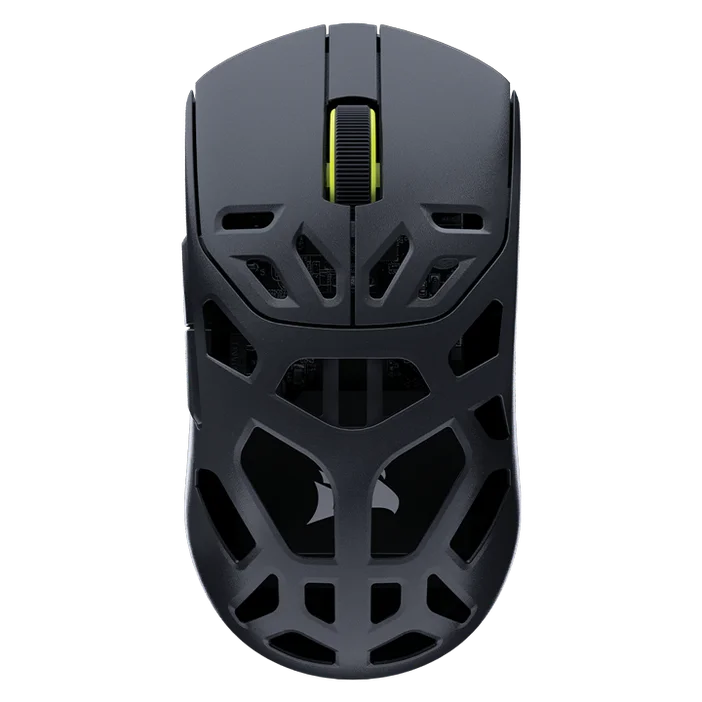
NABÍJENÍ MYŠI
DŮLEŽITÉ: Před prvním použitím je nutné bezdrátový ovladač SABRE v2 PRO WIRELESS MG plně nabít. Pro optimální výkon prosím aktualizujte firmware prostřednictvím aplikace CORSAIR WEB HUB.
Připojte myš k volnému portu USB 2.0 nebo 3.X na počítači pomocí USB kabelu pro nabíjení a přenos dat (L).
Kontrolky pod prostředním tlačítkem / rolovacím kolečkem (C) na myši se rozsvítí podle stavu baterie a po dokončení nabíjení budou svítit trvale zeleně.
SEZNÁMTE SE SE SVOU MYŠÍ
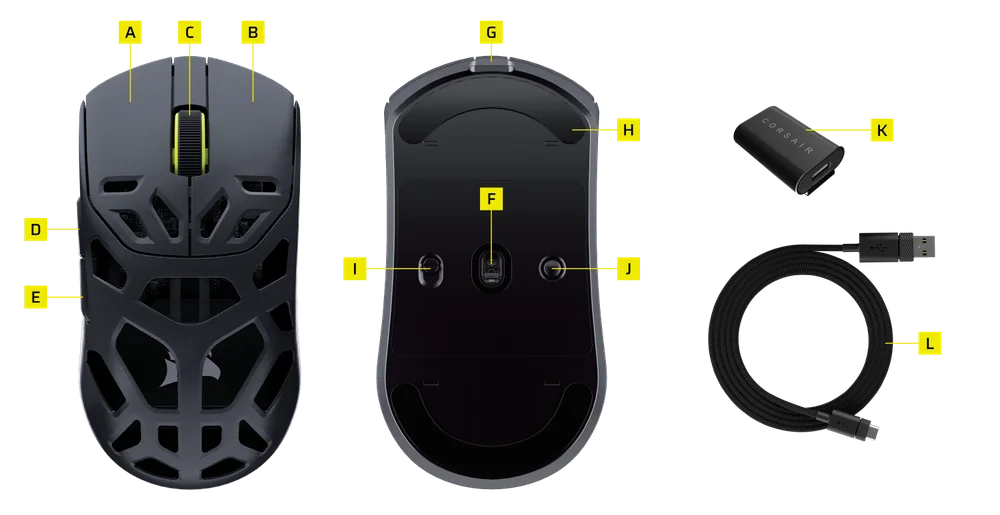
- LEVÉ TLAČÍTKO MYŠI
- PRAVÉ TLAČÍTKO MYŠI
- STŘEDOVÉ TLAČÍTKO / ROZVÍJECÍ KOLEČKO
- TLAČÍTKO „DÁL“
- TLAČÍTKO ZPĚT
- OPTIKOVÝ SNÍMAČ MARKSMAN
- USB port pro nabíjení a přenos dat
- 100% panenské brusle UPE pro myši
- Přepínač napájení / bezdrátového režimu
- Tlačítko DPI a tlačítko pro spárování přes Bluetooth (3 sekundy)
- BEZDRÁTOVÝ USB PŘIJÍMAČ
- NABÍJECÍ A DATOVÝ KABEL USB
NASTavení bezdrátové sítě 2,4 GHz
- Připojte BEZDRÁTOVÝ USB PŘIJÍMAČ (K) k USB NABÍJECÍMU / DATOVÉMU KABELU (L) a druhou stranu kabelu zapojte do volného portu USB 2.0 nebo 3.x na předním panelu počítače nebo do jiného blízkého USB portu.
- Zapněte myš přepnutím přepínače POWER / WIRELESS MODE SWITCH (I) do polohy pro bezdrátové připojení 2,4 GHz.
- LED kontrolka pod tlačítkem pro střední kliknutí / rolovacím kolečkem (C) začne svítit zeleně, jakmile dojde k úspěšnému připojení k přijímači.
NASTavení BLUETOOTH
Bezdrátové připojení Bluetooth se nejlépe hodí pro běžné počítačové úkony, práci a kancelářské aplikace.
- Spusťte párování přes Bluetooth na svém zařízení podporujícím Bluetooth 4.0 nebo novější.
- Zapněte myš přepnutím přepínače POWER / WIRELESS MODE SWITCH (I) do polohy Bluetooth.
- LED kontrolka pod prostředním tlačítkem / rolovacím kolečkem (C) bude po připojení blikat modře a poté svítit modře nepřetržitě.
- Pokud je třeba zařízení pro párování přes Bluetooth znovu spárovat nebo vyměnit, nejprve přepněte do režimu párování přes Bluetooth. Podržte tlačítko DPI a tlačítko pro párování přes Bluetooth (J) po dobu 3 sekund nebo dokud kontrolka LED nezačne blikat modře, čímž vstoupíte do režimu párování přes Bluetooth.
*Bezdrátový MG SABRE v2 PRO lze spárovat pouze s jedním zařízením. Pokud potřebujete spárovat zařízení s jiným zařízením, přepněte jej do režimu opětovného párování a spusťte proces párování.
PROCHÁZENÍ PROFILŮ DPI
Pro rychlé nastavení je k dispozici cyklus DPI.
- Jedním stisknutím tlačítka DPI (J) přepnete na další úroveň DPI.
- Při přepnutí na příslušnou úroveň DPI třikrát zabliká kontrolka na kolečku myši v barvě odpovídající dané úrovni DPI a poté zhasne.
- Opakujte výše uvedené kroky, abyste přepnuli na další úroveň DPI. Projde se všech 5 úrovní DPI a vrátí se zpět na úroveň 1.
Pokročilé nastavení je k dispozici prostřednictvím služby CORSAIR WEB HUB.

STAV MYŠI A INDIKACE
Stav bezdrátového připojení a baterie se signalizuje pomocí kontrolky pod tlačítkem MIDDLE CLICK / SCROLL WHEEL (C).
| STAV DPI – PŘEDEFINOVANÝ | LED kontrolka |
| FÁZE 1 – 400 | ČERVENÁ |
| FÁZE 2 – 800 | MODRÁ |
| FÁZE 3 – 1200 | ZELENÁ |
| 4. etapa – 1600 | ŽLUTÁ |
| 5. ETAPA – 2000 | FIALOVÁ |
| STAV BATERIE | LED kontrolka |
| Nabíjení baterie při nízkém stavu nabití | Dýchající červená |
| Nabíjení baterie při střední úrovni | Dýchat zeleně |
| Baterie je plně nabitá | Plně zelená |
| Baterie je téměř vybitá, je třeba ji dobít | Dýchající červená |
PŘEHLEDNÝ NÁVOD NA NASTAVENÍ MYŠI
Krok 1 – Připojte zařízení SABRE v2
A. Připojte přijímač bezdrátového ovladače SABRE v2 PRO WIRELESS MG pomocí konektoru USB-C.
B. Ujistěte se, že je přepínač na myši nastaven na „2,4 GHz“.
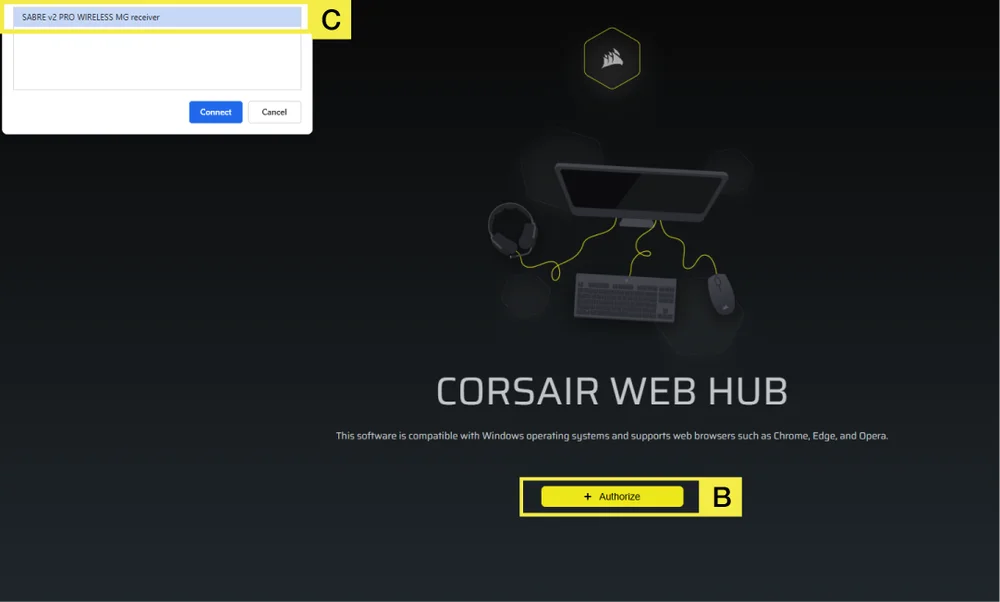
Krok 2 – Spusťte aplikaci CORSAIR WEB HUB a vyberte myš
A. Přejděte na stránku https://www.corsair.com/web-hub/index.html.
B. Klikněte na [Autorizovat].
C. Vyberte bezdrátový přijímač SABRE v2 PRO MG.
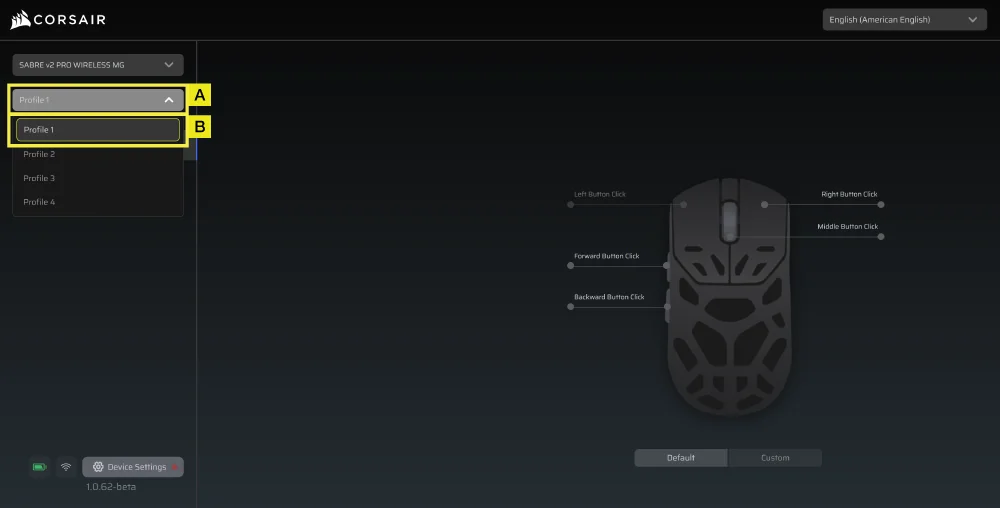
Krok 3 – Vytvořte nebo vyberte profil
A. V levém horním rohu otevřete rozbalovací nabídku profilu.
B. Klikněte na profil, který chcete upravit (například: „Profil 1“).
C. Tento profil uloží vaše nastavení DPI a přiřazení tlačítek.
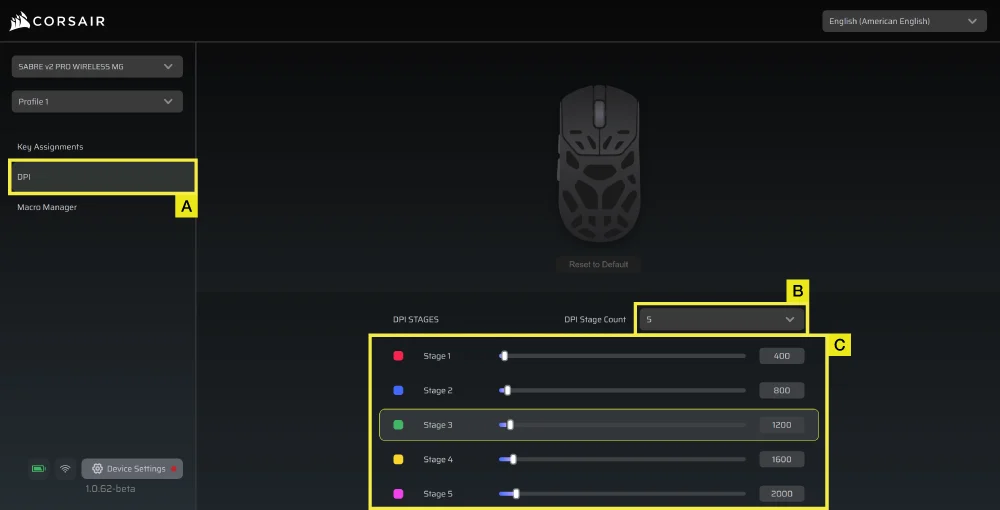
Krok 4 – Nastavení úrovní DPI
A. Klikněte na [DPI] v levém postranním panelu.
B. Zvolte počet stupňů DPI (1–5).
C. Zapněte úrovně DPI, které chcete používat (například 800/1200/1600).
Doporučené výchozí rozlišení (DPI):
– Stolní počítače/obecně: 1200–1600 DPI
– FPS hry: 800–1200 DPI
– MOBA/MMO: 1600–2400 DPI.
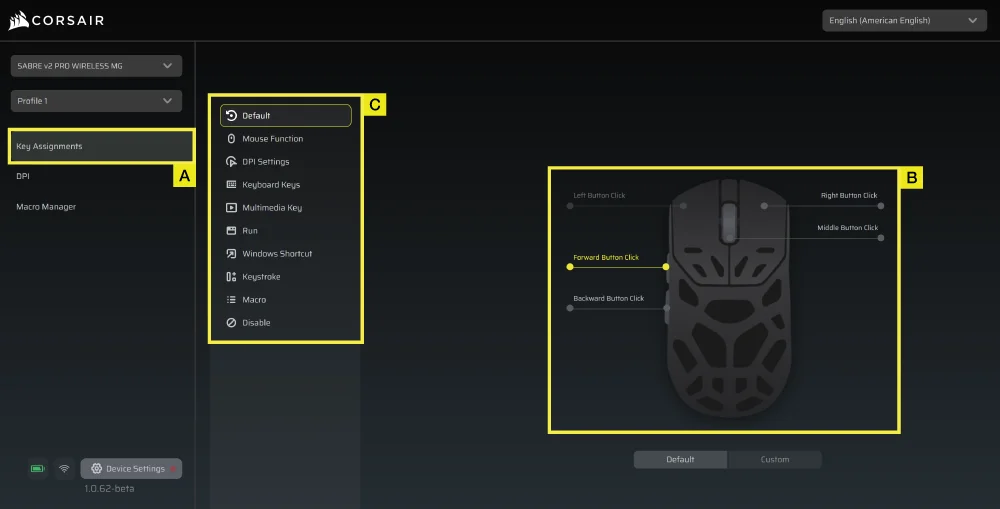
Krok 5 – Přemapování tlačítek (akce / přiřazení kláves)
A. Klikněte na položku [Přiřazení kláves] v levém postranním panelu.
B. Klikněte na tlačítko na obrázku myši, které chcete změnit.
C. Vyberte typ úkolu:
- Klávesnice (přiřaďte k tlačítku jako R, E nebo P)
- Makro (zaznamenání více stisků kláves)
- atd.
D. Potvrďte přiřazení a otestujte ho.
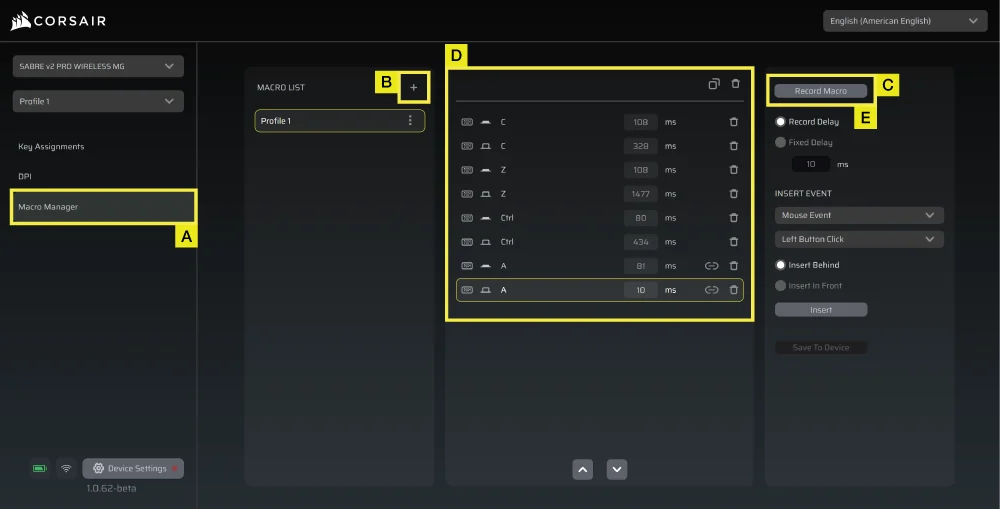
Krok 6 – Nastavení Správce maker
A. Klikněte na položku [Správce maker] v levém postranním panelu.
B. Klikněte na tlačítko [ + ] a přidejte nové makro (například: „Profil 1“).
C. Klikněte vpravo na tlačítko [Zaznamenat makro].
D. Stiskněte klávesy klávesnice nebo proveďte akce myší, které chcete zaznamenat.
E. Klikněte znovu na tlačítko [Zaznamenat makro], čímž nahrávání ukončíte.
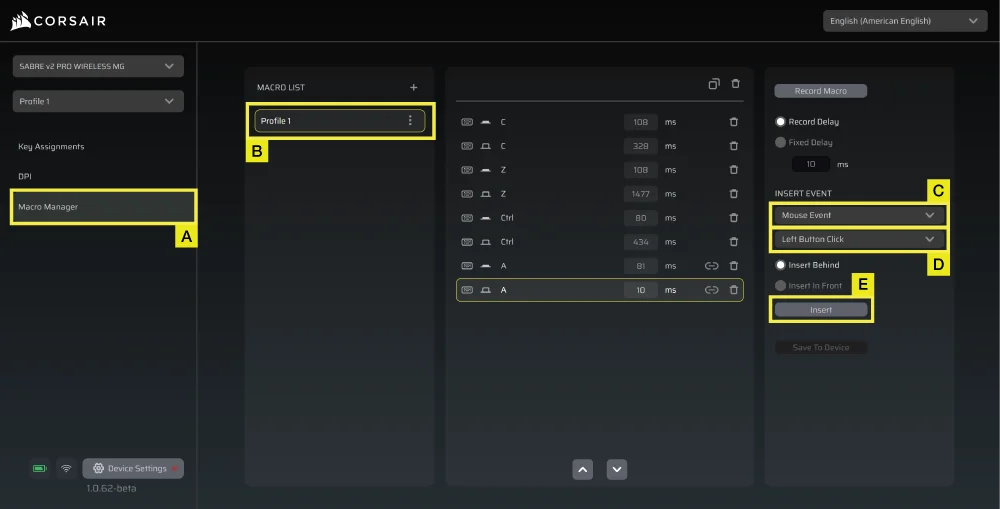
Krok 7 – Ruční vložení událostí makra
A. Klikněte na položku [Správce maker] v levém postranním panelu.
B. Vyberte makro, které chcete upravit.
C. Na panelu pro vkládání událostí vyberte v prvním rozevíracím seznamu, zda chcete vložit události klávesnice nebo myši.
D. V druhém rozevíracím seznamu vyberte událost, kterou chcete vložit.
E. Klikněte na tlačítko [Vložit].
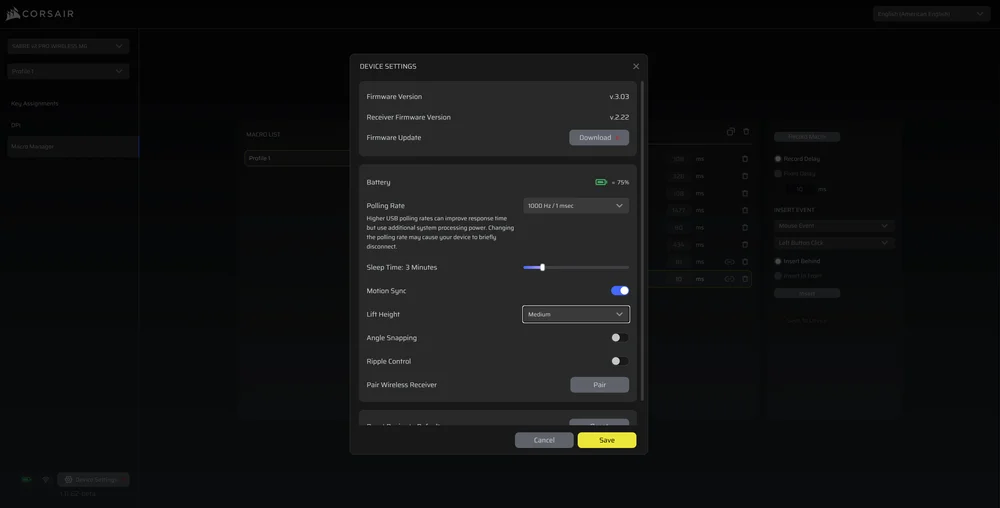
Krok 8 – Nastavení zařízení
- Klikněte na položku Nastavení zařízení v levém dolním rohu.
- Nastavení zařízení.
- Baterie – Stav bezdrátového připojení nebo stavu baterie.

-
Frekvence dotazování – Vyberte možnost [1000 Hz / 1 ms] pro dotazování s frekvencí 1000 Hz.

- Čas na spánek – Nastavit dobu po přechodu myši do režimu spánku.

-
Motion Sync – Synchronizuje údaje o pohybu myši s intervaly dotazování USB, čímž zajišťuje konzistentnější a stabilnější sledování kurzoru.
- Výška zdvihu – výška, při které se senzor vypne.

-
Přichytávání k rohovým bodům – Při zapnutí vyhlazuje pohyb myši pomocí predikce snímače.
-
Řízení vln – Zjemňuje pohyb myši tím, že odfiltruje drobné nechtěné chvění, což však vede k mírnému snížení přesnosti původního vstupu.
-
Bezdrátový přijímač Pair – Spárujte nebo resetujte bezdrátový přijímač.
-
Obnovit výchozí nastavení zařízení – Obnovte nastavení SABRE v2 PRO BEZDRÁTOVÝ MG na výchozí nastavení.
Krok 9 – Aktualizace firmwaru
A. Klikněte na [Nastavení zařízení] v levém dolním rohu.
B. Klikněte na tlačítko [Zkontrolovat aktualizace], abyste se ujistili, že používáte nejnovější verzi firmwaru zařízení.
C. V případě potřeby postupujte podle pokynů k aktualizaci firmwaru.
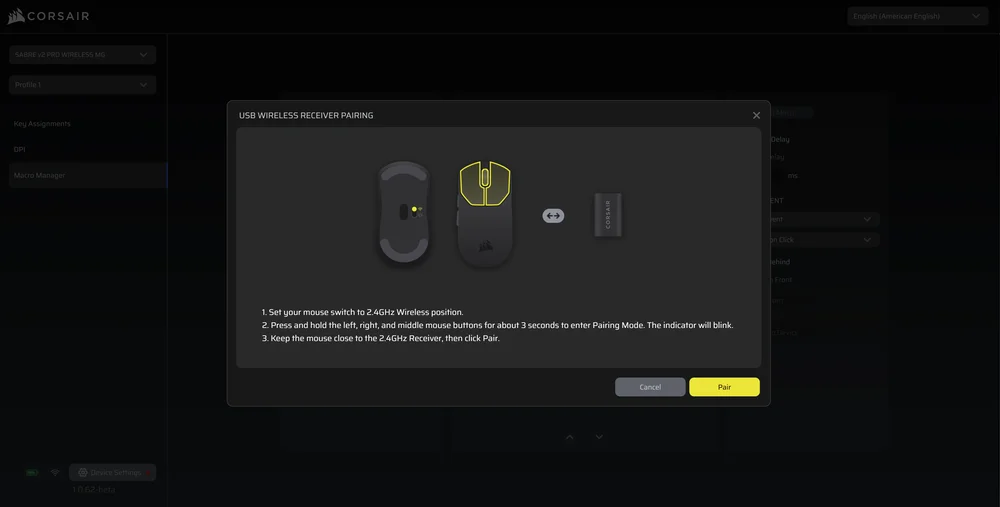
Krok 10 – Spárování bezdrátového přijímače
A. Klikněte na [Nastavení zařízení] v levém dolním rohu.
B. Klikněte na [Spárovat].
C. Postupujte podle pokynů k spárování USB přijímače.
INFORMACE O VYJÍMÁNÍ BATERIE
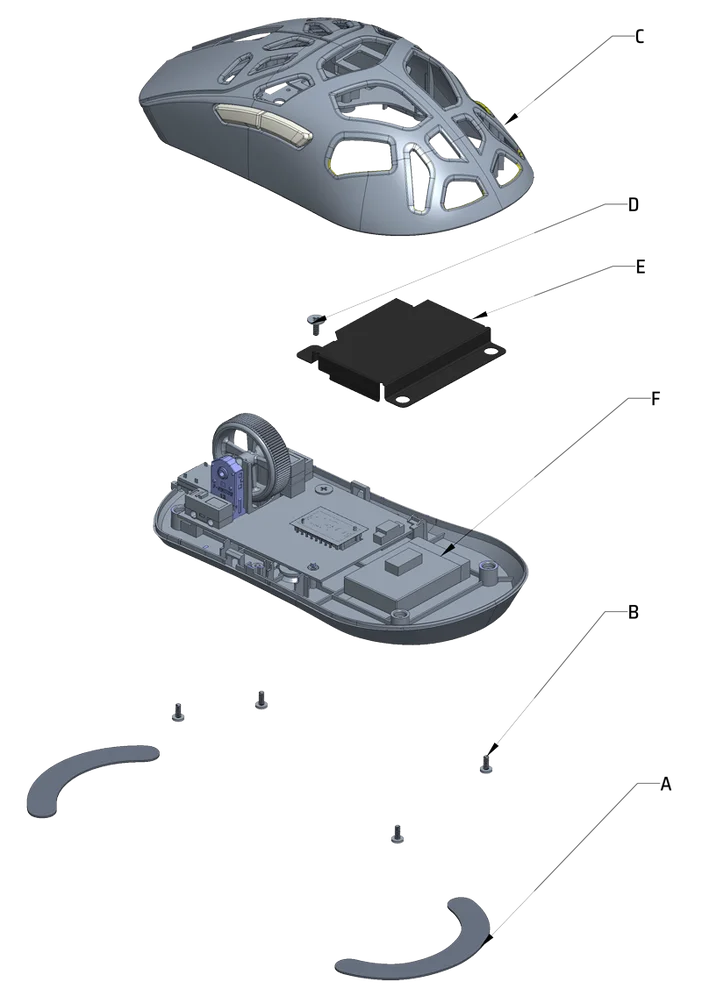
A: Demontujte nožičky (2 ks)
B: Vyšroubujte šrouby (4 ks)
C: Demontujte podsestavu horního krytu
D: Vyšroubujte šroub (1 ks)
E: Sejměte kryt baterie
F: Vyjměte baterii
Tento výrobek je vybaven dobíjecí baterií a při jeho vyřazení z provozu za účelem likvidace a recyklace je nutné dodržovat bezpečnostní pokyny. Chcete-li baterii bezpečně vyjmout za účelem likvidace a recyklace, postupujte podle číslovaných kroků na níže uvedených schématech.
Společnost CORSAIR MEMORY, Inc. vyzývá zákazníky, aby vyřazený elektronický hardware a dobíjecí baterie recyklovali v souladu s místními zákony a předpisy.
INFORMACE O BATERII
- M/N (typ): TW 602030
- Kapacita (kapacita baterie): 3,7 V, 300 mAh, 1,11 Wh
- Naskenujte QR kód a zobrazte podrobnosti o baterii

M/N (model): RGP0184
Technické parametry (napětí, proud): 5 V
 400 mA
Dongle
Číslo modelu: RGP0185
Technické parametry (napětí, proud): 5 V
50 mA FCC ID: 2AAFM-RGP0184 (myš)
FCC ID: 2AAFM-RGP0185 (dongle)
Číslo dílu: 10954A-RGP0184 (myš)
Číslo dílu: 10954A-RGP0185 (hardwarový klíč)

Výkon dodávaný nabíječkou musí být v rozmezí od minimálně 2,5 W, které vyžaduje rádiové zařízení, do maximálně 10 W, aby bylo možné dosáhnout maximální rychlosti nabíjení.
Pro dosažení optimálního výkonu doporučujeme nabíjet při teplotách v rozmezí 5 °C až 40 °C (41 °F až 104 °F).
AUTORSKÁ PRÁVA / PRÁVNÍ INFORMACE
© 2026 CORSAIR MEMORY, Inc. Všechna práva vyhrazena. CORSAIR a logo s plachtami jsou registrované ochranné známky společnosti CORSAIR ve Spojených státech a/nebo dalších zemích. Všechny ostatní ochranné známky jsou majetkem příslušných vlastníků. Produkt se může mírně lišit od vyobrazeného.
