Thinking of upgrading to Windows 11? Well, you might not be able to if you’re still rocking with older hardware in your system. With the release of Windows 11, Microsoft has made it a mandatory requirement to have TPM 2.0 before upgrading. But what is TPM 2.0 and why is it so important?
What is TPM 2.0?
TPM stands for Trusted Platform Module and is a secure microchip designed to carry out hardware-based security functions. The latest version, TPM 2.0, can perform operations such as encrypting and decrypting cryptographic keys within a sealed environment.
TL;DR, think of the TPM as a locked safe and your computer as your house. If someone breaks into your house, the locked safe keeps all of your most valuable items safe and secure. In the same way, the TPM protects your most sensitive information and prevents it from being tampered with or stolen, allowing access only to trusted software.
Why Do You Need TPM 2.0 for Windows 11?
Microsoft has made TPM 2.0 a minimum hardware requirement in order to update to Windows 11. This is to ensure that all devices running Windows 11 meet consistent security requirements, protecting users from malicious digital attacks, data breaches, and other compromising events from occurring.
With the rise of AI and other developing technologies, TPM 2.0 has become a necessity for guarding against future cyberattacks. It acts as a protector of your most important data, securing sensitive information such as encryption keys and passwords. If you want more information, you can read Microsoft's official statement.
Do I have TPM 2.0?
If you purchased your system within the last few years, it's likely that your device already has TPM 2.0. However, you can easily check if your system has TPM 2.0 by following these steps:
1. Press the Windows key and search up ‘Run’.
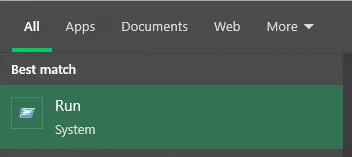
The 'Run' application should look like this
2. Type in tpm.msc and click OK
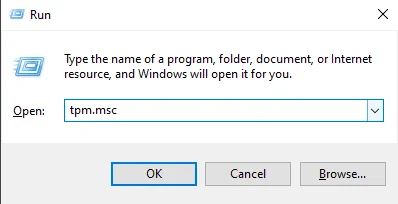
3. Navigate to the TPM Manufacturer Information box and check what version you have. If it says 2.0 you’re good!
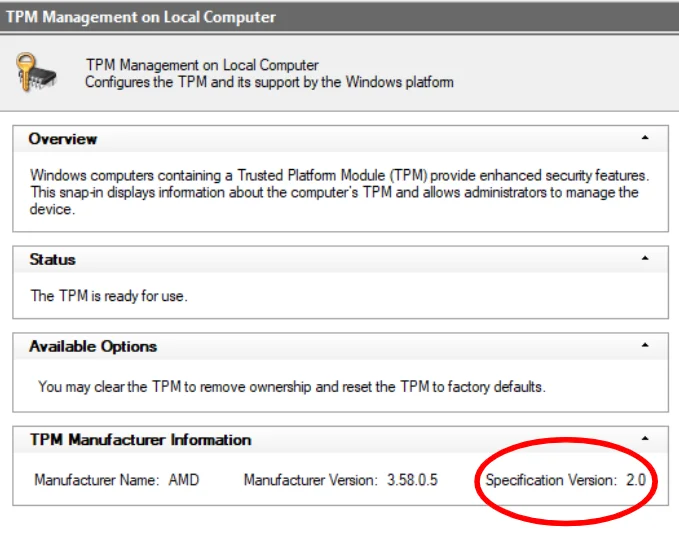
Note: The 'Status' box reads "The TPM is ready for use"
If you see a message that says ‘TPM not found’, you might have it disabled. In that case, check out this Microsoft article on how you can enable TPM on your device.
Do I Really Need TPM 2.0?
On the surface, it might seem like a nuisance to require TPM 2.0 to upgrade to Windows 11 especially if you aren’t looking to upgrade your hardware any time soon. However, this requirement is there for good reason. With Windows 11 and TPM 2.0, you can rest easy knowing that your sensitive data is more secure against malware and cyber attacks.
JOIN OUR OFFICIAL CORSAIR COMMUNITIES
Join our official CORSAIR Communities! Whether you're new or old to PC Building, have questions about our products, or want to chat about the latest PC, tech, and gaming trends, our community is the place for you.