HOW TO
How to: Set up Hydro X Series hardware in iCUE 4 or newer
Need help setting up your Hydro X Series hardware in iCUE after updating iCUE to version 4 or newer? We have a video and guide to help you out.
Video instructions
Creating lighting effects
You can create lighting effects in iCUE to make using your PC a colorful experience. iCUE also lets you create multiple layers of lighting effects for further customization.
To create lighting effects, you need to first set up your lighting channel:
- Select your lighting controller in the iCUE home page.
- Click Lighting Setup.
- Select Hydro X Series in the dropdown menu in the appropriate Lighting Channel window.
- Click the + button in the Lighting Channel window and use the dropdown menu to add Hydro X series components to the lighting channel.
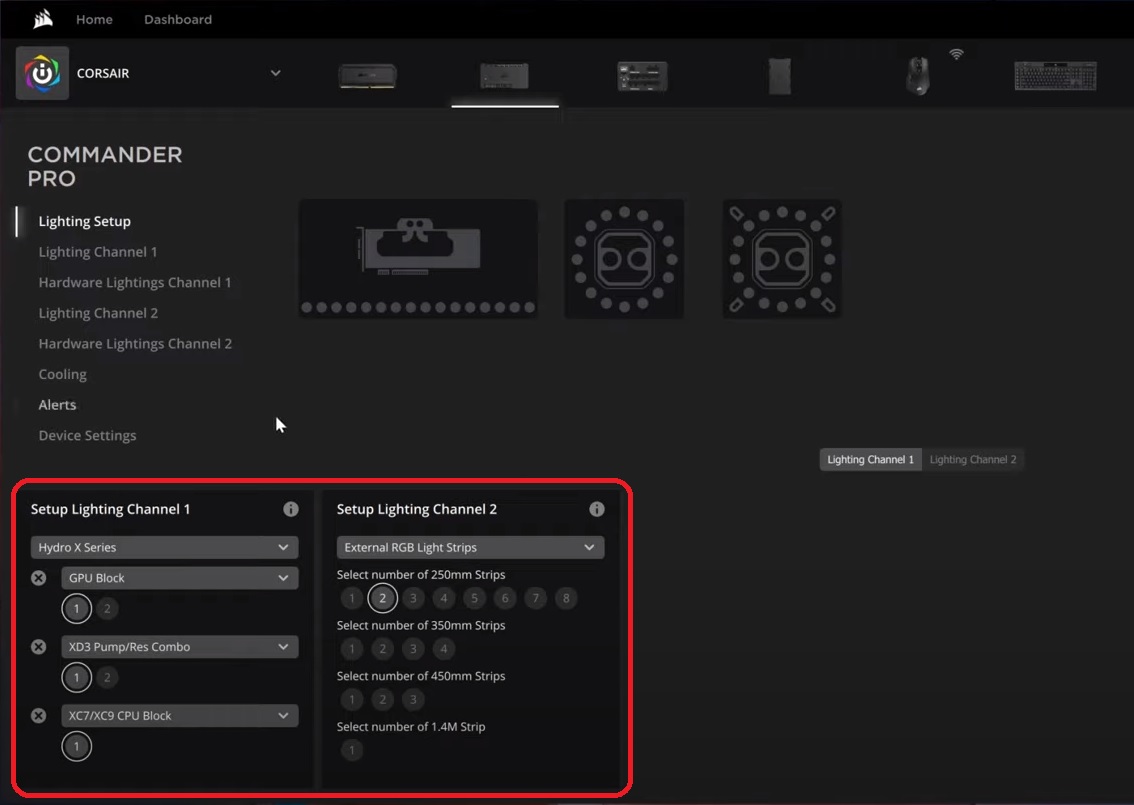
- Repeat step 4 until all components have been added to the lighting channel.
Once you have set up your lighting channel, you can now create lighting effects:
- Click your lighting channel in the left menu.
- Click the + button in the Lighting Layers window.
- Select a lighting effect type in the Lighting Type window.
- NOTE: If you select a Lighting Link effect, the effect will be applied to all iCUE-compatible devices currently connected to your system.
- Customize the lighting effect however you want.
- Apply the lighting effect to the lighting zones of your hardware.
- You can drag and select multiple zones to apply the lighting effect, or hold the CTRL key and left-click to select individual zones.

- You can drag and select multiple zones to apply the lighting effect, or hold the CTRL key and left-click to select individual zones.
Applying cooling profiles to fans and pumps
If your Hydro X Series components are connected to a fan controller, you can use iCUE to apply a cooling profile to the components.
You can also create your own custom presets to apply to your fans and pump. Custom presets come in three types:
- Fixed percentage
- Fixed RPM
- Custom curve
To apply a preset:
- Select your lighting controller in the iCUE home page.
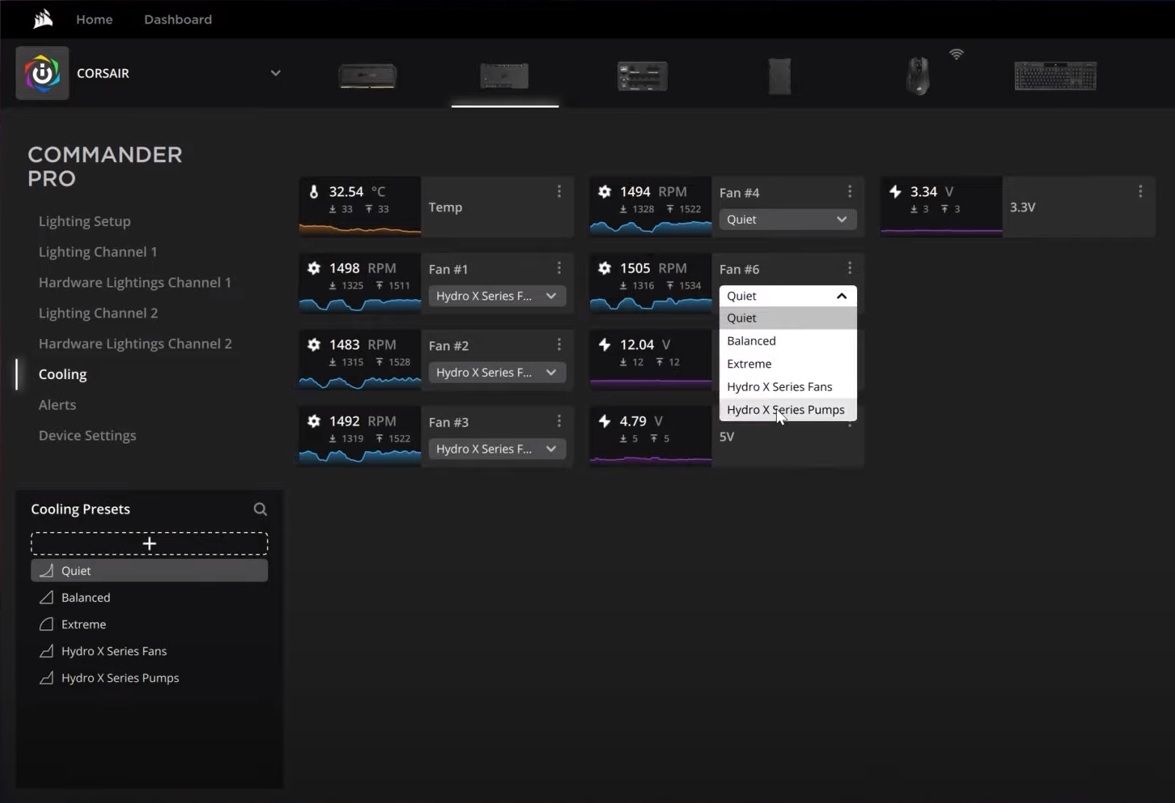
- Click Cooling.
- Click the dropdown menu for your radiator fan readouts and select Hydro X Series Fans.
- Click the dropdown menu for your pump readout and select Hydro X Series Pumps.
To create a custom preset:
- Select your lighting controller in the iCUE home page.
- Click Cooling.
- Click the + button in the Cooling Presets window.
- Select whether the preset will be Fixed %, Fixed RPM, or Custom Curve.
- Adjust your preset however you wish.
- Use the dropdown menu under the fan or pump readouts and select your custom preset to apply it.
Setting up alerts
With alerts, you can set up your hardware to perform a specific behavior once a specified temperature is reached. For example, your alert could cause all fans to be set at 100% once your PC system temperature heats up, or trigger an emergency shutdown if the system temperature becomes too high.
To set up an alert:
- Select your lighting controller in the iCUE home page.
- Click Alerts.
- Click the + button in the Alerts window.
- Toggle the behaviors you want to enable in the alert.
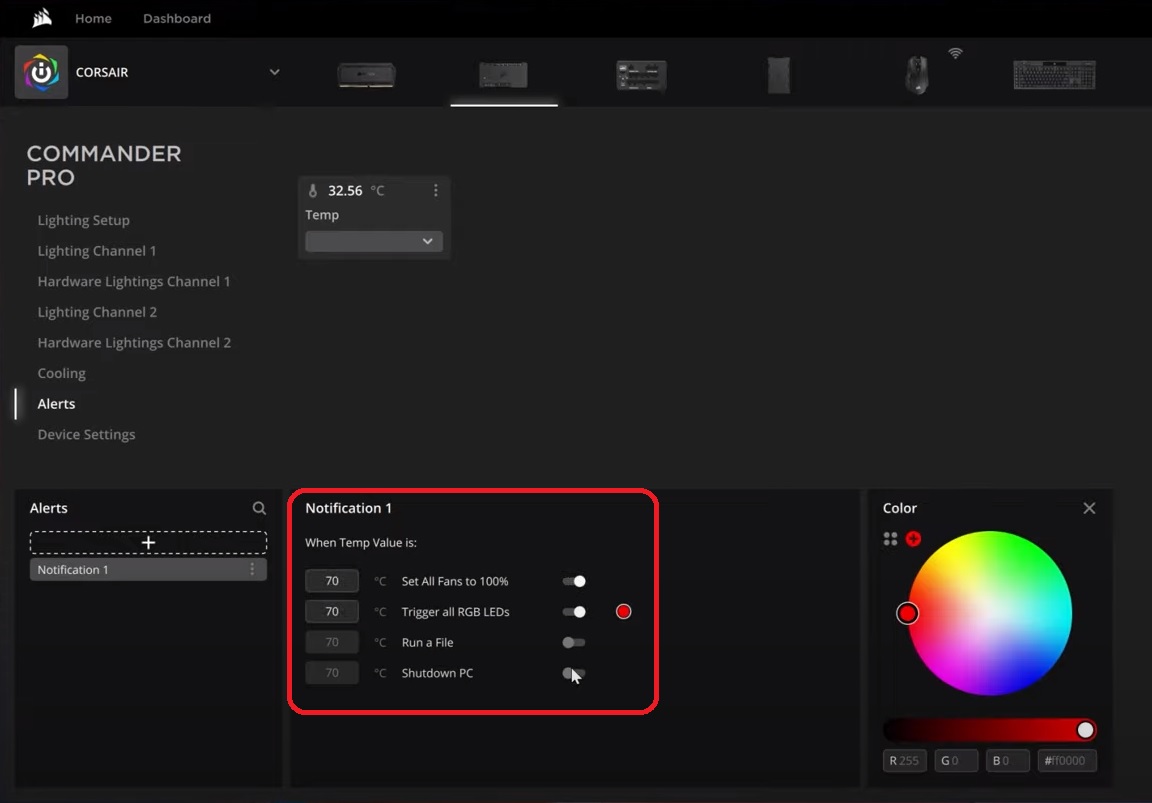
- Enter the temperature you want the behavior to be triggered by.
- Click the dropdown menu under your pump's temperature probe readout and select your alert.
Stay up to date with CORSAIR. Get our latest News, Guides, and Product Updates in your Google feeds.
Add CORSAIR as a preferred sourceWas this article helpful?
Feedback received
Thanks for helping us improve this article.
JOIN OUR OFFICIAL CORSAIR COMMUNITIES
Join our official CORSAIR Communities! Whether you're new or old to PC Building, have questions about our products, or want to chat about the latest PC, tech, and gaming trends, our community is the place for you.