HOW TO
How to: Set up your CORSAIR CX-F RGB series power supply unit
The CORSAIR CX-F RGB series power supply unit is our first PSUs to have RGB lighting. It comes with three different RGB control options:
- iCUE software control
- Third party ARGB lighting control
- A hardware control button
This article will teach you how to set up lighting control via iCUE or third party ARGB.
- Video instructions
- Setting up iCUE software control
- Setting up third party ARGB lighting control
- Using the hardware control button
Video instructions
Setting up iCUE software control
Our iCUE software is the most powerful and complete method of controlling your power supply lighting.
To set up iCUE software control:
- Connect the iCUE RGB cable into your power supply.
- Connect the other end of the iCUE RGB cable into a 4-pin iCUE lighting control port in a device such as the Lighting Node Core or a 6-port RGB fan LED hub.
- NOTE: The iCUE CX-F RGB can be used on the same LED hub as the SP RGB PRO fans.
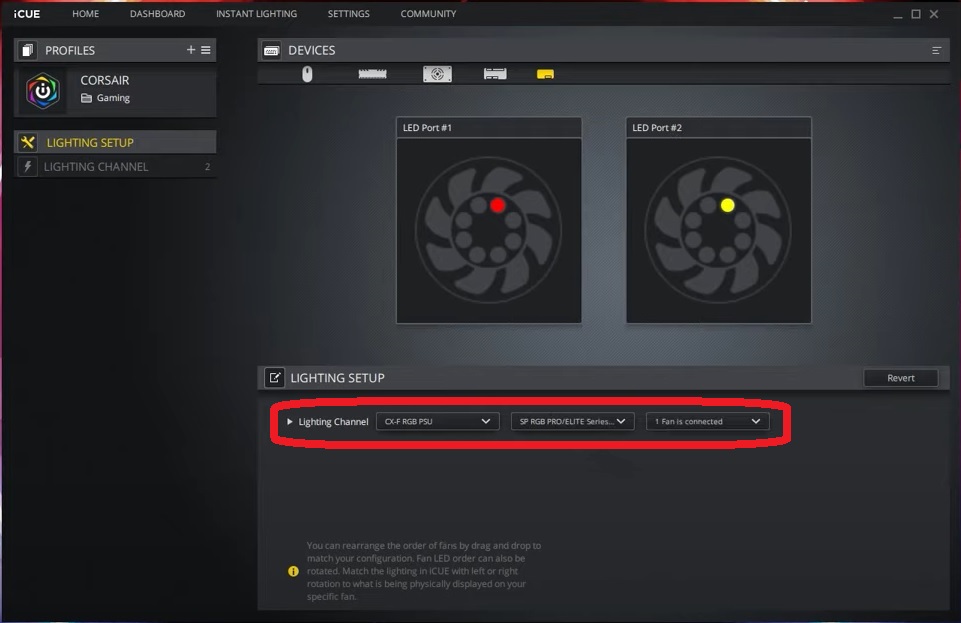
- Open your iCUE software and got to Lighting Setup.
- Select the channel that you connected your CX-F power supply to.
- Select CX-F RGB PSU in the Lighting Channel dropdown menu.
- Select SP RGB PRO/ELITE Series Fans in the Add compatible fans dropdown menu.
- Select how many fans are connected to the lighting controller.
Setting up third party ARGB lighting control
If you do not have iCUE-compatible lighting controller, you can set up third party ARGB lighting control if your motherboard or other controller supports ARGB lighting through a 5V header.
To set up third party ARGB lighting control:
- Connect the iCUE RGB cable to the 5V ARGB adapter.
- Plug the end of the adapter into the ARGB header of a compatible motherboard or controller.
- Install the RGB control software for your motherboard.
Using the hardware control button
As a last resort, you can use the hardware control button on the CX-F RGB PSU to cycle through 7 presets. The button will have “RGB” at its side.
- To cycle through lighting modes, press and hold the hardware control button for 3 seconds until the lighting mode changes.
- To change the colors in a lighting mode, press the button briefly and the color will change.
NOTE: The hardware control button will be disabled if the PSU is connected to an iCUE controller or a motherboard ARGB.
Stay up to date with CORSAIR. Get our latest News, Guides, and Product Updates in your Google feeds.
Add CORSAIR as a preferred sourceWas this article helpful?
Feedback received
Thanks for helping us improve this article.
JOIN OUR OFFICIAL CORSAIR COMMUNITIES
Join our official CORSAIR Communities! Whether you're new or old to PC Building, have questions about our products, or want to chat about the latest PC, tech, and gaming trends, our community is the place for you.