Software Enhancements
- One of the newest features (and changes in the user interface) is the implementation of Device Memory Mode
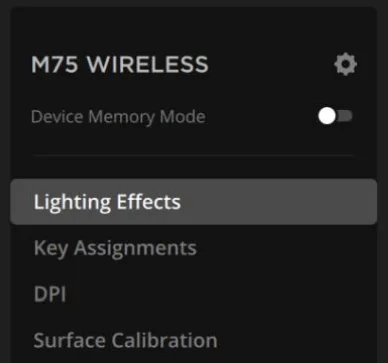
- Device memory mode allows a product to be configured in iCUE in the ‘hardware state’. Previous iterations of iCUE require you to quit iCUE in order for a device to work in the hardware state. Hardware states for our devices allow for device behavior without a dependency on iCUE running in the background. Examples of hardware states include the color of lighting on your Fans and Coolers under ‘Hardware Lighting’ or Hardware Key Assignments for your mouse and keyboard.
- When enabling Device Memory Mode, you can now customize your devices with the same hardware configurations without quitting iCUE to view the changes. This will make it easier for you to view and save your changes as you configure your devices
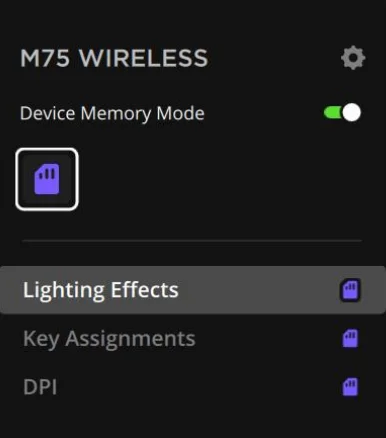
- Device Memory Mode does not change options (and their limitations) in the hardware state but it allows users to manage their configurations in a clearer and more accessible method.
- iCUE now supports a limited number of Govee products. This allows users to detect and control Govee products in iCUE to synchronize with all iCUE-compatible devices. Features like per-LED lighting and iCUE Murals are compatible with Govee devices in the iCUE ecosystem. This feature can be found in Settings > Integrations:
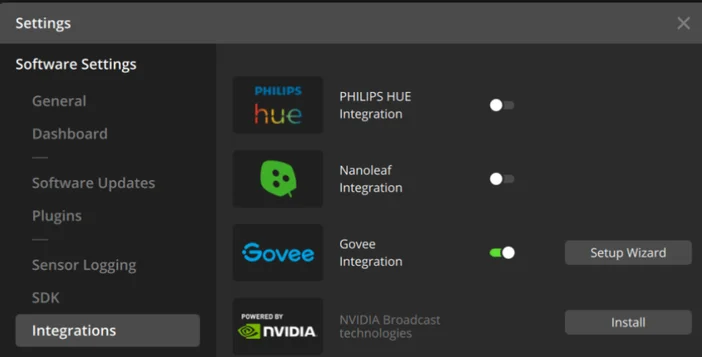
- For proper setup of Govee devices with iCUE, please follow the Setup Wizard exactly as described. You will need to enable LAN Control in your Govee mobile application as a part of the setup process.
- The following products are supported in our initial release of Govee support:
- RGBIC Pro Strip Lights
- H619A - 5m
- H619B - 7.5m
- H619C - 10m
- H619D – 27.5m
- H619E – 210m
- H619Z - 3m
- RGBIC Neon Rope Lights
- H61A0 – 3m
- H61A1 – 2m
- H61A2 – 5m
- H61A3 – 4m
- H61A5 – 10m
- RGBIC LED Neon Rope Lights for Desks
- H61C3 – 3m
- H61C5 – 5m
- H61C2 – 2m
- Glide Hexagon Light Panels
- H6061
- RGBIC Pro Strip Lights
- Additional Govee products will be supported in future iCUE releases
- The following products are supported in our initial release of Govee support:
- Viewing profiles are no longer collapsable – they are now shown vertically for easier edits
- Updated CPUID SDK to the latest version
- HARPOON PRO will now properly show up as a device in Murals
- Resolved some issues with modules not properly uninstalling when deleted
- Resolved an issue that prevented the NVIDIA BROADCAST’s “Learn More” hyperlink from opening correctly
- Toggling Lighting Layers will no longer cause the selection to auto-select the last layer
- iCUE LINK Hydro Coolers in White will now show the proper image in Murals
- Profile names can no longer be blank
- Any iCUE application restart notifications will now show the device associated with the request
HID Product Enhancements
- iCUE will no longer crash when changing the DPI and unplugging the mouse afterwards
- Resolved various issues with headset detection and operation with iCUE macOS
- Dragging and dropping DPI Presets from the DPI List will no longer cause iCUE to quit unexpectedly
- The debounce customization in Settings for certain iCUE keyboards will now show the correct value after configuration
- Resolved an issue that may cause errors in iCUE when deleting an onboard profile on SCIMITAR/ELITE RGB
- Adding a widget to iCUE NEXUS will no longer cause the opacity feature to disappear from background options
- Resolved an issue that prevented G-keys and Lighting Link from working properly for iCUE NEXUS
DIY Product Enhancements
- Triggered Alerts will now properly show in the applicable device tiles under the Home Page
- VENGEANCE DDR4 modules detected in iCUE will no longer cause the DDR5 version of the module to be downloaded
- Users will now be able to use the same name on different sensors
- iCUE LINK Devices will now properly illuminate during the setup wizard
- Users will now be able to drag and drop devices during setup after a firmware update
- Resolved a text issue with LCD screen rotation in different languages
- Resolved an issue that prevented a screen from being deleted after adding it as a custom image/GIF
- QX fans now have a Change Case Color option, so users can select the white version for the user interface
- Resolved various issues when configuring the scaling of custom images for LCD screens
- Resolved an issue that caused iCUE to quit unexpectedly after a successful firmware update to the Voyager A1600 Touch Bar and renaming of the screen