BLOG
Powerline Adapters Explained
When it comes to working on a computer, streaming in HD, or scrolling TikToks at lightning speed to brain rot, fast and reliable internet is a must. While most people are familiar with Wi-Fi and Ethernet, there’s a lesser-known third option that can offer the best of both worlds: the Powerline Adapter.
Let’s talk about it.
What is a Powerline Adapter?
Simply put, a powerline adapter is a device that allows you to extend your home network using your existing electrical wiring. Wherever there is a power outlet, that outlet effectively becomes a network connection point. When installing a powerline adapter, the electrical wiring inside of a home turns into a data transmission highway, eliminating the need for long ethernet cables or relying solely on Wi-Fi signals that can potentially be weak in certain areas.
How to Setup Powerline Adapters
The image below details how to set up Powerline Adapters. Depending on the brand, setup may vary slightly, but most setups will follow this basic set up.
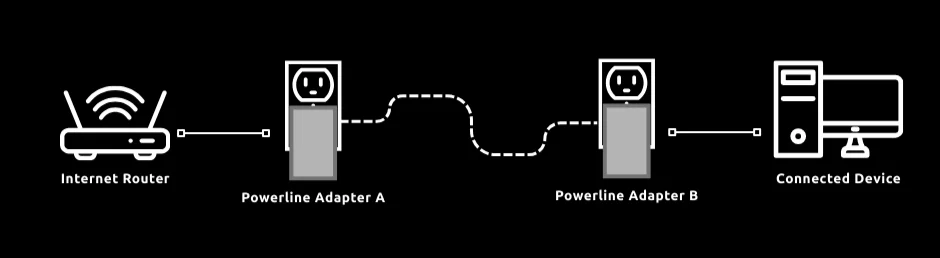
- Step 1: Plug in Powerline Adapter A into a power socket near your internet router. Then, connect the adapter to the router using an Ethernet cable (solid line) to establish a connection.
- Step 2: Plug in Powerline Adapter B into a power socket near the device you want to connect to the internet.
- Step 3: Check if Powerline Adapter A has successfully detected and paired a connection to Powerline Adapter B. Most adapters have indicator lights to show whether a successful connection has been made.
- Step 4: Once powerlines adapters are connected together through your home’s electrical wiring (dashed line), use another Ethernet cable to connect your device to Powerline Adapter B
If the setup is successful, the device will now have a stable internet connection through the powerline network.
Powerline Adapters vs Wi-Fi vs Ethernet
Now, you may be wondering, why choose powerline adapters over Wi-Fi or Ethernet? Is it worth the hassle of switching over? The right choice will depend on a variety of factors, including distance, coverage, and convenience of setup. Keep in mind that these pros and cons can vary, so consider this list as a guide rather than strict rules.
Ethernet
Wifi Router
Pros
- Easy ‘Plug-and-Play’ setup: Convenient and straightforward. Unlike Ethernet, which requires running long cables, or Wi-Fi, where setup may be confusing and time consuming.
- Stable connection: Powerline Adapters typically provide better internet connection in areas with thick walls or significant radio interference.
- Extended reach: Powerline adapters can reach areas where Wi-Fi typically struggles, such as in basements or rooms with thick walls. Additionally, while Ethernet cables are typically limited to 100 meters per segment, powerline adapters can cover distances up to 300 meters, depending on wiring quality and the level of electrical interference.
Cons
- Speed Limitations: Powerline adapters are generally slower than Ethernet and, in some cases, may even be slower than Wi-Fi. Performance, including latency/ ping, depends on the quality of a home’s electrical wiring and distance between powerline adapters.
- Electrical interference: Some electrical appliances, such as microwaves or extension cords, may disrupt the transmission of network signals through powerlines.
- Circuit Limitations: Adapters must be on the same electrical circuit, meaning larger homes or buildings may experience issues if the adapters are plugged into outlets on different circuits.
Should I Switch to Powerline Adapters?
While there's no one-size-fits-all answer, its worth researching what matters the most to you. If the idea of running a wire throughout the house is unappealing, then going for powerline adapters can be a good alternative. On the other hand, if achieving the fastest speed is your top priority, there may be more suitable options available. Nonetheless, powerline adapters offer a solid option for those seeking a balance between convenience and performance.
JOIN OUR OFFICIAL CORSAIR COMMUNITIES
Join our official CORSAIR Communities! Whether you're new or old to PC Building, have questions about our products, or want to chat the latest PC, tech, and gaming trends, our community is the place for you.