JUHEND | KIIRJUHEND
SABRE v2 PRO TRAADITA CF
SÜSINIKKIUDUDEST MÄNGUHIIR
Ingliskeelne versioon on saadaval siin - English
Kui teil on muid probleeme, võtke ühendust klienditugi
HIRE LAADIMINE
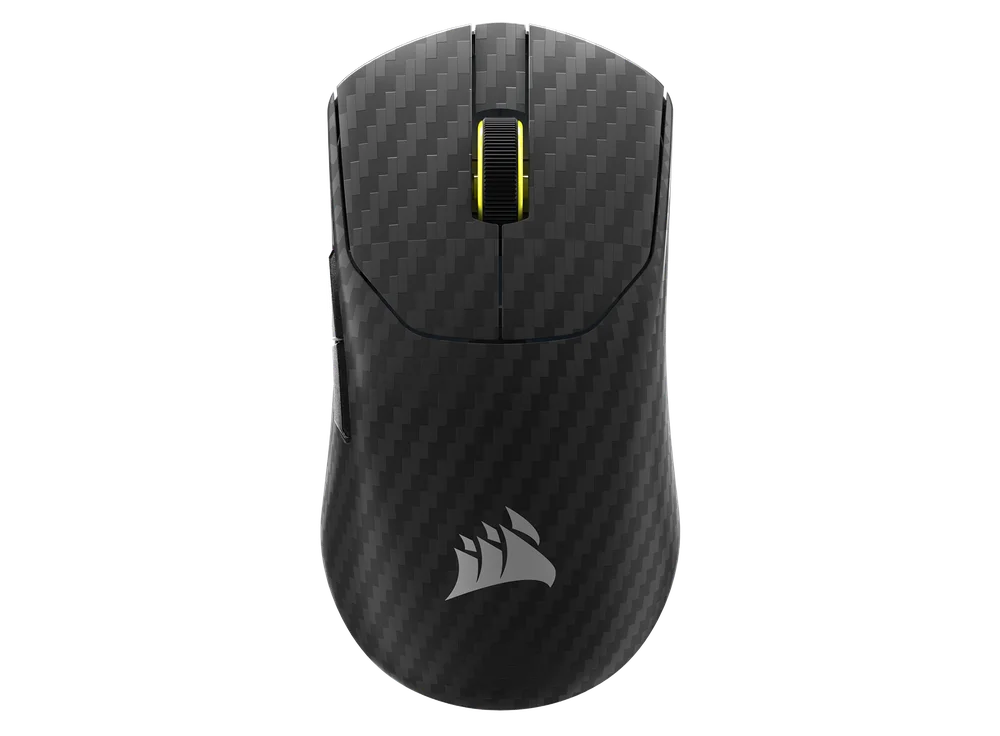
TÄHELEPANU: Enne esimest kasutamist tuleb SABRE v2 PRO WIRELESS CF täielikult laadida. Parima kasutuskogemuse tagamiseks palun uuendage tarkvara CORSAIR WEB HUB-i kaudu.
Ühendage hiir arvuti vaba USB 2.0 või 3.X pordiga USB-laadimis- ja andmesidekaabli (L) abil.
Hiire KESKKLIKU / RULLIRATTA (C) all asuvad tuled süttivad vastavalt aku seisundile ja hakkavad laadimise lõppedes põlema rohelise püsivalgusena.
HIIRE TUTVUSTUS
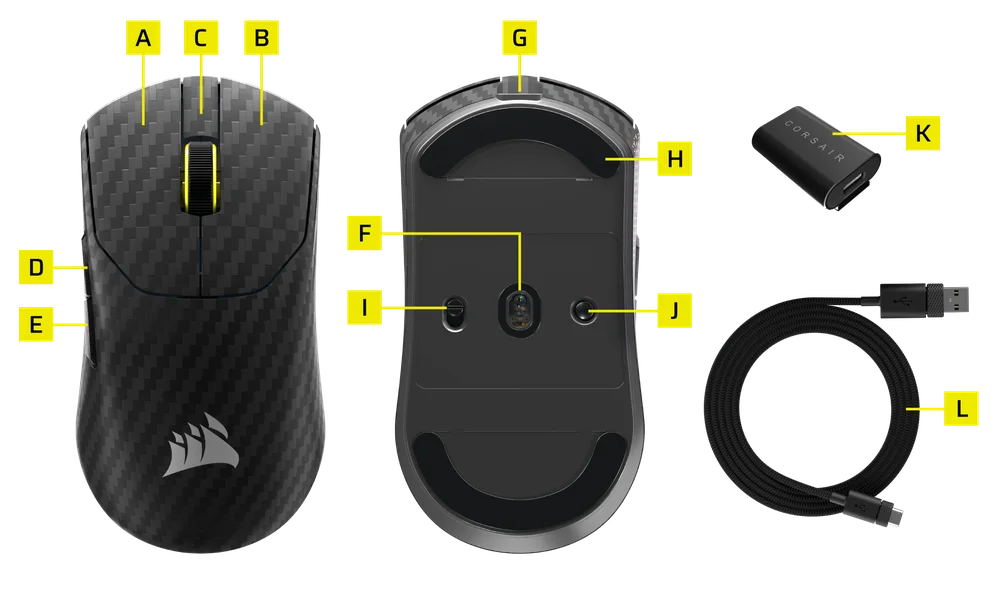
- VASAKU HIIRENUPP
- HIIRE PAREM NUPP
- Keskmine klõps / kerimisratas
- EDASI-NUPP
- TAGASI-NUPP
- MARKSMANi optiline andur
- USB-laadimis- ja andmesideport
- 100% esmaklassilised UPE hiirejalatsid
- VÕIMSUS / TRAADITA REŽIIMI LÜLITI
- DPI ja Bluetoothi sidumise nupp (3 sekundit)
- USB-traadita vastuvõtja
- USB-laadimis- ja andmesidekaabel
2,4 GHz traadita võrgu seadistamine
- Ühendage USB-traadita vastuvõtja (K) USB-laadimis- ja andmesidekaabliga (L) ning ühendage kaabli teine ots vaba USB 2.0 või 3.x pordiga, mis asub arvuti esipaneelil või selle läheduses.
- Lülitage hiir sisse, lükates toite-/traadita režiimi lüliti (I) asendisse „2,4 GHz traadita“.
- Kui seade on vastuvõtjaga edukalt ühendatud, hakkab keskmise klõpsu / kerimisratta (C) all asuv LED-indikaator põlema roheliselt.
BLUETOOTHI SEADISTAMINE
Bluetooth-ühendus sobib kõige paremini igapäevaste arvutitööde, produktiivsuse ja kontoritarkvara kasutamiseks.
- Alustage Bluetoothi sidumist oma Bluetooth 4.0 või uuema versiooniga seadmes.
- Lülitage hiir sisse, lükates toite-/traadita režiimi lüliti (I) asendisse „Bluetooth“.
- Kui seade on ühendatud, hakkab keskmise klõpsu / kerimisratta (C) all asuv LED-indikaator siniselt vilkuma ja muutub seejärel siniseks püsivalguseks.
- Kui Bluetoothi sidumisseadet on vaja uuesti siduda või vahetada, lülita esmalt sisse Bluetoothi režiim. Hoia DPI- ja Bluetoothi sidumise nuppu (J) all 3 sekundit või kuni LED-indikaator hakkab siniselt vilkuma, et siseneda Bluetoothi sidumisrežiimi.
*SABRE v2 PRO WIRELESS CF-i saab siduda ainult ühe seadmega. Kui soovite seadme siduda mõne teise seadmega, palun sisenege uuesti sidumise režiimi, et alustada sidumisprotsessi.
DPI-PROFIILIDE VAHEL VAHEL
Kiireks seadistamiseks on saadaval DPI-tsükkel.
- Vajuta DPI ja Bluetoothi sidumise nuppu (J) üks kord, et minna järgmisele DPI-tasemele.
- Kui lülitate sisse vastava DPI-taseme, vilgub hiirerattal olev märgutuli kolm korda vastava DPI-värviga ja kustub seejärel.
- Korrake eespool kirjeldatud samme, et minna järgmisele DPI-tasemele. Seade läbib järjest kõik 5 DPI-taset ja naaseb seejärel 1. tasemele.
Täpsemad seadistused on kättesaadavad CORSAIR WEB HUB-i kaudu .

HIRE SEISUND JA NÄIDUD
Traadita ühenduse ja aku seisundit näitavad tuled KESKMIKLIKU/KERIMISRATTA (C) all.
| DPI-SEADE – EELMÄÄRATUD | LED-indikaator |
| 1. ETAPP – 400 | PUNANE |
| 2. ETAPP – 800 | SININE |
| 3. ETAPP – 1200 | ROHELINE |
| 4. ETAPP – 1600 | KOLLANE |
| 5. ETAPP – 2000 | LILLA |
| AKU SEISUND | LED-indikaator |
| AKU LAADIMINE, KUI AKU ON PEAAEGU TÜHI | HINGAMINE PUNANE |
| AKU LAADIMINE KESKMISEL REŽIIMIL | HINGAMINE ROHEKAS |
| AKU ON TÄIS | TÄIELIKULT ROHEline |
| AKU TASEM ON KRIITILINE, VAJAB LAADIMIST | HINGAMINE PUNANE |
HIRE SEADISTAMISE SAMM-SAMMULT JUHEND
1. samm – Ühendage oma SABRE v2
A. Ühendage SABRE v2 PRO WIRELESS CF vastuvõtja Type-C-pesa kaudu.
B. Veenduge, et hiire toitelüliti on seatud sagedusele 2,4 GHz.
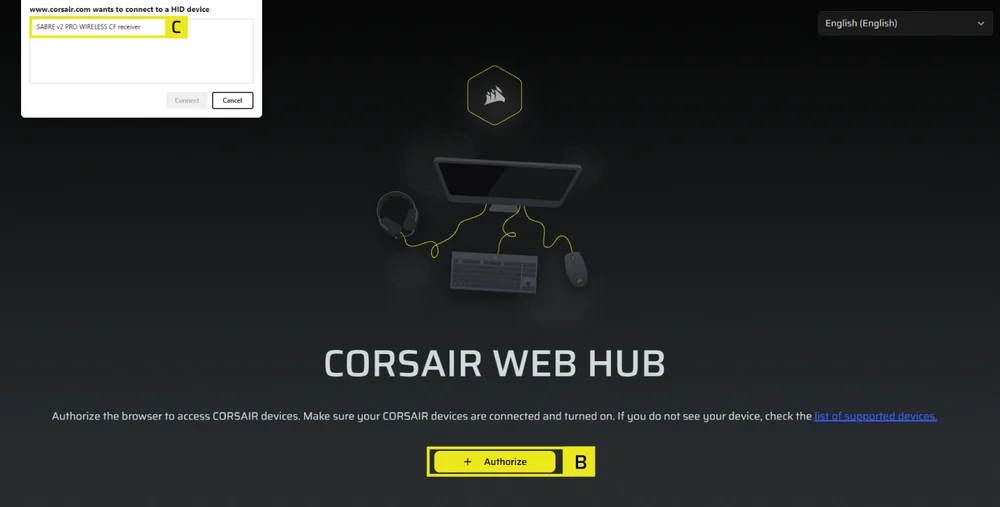
2. samm – Avage CORSAIR WEB HUB ja valige hiir
A. Mine veebilehele https://www.corsair.com/web-hub/index.html.
B. Klõpsa nuppu [Autoriseeri].
C. Vali SABRE v2 PRO WIRELESS CF vastuvõtja.
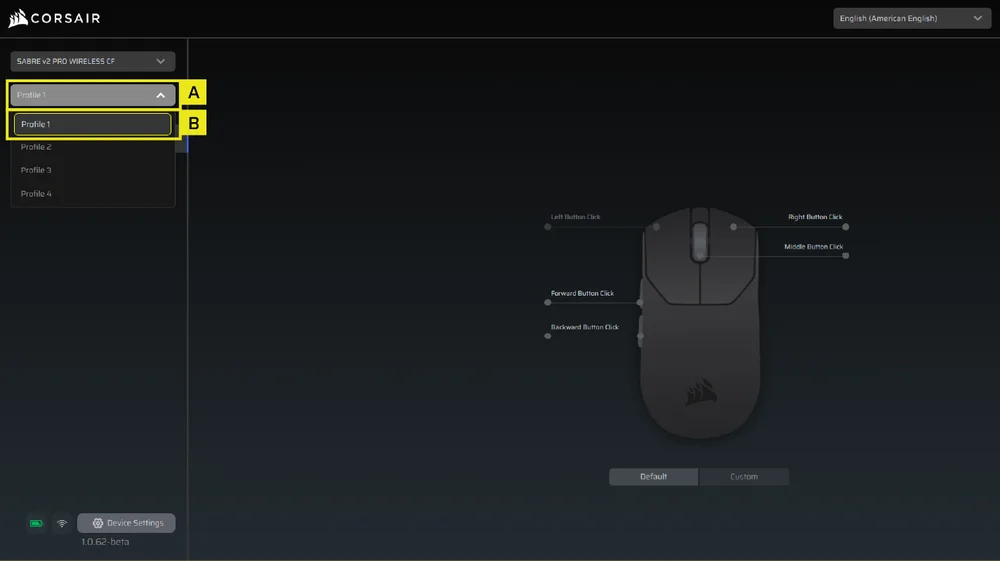
3. samm – Profiili loomine või valimine
A. Avage vasakul ülaosas profiili rippmenüü.
B. Klõpsake profiilil, mida soovite muuta (näiteks: „Profiil 1”).
C. Sellesse profiili salvestatakse teie DPI-väärtus ja nupuvajutuste seadistused.
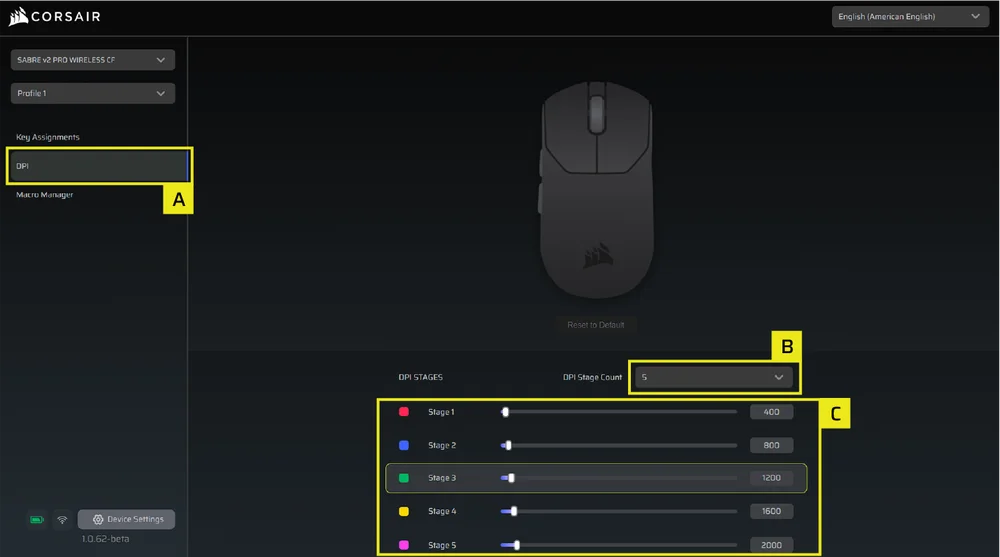
4. samm – DPI-tasemete seadistamine
A. Klõpsake vasakul külgribal nuppu [DPI].
B. Valige, mitu DPI-astet soovite (1–5).
C. Lülitage sisse need DPI-astmed, mida soovite kasutada (näiteks 800 / 1200 / 1600).
Soovitatav algne DPI:
- Töölauaarvutid/üldine kasutamine: 1200–1600 DPI
- FPS-mängud: 800–1200 DPI
- MOBA/MMO: 1600–2400 DPI.
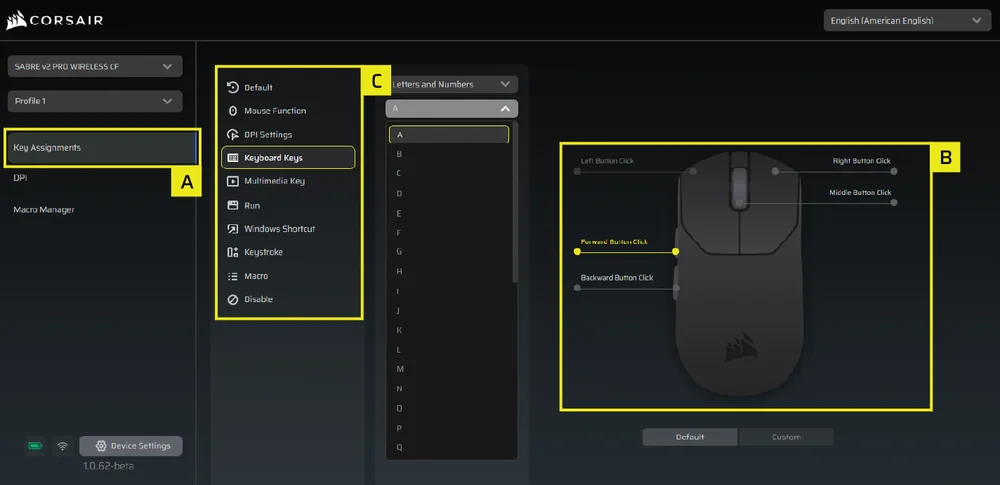
5. samm – Nuppude ümbermääramine (tegevused / klahvide määramine)
A. Klõpsake vasakul külgribal nuppu [Klahvide määramine].
B. Klõpsake hiire skeemil nuppu, mida soovite muuta.
C. Valige määramise tüüp:
- Klaviatuur (määra ümber näiteks klahvidele R, E või P)
- Makro (mitme klahvivajutuse salvestamine)
- jne.
D. Kinnitage ülesanne ja testige seda.
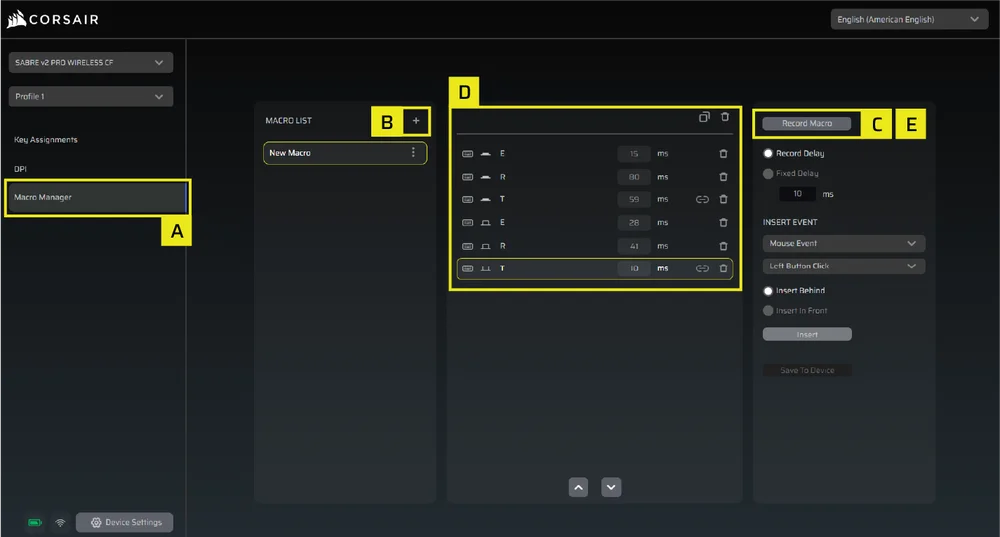
6. samm – Makrohalduri seadistamine
A. Klõpsake vasakul külgribal nuppu [Makrohaldur].
B. Klõpsake nuppu [+], et lisada uus makro (näiteks: „Profiil 1”).
C. Klõpsake paremal nuppu [Salvesta makro].
D. Vajutage klahve või tehke hiirega toiminguid, mida soovite salvestada.
E. Klõpsake uuesti nuppu [Salvesta makro], et salvestamine lõpetada.
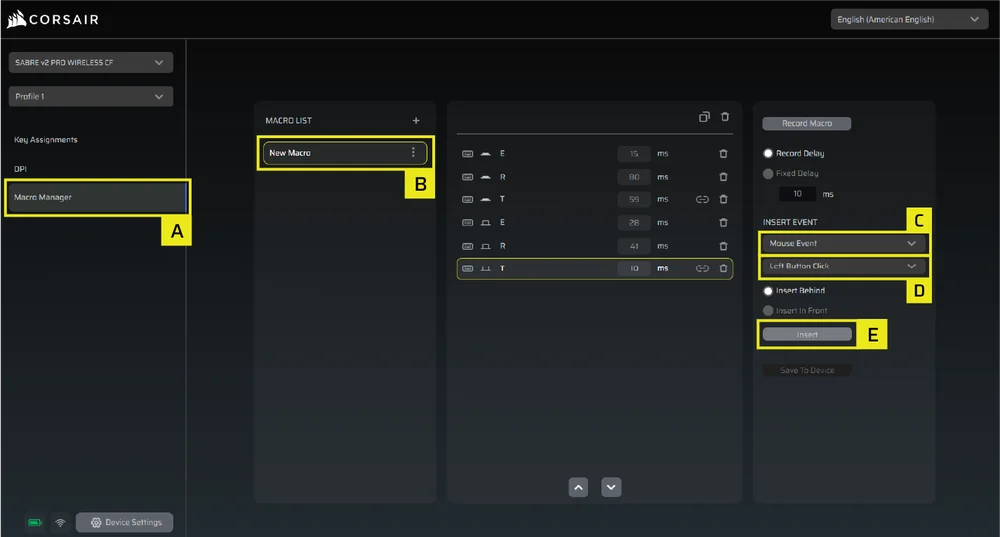
7. samm – Makro sündmuste käsitsi sisestamine
A. Klõpsake vasakul külgribal nuppu [Makrohaldur].
B. Valige makro, mida soovite muuta.
C. Sündmuste lisamise ribal valige esimesest rippmenüüst, kas soovite lisada klaviatuuri- või hiiresündmusi.
D. Valige teisest rippmenüüst sündmus, mida soovite lisada.
E. Klõpsake nuppu [Lisa].
8. samm – Seadme seadistamine
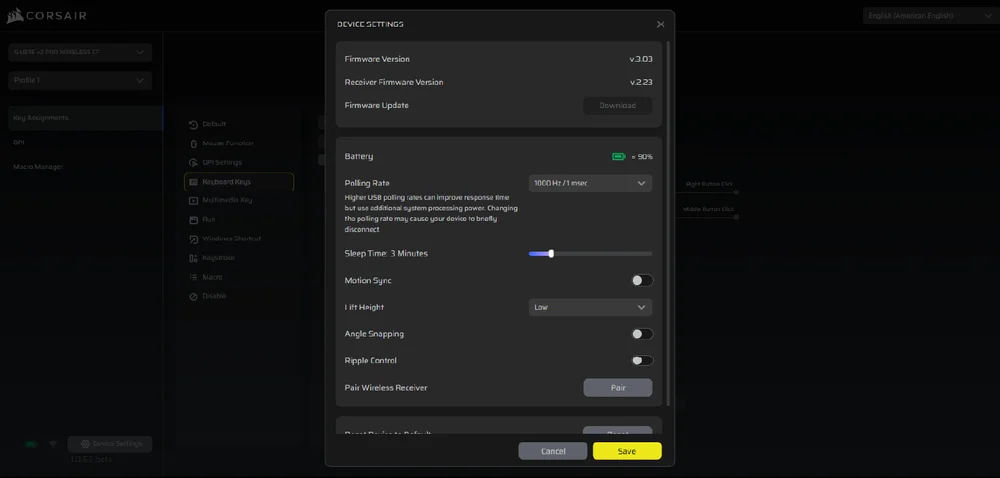
A. Klõpsake vasakul allosas asuvat nuppu „Seadme seaded”.
B. Seadme seaded.
- Aku – Traadita ühendus või aku seisund.

- Küsitluskiirus – Valige [1000 Hz / 1 ms], et kasutada 1000 Hz küsitluskiirust.

- Magamisaeg – Seadista aeg pärast hiire üleminekut puhkeolekusse.

- Motion Sync – Sünkroniseerib hiire liikumisandmed USB-päringute intervallidega, tagades ühtlasema ja stabiilsema kursori jälgimise.
- Tõstekõrgus – anduri lülituspiir.

- Nurga haakumine – Sisse lülitatuna silub hiire liikumist anduri ennustuse abil.
- Lainekontroll – Silub hiire liikumist, filtreerides välja väikesed, tahtmatud värinad, kuid see vähendab veidi sisendi algset täpsust.
- Paari traadita vastuvõtja – Siduge traadita vastuvõtja või taastage selle algseadistused.
- Taasta seadme tehase sätted – Taasta oma Saber v2 Pro ultrakerge juhtmeta tagasi vaikimisi seadistustele.
9. samm – Põhivarustuse uuendamine
A. Klõpsake vasakul allosas nuppu [Seadme seaded].
B. Klõpsake nuppu [Kontrolli uuendusi], et veenduda, et kasutate seadme uusimat püsivara.
C. Juhul kui vaja, järgige juhiseid püsivara uuendamiseks.
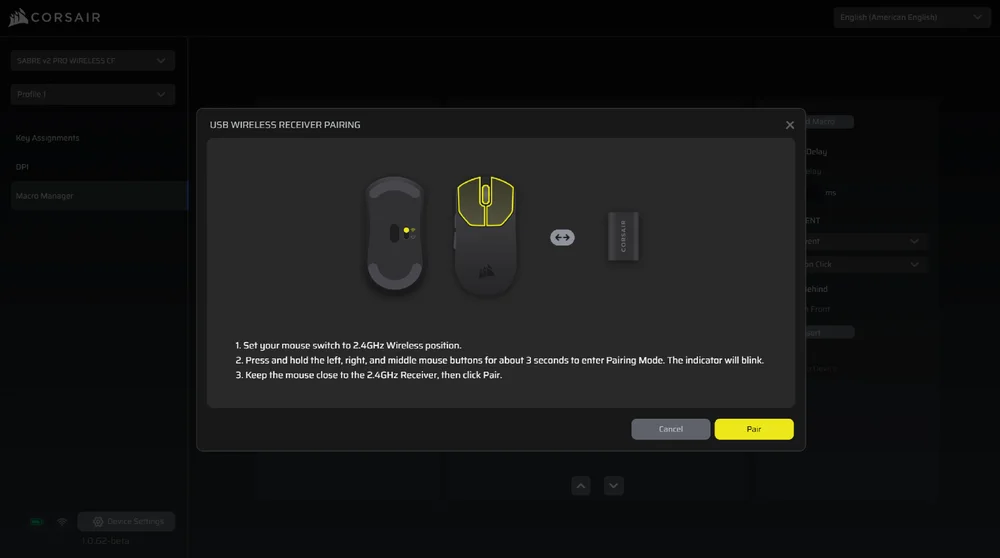
10. samm – Traadita vastuvõtja sidumine
A. Klõpsake vasakul allosas nuppu [Seadme seaded].
B. Klõpsake nuppu [Paari moodustamine].
C. Järgige juhiseid USB-vastuvõtja ühendamiseks.
AKU EEMALDAMISE JUHEND
Käesolev toode töötab laetava akuga ning toote kasutuselt kõrvaldamisel ja ringlussevõtul tuleb järgida ohutusjuhiseid. Aku ohutuks eemaldamiseks kasutuselt kõrvaldamiseks ja ringlussevõtuks järgige allpool esitatud joonistel näidatud nummerdatud samme.
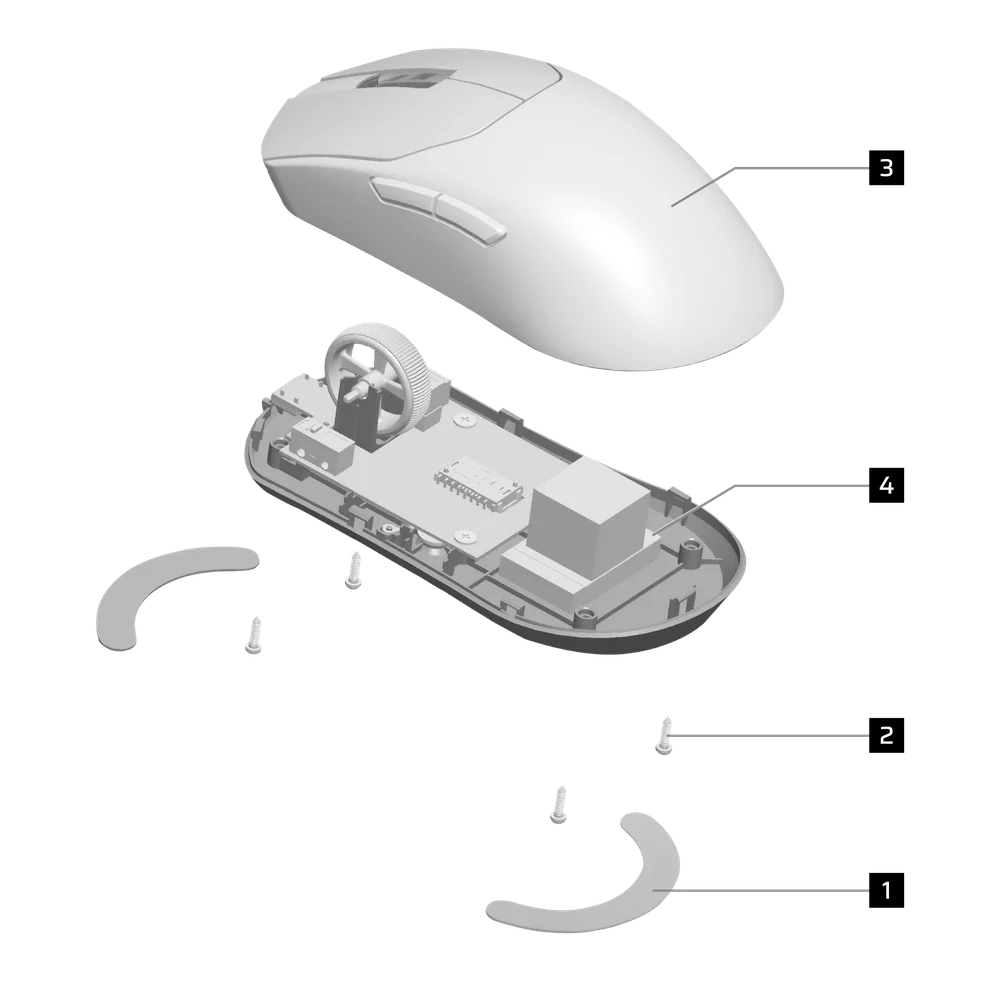
- Eemalda jalad (2 tk)
- Eemalda 4 kruvi
- Lahti monteerida pagasikasti alakoost
- Eemalda aku
CORSAIR MEMORY, Inc. soovitab klientidel kasutatud elektroonikaseadmeid ja laetavaid akusid ringlusse võtta vastavalt kohalikele seadustele ja eeskirjadele.
AKU TEAVE
- M/N (mudel): TW 602030
- Mahutavus (aku maht): 3,7 V, 300 mAh, 1,11 Wh
- Skannige QR-koodi, et vaadata aku andmeid

Hiir
M/N (mudel): RGP0184
Nimetatud parameetrid (pinge ja vool): 5 V  400mA
400mA
-vastuvõtja
Mudel: RGP0185
Nimetusväärtus (pinge ja vool): 5 V 50 mA
FCC ID: 2AAFM-RGP0184 (hiir)
FCC ID: 2AAFM-RGP0185 (vastuvõtja)
IC: 10954A-RGP0184 (hiir)
IC: 10954A-RGP0185 (vastuvõtja)

Laadija väljastatav võimsus peab jääma raadiosideseadme nõutava minimaalse 2,5 vati ja maksimaalse 10 vati vahele, et saavutada maksimaalne laadimiskiirus.
Parima tulemuse saavutamiseks soovitame laadida seadme temperatuurivahemikus 5–40 °C (41–104 °F).
AUTORIÕIGUSED/ÕIGUSLIK TEAVE
©2026 CORSAIR MEMORY, Inc. Kõik õigused kaitstud. CORSAIR ja purjelogo on CORSAIRi registreeritud kaubamärgid Ameerika Ühendriikides ja/või muudes riikides. Kõik muud kaubamärgid kuuluvad nende vastavatele omanikele. Toode võib pildil kujutatust veidi erineda.

SEOTUD SISU