HOW TO
How to: Install HYDRO X Series XG7 Water Block for NVIDIA RTX 3080 / 3090 Founders Edition
Need help installing your HYDRO X Series XG7 Water Block for your NVIDIA RTX 3080 or 3090? We have a video that can help you get your water block up and running.
Tools to use
To install your water block, you will need the following screwdrivers:
- PH1
- T5
- T6H
- T8H
Video instructions
Step one: Removing the graphics card
The first step to installation is to remove the graphics card from the heat sink fan assembly.
- Remove any covers and screws securing the backplate to your graphics card.
- We recommend using a piece of strong tape to remove the four small screw covers.
- Remove the PCI slot mounting bracket from your graphics card.
- (Optional) If you have an XG7 3090, replace the PCI slot mounting bracket with the dual socket bracket included with the water block.
- Disconnect all cables connected from the heat sink fan assembly.
- Remove the screws that are securing the graphics card to the heat sink fan assembly.
- Gently remove the graphics card from the heat sink fan assembly.
- Wipe off the original thermal compound and remove the thermal pads.
- Use isopropyl alcohol, if necessary.
Step two: Installing the water block
Once you have removed the graphics card from the heat sink fan assembly, you can now install the water block.
- Route the wiring through the rear of the water block.
- Remove the TIM cover and place the water block on a smooth surface with the cover and acrylic glass facing downwards.
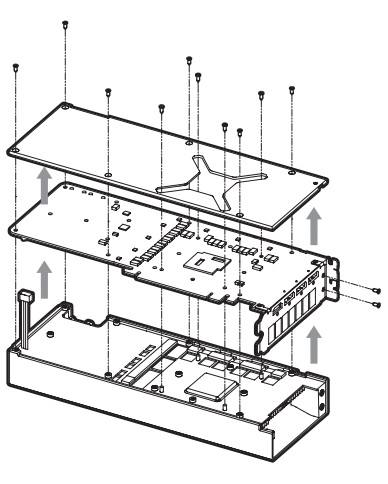
- Carefully place your bare graphics card onto the water block with pre-installed thermal material.
- Make sure to carefully align the holes of the graphics card with the holes in the water block.
- Reinstall the PCI slot mounting bracket.
- Place the provided backplate of the water block over the graphics card.
- Make sure to carefully align the holes of the backplate with the holes of the graphics card.
- Use a Phillips-head screwdriver to secure the water block assembly with the enclosed M2.5x5mm screws.
- Use the included RTGB adapter cable to connect the water block assembly to a Corsair RGB lighting controller, another Hydro X series component, or a motherboard RGB header.
JOIN OUR OFFICIAL CORSAIR COMMUNITIES
Join our official CORSAIR Communities! Whether you're new or old to PC Building, have questions about our products, or want to chat about the latest PC, tech, and gaming trends, our community is the place for you.