HOW TO
How to: Set up the CORSAIR Hydro X Series XD7 RGB Pump/Reservoir combo
Need help setting up your Hydro X Series XD7 RGB Pump/Reservoir combo? We have a video and this guide to help you out.
- Box contents
- Setting up the XD7
- Optional: Installing the temperature probe
- Filling the XD7
- Video instructions
Box contents
The box containing the XD7 should have the following parts:
- XD7 Pump/Reservoir combo
- G1/4 plugs
- Temperature probe
- Mounting screws
- ARGB adapter
- 24-pin jumper
Setting up the XD7
To set up your XD7:
- Mount the XD7 to a case fan bracket or directly in your PC system case.
- Use the diagram below for the recommended positioning of the XD7.
-
NOTE: The bottom two ports should be used for drain ports only.
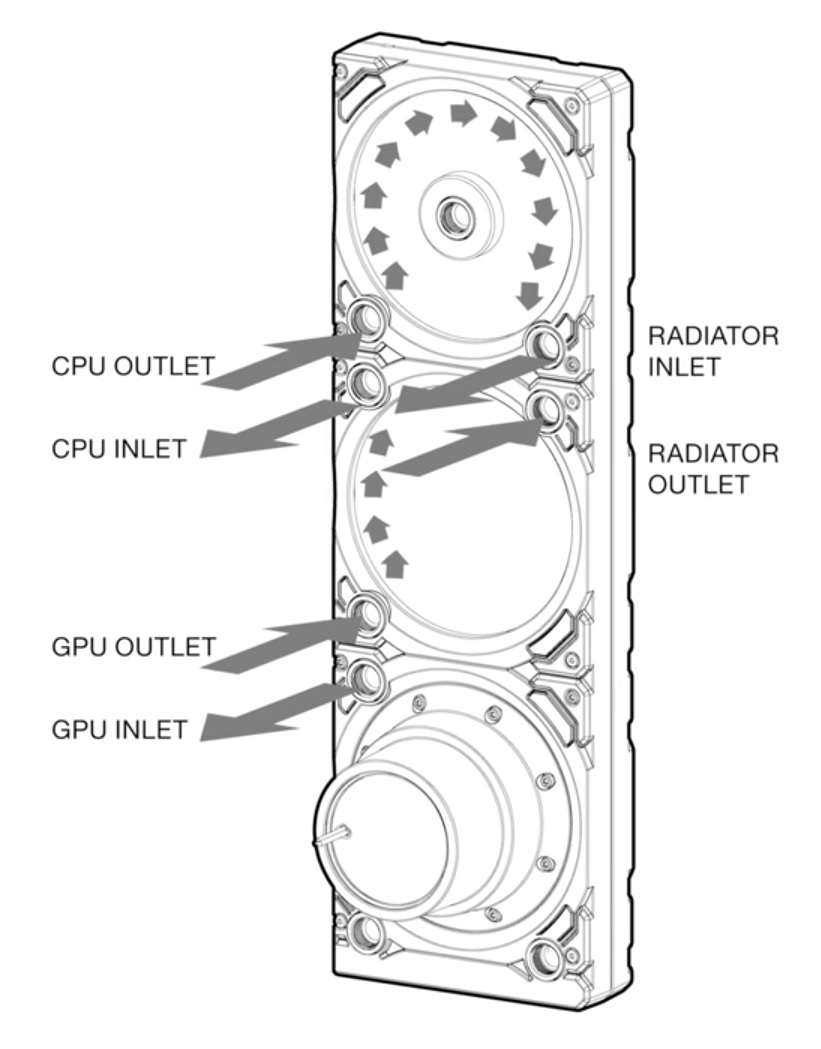
-
NOTE: The bottom two ports should be used for drain ports only.
- Install the XD7 into your PC system case.
- Attach the tube fittings onto the XD7 ports.
- Connect the tubing to the XD7 and your other Hydro X series components.
Optional: Installing the temperature probe
If you want to install a temperature probe, you can:
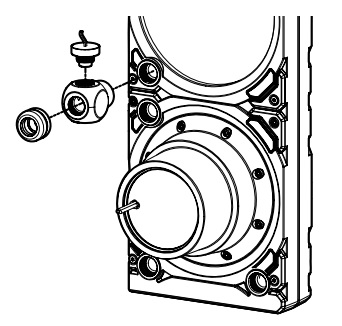
- Install a Y-splitter adapter fitting onto any inlet/outlet port on the XD7 EXCEPT the Fill or Drain ports, then install the temperature probe onto the Y-splitter adapter fitting.
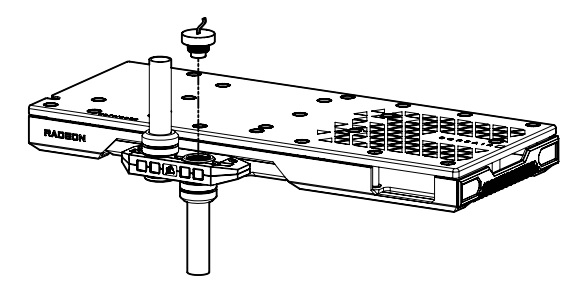
- Install the temperature probe onto an unused port on a GPU block.
Filling the XD7
Once you have finished setting up the XD7, it is time to fill it with coolant.
NOTE: Make sure your power supply unit is turned off and disconnected from all of your computer components when filling the XD7.
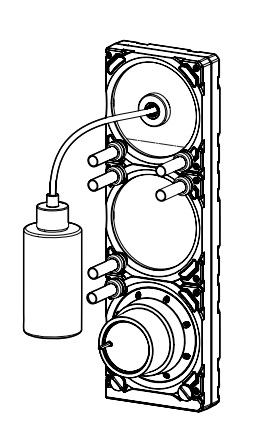
- Remove the G1/4 plug from the top of the XD7.
- NOTE: Make sure any other unused G1/4 ports are plugged.
- Use a bottle to fill the XD7 with coolant.
- Connect the enclosed 24-pin jumper to your PSU's 24-pin ATX cable.
- Disconnect the XD7 pump's 4-pin fan connector from your motherboard/fan controller; this will force the pump to run at 100% speed to make filling easier.
- Connect the PSU to power and turn it on to run the pump; the coolant will start flowing through the system.
- Before the reservoir runs out of coolant, turn the PSU off.
- IMPORTANT: Do NOT let the pump run dry or the reservoir run out of coolant, as this can damage the pump.
- Repeat steps 5 and 6 until the XD7 maintains its coolant level.
- NOTE: We recommend not filling the reservoir up to more than 4cm (1.5") from the top.
- Let the pump run for about 24 hours to get rid of any air trapped in the components and to ensure there are no leaks.
- After leak-testing the system, turn off the PSU and disconnect the 24-pin jumper.
- Reconnect the power to your other computer peripherals and turn on your computer.
JOIN OUR OFFICIAL CORSAIR COMMUNITIES
Join our official CORSAIR Communities! Whether you're new or old to PC Building, have questions about our products, or want to chat about the latest PC, tech, and gaming trends, our community is the place for you.