GAME GUIDES
Battlefield 6 Flick Look Tutorial: How to Instantly Shoot Backwards
Viimeksi päivitetty:
Picture this: You’re playing Battlefield 6, making your way through the tight, dangerous alleyways of New Sobek City. You round a corner, spot a foe facing away from you, and start shooting. Somehow, they turn on you instantly, and you’re dead before you even know what happened. In fact, they shoot you before they’ve even turned around.
You managed to get the drop on someone, and they still came out on top? How does that work?
Well, they might have been using Flick Look. Let's talk about it.
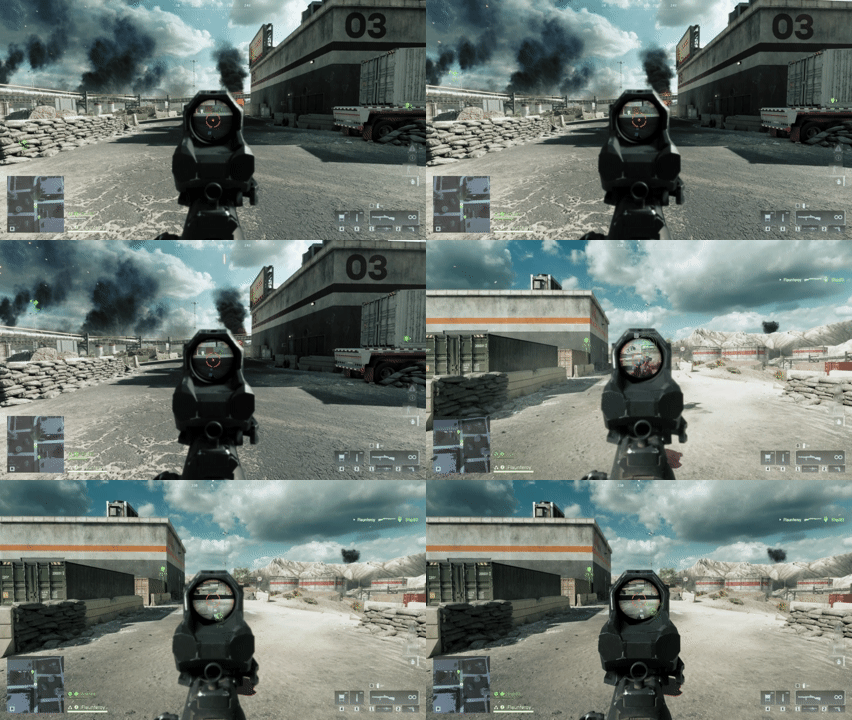
What is Flick Look in Battlefield 6?
Flick Look allows you to almost instantly spin around 180 degrees at the touch of a button. We'll explain how to use it, along with the benefits and drawbacks if you decide to switch it on.
(Spoiler Alert: It’s not nearly as powerful as it looks. At least not without a lot of practice.)
How to Enable Flick Look in Battlefield 6
Flick look is not an ability you unlock through progression or weapon mastery. It’s not a gadget or a perk tied to a specific class. It’s just a keybind.
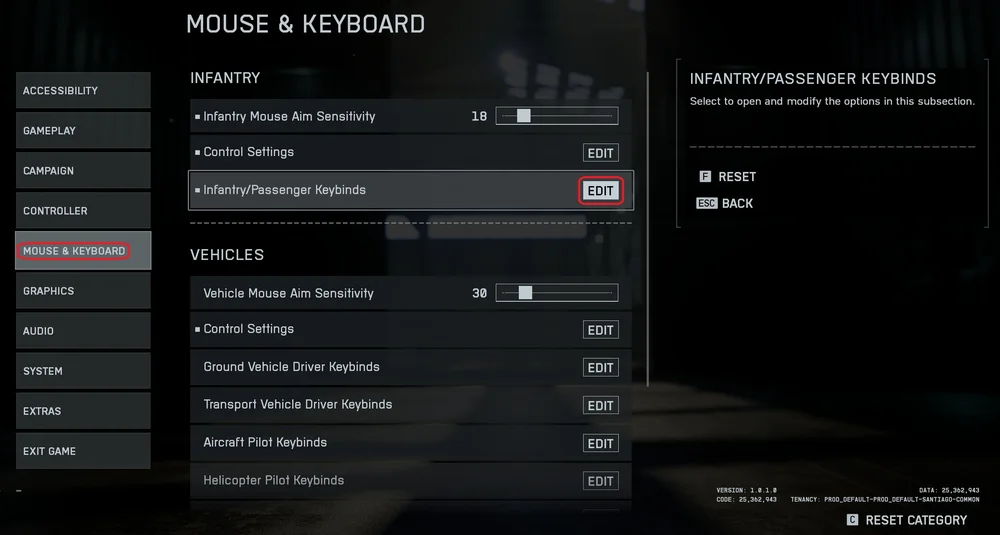
- Hit the gear icon at the top to open the settings menu, then go to the “Mouse & Keyboard” tab. Click the “Edit” option on “Infantry/Passenger Keybinds”.
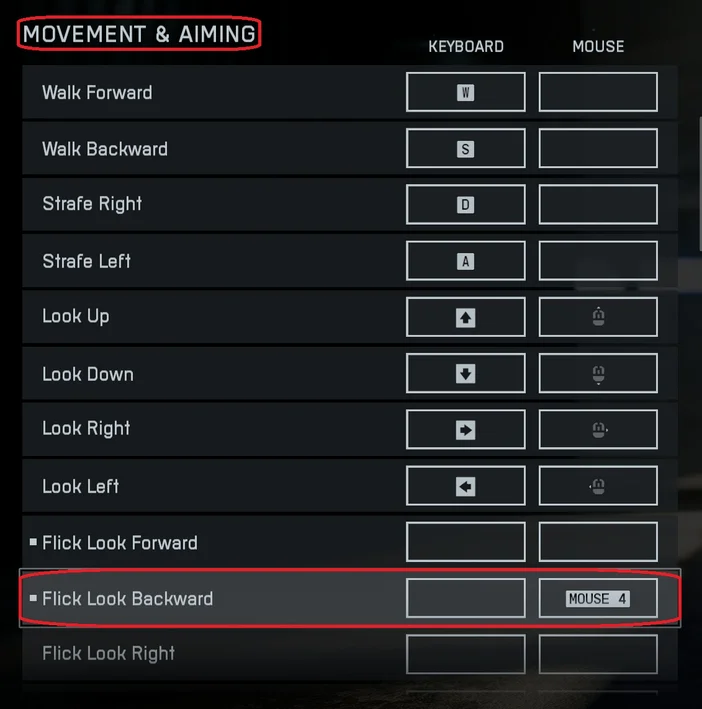
- Under the “Movement & Aiming” section, find “Flick Look Backward” and bind it to whatever input you prefer. If you’re using something like the SABRE v2 PRO ULTRALIGHT WIRELESS, assigning it to the rear side button is a good idea since you can easily press it with your thumb.
You can use Flick Look on a controller and on console too. You just need to bind it to an available input. A controller with back paddles, like the SCUF REFLEX, is a good option since you can hit the Flick Look button with your ring or pinky finger.
Battlefield 6 Flick Look Video Example
After this, you’re all set to enjoy the benefits of this setting. Take a look at the example videos we recorded below, showing both the perspective of the Flick Looker and the Flick Lookee.
First, this is how it looks when you use it:
- Notice how it's not literally instant, but it's fast enough that you can turn much quicker than would otherwise be possible using practical DPI and mouse sensitivity settings.
Now, let's look at it from the perspective of the poor individual who got shot:
- Notice how the shot comes from the other player and kills us. Only after this does the other player appear to turn around. From their perspective, they turned quickly and shot us. But from our perspective, they shot backwards with no clear indication of the turn, and then turned to face us.
Also, when the turning animation does happen, it doesn't happen any faster than normal. That's why being killed like this is so confusing, it would be very easy to misidentify this as an aimbot.
With this in mind, if you do choose to utilize Flick Look in Battlefield 6, be aware that it's likely that people might report you. It looks like you're using an aimbot, even though it's just a built-in feature.
Is Flick Look Overpowered?
It certainly looks overpowered in those clips, doesn't it? But don't assume that enabling Flick Look will turn you into the Buster Scruggs of Battlefield. In regular gameplay, it will rarely play out that way.
While it spins you around 180 degrees almost instantly, it preserves the angle at which you’re aiming. So if you’re aiming upward and use the bind, you’ll still be aiming upward after the spin. This means you’ll need to adjust your aim to be on target. That is, unless they happen to be at the same elevation you were aiming at before hitting Flick Look.
Try it out in the Firing Range and you’ll see what we mean.
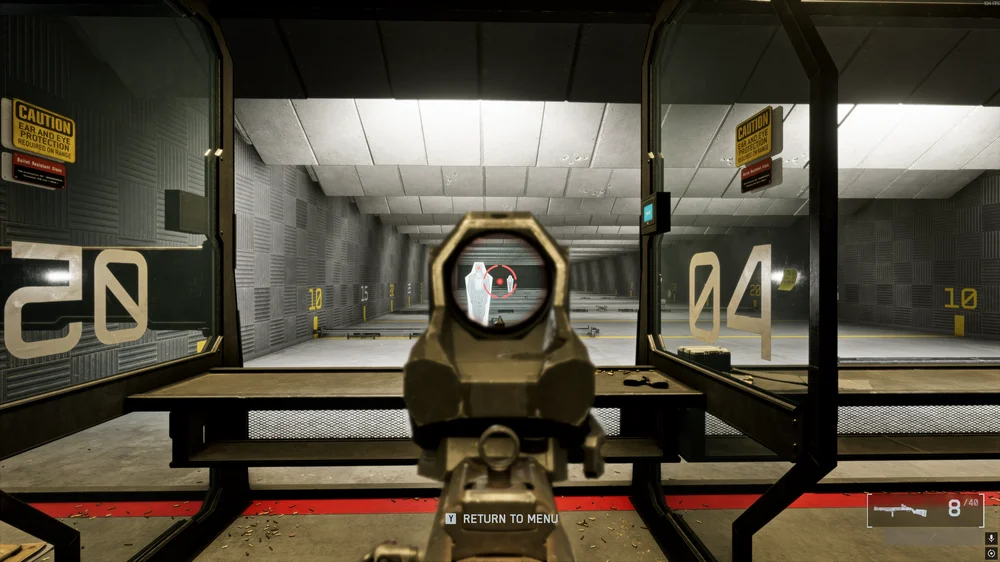
Additionally, it’s worth keeping in mind that if you commit to Flick Look, it’s going to take a lot of practice. If you’ve been playing games for any amount of time, un-learning the muscle memory of just using the mouse to turn around is going to be a painful experience.
You'll probably end up moving the mouse and hitting Flick Look at the same time, which will cause you to overshoot your target. Additionally, with the time-to-kill (TTK) of Battlefield 6 being relatively low, even with this ability, you might not even react fast enough to hit the button before you’re dead.
Where Flick Look really shines isn't in turning on people like an aimbot. It's in objective play. If you’re holding down an objective, you can use flick look to check behind you in an instant. Then if you manually look 90 degrees and hit Flick Look, you can check the other two cardinal directions. This gives you much better situational awareness when defending or holding an objective.
How Fast is Battlefield 6 Flick Look?
We locked Battlefield 6 to 60 FPS and recorded those videos at the same frame rate. Stepping through the original recording frame-by-frame. we discovered that it took 6 frames for Flick Look to rotate us around. Which means at 60 FPS, Flick Look will turn you around in 0.1 seconds, or one tenth of a second.
TUOTTEET ARTIKLASSA
JOIN OUR OFFICIAL CORSAIR COMMUNITIES
Join our official CORSAIR Communities! Whether you're new or old to PC Building, have questions about our products, or want to chat about the latest PC, tech, and gaming trends, our community is the place for you.