Borderlands 4 has finally arrived, bringing with it a vibrant, seamless open world powered by Unreal Engine 5, albeit at lower FPS than gamers would like and with very frequent stuttering. While the new technology delivers a visually stunning evolution for the franchise, it also presents a colossal challenge for even the most powerful PC hardware. This guide provides Vault Hunters with practical strategies to achieve smooth FPS and fully enjoy the thrilling visuals of Pandora’s dynamic future.

System Requirements
Let’s get the numbers out of the way. Borderlands 4’s official requirements set a high bar – and benchmarks show even higher hurdles:
|
Tier |
CPU | GPU | VRAM | RAM | Target Performance |
|---|---|---|---|---|---|
| Minimum | i7-9700 / Ryzen 7 2700X | RTX 2070 / RX 5700 XT | 8GB | 16GB | 1080p, 30 FPS Low |
| Recommended | i7-12700 / Ryzen 7 5800X | RTX 3080 / RX 6800 XT | 12GB | 32GB | 1440p, 60 FPS Medium |
On high-end hardware, 4K Ultra settings yield 30-40 FPS even for a RTX 5090. Framerates plunge at native resolutions, and upscaling isn’t just recommended...it’s mandatory. Think of recommended specs as the minimum for upscaled, not native gameplay. Take a look at our full Borderlands 4 System Requirements page for some additional information.
Why Borderlands 4 Is So Demanding
- Unreal Engine 5 features like Lumen (global illumination) and Nanite (geometry streaming) are baked into the game and cannot be disabled.
- Upscaling (DLSS, FSR, TSR) is not as optional as it normally is. At time of writing, this game basically requires upscaling.
- The seamless open world with constant asset streaming stresses CPU, GPU, and SSD alike.
- VRAM and RAM demands are steep, with 12GB+ VRAM and 32GB system RAM now the sweet spot for silky gameplay.
What FPS can I expect in Borderlands 4?
At 1080p and 1440p, even premium cards stumble. Here’s a snapshot based on compiled benchmarks at various settings:
| GPU | 1080p High | 1440p High | 4K Ultra |
|---|---|---|---|
| RTX 5090 | ~100 FPS | ~77 FPS | ~45 FPS |
| RTX 4090 | ~91 FPS | ~67 FPS | ~36 FPS |
| RTX 3080 | ~46 FPS | ~36 FPS | ~19 FPS |
| RX 7900 XTX | ~70 FPS | ~50 FPS | ~28 FPS |
Without upscaling, native performance on all tiers falls short of the coveted 60 FPS threshold. The solution? Upscaling is required for playable framerates at any resolution over 1080p.
How to Increase Borderlands 4 FPS
|
Recommended |
Why it matters |
|
|---|---|---|
|
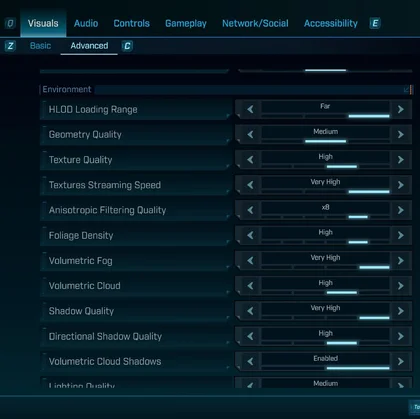
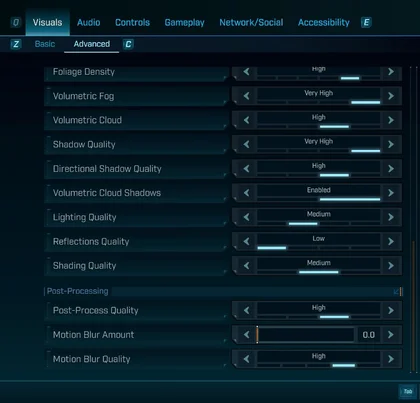
Lighting Quality |
Medium |
The biggest FPS win (roughly +10–27% depending on scene). Lumen is heavy; Medium maintains look with far less cost. |
|
Reflections Quality |
Low |
Surprisingly large uplift (double‑digit gains reported). Minimal visual loss in combat chaos. |
|
Volumetric Fog/Clouds |
Low–Medium |
Clouds/fog eat frames; stepping down recovers smoothness. |
|
Shadows (incl. Directional) |
Medium |
Reliable 3–8% back without wrecking image stability. |
|
Foliage Density |
Medium or Low |
Big perf tax outdoors; drop early on mid‑range rigs. |
|
Textures |
Very High only if ≥12 GB VRAM |
Looks great and cheap if you have the VRAM; otherwise go Medium/Low to avoid stutter. |
Tip: Avoid the “Badass” preset. In our testing it offers almost no visual improvement over "Very High" for a massive, inefficient performance drop.
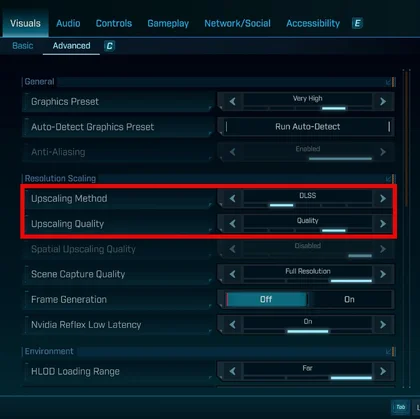
Upscaling & Frame Generation
Since native resolution is off the table, your first stop should be the upscaling menu.
- NVIDIA (RTX Cards): DLSS is the top choice, offering excellent image quality.
- All GPUs: AMD's FSR and Intel's XeSS are great cross-vendor options. Start with “Quality” mode and reduce as needed for performance.
- Temporal Super Resolution (TSR); community feedback suggests it can be a "decent alternative" to DLSS and sometimes provides a sharper image than FSR.
For those with the latest cards,
- Frame Generation (FG) can dramatically smooth out gameplay, but it comes with a critical trade-off: higher input latency. The community consensus is clear:
- only enable Frame Generation if your base framerate (before FG) is already a stable 60 FPS or higher. Using it to boost a 40 FPS experience will result in a game that looks smooth but feels sluggish and unplayable.
If you have an older card, check out Lossless Scaling! We have a guide on how to make use of this powerful software

How to Stop Borderlands 4 Stutter
Here’s how some more advanced but optional tips and known issues driven and found by the Community:
- Increase GPU shader cache (NVIDIA/AMD control panel):
- Bump cache size (e.g., to 10–100 GB) to reduce shader hitches. You can also clear/rebuild the cache once if it’s corrupted. Expect fewer “new effect” stutters after a short warm‑up.
- Community mods:
- “Ultra+ / Ultimate Engine Tweaks” from P40L0X retune streaming, virtual textures, and LODs to slash traversal stutter a big quality‑of‑life gain while waiting for patches. Use at your own risk
- Split-Screen Lag:
- Having performance issues on Split-Screen? Set session privacy to “Local Only” for better splitscreen FPS on co-op runs.
- Crashes (RTX 40xx Series):
- If you encounter frequent crashes while using RTX 40 series cards, consider undervolting your GPU by -0.100V to enhance stability and reduce the likelihood of crashes.
Three optimized profiles you can use now:
- High-Fidelity Vault Hunter (RTX 4080+/RX 7900 XTX)
- 1440p/4K with DLSS/TSR (Quality/Balanced).
- Settings: Textures Very High, Lighting Medium, Reflections Low, Volumetric Cloud Shadows Off.
- Frame Generation: Enable only if baseline FPS >80.
- Troubleshooting: Shader cache 10GB+, install “Ultra” mod for asset streaming fixes.
- Performance-Priority Build (RTX 3070-4070/RX 6700 XT-7800 XT)
- 1080p DLSS/TSR Quality, 1440p Performance mode if necessary.
- Settings: Medium preset, but manually optimize Lighting, Foliage, and Shadows.
- Frame Generation: Avoid, focus on raw framerate.
- Mods: .ini tweaks mandatory, Ultra Engine Tweaks.
- Minimum-Spec (RTX 2070/RX 5700 XT)
- 1080p, aggressive upscaling (“Ultra Performance”).
- Settings: Low everything, only medium textures if VRAM allows.
- Frame Generation: Disabled (too much latency).
- All community fixes are essential for stutter and stability.
Should I Upgrade my PC to play Borderlands 4?
At time of writing, you cannot really buy your way into great performance for this game. Even on crazy high-end systems, issues remain. However, upgrading a few components can alleviate these issues to an extent.
32GB of RAM is strongly recommended. Not only because it will help here, but because it's one of the few PC upgrades that will improve every aspect of your PC performance regardless of if you're gaming or not. 32GB of VENGEANCE RGB DDR5 is the sweet spot, but if you're not yet on a chipset that can handle DDR5, then 32GB of VENGEANCE RGB PRO DDR4 will still help.
Additionally, with reports of people getting CPU-bound on this game, making sure that poor little chip stays cool will be handy, so a 360mm AIO is a good option. an iCUE LINK TITAN 360 RX is our best-performing CPU cooler right now, but the NAUTILUS 360 RS is not far behind and significantly cheaper.
If you're truly keen to get as much performance as you can from Borderlands 4, and have the cash on hand, then an Nvidia 50-Series GPU or 9070 / 9070 XT from AMD will improve things, though not as much as you might hope.
Do I really need 32 GB of RAM?
For smooth streaming in this open world, yes 32 GB helps reduce hitching, especially alongside a fast SSD.
Why does my GPU show low usage while FPS is low?
You’re likely CPU‑bound; BL4’s streaming and world simulation can max out modern CPUs. Drop CPU‑heavy settings (Lighting, Foliage) and keep background apps closed.
Which upscaler should I use on AMD?
Start with TSR (often cleaner at aggressive scales), then compare FSR. Image preference varies by scene try both.
Is Frame Generation worth it?
Only if your base FPS is healthy (≥60–80).
Why does Borderlands 4 get worse the longer I play?
A memory leak is commonly reported. Until an official fix is available, it's advisable to restart the game between extended play sessions.
A CIKKBEN SZEREPLŐ TERMÉKEK
JOIN OUR OFFICIAL CORSAIR COMMUNITIES
Join our official CORSAIR Communities! Whether you're new or old to PC Building, have questions about our products, or want to chat the latest PC, tech, and gaming trends, our community is the place for you.