The new CORSAIR NAUTILUS II is, as its name would suggest, an updated version of the CORSAIR NAUTILUS. There are a few key differences to be aware of, so let's get into it, starting of course with the specs:
CORSAIR NAUTILUS II vs NAUTILUS: Specs Compared
| CORSAIR NAUTILUS 360 RS ARGB | CORSAIR NAUTILUS II 360 RS ARGB | |
| Color | Black / White | Black / White |
| Radiator Dimensions (mm) | 394mm x 120mm x 27mm | 394mm x 120mm x 27mm |
| Coldplate Material: | Copper | Copper |
| Radiator Material: | Aluminum | Aluminum |
| Fans included: | 3x RS120 fan or 3x RS120 ARGB fan | 1x RS360 II Unified Frame fan / 1x RS360 II ARGB Unified Frame fan |
| Fan Bearing: | Magnetic Dome | Magnetic Dome |
| Fan Max Speed: | 0, 350 - 2,100 RPM ±10% | 0, 420 - 2,100 RPM ±10% |
| Fan Dimensions: | 120 x 25mm | 360 x 120 x 26mm |
| Fan Airflow: | 13.3 – 72.8 CFM | 10.8 – 73 CFM (per fan) |
| Fan Static Pressure: | 0.20 – 4.15 mm-H2O | 0.15 – 4.2 mm-H2O (per fan) |
| Fan Noise Level: | 10 - 36 dB(A) | 10 - 36 dB(A) |
| Tubing Length: | 450mm | 450mm |
| Tubing Material: | Black Sleeved Low-Permeation Rubber | Black Sleeved Low-Permeation Rubber |
| Cooling Socket Support: | AMD: AM5, AM4 | Intel: 1851, 1700 | AMD: AM5, AM4 | Intel: 1954, 1851, 1700 |
| Warranty: | 5 Years | 5 Years |
RS120 fans
RS360 Unified Frame fan
RS VS RS II Fans
From the specs, we can see updated fans present for the new AIO, the CORSAIR RS II series. These provide quiet, efficient airflow while maintaining high static pressure to improve cooling and are 1mm thicker. The other big change here is that the RS360 II and RS360 II ARGB are unified frame fans.
This means that you no longer have a series of daisy chained cables along the side of the AIO, meaning a cleaner finished look, and less connections overall. For the ARGB models, this also helps create an even ARGB lighting pattern across the fan. These also simplify installation needing only four screws for the entire Unified Frame as opposed to four per fan slashing the time to remove and reinstall them if needed.
As with the previous version. the new RS fans are PWM and use ARGB cables where applicable meaning they will connect directly to your motherboard or fan controller such as the CORSAIR COMMANDER DUO.
Both the 240mm and 360mm versions feature the Unified Frame fans and the reduced cables so which ever version you choose, you’re not missing out on the benefits of a Unified Frame fan.
FlowDrive 2S pump
With the new NAUTILUS AIO, among the wealth of new features is the new pump. The previous generation of NAUTILUS we introduced our FlowDrive pump.
With the NAUTILUS II, we have improved on this to bring the quiet-running FlowDrive 2S pump using a thinner lower-resistance cold plate for improved transfer and contact pressure for AMD and Intel CPUs, with optimization for AMD AM5 and pre-applied XTM60 thermal paste. The new FlowDrive 2S is designed to work under sustained high loads while keeping things quiet, and cool. While keeping installation hassle free using the standard motherboard retention plates to make installation a breeze.
NAUTILUS II LCD Liquid CPU Cooler
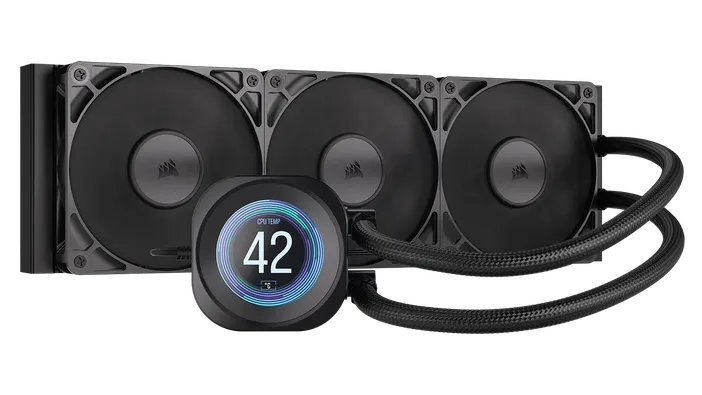
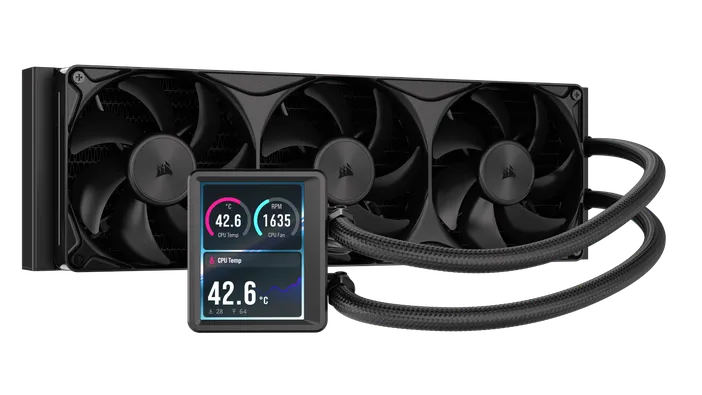
As with our previous NAUTILUS, we offer the CORSAIR NAUTILUS II 240 / 360 RS LCD Liquid CPU Cooler. These feature a rectangular 3.5" IPS LCD Screen which connects via DisplayPort. This is an upgrade over the previous NAUTILUS which featured a round 2.1" IPS LCD screen which connected via an internal USB 11 pin header.
The new screen is also a higher resolution, going from 480 x 480 pixels with a refresh rate of 30fps, to a resolution of 480x640 at 60fps to deliver a smoother, better experience.
PRODUKTI RAKSTĀ
Stay up to date with CORSAIR. Get our latest News, Guides, and Product Updates in your Google feeds.
Add CORSAIR as a preferred sourceWas this article helpful?
Feedback received
Thanks for helping us improve this article.
JOIN OUR OFFICIAL CORSAIR COMMUNITIES
Join our official CORSAIR Communities! Whether you're new or old to PC Building, have questions about our products, or want to chat about the latest PC, tech, and gaming trends, our community is the place for you.