-
ACTUALIZARE FIRMWARE
-
CUM SĂ VĂ CUNOAȘTEȚI CONTROLERUL FĂRĂ MANETĂ
-
MOD DE JOC
-
RECONFIGURARE
-
FLASHTAP (SOCD)
-
MATRICE DE CONECTIVITATE
-
ÎNCĂRCARE ȘI DURATA DE VIAȚĂ A BATERIEI
-
COMENZI RAPIDE STANDARD
-
ÎNREGISTRARE MACRO
-
5 profiluri integrate
-
INFORMAȚII PRIVIND DESMONTAREA BATERIEI
-
DREPTURI DE AUTOR/INFORMAȚII LEGALE
- CONȚINUT CONEX
MANUAL | GHID DE START RAPID
NOVABLADE PRO
CONTROLER FĂRĂ CABLU CU EFECT HALL, FĂRĂ MANETĂ
Versiunea în limba engleză este disponibilă aici - English
Dacă aveți alte probleme, vă rugăm să contactați asistență pentru clienți
CITIȚI ÎNTÂI ACEST MESAJ – ÎNAINTE DE PRIMA UTILIZARE: Utilizați utilitarul CORSAIR Firmware Update Utility pentru a actualiza firmware-ul.
ACTUALIZARE FIRMWARE
- Conectați receptorul wireless la dispozitivul gazdă
- Comutați comutatorul în modul 2,4 GHz
- Comutați comutatorul în modul PC
- Porniți controlerul pentru a vă asigura că modul de 2,4 GHz funcționează
Folosiți următorul link pentru a efectua actualizarea firmware-ului: Utilitarul de actualizare firmware CORSAIR.
După ce accesați linkul, urmați pașii de mai jos pentru a actualiza atât receptorul wireless, cât și controlerul:
- Selectați „NOVABLADE 2.4GHz RECEIVER” în utilitarul de actualizare a firmware-ului CORSAIR și efectuați actualizarea
- După finalizarea actualizării receptorului wireless, conectați controlerul prin cablu USB
- Comutați comutatorul în modul cu fir
- Selectați „NOVABLADE PRO Wireless Hall Effect Leverless Controller” în utilitarul CORSAIR Firmware Update Utility și efectuați actualizarea
- Dacă telecomanda și receptorul wireless își pierd conexiunea după actualizarea firmware-ului, efectuați manual asocierea la frecvența de 2,4 GHz urmând pașii de mai jos:
-
- Asigurați-vă că controlerul este oprit (nu este conectat prin USB)
- Comutați comutatorul în modul 2,4
- Ține apăsate butoanele L3 și R3
- Porniți controlerul apăsând simultan butonul HOME
- Țineți apăsate butoanele L3 + R3 + HOME timp de 3 secunde pentru a activa modul de asociere
- Indicator – LightEdge 360° și toate cele 15 butoane:
- Lumină albă continuă timp de 2 secunde: Conectat
- Albastru intermitent: Neconectat
- Clipește rapid cu lumina albă timp de 2 secunde în timpul procesului de asociere
- După finalizarea procesului de asociere, iluminatul revine la ultima setare utilizată
CUM SĂ VĂ CUNOAȘTEȚI CONTROLERUL FĂRĂ MANETĂ
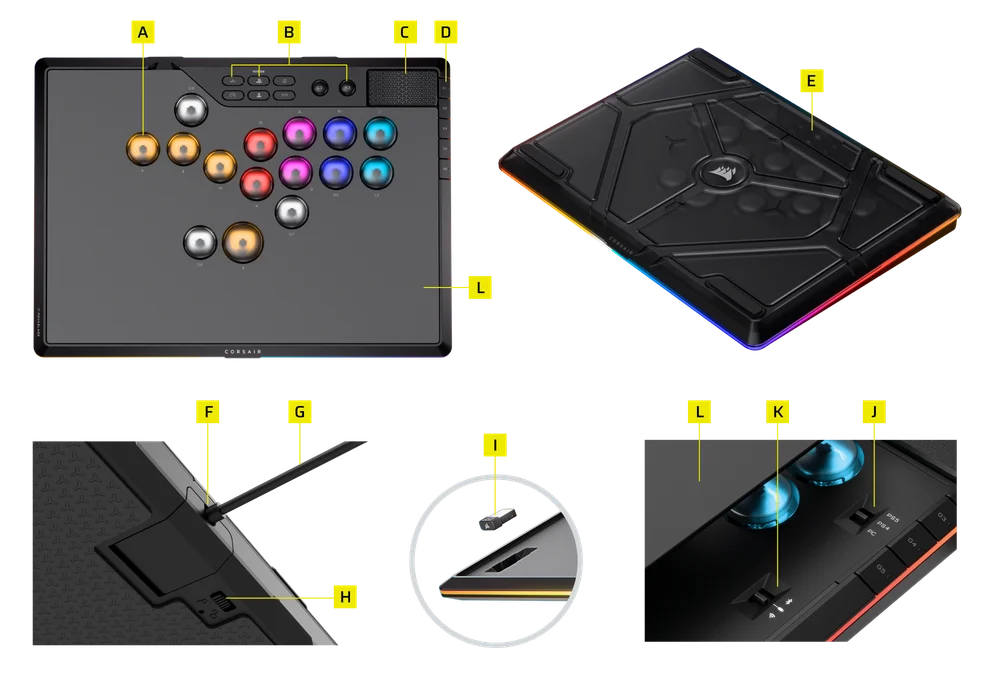
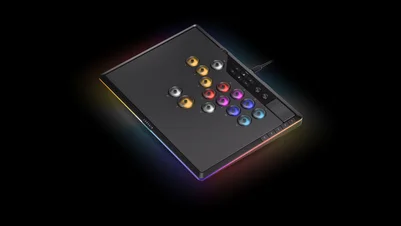
- 15 butoane de comutare MGX HYPERDRIVE
- 8 taste funcționale
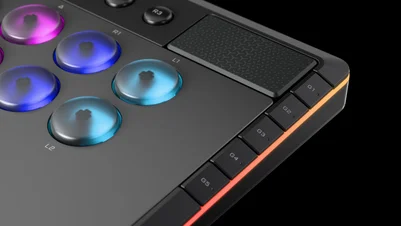
- PAD DE TACTIL
- 5 x G-KEYS
- GEANTĂ DE CĂLĂTORIE
- PORT USB DE TIP C
- Cablu USB tip C la tip A
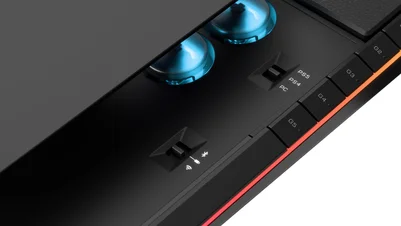
- GLISOR (CONECTIVITATE ȘI BLOCARE USB)
- RECEPTOR FĂRĂ FIR
- COMUTATOR PS/PC
- COMUTATOR 2,4 GHz/Bluetooth/cu cablu
- PLACĂ SUPERIOARĂ DIN ALUMINIU MAGNETICĂ
CUM SE DESCHIDE VALIZA DE CĂLĂTORIE
Geanta de călătorie poate fi deschisă în următoarele poziții.
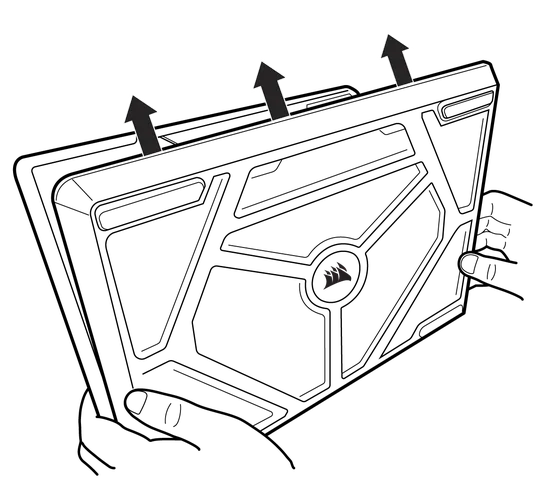
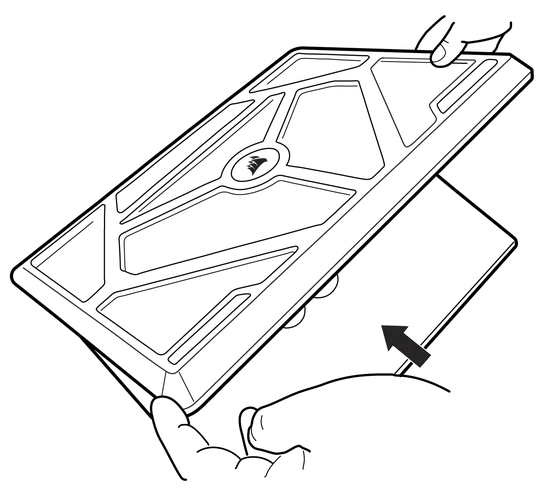
RESETARE LA SETĂRILE DIN FABRICĂ
- Treceți la modul USB
- Deconectați cablul USB
- Ține apăsate butoanele L3 și R3
- Conectați cablul USB
- Ține apăsate butoanele L3 și R3 timp de 2 secunde
Indicator – Lumină albă continuă pe toate cele 15 butoane până la finalizarea resetării la setările din fabrică.
MOD DE OPRIRE
Dispozitivul se va opri după 30 de minute de inactivitate, atât în modul PS, cât și în modul PC. Inactivitatea este definită ca:
- Nu s-a detectat nicio introducere de la tastatură
- Cablu de alimentare deconectat
INDICATOR
- LightEdge 360°
- 15 BUTOANE
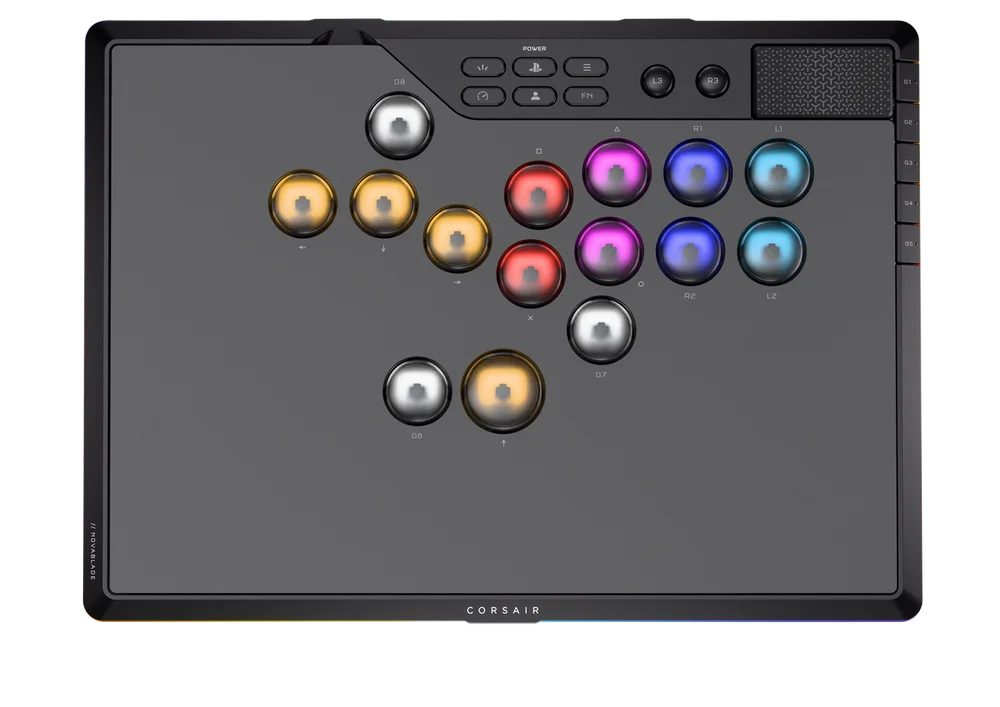
BUTOANE DE COMUTARE MGX HYPERDRIVE (A)
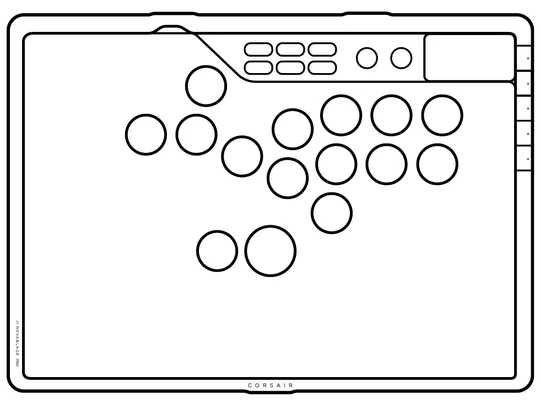
Toate cele 15 butoane ale comutatorului MGX Hyperdrive sunt permise pentru:
- Puncte de acționare reglabile de către utilizator
- Modul de declanșare rapidă
- Apăsați tasta G4 sau țineți apăsate tastele FN + R2 pentru a activa sau dezactiva funcția
- Caracteristici: 15 capace pentru taste și iluminare LightEdge la 360°
- Activare rapidă:
- LightEdge 360°: specific profilului
- 15 capace de taste clipesc rapid în roșu timp de 3 secunde, apoi revin la iluminarea specifică profilului - Declanșator rapid dezactivat:
- LightEdge 360°: iluminare specifică profilului
- 15 capace de taste afișează o lumină albă statică timp de 3 secunde, apoi revin la iluminarea specifică profilului
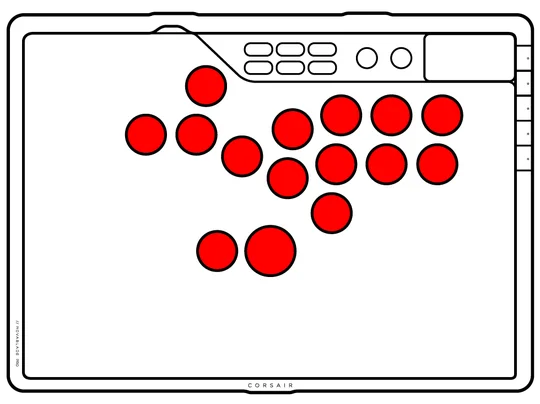
Activare rapidă
Declanșare rapidă dezactivată
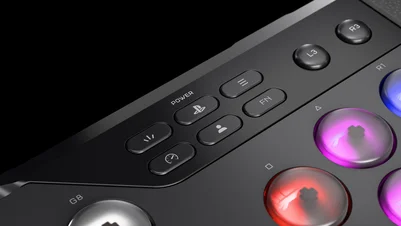
TASTELE FUNCȚIONALE (B)
- Creare, Acasă și Alimentare (butonul PS), Opțiuni
- Mod joc, Profil, FN
- L3, R3
PAD DE TACTIL (C)
Touchpad capacitiv cu funcție de apăsare.
- În modul PC: Funcția mousepad
- În modul PS: Suportă funcția TouchPad pentru PS4/PS5
5 x G-KEYS (D)
- Programabil prin înregistrarea de macrocomenzi (nu este permis în modul PS)
- Conceput special pentru modul PS (disponibil și în modul PC)
- Funcțiile implicite ale tastelor G1-G5
În ceea ce privește funcțiile implicite ale butoanelor G1–G5: atunci când se selectează o anumită funcție, mențineți apăsat butonul timp de 3 secunde, iar setarea va fi salvată automat.
| G1 |
CICLUL EFECTELOR DE ILUMINARE 1. Tip de iluminare (Implicit) > 2. Model de culoare static „Orizont” > 3. Val „Orizont” > 4. Val „Curcubeu” > 5. Schimbare de culoare > 6. Puls de culoare |
| G2 |
CICLUL DE LUMINOZITATE 1. 100% > 2. 75% > 3. 50% > 4. 25% > 5. 0% |
| G3 |
CICLUL FLASHTAP (SOCD) 1. Neutru (implicit) > 2. Oprit > 3. Sus > 4. Primul > 5. Ultimul |
| G4 |
BUTON DE PORNIRE/OPRIRE RAPIDĂ 1. Oprit > 2. Pornit |
| G5 |
CICLUL DE ACTIONARE 1. 1 mm (valoare implicită de acționare) > 2. 2 mm > 3. 3 mm > 4. 4 mm > 5. 0,5 mm |
Ciclul de acționare al funcției implicite G5 – Indicator luminos: LightEdge inferior


1 mm (valoare implicită de acționare)
2 mm


3 mm
4 mm


0,5 mm
MOD DE JOC
Modul Joc activat: Apăsați butonul Mod Joc timp de 3 secunde pentru a activa modul Joc
- Blocare touchpad:
- Țineți apăsată tasta FN pentru a dezactiva temporar touchpad-ul, atâta timp cât tasta FN rămâne apăsată
- Butoanele Lock Create, Power și Option
- FlashTap (SOCD) activat în modul „Neutru” (implicit)
- Modul FlashTap (SOCD) poate fi schimbat în alte moduri –
, Prioritate sus, Prioritate întâi, Prioritate ultimă sau FĂRĂ SOCD – folosind comenzile rapide FN + Cercul sau G3
- Modul FlashTap (SOCD) poate fi schimbat în alte moduri –
- Declanșare rapidă: Activat
- Toate tastele G1-G8 sunt dezactivate (funcțiile macro sunt dezactivate)
- Durata de comutare poate ajunge până la 1 secundă dacă setați o frecvență de sondare diferită în modul Joc față de frecvența implicită
- Efect de introducere
- Toate tastele și marginea iluminată creează un efect de lumină intermitentă timp de 2 cicluri în 3 secunde
- Culoare: Horizon
- După introducere, afișează efectul de iluminare tip
- Capace de taste: Tasta se luminează la apăsare
- 360° LightEdge: Inelul se luminează în întregime la apăsarea oricărei taste
- Culoare
- Mod PS: 1P roșu; 2P albastru; 3P galben; 4P verde
- Mod PC: Toate alb
Modul de joc dezactivat: toate setările respectă setările profilului (ultimele setări utilizate)
- FlashTap (SOCD): Dezactivat (în funcție de ultimele setări utilizate de utilizatori)
- Deblochează touchpad-ul
- Deblochează butoanele Create, Power și Option
- Frecvență de sondare predefinită
- Declanșare rapidă: Dezactivată (în funcție de ultimele setări utilizate de utilizatori)
- Efect de iluminare predefinit
RECONFIGURARE
Doar modelele G6, G7 și G8 pot fi reconfigurate.
Remapare
- Țineți apăsat butonul „Profil” timp de 2 secunde
- Tastele G6, G7 și G8 vor clipi în alb; toate celelalte 13 taste se vor stinge
- Apăsați o dată tasta G6 (dacă intenționați să reconfigurați tasta G6)
- Tasta G6 va clipi în alb, tastele G7 și G8 se vor stinge, celelalte 13 taste vor afișa culoarea magenta, iar tastele L3/R3 și touchpad-ul nu vor fi iluminate
- Apăsați tasta pe care doriți să o atribuiți butonului G6 (una dintre cele 13 taste principale sau L3/R3/Touchpad)
- Dacă selectați una dintre cele 13 taste principale (de exemplu, tasta O), tasta G6 va clipi în aceeași culoare ca tasta O, iar toate celelalte taste se vor stinge
- Dacă selectați L3/R3/Touchpad, indicatorul G6 va clipi în roșu
- Țineți apăsat din nou butonul „Profil” timp de 2 secunde pentru a salva setările de reconfigurare
Ștergerea remapării (Unmap)
- Țineți apăsat butonul „Profil” timp de 2 secunde
- Tastele G6, G7 și G8 vor clipi în alb; toate celelalte 13 taste se vor stinge
- Apăsați o dată tasta G6
- Tasta G6 va clipi în alb, tastele G7 și G8 se vor stinge, celelalte 13 taste vor fi iluminate în magenta, iar tastele L3, R3 și touchpad-ul nu vor fi iluminate
- Nu apăsați nicio tastă
- Țineți apăsat din nou butonul „Profil” timp de 2 secunde pentru a salva setările de remapare
FLASHTAP (SOCD)
Comenzi rapide:
- FN + Cercul
- Ciclul implicit G3: 1. Neutru (implicit) > 2. Oprit > 3. Sus > 4. Primul > 5. Ultimul
| Mod | Comportament | Definiția iluminatului | |
| Neutru (Implicit) | Fără ieșire sau poziție neutră |
Alb
|
 |
| Prioritate ridicată | Mergi întotdeauna în sus când se apasă butonul „Sus” |
Alb
|
 |
| Prioritate absolută | Prima intrare este activată. Intrările secundare sunt ignorate până când prima intrare este dezactivată. |
Verde
|
 |
| Ultima prioritate | A doua intrare (sau cea mai recentă) este activată |
Chihlimbar
|
 |
| Fără FlashTap (SOCD) | Apăsările pe butoanele Stânga + Dreapta și Sus + Jos sunt înregistrate așa cum sunt |
Stingeți luminile
|
 |
MATRICE DE CONECTIVITATE
- Acest controler utilizează banda de frecvență radio de 2,4 GHz. Când PlayStation®Dispozitivul 5 și alte produse utilizează, de asemenea, banda de frecvență radio de 2,4 GHz, existând posibilitatea apariției unor interferențe wireless
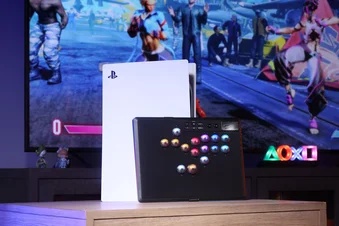
- Corsair a validat acest controler pentru PlayStation®5 (seriile CFI-1000, CFI-2000 și CFI-7000), inclusiv testarea conexiunilor fără fir, iar Corsair își asumă răspunderea pentru acest controler
- Cu PlayStation®Pentru seria 5 1000, se recomandă conectarea cheii USB a acestui controler la portul USB din partea frontală a consolei PlayStation®5
Dispozitivul este conectat la PC sau la consolă
| Comutator de mod | Comutator de conectivitate | ||
| Cu fir |
Fără fir, 2,4 GHz (Receptorul este conectat la PC-ul gazdă/PS) |
Bluetooth | |
| PS5 | Mod cu cablu; Încărcare | Mod wireless de 2,4 GHz; Încărcare | Nu este acceptat; Doar încărcare |
| PS4 | |||
| PC | Modul Bluetooth | ||
Dispozitivul nu este conectat la sursa de alimentare. Receptorul wireless este conectat la dispozitivul selectat prin comutatorul de moduri
| Comutator de mod | Comutator de conectivitate | ||
| Cu fir |
Fără fir, 2,4 GHz (Receptorul este conectat la PC-ul gazdă/PS) |
Bluetooth | |
| PS5 | NA | Modul wireless de 2,4 GHz | Nu este acceptat |
| PS4 | |||
| PC |
Modul Bluetooth |
||
CONECTARE ÎN MODUL DE 2,4 GHz
- Asigurați-vă că dispozitivul este oprit (nu este conectat prin USB)
- Comutați comutatorul în modul 2,4 GHz
- Ține apăsate butoanele L3 și R3
- Porniți dispozitivul apăsând simultan butonul HOME
- Țineți apăsate butoanele L3 + R3 + HOME timp de 3 secunde pentru a activa modul de asociere
- Indicator – LightEdge 360° și toate cele 15 butoane:
- Lumină albă continuă timp de 2 secunde: Conectat
- Albastru intermitent: Neconectat
- Clipește rapid cu lumina albă timp de 2 secunde în timpul procesului de asociere
După finalizarea procesului de asociere, iluminatul revine la ultima setare utilizată.
CONECTARE PRIN MODUL BLUETOOTH
- Asigurați-vă că dispozitivul este oprit (nu este conectat prin USB)
- Comutați comutatorul în modul BT
- Ține apăsate butoanele L3 și R3
- Porniți dispozitivul apăsând simultan butonul HOME
- Țineți apăsate butoanele L3 + R3 + HOME timp de 3 secunde pentru a activa modul de asociere
- Indicație – LightEdge 360° și toate cele 15 butoane:
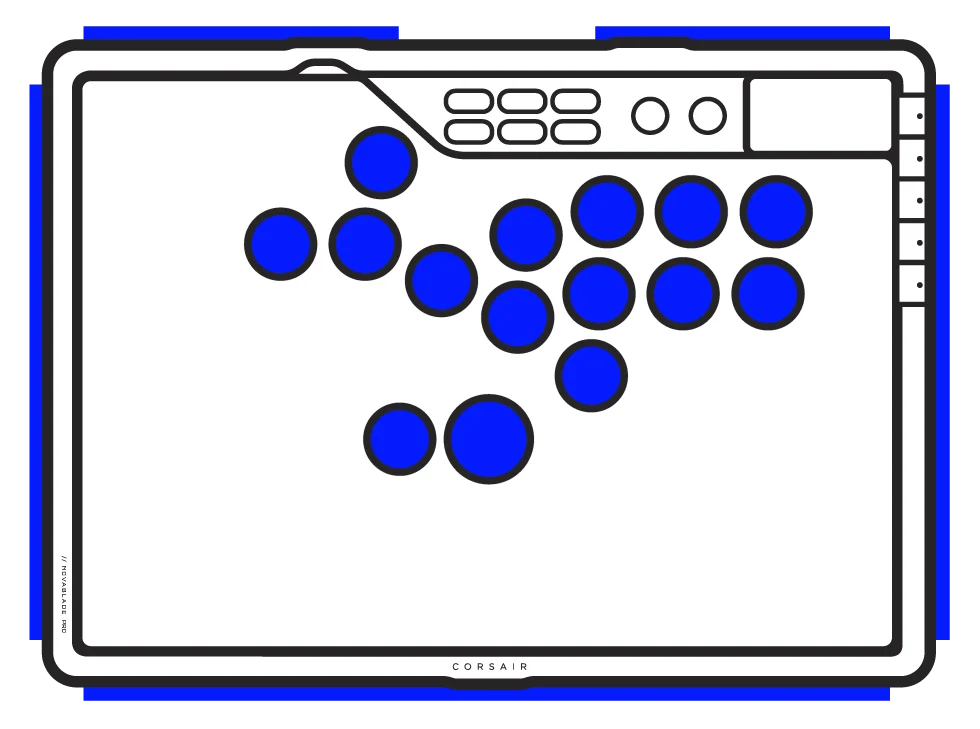
- Albastru continuu timp de 2 secunde: Conectat
- Albastru intermitent: Neconectat
- Clipește rapid cu lumina albastră timp de 2 secunde în timpul procesului de asociere
După finalizarea procesului de asociere, iluminatul revine la ultima setare utilizată.
ÎNCĂRCARE ȘI DURATA DE VIAȚĂ A BATERIEI

| Comenzi rapide | Acțiune | Comportamentul dorit | Indicație (Lighting Edge) |
| Tasta FN+ G8 | Verificarea bateriei | Afișează culoarea/efectul indicând nivelul bateriei pe marginea luminoasă timp de 3 secunde |
*Când se încarcă cu cablul conectat, 360° LightEdge va afișa un efect intermitent timp de 3 secunde, în culoarea care indică starea bateriei. |
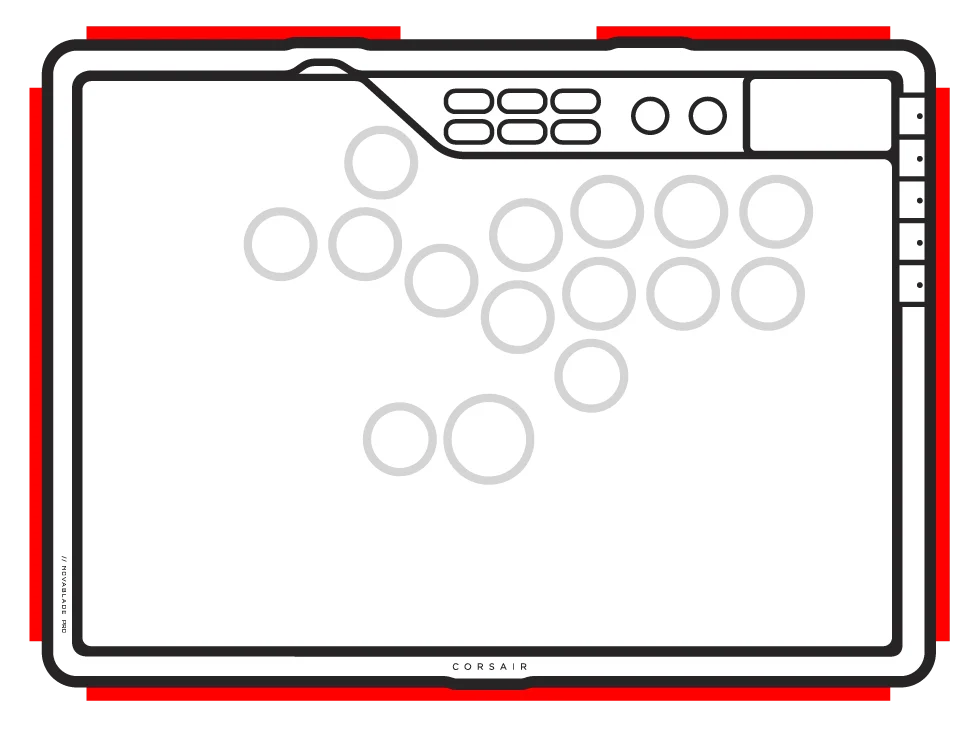
- Indicație: LightEdge 360°
- 15 capace de taste: specifice profilului
COMENZI RAPIDE STANDARD
Toate funcțiile de mai jos presupun că tasta FN este ținută apăsată și că acțiunea se activează la apăsare, dacă nu se specifică altfel.
| Comenzi rapide | Acțiune | Comportamentul dorit | Note |
| FN + X | Luminozitatea LED-urilor - Taste | Luminozitatea LED-urilor RGB variază în pași de 25% pe tastele principale | |
| FN + Pătrat | Luminozitatea LED-urilor – LightEdge 360° | Reglează luminozitatea LED-urilor RGB în pași de 25% pe LightEdge | |
| FN + Triunghi | Ciclul efectelor RGB | Treci la următorul efect de iluminare la bord |
Zona de iluminare: capacele tastelor și marginea iluminată
|
| FN + Cercul | Ciclul modului SOCD | Comutare între modurile SOCD | |
| FN + R1 | Înregistrare macro | Țineți apăsat timp de 2 secunde pentru a intra în modul de înregistrare macro | *Disponibil numai în modul PC |
| FN + R2 | Comutator cu acțiune rapidă | Comută funcția „Rapid Trigger” între activat și dezactivat | |
| FN + L1 | Creșterea puterii de acționare | Crește punctul de acționare în pași de 0,1 mm |
*Pentru o precizie optimă, intervalul recomandat este de 0,3 mm–3,6 mm. Setarea cursorului în afara intervalului recomandat poate duce la o sensibilitate mai mare și la o consistență redusă a efectului. Efectuați o resetare la setările din fabrică dacă întâmpinați probleme legate de sensibilitate excesivă sau de funcționarea neregulată a tastelor. |
| FN + L2 | Acționare inferioară | Reduce punctul de acționare în pași de 0,1 mm | |
| FN + L3 | Autocalibrare |
|
Comenzi rapide FN Indicator de iluminare
Când apăsați tasta FN, toate luminile se vor stinge temporar, cu excepția tastelor cu funcții secundare, ale căror iluminare de fundal va rămâne aprinsă.
- Culoarea implicită va fi ALB
- Indicatorul de culoare pentru profilul utilizat în prezent va avea prioritate față de iluminarea tastelor rapide FN
ÎNREGISTRARE MACRO
Nu este permis în modul PS
- Ține apăsate tastele FN + R1
- Aceasta activează modul de înregistrare macro
- Indicație: LightEdge 360° luminează în roșu
- Apăsați orice combinație de taste standard pentru a începe înregistrarea
- Aceasta include comenzi rapide precum combinațiile FN + o altă tastă. Se pot înregistra doar funcțiile standard ale tastaturii, nu și tastele rapide precum:
- L3, R3
- Create
- Home & Power
- Options
- FN
- Profile
- Game Mode - Se înregistrează și întârzierile
- Indicație: Lumina LightEdge clipește la 360°
- Aceasta include comenzi rapide precum combinațiile FN + o altă tastă. Se pot înregistra doar funcțiile standard ale tastaturii, nu și tastele rapide precum:
- Apăsați tastele FN + R1 timp de 2 secunde
- Aceasta oprește înregistrarea și pregătește macro-ul pentru a fi salvat sau șters
- Apăsarea acestei butoane de mai multe ori nu are nicio funcție suplimentară
- Indicație: indicatorul LightEdge de 360° clipește rapid în roșu
- Apăsați orice tastă G (tastele G1-G8)
- Dacă au fost înregistrate taste: apăsați orice tastă G pentru a salva macro-ul
- Dacă nu au fost înregistrate taste: apăsarea oricărei taste G șterge orice macro
- Dacă există o comandă rapidă de firmware asociată în mod normal acelei combinații, aceasta este restabilită
5 profiluri integrate
Cu până la 5 profiluri personalizate salvate direct în memoria internă, te poți adapta rapid în timpul jocului. Pe măsură ce îți ajustezi schema de comenzi și setările pentru a se potrivi stilului tău de joc, acestea vor fi salvate automat în profilul utilizat în acel moment. În mod implicit, vei fi pe Profilul HW 1. Ține apăsat butonul de profil timp de 3 secunde pentru a comuta între profiluri.
| Numele funcției | Implicit | Observații |
| Numele profilului | Profilul HW 1 | Profil implicit |
| Culoarea profilului | Alb | Culoarea luminii butonului Circle, care rămâne aprinsă timp de 2 secunde, după care revine la iluminarea specifică profilului |
| Modul de joc | Oprit | |
| Sarcini principale | NA | |
| Efecte de iluminat | Tip de iluminat | |
| Numele profilului | Profilul HW 2 | |
| Culoarea profilului | Roșu | Culoarea luminii butonului Circle, care rămâne aprinsă timp de 2 secunde, după care revine la iluminarea specifică profilului |
| Modul de joc | Oprit | |
| Sarcini principale | NA | |
| Efecte de iluminat | Modelul de culori Horizon Static | |
| Numele profilului | Profilul HW 3 | |
| Culoarea profilului | Verde | Culoarea luminii butonului Circle, care rămâne aprinsă timp de 2 secunde, după care revine la iluminarea specifică profilului |
| Modul de joc | Oprit | |
| Sarcini principale | NA | |
| Efecte de iluminat | Horizon Wave | |
| Numele profilului | Profilul HW 4 | |
| Culoarea profilului | Albastru | Culoarea luminii butonului Circle, care rămâne aprinsă timp de 2 secunde, după care revine la iluminarea specifică profilului |
| Modul de joc | Oprit | |
| Sarcini principale | NA | |
| Efecte de iluminat | Schimbare de culoare | |
| Numele profilului | Profilul HW 5 | |
| Culoarea profilului | Chihlimbar | Culoarea luminii butonului Circle, care rămâne aprinsă timp de 2 secunde, după care revine la iluminarea specifică profilului |
| Modul de joc | Oprit | |
| Sarcini principale | NA | |
| Efecte de iluminat | Pulsul culorilor |
INFORMAȚII PRIVIND DESMONTAREA BATERIEI
Acest produs utilizează o baterie reîncărcabilă, iar în cazul în care produsul este scos din uz în vederea eliminării și reciclării, trebuie respectate instrucțiunile de siguranță. Pentru a scoate bateria în condiții de siguranță în vederea eliminării și reciclării, urmați pașii numerotați, conform schemelor de mai jos.
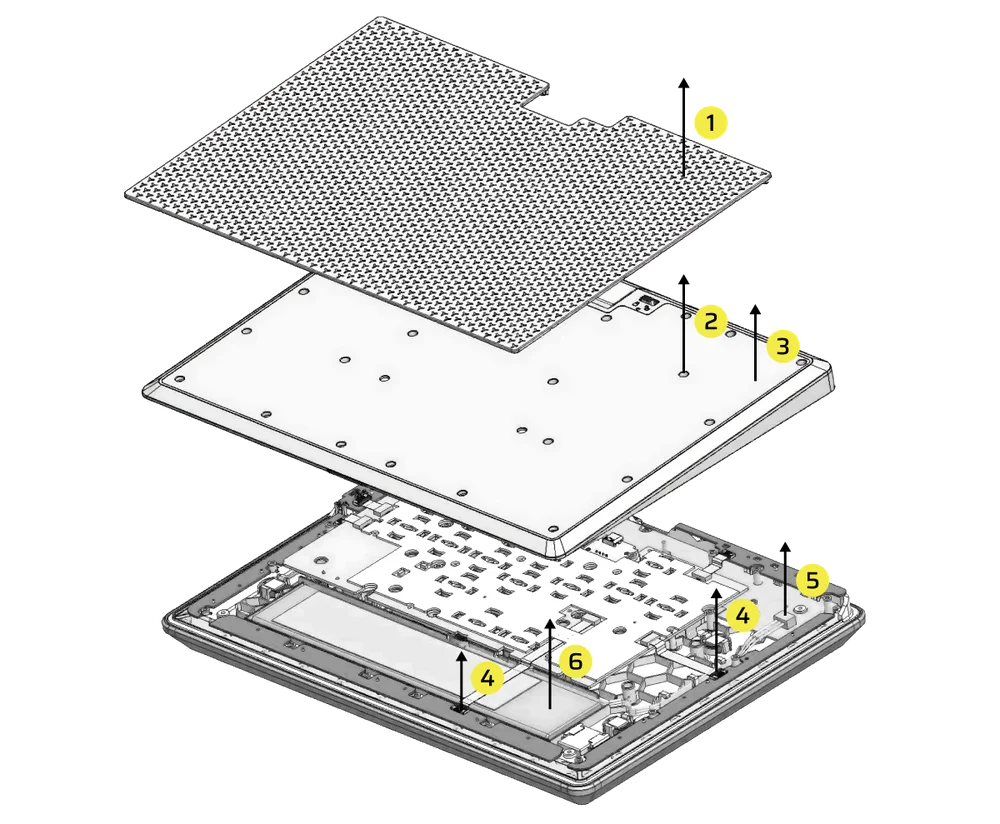
- Scoateți talpa de cauciuc
- Scoateți cele 25 de șuruburi ale capacului din spate
- Scoateți ansamblul capacului din spate
- Scoateți cele 2 conectori de cablu
- Scoateți conectorul bateriei
- Scoateți bateria
INFORMAȚII DESPRE BATERIE
- Număr de referință: GSP6545108
- Caracteristici tehnice: 3,7 V, 7500 mAh, 27,75 Wh
- Scanează codul QR pentru informații detaliate despre baterie
Controler
, model: RGP0180,
, specificații tehnice (tensiune/curent): 5 V  Dongle 1,5 A
Nr. de model: RGP0146
Caracteristici tehnice (tensiune/curent): 5 V 0,1 A
FCC ID: 2AAFM-RGP0180 (controler)
FCC ID: 2AAFM-RGP0146A (dongle)
IC: 10954A-RGP0180 (controler)
IC: 10954A-RGP0146 (dongle)
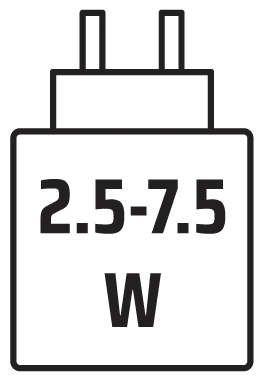
Puterea furnizată de încărcător trebuie să se încadreze între 2,5 wați (valoarea minimă necesară pentru echipamentul radio) și 7,5 wați (valoarea maximă), pentru a atinge viteza maximă de încărcare.
DREPTURI DE AUTOR/INFORMAȚII LEGALE
© 2025 CORSAIR MEMORY, Inc. Toate drepturile rezervate. CORSAIR și logo-ul cu pânzele sunt mărci înregistrate ale CORSAIR în Statele Unite și/sau în alte țări. Toate celelalte mărci comerciale sunt proprietatea deținătorilor respectivi. Produsul poate diferi ușor de cel prezentat în imagini.

CONȚINUT CONEX