MANUAL | GHID DE START RAPID
SABRE v2 PRO CF fără fir
MOUSE DE GAMING DIN FIBRĂ DE CARBON
Versiunea în limba engleză este disponibilă aici - English
Dacă aveți alte probleme, vă rugăm să contactați asistență pentru clienți
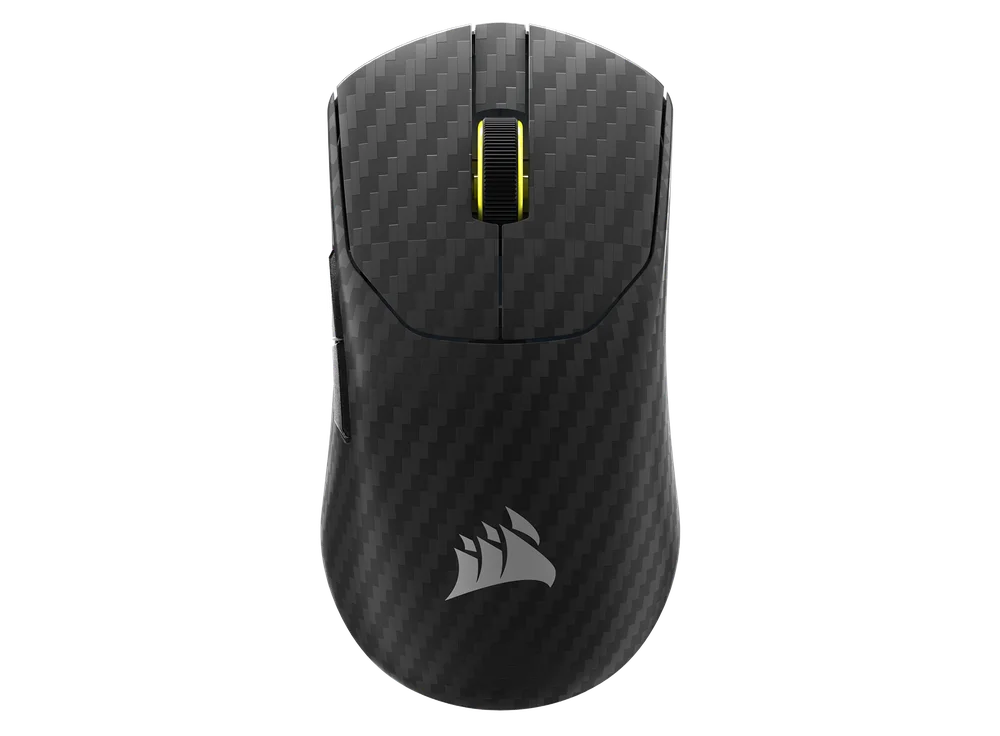
ÎNCĂRCAREA MOUSE-ULUI
IMPORTANT: SABRE v2 PRO WIRELESS CF trebuie să fie complet încărcat înainte de prima utilizare. Vă rugăm să actualizați firmware-ul prin intermediul CORSAIR WEB HUB pentru a beneficia de o experiență optimă.
Conectați mouse-ul la un port USB 2.0 sau 3.X disponibil pe computerul dumneavoastră folosind CABLUL USB DE ÎNCĂRCARE/TRANSFER DE DATE (L).
Luminile de sub BUTONUL DIN MIEZ / ROATA DE DERULARE (C) a mouse-ului se vor aprinde în funcție de starea bateriei și vor rămâne aprinse cu o lumină verde continuă atunci când încărcarea este finalizată.
CUM SĂ ÎȚI CUNOȘTI MOUSE-UL
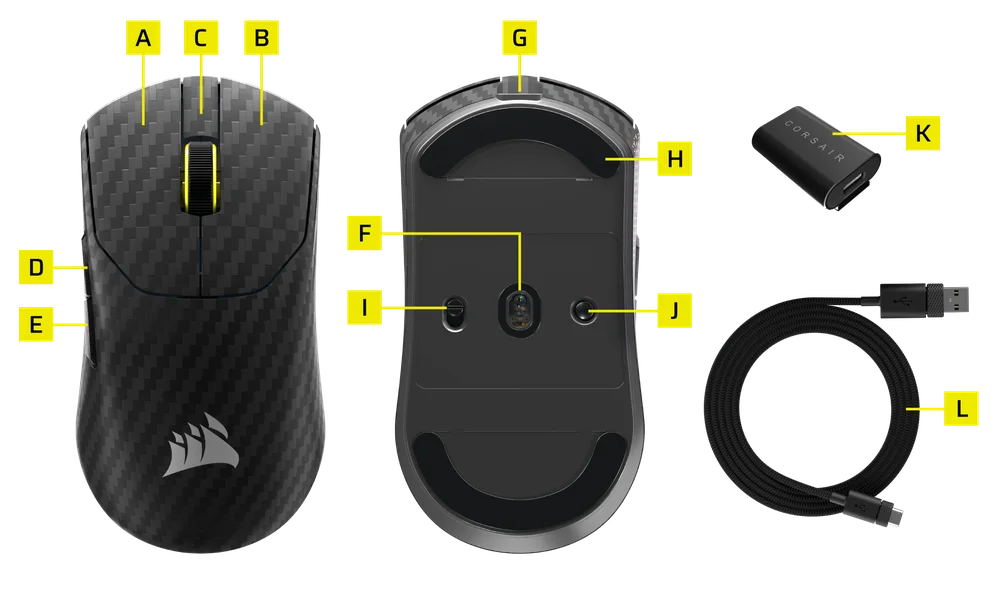
- BUTONUL STÂNG AL MOUSE-ULUI
- BUTONUL DREPT AL MOUSE-ULUI
- BUTONUL DIN MIEZ / ROȚA DE DERULARE
- BUTONUL „ÎNAINTE”
- BUTONUL ÎNAPOI
- SENSORUL OPTIC MARKSMAN
- PORT USB DE ÎNCĂRCARE / TRANSFER DE DATE
- Patine pentru șoareci din UPE 100% de calitate virgină
- COMUTATOR MOD ALIMENTARE / MOD FĂRĂ FIR
- BUTONUL DE ASOCIERE DPI ȘI BLUETOOTH (3 SEC)
- RECEPTOR USB FĂRĂ FIR
- CABLU USB DE ÎNCĂRCARE / TRANSFER DE DATE
CONFIGURAREA REȚELEI FĂRĂ FIR DE 2,4 GHz
- Conectați RECEPTORUL FĂRĂ FIR USB (K) la CABLUL DE ÎNCĂRCARE/TRANSFER DE DATE USB (L), apoi conectați celălalt capăt al cablului la un port USB 2.0 sau 3.x disponibil situat pe panoul frontal al computerului sau la un port USB din apropiere.
- Porniți mouse-ul comutând comutatorul POWER / WIRELESS MODE SWITCH (I) pe modul wireless de 2,4 GHz.
- Indicatorul LED situat sub butonul de clic mijlociu / rotița de derulare (C) va lumina verde continuu atunci când dispozitivul este conectat cu succes la receptor.
CONFIGURAREA BLUETOOTH
Tehnologia wireless Bluetooth este cea mai potrivită pentru sarcinile informatice de zi cu zi, pentru activități de productivitate și pentru aplicațiile de birou.
- Porniți procedura de asociere Bluetooth pe dispozitivul dvs. compatibil cu Bluetooth 4.0 sau o versiune ulterioară.
- Porniți mouse-ul comutând comutatorul POWER / WIRELESS MODE (I) pe Bluetooth.
- Indicatorul LED situat sub butonul de clic mijlociu / rotița de derulare (C) va clipi în albastru și va rămâne aprins continuu în albastru odată ce dispozitivul este conectat.
- Dacă dispozitivul de asociere Bluetooth trebuie asociat din nou sau schimbat, comutați mai întâi în modul Bluetooth. Țineți apăsat butonul DPI și de asociere Bluetooth (J) timp de 3 secunde sau până când indicatorul LED începe să clipească albastru pentru a intra în modul de asociere Bluetooth.
*SABRE v2 PRO WIRELESS CF poate fi asociat cu un singur dispozitiv. Dacă doriți să îl asociați cu un alt dispozitiv, vă rugăm să intrați în modul de reasociere pentru a iniția procesul de asociere.
PARCURGERE PRIN PROFILURILE DPI
Funcția de reglare a rezoluției DPI este disponibilă pentru o configurare rapidă.
- Apăsați o dată BUTONUL DPI ȘI DE ASOCIEREA BLUETOOTH (J) pentru a trece la următorul nivel DPI.
- La trecerea la nivelul DPI corespunzător, indicatorul luminos de pe rotița mouse-ului va clipi de 3 ori în culoarea corespunzătoare nivelului DPI, apoi se va stinge.
- Repetați pașii de mai sus pentru a trece la următorul nivel de DPI. Dispozitivul va parcurge cele 5 niveluri de DPI, după care va reveni la nivelul 1.
Configurațiile avansate sunt disponibile prin intermediul CORSAIR WEB HUB.

STARE ȘI INDICAȚII ALE MOUSE-ULUI
Starea conexiunii wireless și a bateriei sunt indicate prin intermediul luminilor situate sub butonul de clic mijlociu/rotița de derulare (C).
| STATUS DPI - PREDEFINIT | INDICATOR LED |
| ETAPA 1 - 400 | ROȘU |
| ETAPA 2 - 800 | ALBASTRU |
| ETAPA 3 - 1200 | VERDE |
| ETAPA 4 - 1600 | GALBEN |
| ETAPA 5 - 2000 | VIOLET |
| STARE BATERIE | INDICATOR LED |
| ÎNCĂRCAREA BATERIEI CÂND NIVELUL ESTE SCĂZUT | RESPIRAȚIE ROȘIE |
| ÎNCĂRCAREA BATERIEI LA NIVEL MEDIU | RESPIRAȚIE VERDE |
| BATERIE PLINĂ | VERDE UNIFORM |
| BATERIA ESTE LA LIMITA CAPACITĂȚII, ESTE NECESARĂ REÎNCĂRCAREA | RESPIRAȚIE ROȘIE |
GHID PAS CU PAS PENTRU CONFIGURAREA MOUSE-ULUI
Pasul 1 – Conectați dispozitivul SABRE v2
A. Conectați receptorul mouse-ului SABRE v2 PRO WIRELESS CF prin portul Type-C.
B. Asigurați-vă că comutatorul de alimentare de pe mouse este setat pe 2,4 GHz.
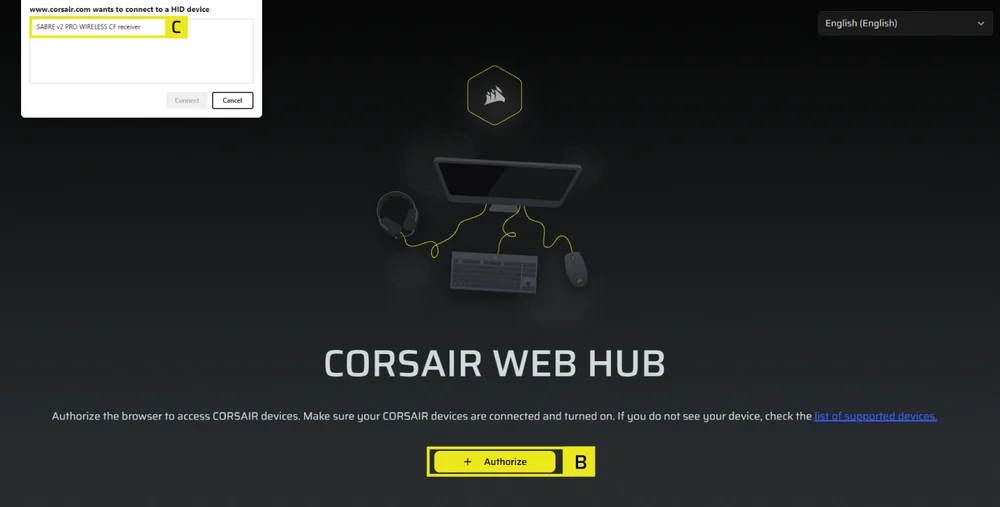
Pasul 2 – Deschideți CORSAIR WEB HUB și selectați mouse-ul
A. Accesați https://www.corsair.com/web-hub/index.html.
B. Faceți clic pe [Autorizare].
C. Alegeți receptorul SABRE v2 PRO WIRELESS CF.
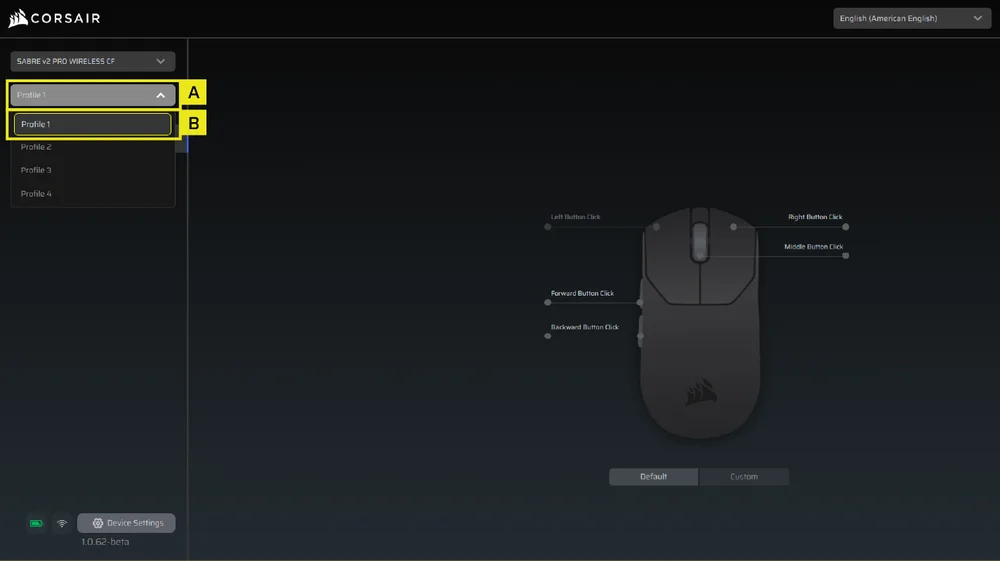
Pasul 3 – Creați sau selectați un profil
A. În colțul din stânga sus, deschideți meniul derulant al profilului.
B. Faceți clic pe profilul pe care doriți să îl editați (de exemplu: „Profil 1”).
C. Acest profil va stoca setările DPI și alocările butoanelor.
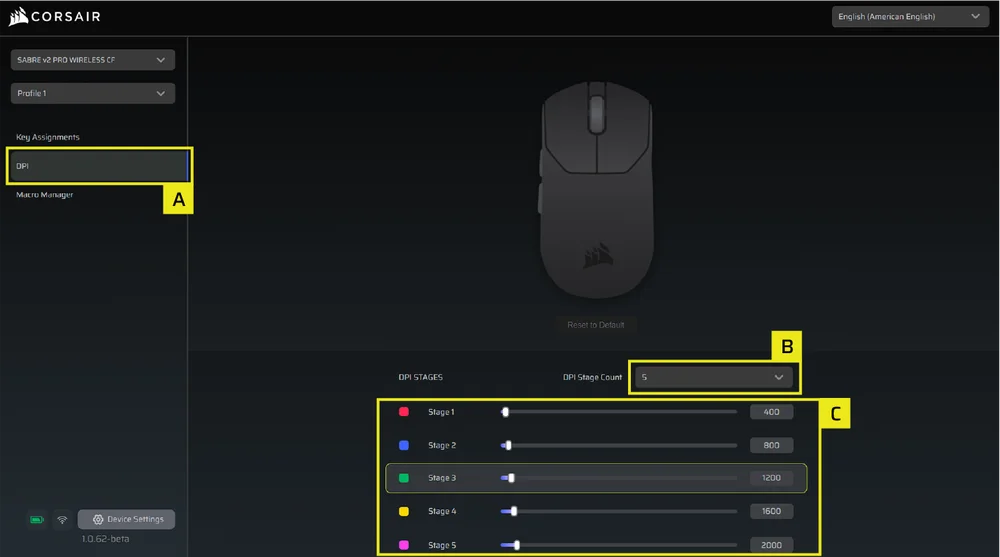
Pasul 4 – Configurarea nivelurilor DPI
A. Faceți clic pe [DPI] în bara laterală din stânga.
B. Alegeți numărul de niveluri DPI dorite (1–5).
C. Activați nivelurile DPI pe care doriți să le utilizați (de exemplu, 800 / 1200 / 1600).
DPI recomandat la pornire:
- Desktop/utilizare generală: 1200–1600 DPI
- Jocuri FPS: 800–1200 DPI
- MOBA/MMO: 1600–2400 DPI.
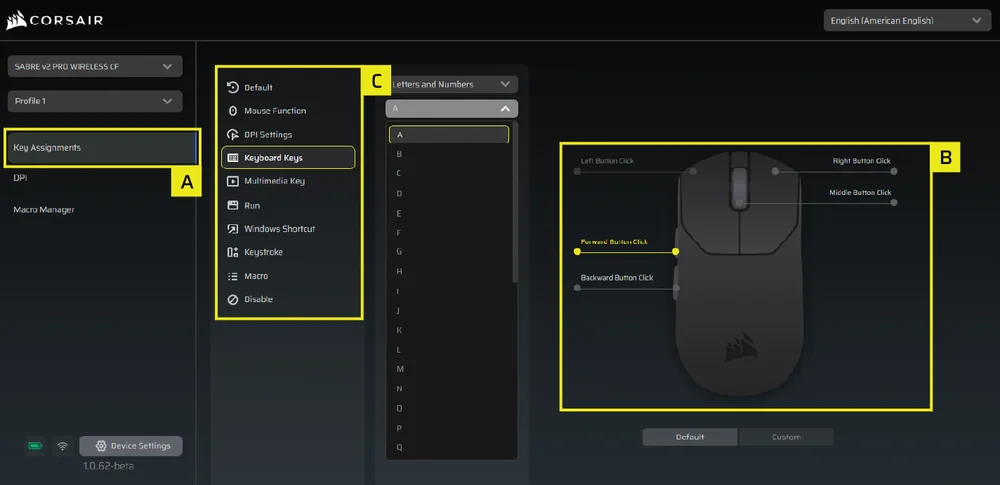
Pasul 5 – Reconfigurarea butoanelor (Acțiuni / Atribuirea tastelor)
A. Faceți clic pe [Configurare taste] în bara laterală din stânga.
B. Faceți clic pe butonul din diagrama mouse-ului pe care doriți să îl modificați.
C. Alegeți tipul de configurare:
- Tastatură (reconfigurează pe o tastă precum R, E sau P)
- Macro (înregistrarea mai multor apăsări de taste)
- etc.
D. Confirmați atribuirea și testați-o.
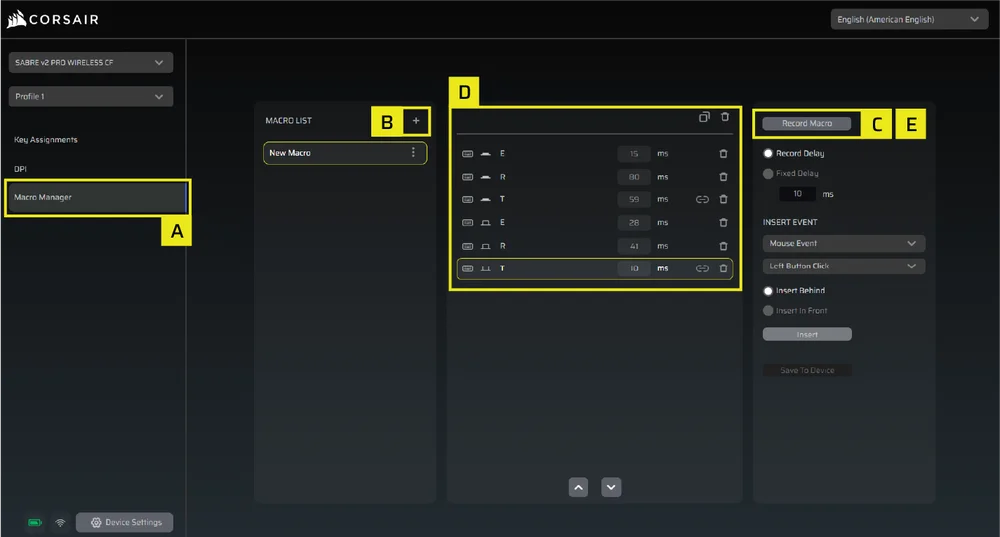
Pasul 6 – Configurarea Macro Manager
A. Faceți clic pe [Manager macro] în bara laterală din stânga.
B. Faceți clic pe [ + ] pentru a adăuga o nouă macro (de exemplu: „Profil 1”).
C. Faceți clic pe [Înregistrare macro] în partea dreaptă.
D. Apăsați tastele de pe tastatură sau efectuați acțiunile cu mouse-ul pe care doriți să le înregistrați.
E. Faceți clic din nou pe [Înregistrare macro] pentru a opri înregistrarea.
Pasul 7 – Introduceți manual evenimentele macro
A. Faceți clic pe [Manager macro] în bara laterală din stânga.
B. Alegeți macro-ul pe care doriți să îl editați.
C. În bara de inserare a evenimentelor, alegeți dacă doriți să inserați evenimente de tastatură sau de mouse folosind primul meniu derulant.
D. Alegeți evenimentul pe care doriți să îl inserați folosind al doilea meniu derulant.
E. Faceți clic pe [Inserare].
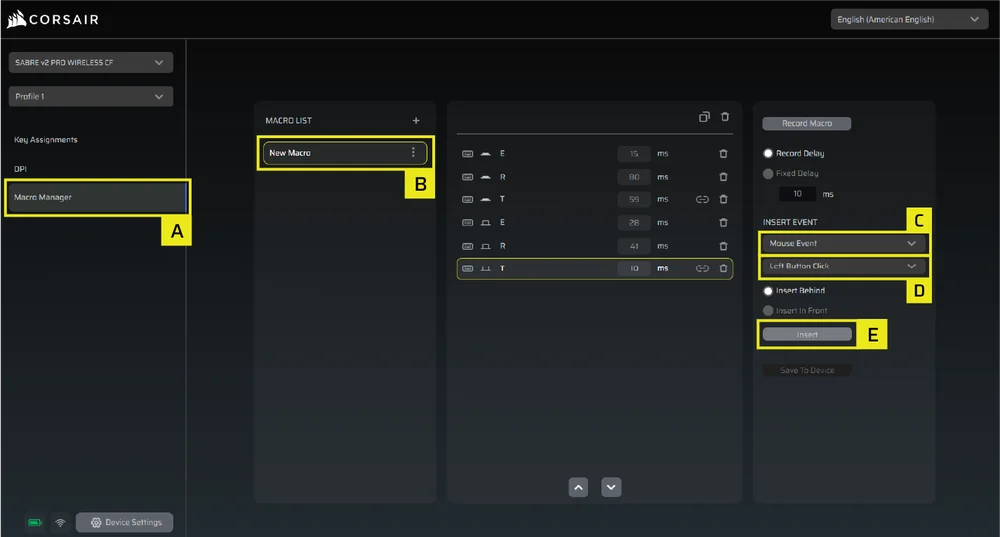
Pasul 8 – Configurarea dispozitivului
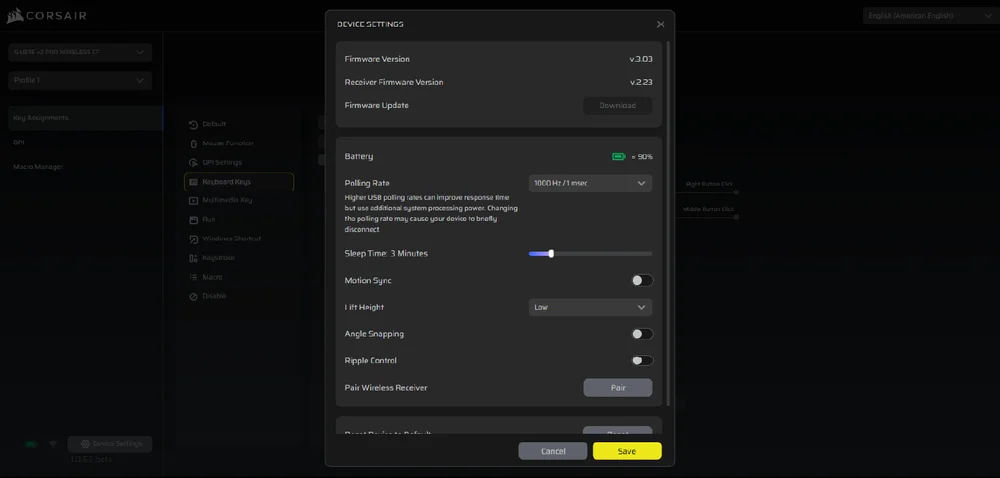
A. Faceți clic pe „Setări dispozitiv” în partea din stânga jos.
B. Setări dispozitiv.
- Baterie – Conectivitate wireless sau starea bateriei.

- Frecvența de interogare – Selectați opțiunea [1000 Hz / 1 ms] pentru o frecvență de interogare de 1000 Hz.

- Ora de culcare – Reglați durata după ce mouse-ul intră în modul de repaus.

- Motion Sync – Sincronizează datele privind mișcarea mouse-ului cu intervalele de interogare USB pentru a asigura o urmărire mai consistentă și mai stabilă a cursorului.
- Înălțimea de ridicare – Înălțimea de oprire a senzorului.

- Aliniere la unghi – Netezește mișcarea mouse-ului prin predicția senzorului atunci când funcția este activată.
- Controlul prin undă – Netezește mișcarea mouse-ului prin filtrarea micilor oscilații neintenționate, cu prețul unei precizii ușor reduse a datelor brute de intrare.
- Receptor wireless Pair – Conectați sau resetați receptorul wireless.
- Resetare la setările implicite ale dispozitivului – Resetează-ți Saber v2 Pro Ultralight fără fir la setarea implicită.
Pasul 9 – Actualizați firmware-ul
A. Faceți clic pe [Setări dispozitiv] în partea stângă jos.
B. Faceți clic pe [Verificați actualizările] pentru a vă asigura că utilizați cea mai recentă versiune de firmware a dispozitivului.
C. Urmați pașii pentru a actualiza firmware-ul, dacă este necesar.
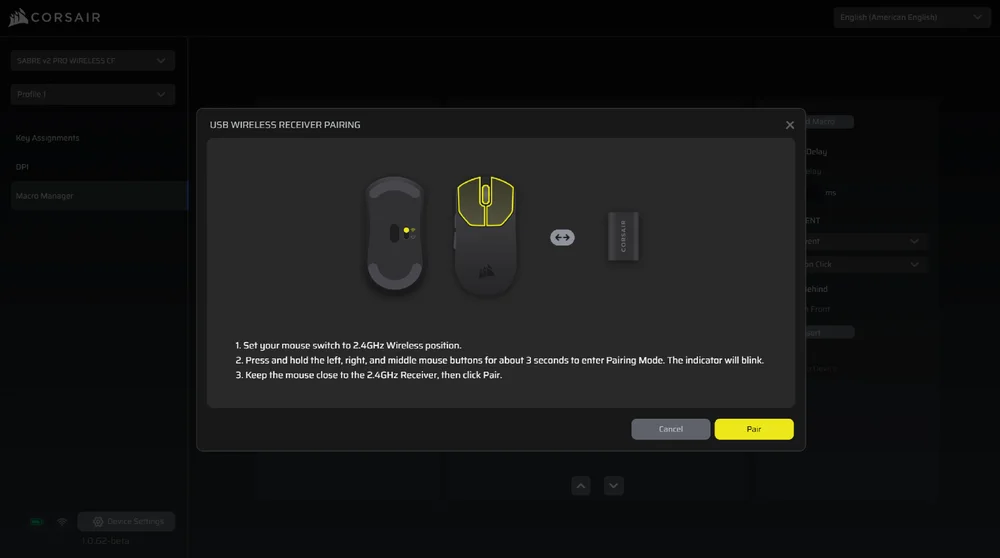
Pasul 10 – Conectați receptorul wireless
A. Faceți clic pe [Setări dispozitiv] în partea din stânga jos.
B. Faceți clic pe [Asociere].
C. Urmați pașii pentru a asocia receptorul USB.
INFORMAȚII PRIVIND DESMONTAREA BATERIEI
Acest produs utilizează o baterie reîncărcabilă, iar în cazul în care produsul este scos din uz în vederea eliminării și reciclării, trebuie respectate instrucțiunile de siguranță. Pentru a scoate bateria în condiții de siguranță în vederea eliminării și reciclării, urmați pașii numerotați, conform schemelor de mai jos.
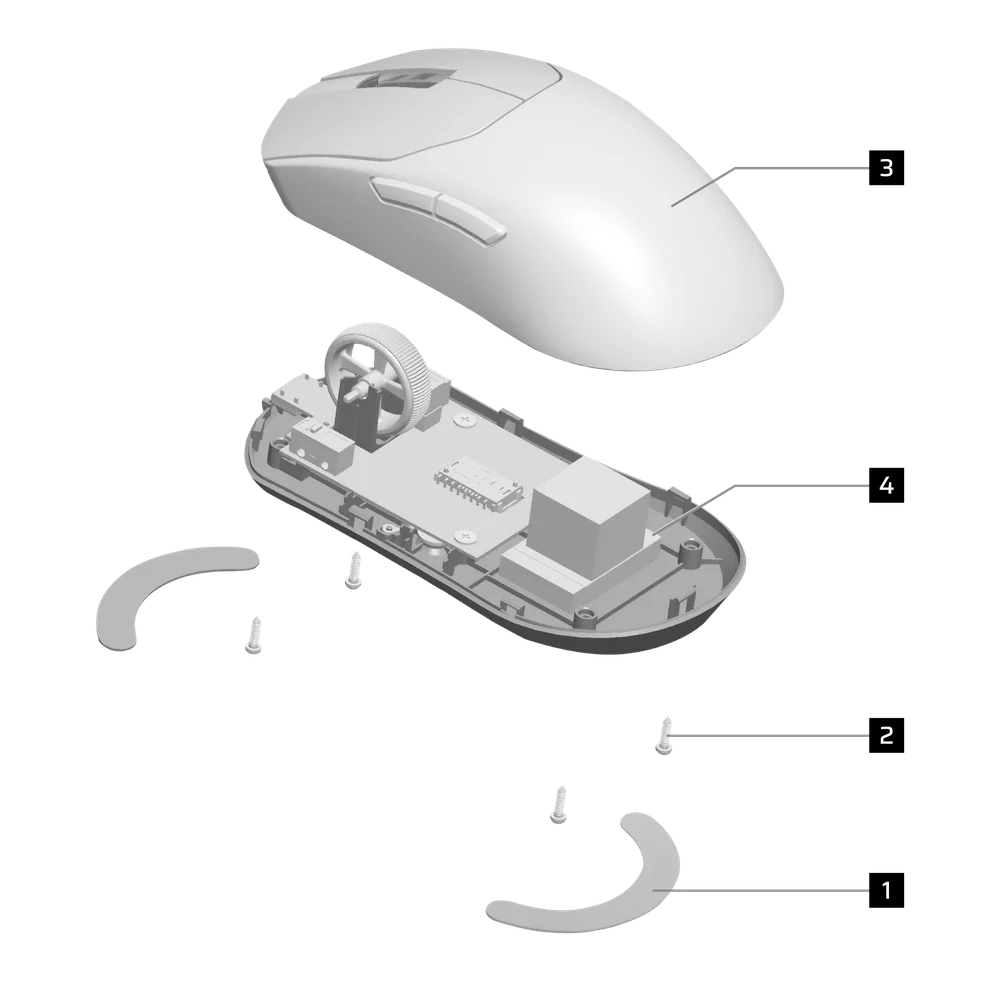
- Scoateți picioarele (x2)
- Scoateți cele 4 șuruburi
- Demontarea subansamblului carenajului superior
- Scoateți bateria
CORSAIR MEMORY, Inc. încurajează clienții să recicleze echipamentele electronice uzate și bateriile reîncărcabile în conformitate cu legile și reglementările locale.
INFORMAȚII DESPRE BATERIE
- M/N (model): TW 602030
- Capacitate (capacitatea bateriei): 3,7 V, 300 mAh, 1,11 Wh
- Scanează codul QR pentru detalii despre baterie

Mouse
M/N (model): RGP0184
Parametri tehnici (tensiune/curent): 5 V  Receptor
, 400 mA
Model: RGP0185
Caracteristici tehnice (tensiune/curent): 5 V 50 mA
FCC ID: 2AAFM-RGP0184 (mouse)
FCC ID: 2AAFM-RGP0185 (receptor)
IC: 10954A-RGP0184 (mouse)
IC: 10954A-RGP0185 (receptor)

Puterea furnizată de încărcător trebuie să se încadreze între 2,5 wați (valoarea minimă necesară pentru echipamentul radio) și 10 wați (valoarea maximă), pentru a atinge viteza maximă de încărcare.
Pentru performanțe optime, se recomandă încărcarea la temperaturi cuprinse între 5 °C și 40 °C (41 °F și 104 °F).
DREPTURI DE AUTOR/INFORMAȚII LEGALE
©2026 CORSAIR MEMORY, Inc. Toate drepturile rezervate. CORSAIR și logo-ul cu pânzele sunt mărci înregistrate ale CORSAIR în Statele Unite și/sau în alte țări. Toate celelalte mărci comerciale sunt proprietatea deținătorilor respectivi. Produsul poate diferi ușor de cel prezentat în imagini.

CONȚINUT CONEX