BLOG
What is Ambient Occlusion in Games?
Many games strive for realism. Developers want to create worlds that you believe exist. A fundamental part of that is getting the lighting just right, something that modern games have largely sorted, although getting that last bit perfect still takes a lot of energy and graphics card processing cycles. We’re talking about techniques like ray tracing, global illumination, and shading. Ambient Occlusion is one of these techniques, but what is it? Let us explain.

What is Ambient Occlusion?
Ambient Occlusion is a rendering technique that calculates the lighting intensity for each object based on ambient lighting. Ultimately, it makes for a more realistic image, one where objects look connected to the world they inhabit rather than floating above it. It considers factors such as light sources, the physical environment, and object placement. It evaluates the entire scene, not just local information, and adds subtle contact shadows where geometry meets.
Ambient Occlusion doesn’t necessarily jump out at you like a ray-traced reflection in a puddle, but it adds a great deal of believability to a scene when you’re moving around and observing objects. Think of the subtle lighting effect that makes ceiling corners appear darker than the centre of the room. Or a warehouse stacked with crates that has proper shadows instead of uniform lighting everywhere. When tuned well, AO deepens corners, creases, and small gaps, which helps objects feel grounded.
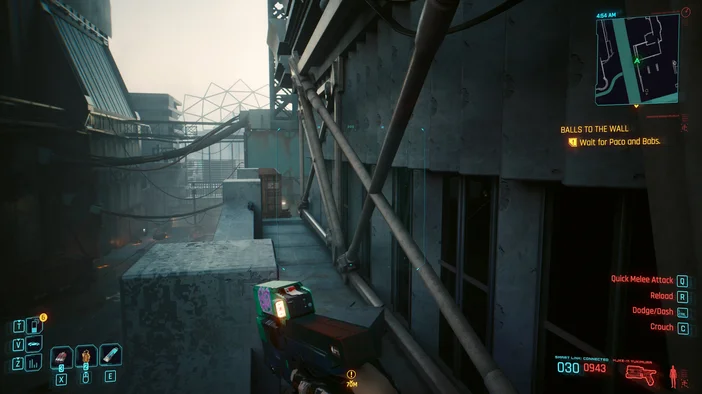
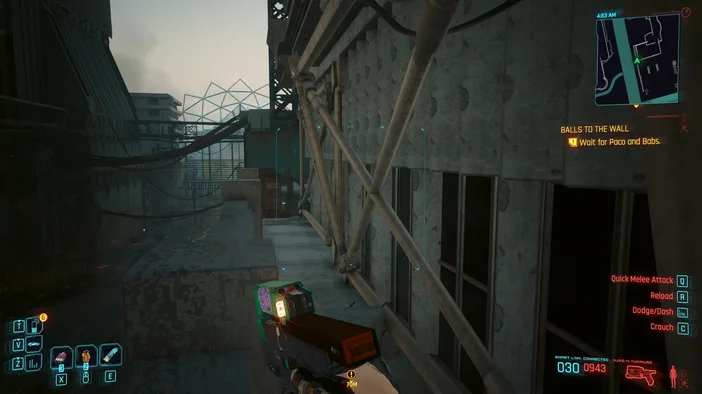
What are the different types of Ambient Occlusion?
As in most graphics rendering techniques, there are multiple implementations of Ambient Occlusion for developers to choose from. This means you’ll see several options in your graphics settings and need to experiment to see what difference they make. Here are the main ones:
SSAO: Screen Space Ambient Occlusion
Calculates occlusion based on what’s visible on the screen, making it fast and widely supported. It’s the most basic AO method and works on both AMD and Nvidia cards. Quality can vary with camera distance and can introduce haloing around thin objects.
HBAO: Horizon Based Ambient Occlusion
Developed by Nvidia, HBAO improves accuracy by considering horizon lines for better shadowing in crevices and corners. Many games implement similar horizon‑based techniques that run on any modern GPU, so it is not strictly hardware‑exclusive.
HDAO: High Definition Ambient Occlusion
AMD’s answer to HBAO, offering higher precision and better depth handling. Again, expect comparable non‑vendor‑locked variants in many engines.
GTAO and CACAO
Newer screen‑space methods that aim for higher quality at reasonable cost. GTAO (Ground Truth Ambient Occlusion) targets more physically plausible results, while CACAO focuses on performance and stability. You may see these named explicitly in some settings menus.
RTAO: Ray Traced Ambient Occlusion
Uses ray tracing for more physically accurate light occlusion, delivering the most realistic results but at a heavy performance cost. Requires a GPU with hardware ray tracing (Nvidia RTX, AMD RDNA2 or newer, Intel Arc).

Should you turn Ambient Occlusion on?
If you want a believable, immersive world, then yes, Ambient Occlusion makes a noticeable difference and is a must have in certain games. First‑person titles that emphasize exploration particularly benefit from the technique.
For competitive shooters, consider performance and visibility first, since strong AO can deepen shadows and make it harder to see targets.
Practical tuning tips:
- Start with SSAO on Low then raise quality until frame rate drops.
- Use lower AO radius to avoid over‑darkening large areas, and adjust intensity so corners deepen without crushing mid-tones.
- If you do enable RTAO, pair it with a frame generation likes or upscaler modes like DLSS to offset the performance cost. Test in dense scenes.
Watch for pitfalls:
- Double‑darkening can occur if a game bakes AO into textures or lightmaps and applies real‑time AO on top of that. If interiors look sooty or faces look dirty, reduce AO intensity or disable the extra pass.
- Screen‑space methods can produce halos at object edges, flicker with temporal anti‑aliasing, or fade in the distance. Switching to a higher quality preset or a newer method like GTAO can help.
Turn AO on if you can hold a stable frame rate, prioritize higher quality in slower paced or cinematic games, and step down to a simpler model such as SSAO when every frame counts.
JOIN OUR OFFICIAL CORSAIR COMMUNITIES
Join our official CORSAIR Communities! Whether you're new or old to PC Building, have questions about our products, or want to chat the latest PC, tech, and gaming trends, our community is the place for you.