BLOG
What is Intel APO?
Intel APO (short for Application Optimization) is Intel’s per‑title performance tuning that steers how games use your CPU in real time. Instead of overclocking, APO optimizes thread scheduling on Intel’s hybrid processors (P‑cores/E‑cores) so supported games get more of the “right” cores when they need them.

(Image credit: Future / John Loeffler)
How does Intel APO work?
APO lives inside Intel’s Dynamic Tuning Technology (DTT). On a compatible system, DTT runs in the background and APO applies game‑specific profiles to guide Windows’ scheduler prioritizing critical game threads and shuffling less important work to other cores. It doesn’t change frequencies or overclocking settings. It’s about smarter scheduling, not higher clocks.
What do I need to use it?
- Windows 11 (Windows 10 isn’t supported).
- Motherboard/BIOS support for Intel DTT and the Intel DTT driver installed. Many newer boards ship with the needed BIOS options; on some you may enable DTT manually.
- A supported Intel CPU. Intel’s “verified” list includes 14th‑Gen K‑series (e.g., i9‑14900K/KF, i7‑14700K/KF, i5‑14600K/KF), Core Ultra 200S desktop parts (e.g., Ultra 9 285K), and select HX mobile chips.
What is “Advanced Mode”?
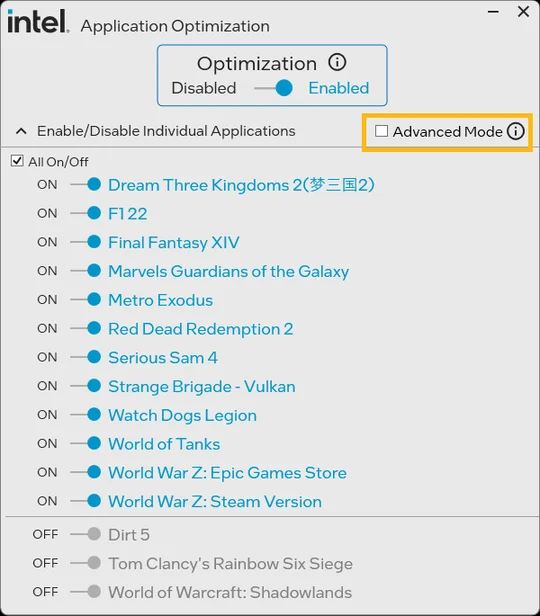
If your processor isn’t on the verified list (but has at least six P‑cores), APO’s Advanced Mode can widen support. You’ll need Intel DTT v11405 or newer, and you may have to toggle individual titles on in the UI. Gains aren’t guaranteed and can vary by system; you can always turn a profile off if it isn’t helping.
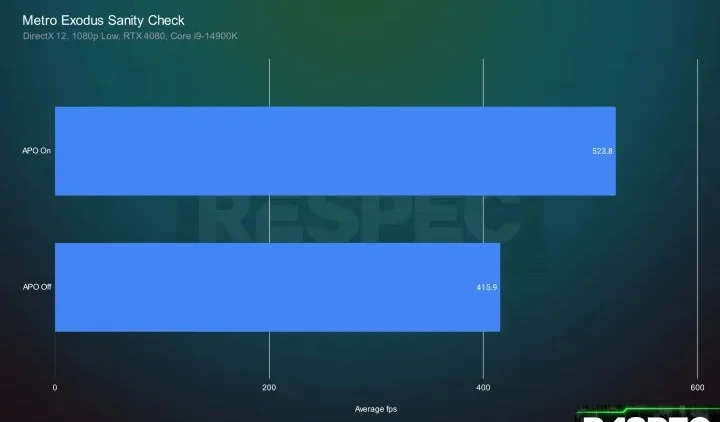
Benchmarks done by Respec
Which games does Intel APO Support?
The catalog changes over time. Intel maintains a living List of Games and adds new profiles via updates. Check that list for your titles and platform notes.
Recent update: Intel added support for 15 more games (including Metro Exodus Enhanced Edition, Dyson Sphere Program, Cities: Skylines, God of War, and EA Sports FC 24). Intel cites up to ~14% uplift in some cases, with improved 1% lows in certain titles. Results depend on your exact CPU, drivers, and settings.
How do I install or turn it on?
- Update BIOS and make sure Intel DTT is enabled on your board (some newer boards enable it by default).
- Install the Intel DTT driver from your system/motherboard vendor.
- (Optional) Install the Intel Application Optimization app from the Microsoft Store to see detected games and toggle profiles globally or per‑game. The UI is optional the core optimization runs with DTT.
How do I know it’s working?
On supported systems, APO is enabled by default with DTT; it runs quietly in the background. The Microsoft Store app lets you confirm which games are optimized and flip profiles on/off if needed.
Is Intel APO worth it?
If you have a supported CPU and Windows 11, yes turn it on. It’s free, reversible, and designed to improve supported titles’ frame rates and frame consistency. Just remember: gains vary by game, and Advanced Mode can occasionally reduce performance so use the app to disable a profile if a title doesn’t benefit on your setup.
Does APO work on Windows 10?
No. Windows 11 only.
Is this the same as turning off E‑cores or overclocking?
No. APO doesn’t change clocks or disable cores it instructs how threads are scheduled so critical work lands on the most suitable cores.
Where can I see the current game list?
Do I have to run the Microsoft Store app?
The app is optional (handy for per‑game toggles). The underlying optimization runs via DTT.
JOIN OUR OFFICIAL CORSAIR COMMUNITIES
Join our official CORSAIR Communities! Whether you're new or old to PC Building, have questions about our products, or want to chat the latest PC, tech, and gaming trends, our community is the place for you.