CORSAIR is growing its keyboard lineup with the SKIFF 100 and SKIFF 100 PLUS, two new membrane gaming keyboards built for everyday gamers who want reliable, responsive performance. Together, they serve as the successor to CORSAIR's K55 series, carrying forward the features that have defined that lineup while building in newer upgrades on top. To see how that plays out, this comparison looks at two keyboards from the K55 series: K55 CORE and K55 RGB PRO. Across all four keyboards, the shared goal is the same: dependable, full-sized gaming keyboards built for daily use. Here's a look at what sets SKIFF 100 and SKIFF 100 PLUS apart from K55 CORE and K55 RGB PRO before them.
SKIFF 100 vs SKIFF 100 Plus vs K55 Core: Specs
| SKIFF 100 | SKIFF 100 PLUS | K55 CORE | K55 RGB Pro | |
| Form Factor | Full Size | Extended Full Size | ||
| Switch Type | Membrane/Rubber Dome | |||
| Backlighting | 10-Zone RGB | 5-Zone RGB | ||
| Media Control | Rotary Dial | 4 Dedicated Media Buttons | 7 Dedicated Media Buttons | |
| G-Keys | None | 6 Keys | None | 6, Elgato Stream Deck Integration |
| Wrist Rest | Detachable, Soft Touch | None | Detachable, Soft Touch | |
| Dust & Water Resistance | IP53 Rated | 300mL spill resistance | IP42 Rated | |
| Connectivity | Wired USB | |||
| Polling Rate | 1,000 Hz | |||
| Compatibility | PC, Mac, Xbox One, Xbox Series X|S, PS4, PS5 | PC, Mac | ||
| Software | Web Hub, iCUE (Coming Soon) | iCUE | ||
| Warranty | 2 Years | |||
Rotary Dial vs Dedicated Keys
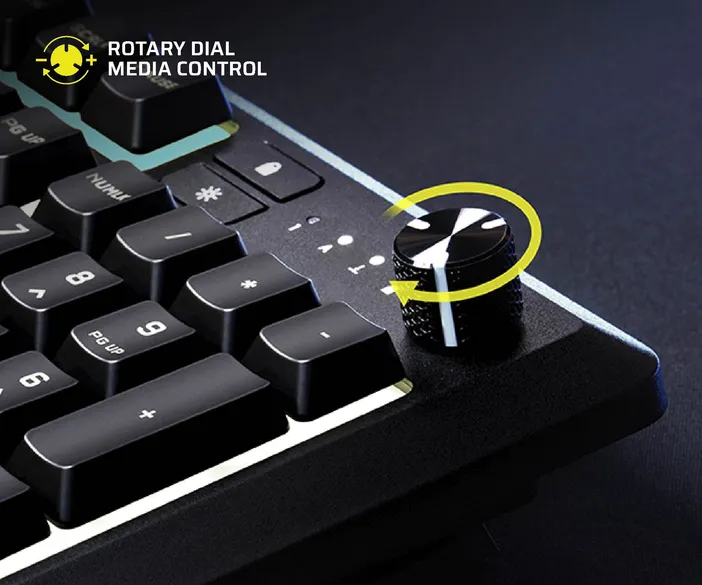
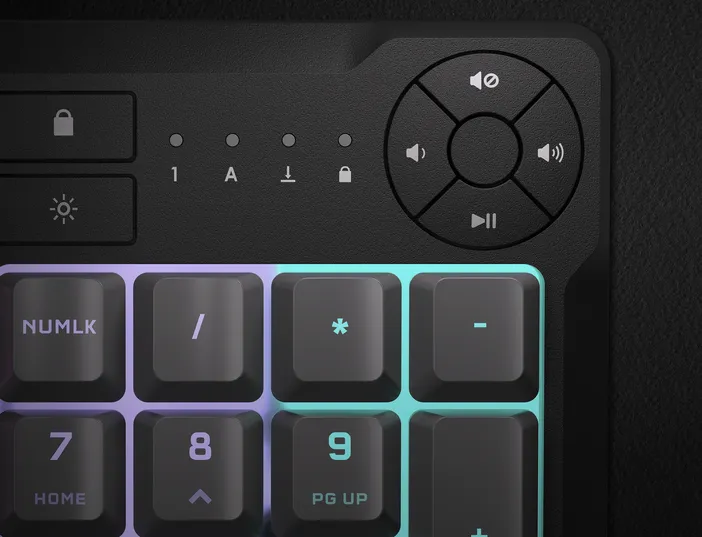
The most immediate difference between the two lines shows up at the top-right corner of the keyboard. Both SKIFF 100 and SKIFF 100 PLUS use a rotary dial that gives users full control over volume and media playback directly from the keyboard. In Volume Mode, rotating the dial adjusts volume, and pressing it mutes or unmutes. Hold FN and the dial switches to Media Mode, where rotating it skips to the next or previous track, and pressing it plays or pauses.
K55 CORE and K55 RGB PRO both take a different approach, relying on dedicated keys instead of a dial. K55 CORE uses four dedicated media keys and two function keys, while K55 RGB PRO includes seven dedicated media keys covering play/pause, stop, next track, last track, mute, and volume up and down. All methods get the job done, but the rotary dial packs volume and media playback into a single control point.
Macro Keys
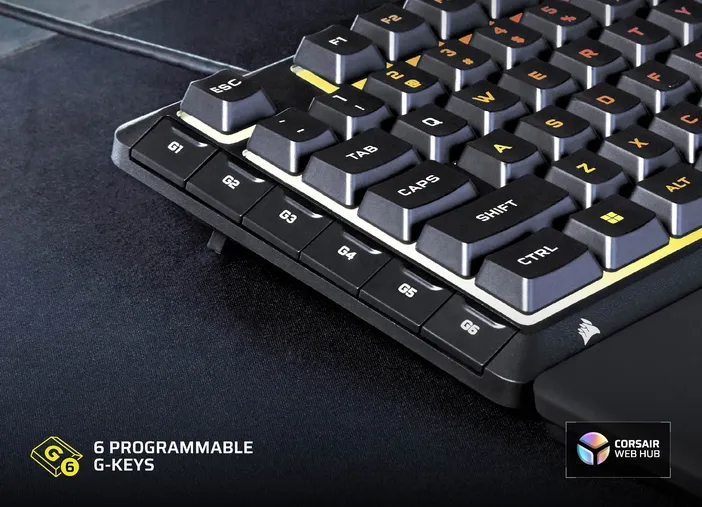
This is where SKIFF 100 PLUS carries on a feature that's been part of K55 series' identity. K55 RGB PRO includes six dedicated macro keys with Elgato Stream Deck software integration, and SKIFF 100 PLUS continues that idea with six dedicated G-keys of its own, letting users record and assign custom macros without giving up any of the keyboard's primary keys.
Neither SKIFF 100 nor K55 CORE has dedicated macro keys. SKIFF 100 still supports macro recording and remapping, but macros must be assigned to a regular key, which means that key loses its default function in the process. For anyone who wants dedicated macro keys, SKIFF 100 PLUS picks up where K55 RGB PRO left off.
IP53 vs IP42 vs Spill Resistance
Durability against everyday accidents is a shared priority across all four keyboards, but each one handles it a little differently. SKIFF 100 and SKIFF 100 PLUS carry an IP53 rating, an upgrade over K55 RGB PRO's IP42 rating. The first digit covers dust protection: IP42's 4 blocks particles larger than 1mm, while IP53's 5 blocks dust more thoroughly, preventing buildup that could interfere with performance over time. The second digit covers water protection: IP42's 2 protects against vertically falling drops, while IP53's 3 protects against water sprayed at up to a 60-degree angle. It's worth noting that none of these keyboards are waterproof, the ratings protect against accidental splashes, not submersion.
K55 CORE instead carries a 300mL spill-resistance claim. This is a volume-based claim rather than a certified ingress-protection rating like IP42 or IP53, so it isn't tested the same way, even though it's designed to survive the occasional spill.
Detachable Wrist Rest
The detachable rest is another feature carried over from the K55 series. K55 RGB PRO ships with a soft rubber palm rest with a textured surface to keep hands from slipping. SKIFF 100 and SKIFF 100 PLUS carry the concept forward with a detachable, soft-touch wrist rest and one-stage tilt legs. The wrist rest offers added comfort during long typing or gaming sessions and can snap on or off depending on whether users want the extra support or a smaller footprint, while the tilt legs let users adjust the keyboard angle to find the most comfortable typing position. K55 CORE is the outlier within the K55 series here, as it does not include a wrist rest at all.
Software & Platform Support
At launch, SKIFF 100 and SKIFF 100 PLUS are configured through CORSAIR Web Hub, a browser-based tool that doesn't require a software to download, with CORSAIR iCUE support arriving post-launch. K55 RGB Pro and K55 CORE is managed through CORSAIR iCUE, with the K55 RGB PRO also supporting Elgato Stream Deck software for streaming commands.
Platform support also differs. SKIFF 100 and SKIFF 100 PLUS are compatible with PC, Mac, Xbox One, Xbox Series X|S, PS4, and PS5, making either one a viable option for gamers who move between a PC and a console. K55 CORE and K55 RGB PRO are both limited to PC and Mac.
Which One Should You Get?
Skiff 100
Skiff 100 Plus
K55 RGB Pro
K55 CORE
Across the four keyboards, the differences come down to a handful of features. K55 RGB PRO relies on dedicated media hotkeys, six macro keys with Elgato Stream Deck integration, a soft rubber palm rest, and an IP42 rating. K55 CORE takes a simpler approach, with dedicated media and function keys, no macro keys, no wrist rest, and a spill-resistance claim rather than a certified IP rating. As successors to the K55 series, SKIFF 100 and SKIFF 100 PLUS build on those same foundations, adding a rotary dial for volume and media playback, a detachable wrist rest, an IP53 rating, and console compatibility, with SKIFF 100 PLUS carrying the macro key concept forward through six dedicated G-keys.
All four are well suited to any setup, whether that's a dedicated gaming desk or a shared workspace that sees both typing and gaming. K55 CORE covers the fundamentals of a reliable gaming keyboard, K55 RGB PRO adds macro keys and a palm rest on top of that, and SKIFF 100 and SKIFF 100 PLUS carry the K55 series forward, adding the rotary dial, wrist rest, IP53 rating, and broader platform support that make daily use more comfortable and more capable.
产品注册
Stay up to date with CORSAIR. Get our latest News, Guides, and Product Updates in your Google feeds.
Add CORSAIR as a preferred sourceWas this article helpful?
Feedback received
Thanks for helping us improve this article.
JOIN OUR OFFICIAL CORSAIR COMMUNITIES
Join our official CORSAIR Communities! Whether you're new or old to PC Building, have questions about our products, or want to chat about the latest PC, tech, and gaming trends, our community is the place for you.