BLOG
What is an Uninterruptable Power Supply (UPS)?
An Uninterruptable Power Supply (UPS) is a device that is used to provide power to your devices when there is a power outage. It’s essentially a giant battery that you connect all your gear to so that when the power goes out its battery can power your equipment for a short period so you can save your files and shutdown your PC gracefully to prevent hardware damage.
The Biggest Benefit of a UPS
UPS devices all contain a big battery so they can provide power to connected devices when the power goes out. This means you can hook up your PC as well as your modem, router, and networking devices to them so if the power goes out not only do you have time to save your files, but you could still have working Internet for a little while too. It’s essentially an insurance policy for your files and hardware, as unexpected shutdowns can wreak havoc on CPUs, motherboards, power supplies, and other PC gear.
How Long Will a UPS Last Without Power?
That depends on the size of the UPS battery, how many devices you have connected to it, and how much power they are drawing. If you’re gaming at 4K on an RTX 5090 and running it off a UPS, good luck getting more than a minute or two, but generally speaking you can expect a few minutes or up to 10-20 minutes with a light load on the unit. The most important function they serve is letting you shut your gear off safely instead of having power be cut unexpectedly, so you really only need a few minutes of battery runtime for it to work as intended. It's not designed to let you run all your gear like normal during a power outage.
What else dos a UPS do?
In addition to offering auxiliary power via its batteries, a UPS can also help protect connected devices from power fluctuations and voltage spikes as well, also known as a "surge protector." Most of the UPS models available today double also surge protectors too, so they include circuitry that can absorb power spikes, and they use the battery to provide power if incoming voltage drops too much.
Power comes out of the wall socket and into the UPS, then goes to your devices, so it acts as a filter for the power it sends to your devices, which can be very helpful in some future scenario where lighting strikes near your house or there’s a power surge for some reason. Most UPS devices will feature two rows of connectors: one for battery and surge protection, and one row just for surge protection.
What Features Do I Need in a UPS?
The main feature you should look for is enough battery-protected plugs for the devices you want to connect, so if you have a PC, router, modem, and a NAS, you just need four connections, which is very common even on basic UPS devices. It’s much trickier if you need more than five connections as you’d have to buy a bigger device which will cost a lot more money and be physically larger as well.
Some UPS devices also have USB charging ports for your devices, which can be handy since it’s usually near your desk. This is likely not a must-have, but nice-to-have for most people.
Some UPS devices will also offer an LCD display to show the current battery level and run-time allowed, which is very useful when you're trying to figure out if you have enough time to complete a file before you shut down your computer.
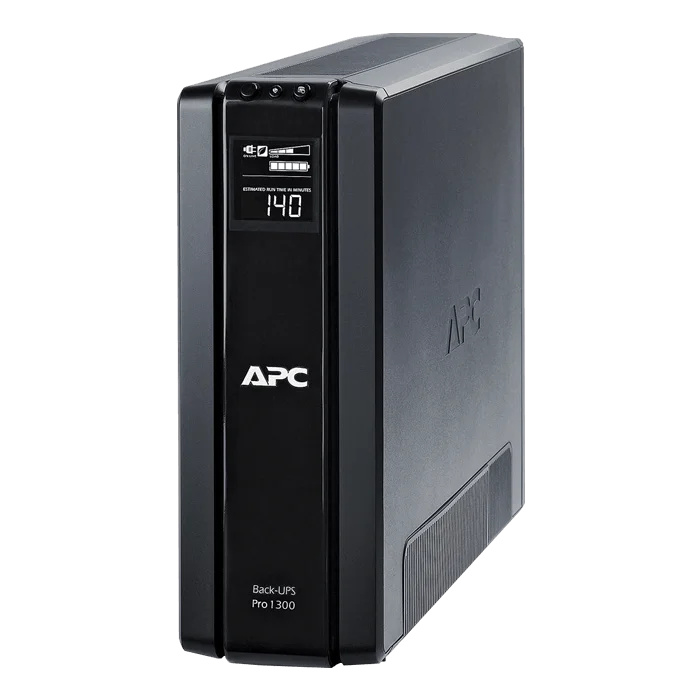
Some UPS devices will indicate the current run-time in minutes, which is very helpful in the event of a power outage.
The Types of UPS
Generally speaking a UPS will have a wattage rating for the battery, so if you want to connect more devices, or run it longer during a power outage, a bigger number is better. In this scenario just think about the wattage of your power supply (650w, 850w, 1000w, etc) and how much power your computer and devices consume, and plan accordingly.
UPS devices are also distinguished by being either Pure Sine Wave or Simulated/Modified Sine Wave, and both types are compatible with CORSAIR power supplies. A Pure Sine Wave UPS is more sophisticated than one that modifies the sine wave, as it is able to send a steady flow of power to connected devices through advanced circuitry. A lower-end model will offer a simulated sine wave, which offers a stepped wave form instead of a smooth one, which might cause issues on high-end devices that are more sensitive, but for CORSAIR power supplies, both types are fine.
What is the Downside to a UPS?
There aren't major downsides aside from cost. You’ll be paying a decent amount of money for something you may never use, so it’s up to you to decide if the peace of mind is worth it. The author of this article has been using PCs his entire life — 25 years now — and never had a UPS and never had any issues. That said, it’s not hard to see the benefits of having one just in case, and for regions with spotty or unreliable power it’s likely a must-have item. For some it’ll totally be worth it, and for others, it’s likely just an optional extravagance.
What Devices Should I Avoid Connecting to a UPS?
Generally speaking, high-wattage items such as space heaters, laser printers, paper shredders, refrigerators, and vacuums are beyond the spec of your typical UPS and will not only void the UPS warranty, but they could also damage it as well. That said, we do like the idea of using a UPS with a refrigerator, because what else are you going to do when the power goes out other than eat?! Note that we are joking, do not plug your refrigerator into a UPS (hello legal team).
JOIN OUR OFFICIAL CORSAIR COMMUNITIES
Join our official CORSAIR Communities! Whether you're new or old to PC Building, have questions about our products, or want to chat about the latest PC, tech, and gaming trends, our community is the place for you.