HOW TO
Headset Configuration Guide
If Windows does not automatically set your Corsair audio device to output sound by default, you can use your Windows taskbar to enable it for use.
If you have any programs open before enabling your headset, Windows will frequently default their sound settings to whatever you’ve previously set. If you close the programs and then reopen them after you enable your headset, you should be able to hear them through your headset.
To enable your headset for use:
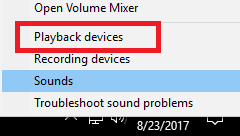
- Right-click the Volume icon in your Windows Taskbar.

- Select Playback devices.
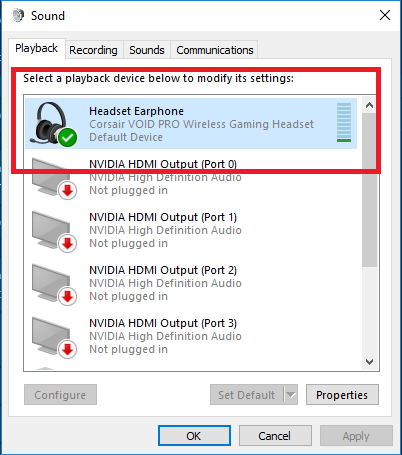
- Right-click your headset in the list.
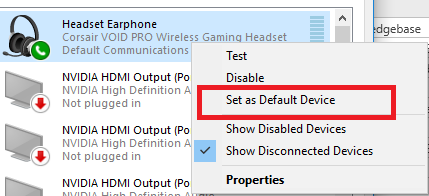
- Select Set as Default Device.
JOIN OUR OFFICIAL CORSAIR COMMUNITIES
Join our official CORSAIR Communities! Whether you're new or old to PC Building, have questions about our products, or want to chat about the latest PC, tech, and gaming trends, our community is the place for you.