BLOG
Hall Effect Keyboards Explained
In recent years, the rise of Hall Effect technology in gaming keyboards has increased drastically. Before Hall Effect, the most common gaming keyboards were Mechanical, Membrane, or Optical. With Hall Effect technology, gaming keyboards have been greatly enhanced, offering more precise and improved gameplay. Now with Hall Effects, player inputs are read near-instantaneously without having to rely on hardware friction and mechanical contacts.
This article will cover what Hall Effects are, how it has enhanced the gaming experience, and its impact on the competitive landscape.
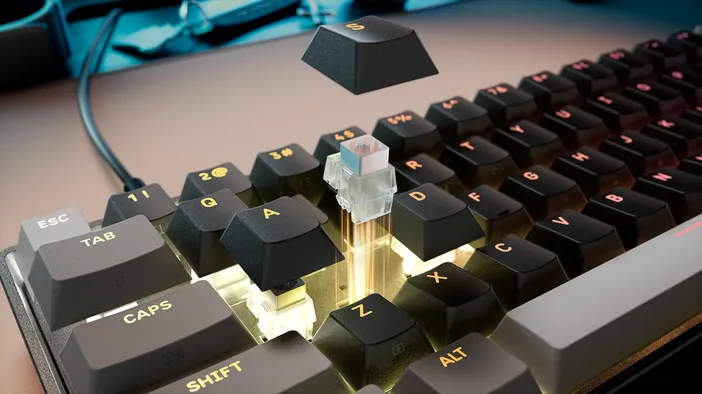
The Science Behind Hall Effect
Hall Effect technology comes from physicist Edwin Hall, who discovered the phenomenon in 1879. Edwin Hall found that when a current-carrying conductor is exposed to a magnetic field, a voltage is produced perpendicular to both the current and the magnetic field. This means that the magnetic field produces a measurable voltage, and scientists can measure the change produced by that voltage.
In modern times, engineers have been able to use sensors to read this magnetic field shift, thus creating Hall Effect sensors. With Hall Effect sensors, the overall magnetic field shift can be analyzed with near precision, allowing this technology to be added to gaming peripherals.
Keyboard Switches - Mechanical vs Hall Effect
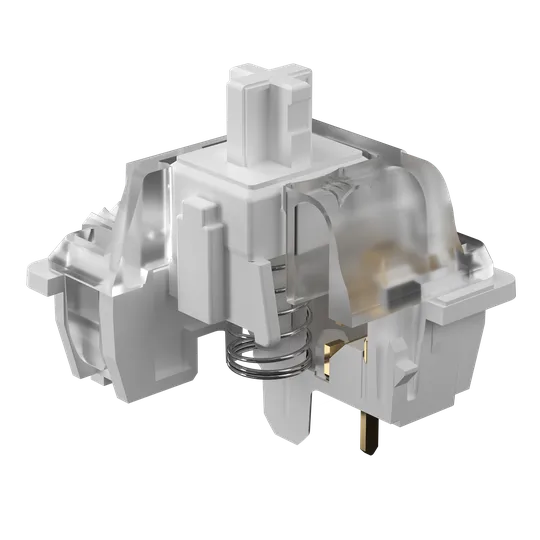
Mechanical (MLX Quantum)
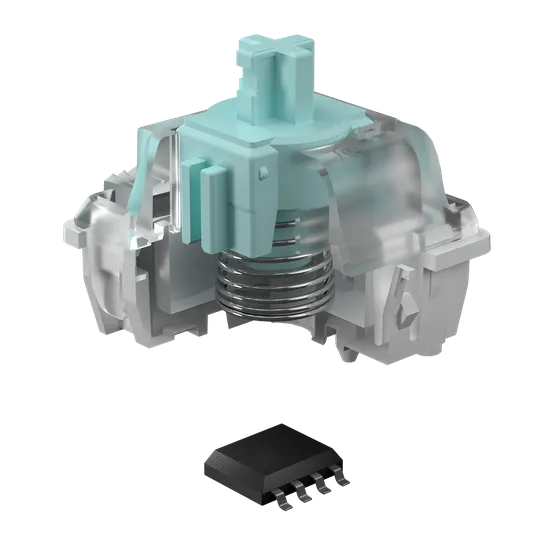
Hall Effect (MGX Hyperdrive)
A traditional Mechanical Switch works by bringing two metal contacts together to complete a circuit. The keyboard reads whether a switch is pressed or not, if pressed send a signal, if not send nothing. That binary design comes with two limitations. First, when the contacts meet, they bounce microscopically before settling, so keyboards apply a small debounce delay to avoid registering multiple inputs from a single keypress. Second, the point at which those contacts meet, the actuation point, is fixed and cannot be changed.
Hall Effect switches work differently. A small magnet is embedded inside the key stem, with a Hall Effect sensor on the Printed Circuit Board (PCB) directly beneath it. As the key is pressed, the sensor continuously reads how close the magnet is getting and translates that into a precise position value in real time. Because the sensor reads the full travel path of the key rather than a single contact point, there is no debounce delay and the actuation point can be set anywhere along that path, adjusted per key.
Due to the continuous position read, a new feature set can be unlocked, expanding the capabilities of a keyboard.
Hall Effect Features
Because Hall Effect switches track a key's full travel path rather than simply detecting a signal, they enable a feature set that mechanical switches cannot offer. For CORSAIR, these features include Per-Key Actuation Adjustment, Rapid Trigger, Multi Action, Smart Tap, and Tap Lock.
1) Per-Key Actuation Adjustment
With Hall Effect switches, continuous position reading allows each key's actuation point to be set independently. With mechanical switches there was only one point where the contacts would meet and send a signal. With Hall Effect switches there is no fixed point, giving users the ability to set exactly where they want their keys to register, whether that is a light tap near the top of the travel path or a full press all the way down.
2) Rapid Trigger
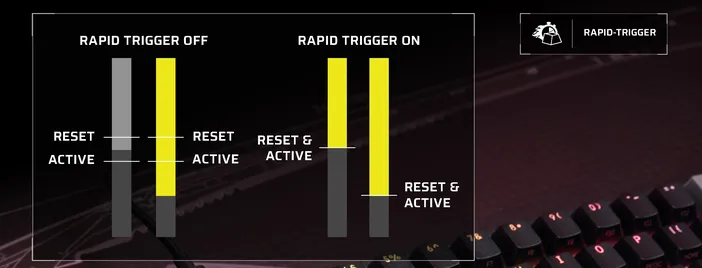
Rapid Trigger expands on Per-Key Actuation Adjustment. On mechanical switches, once a key is activated it remains activated as long as it is pressed past the actuation point. To reactivate the key, a user must fully release it above the actuation point before pressing it again. With Hall Effect switches, Rapid Trigger allows a key to reset and reactivate at any point along the travel path, without requiring the key to clear the actuation point. This means a key can reset and reactivate without ever needing to travel back past the original actuation point. For a full breakdown and setup guide, check out How to Set Up Rapid Trigger on CORSAIR Keyboards.
3) Multi Action
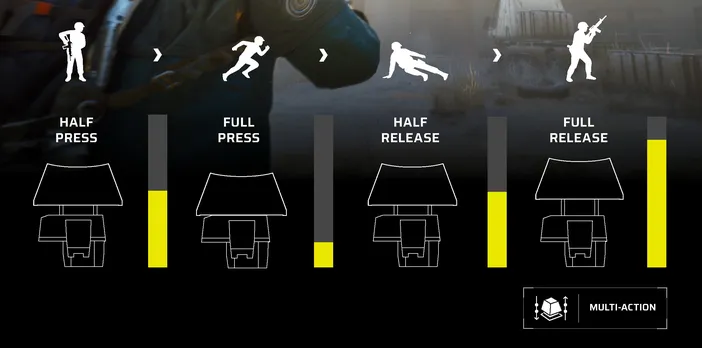
Multi Action gives users the ability to set up to four different actions on a single key, each triggered at a different point along the key's travel path. When the key moves past a set point the assigned action is triggered. The four points are: half-press, full press, half-release, and full release. Multi Action is particularly useful in games that require multiple ability inputs, combos, or complex key usage, giving players more control over their gameplay. To learn more, visit What is Multi Action.
4) Smart Tap
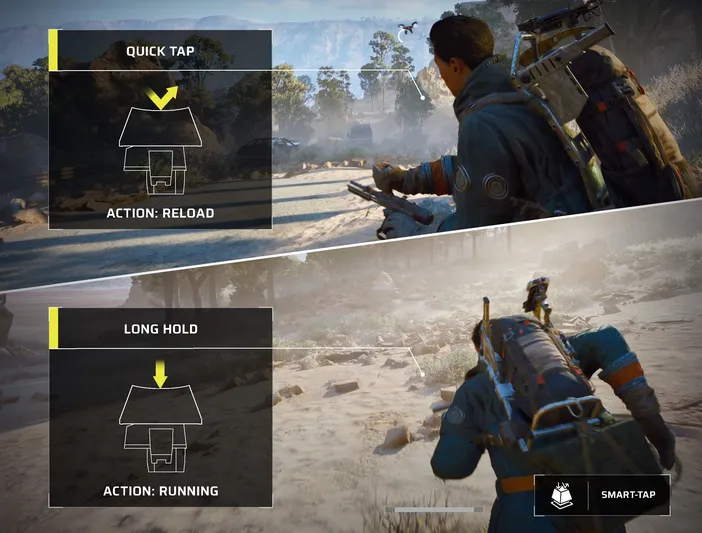
Smart Tap allows two actions to be assigned to one key, differentiated by how the key is pressed rather than how far. A different action can be assigned to a quick tap versus a held press on the same key. A great example of this is on smaller form factor keyboards that don't have dedicated arrow keys. A key can be set to perform arrow key functions on a tap and its primary function when held, making compact layouts more versatile. To learn more, visit What is Smart Tap.
5) Tap Lock
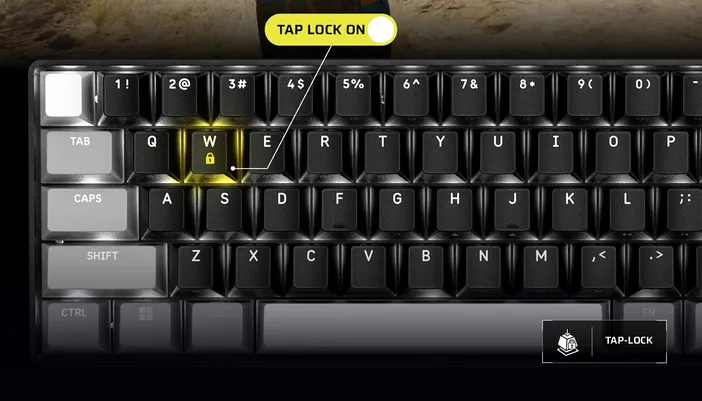
Tap Lock allows keys to be toggled on or off without being held down. Rather than holding a key continuously for sustained actions like walking or crouching, Tap Lock enables the action with one press and disables it with another, freeing up finger space while gaming. To learn more, visit What is Tap Lock.
Together, these features give players a level of keyboard customization and input precision that mechanical switches simply cannot match.
CORSAIR's Implementation
CORSAIR's entry into Hall Effect technology began in 2023 with the K70 MAX, marking the start of a growing lineup of Hall Effect keyboards.
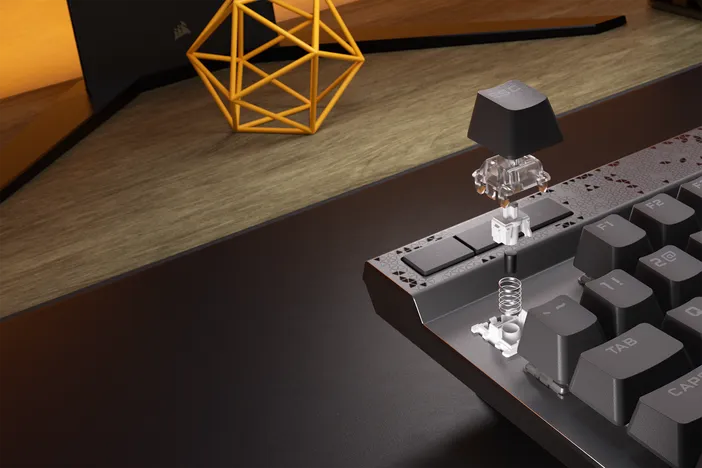
Since the K70 MAX, CORSAIR has continued to enhance its Hall Effect technology with its two main Hall Effect switches: MGX Hyperdrive and MGX Hyperdrive Core. Both switches offer a linear feel and are rated at 100 and 150 million keystrokes, respectively, with per-key adjustable actuation. CORSAIR has utilized these switches across products like VANGUARD PRO 96, MAKR PRO 75, CLIPPER PRO MINI 60, and more, bringing features like Rapid Trigger, Multi Action, Smart Tap, and Tap Lock to competitive gamers.
Hall Effect technology is here to stay and will continue to evolve, providing a better experience for gamers.
A CIKKBEN SZEREPLŐ TERMÉKEK
Stay up to date with CORSAIR. Get our latest News, Guides, and Product Updates in your Google feeds.
Add CORSAIR as a preferred source
JOIN OUR OFFICIAL CORSAIR COMMUNITIES
Join our official CORSAIR Communities! Whether you're new or old to PC Building, have questions about our products, or want to chat about the latest PC, tech, and gaming trends, our community is the place for you.