GLOSSARY
What does Integrated Graphics or IGP Mean?
Being able to appreciate breathtaking in-game visuals while playing a game is one of those things that every gamer dreams about. Besides experiencing the game with well-thought-out game mechanics, compelling storytelling, and engaging gameplay, stunning graphics are what take the gaming experience to the next level. So, which of the PC hardware components is responsible for producing silky, smooth graphics in games? The answer is the Graphics Processing Unit, also known as GPUs.

There are two types of GPUs, Dedicated GPU and Integrated Graphics Processor, commonly referred to as IGP. These two PC components have very similar functions in a PC build, and that is to process complex calculations required for graphics rendering, enabling smooth and high-quality visual output. In layman’s terms, think of it as a specialized helper for your CPU that makes everything you see on the screen look smooth and crispy, in the sense that it takes care of drawing everything from simple shapes to complex 3D environments in video games or movies.
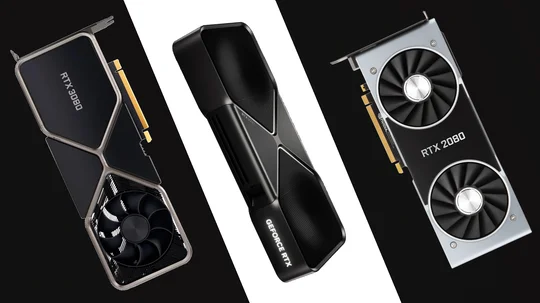

IGP (Integrated Graphics) vs Dedicated GPU
IGPs or Integrated Graphics Processors, from the word “Integrated”, are built into the CPU, essentially sharing system memory with the CPU for graphics processing. With IGPs being embedded into the CPU, CPU manufacturers can offer cost-effective video output solutions to those who don’t require high graphical processing power for their applications. IGPs are ideal for the most fundamental PC tasks, such as document editing, web browsing, media playback, and some light gaming.
Due to its design, it has some limitations when processing graphics. IGPs heavily rely on CPU memory (since it’s part of the package), which means adding more load to the CPU on top of the CPU’s main tasks, which is to process and execute instructions from software and hardware, could lead to reduced performance, especially in memory-intensive applications such as gaming or 3D rendering.

Since IGPs share memory with the CPU, they may not have sufficient bandwidth or speed to handle complex graphical tasks efficiently, resulting in lower frame rates and reduced visual quality. One of the primary advantages of IGPs is their energy efficiency. With IGPs sharing resources with the CPU, they typically consume less power compared to stand-alone graphics cards, which can result in longer battery life for laptops and lower energy costs for desktop systems.
Now compare that to a Dedicated GPU, and again, from the word “Dedicated”, they are a separate hardware component designed specifically for rendering graphics. The NVIDIA 50 series and AMD 9000 series are examples of dedicated GPUs, also known as graphics cards. Unlike IGPs, which are inside the CPU or part of the motherboard, dedicated GPUs are installed into the motherboard’s PCIe slot.
Having a dedicated GPU in the PCIe slot allows it to operate at a higher bandwidth, enabling it to process more complex graphical data significantly faster on its own, as opposed to IGPs that rely on the CPU’s memory and processing speed. By utilizing the PCIe interface, dedicated GPUs can leverage multiple lanes for data transmission, significantly enhancing performance compared to IGPs. This results in smoother graphics and improved frame rates, particularly in graphics-intensive games.


A couple of areas where IGPs have an edge on the dedicated GPUs are in power consumption and heat generation. As mentioned earlier, IGPs typically consume less power and generate less heat since they share resources with the CPUs. This can prolong laptop battery life and provide quieter operation. In contrast, dedicated GPUs often require additional power and cooling solutions, which can increase the overall energy consumption and noise levels of a PC system, especially during intensive tasks, such as gaming or 3D rendering.
A couple of areas where IGPs have an edge on the dedicated GPUs are in power consumption and heat generation. As mentioned earlier, IGPs typically consume less power and generate less heat since they share resources with the CPUs. This can prolong laptop battery life and provide quieter operation. In contrast, dedicated GPUs often require additional power and cooling solutions, which can increase the overall energy consumption and noise levels of a PC system, especially during intensive tasks, such as gaming or 3D rendering.
And, like any other PC component, choosing between Integrated and dedicated graphics depends on the applications you will be running on your PC. For those who are doing the most basic PC tasks, or I should say casual PC users who deal with word processing, generating Excel reports, media playback, web browsing, or perhaps even some occasional light gaming, an IGP is the way to go.
For those involved in heavy gaming, especially with triple-A title games, graphics designers, 3D animators, video editors, or any other professional work that requires high-performance graphics, opting for a dedicated GPU is a worthwhile investment to achieve optimal performance and visual quality.