ORDLISTE
Hvad er en virtuel maskine?
En virtuel maskine (VM) er en "computer inde i din computer". Det er software, der fungerer som en fysisk pc med sin egen virtuelle CPU, hukommelse, lagerplads og netværk, så du kan køre et andet operativsystem (OS) i et vindue på din desktop eller på en server. Tænk på det som en sikker, selvstændig sandkasse, hvor du kan installere apps, afprøve indstillinger eller køre gammel software uden at røre ved dit hovedsystem.
Hvordan fungerer en VM?
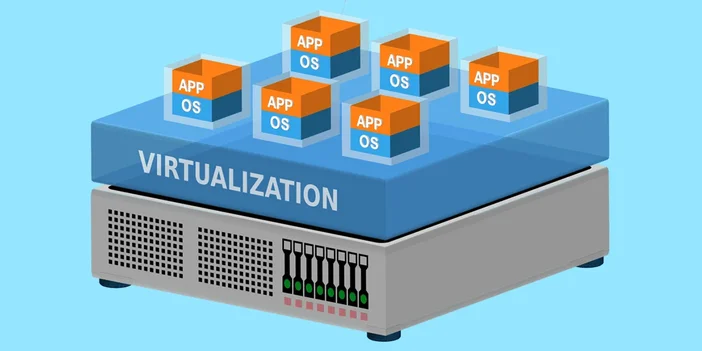
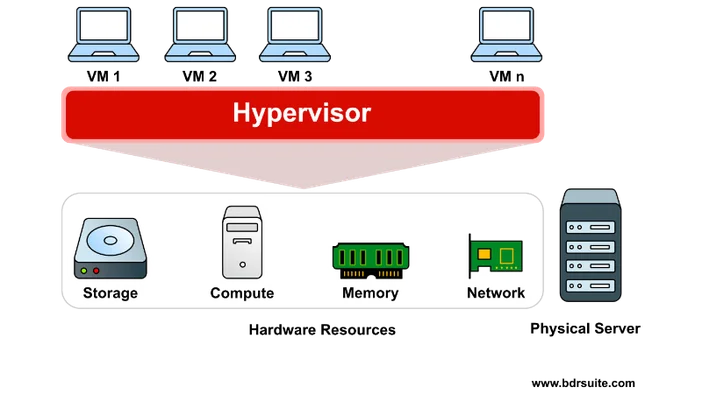
Under overfladen opretter og administrerer et program kaldet en hypervisor den virtuelle maskine. Det opdeler din fysiske hardware og tildeler dele af den til hver virtuel maskine. Gæst-OS'et inde i den virtuelle maskine tror, at det har hele pc'en for sig selv, selvom det deler ressourcer med dit værtsystem og andre virtuelle maskiner, du kører. Smart trick, ikke?
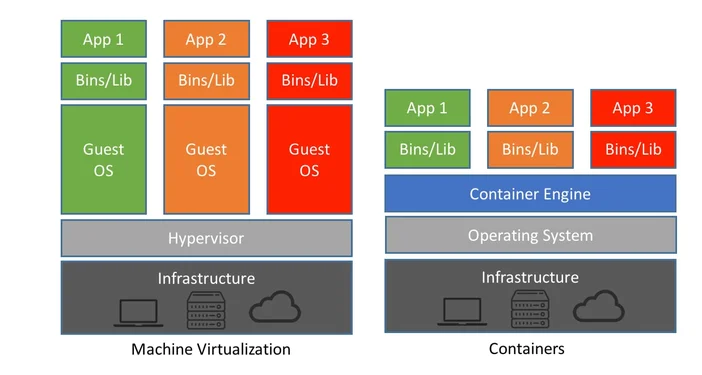
VM vs. container: Hvad er forskellen?
Hvis man skal være præcis, så virtualiserer VM'er hardware, mens containere virtualiserer operativsystemets brugerrum. En VM indeholder et komplet gæstoperativsystem og er mere isoleret, hvilket er ideelt til stærk adskillelse og kørsel af forskellige operativsystemer. Containere deler værtsoperativsystemets kerne, så de er lettere og starter hurtigere, hvilket er perfekt til pakning og implementering af apps. Begge har deres berettigelse. VM'er er dine komplette lejligheder, mens containere er effektive studiolejligheder på samme etage.
Er det værd at bruge en VM?
Det afhænger af, hvad du har brug for. Hvis du tester software, kører upålidelige filer, holder arbejds- og privatmiljøer adskilt eller har brug for et bestemt operativsystem til en bestemt app, er en VM en stor fordel. Til daglig webbrowsing eller gaming vil du normalt holde dig til dit værtsoperativsystem. Og ja, du kan game i en VM, men ydeevne og hardware-pass-through bliver hurtigt kompliceret, så det er ikke de flestes førstevalg.
Har jeg brug for speciel hardware?
Ikke eksotisk, bare moderne. De fleste CPU'er fra det sidste årti understøtter virtualisering (se efter Intel VT‑x/VT‑d eller AMD‑V), og mindst 8-16 GB RAM gør livet lettere. Lagerplads hjælper også, da VM-diskfiler kan være store. På bærbare computere kan du forvente højere blæserstøj og større batteriforbrug, når en VM er under belastning. På stationære computere og servere kan du køre flere VM'er uden problemer, hvis du vælger en generøs RAM- og lagerstørrelse.
Hvad kan jeg bruge en VM til?
- Test og udvikling: Opret rene miljøer, som du kan tage snapshots af og rulle tilbage på få sekunder.
- Ældre software: Hold ældre apps i live på deres foretrukne operativsystem uden at trække hele dit system tilbage i tiden.
- Sikkerhedssandkasse: Åbn mistænkelige filer eller besøg risikable websteder i en engangs-VM.
- Multi-OS-arbejdsgange: Kør Linux-værktøjer på Windows, tjek et websted i flere OS/browser-kombinationer, eller prøv en ny distribution på en sikker måde.
- Træning og demonstrationer: Giv dine kolleger et færdigbygget, velkendt miljø, der ikke ødelægger deres maskiner.
Hvor sikre er virtuelle maskiner?
VM'er er stærkt isolerede, hvilket er en af grundene til, at de er så populære i datacentre. Men intet er magisk: Hold værts- og gæst-OS'er opdaterede, brug velrenommerede hypervisorer, og behandl VM'er med samme sikkerhedshygiejne, som du ville bruge andre steder. Snapshots er dine venner – tag et, før du foretager store ændringer, så du kan fortryde fejl uden tårer.
Populære VM-platforme
På desktops finder du værktøjer som Hyper‑V, VirtualBox, VMware Workstation og Parallels. I serververdenen er KVM, VMware ESXi og Hyper-V almindelige. Det rigtige valg afhænger af dit operativsystem, din hardware og om du har brug for funktioner som PCIe/GPU-pass‑through, live migration eller delt lagerplads.