The CORSAIR RX II and RS II fans sound similar, but there are a few key differences to be aware of. In this page we're going to compare the specs, and talk about the considerations you might make when choosing between the two.
CORSAIR RS II vs RX II Fans: Specs Compared
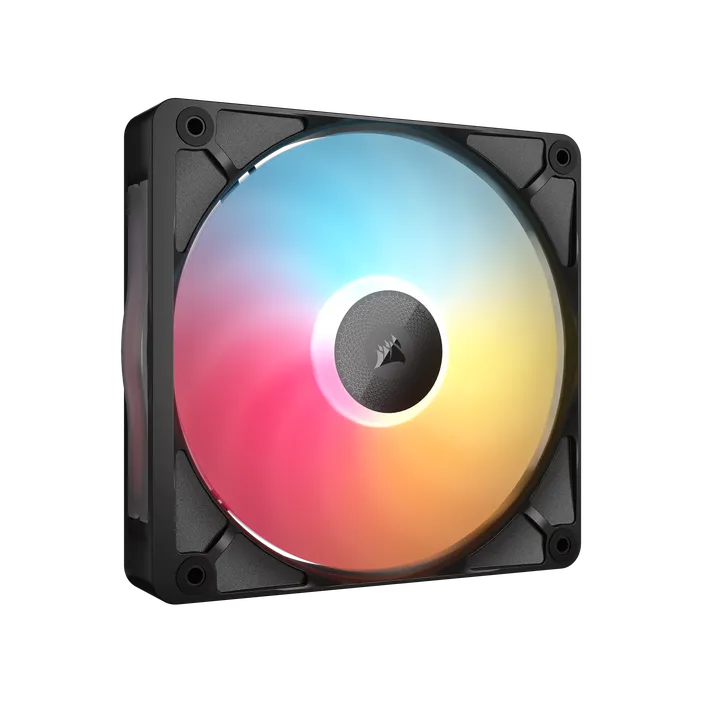
RS120 II
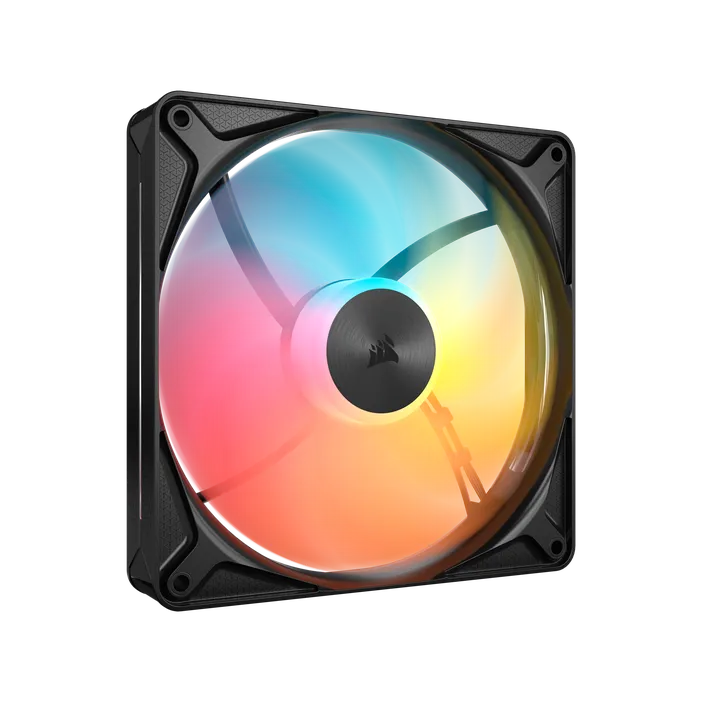
RX120 II
120mm
| RS II ARGB | RX II | |
| Dimensions: | 120mm x 120mm x 26mm | 120mm x 129mm x 26mm |
| Rated Current: | 12V max 0.4A/typical 0.17A 5V max 0.3A/typical 0.3A |
Max 0.46A/Typical 0.25A |
| Speed: | 420 - 2100 RPM ±10% | 400 – 2100 RPM ±10% |
| Airflow: | 10.8 – 73 CFM | 14.12 – 64.72 CFM |
| Static Pressure: | 0.15 – 4.2 mm-H2O | 0.21 – 3.57 mm-H2O |
| Sound Level: | 10 – 36 dBA | 10 – 32.8 dBA |
| Number of LEDs | 8 RGB LEDs | 8 RGB LEDs |
| Connection Cable: | PWM/ARGB | iCUE LINK |
| PWM Control: | 0%, 20% - 100% | 0%, 20% - 100% |
| Bearing Type: | Magnetic Dome | Magnetic Dome |
| Warranty: | 5 Years | 5 Years |
RS II 140mm
RX II 140mm
140mm
| RS II ARGB | RX II | |
| Dimensions: | 140mm x 140mm x 26mm | 140mm x 149mm x 26mm |
| Rated Current: | 12V max 0.45A/typical 0.18A 5V max 0.3A/typical 0.3A |
Max 0.46A/Typical 0.25A |
| Speed: | 0, 330 - 1700 RPM ±10% | 0, 350 - 1700 RPM ±10% |
| Airflow: | 12.6 – 96 CFM | 20.16 – 84.06 CFM |
| Static Pressure: | 0.11 – 3.5 mm-H2O | 0.17 – 2.73 mm-H2O |
| Sound Level: | 10 – 36 dBA | 10 – 31.8 dBA |
| Number of LEDs: | 8 RGB LEDs | 8 RGB LEDs |
| Connection Cable: | PWM/ARGB | iCUE LINK |
| PWM Control: | 0%, 20% - 100% | 0%, 20% - 100% |
| Bearing Type: | Magnetic Dome | Magnetic Dome |
| Warranty: | 5 Years | 5 Years |
RS II 360
RX II 360
360mm UNIFIED FRAME
| RS II ARGB | RX II | |
| Dimensions: | 360mm x 120mm x 26mm | 360mm x 129mm x 26mm |
| Rated Current: | 12V max 1.2A/typical 0.51A 5V max 0.9A/typical 0.9A |
Max 1.39A/Typical 0.8A |
| Speed: | 0, 420 – 2100 RPM ±10% | 0, 400 – 2100 RPM ±10% |
| Airflow Per fan: | 10.8 – 73 CFM | 14.12 – 64.72 CFM |
| Static Pressure Per Fan: | 0.15 – 4.2 mm-H2O | 0.21 – 3.57 mm-H2O |
| Sound Level: | 10 – 36 dBA | 10 – 32.8 dBA |
| Number of LEDs: | 8 RGB LEDs Per Fan 24 Total | 8 RGB LEDs Per Fan 24 Total |
| Connection Cable: | PWM/ARGB | iCUE LINK |
| PWM Control: | 0%, 20% - 100% | 0%, 20% - 100% |
| Bearing Type: | Magnetic Dome | Magnetic Dome |
| Warranty: | 5 Years | 5 Years |
There's a host of differences in the charts, but we can break these down into simple points.
- The RS II are PWM and ARGB while the RX II are iCUE LINK enabled.
- RS II ARGB fans excel as both case and radiator fans, offering powerful airflow and excellent static pressure to improve both air and liquid cooling setups.
- RX II features a built-in temperature sensor for real-time thermal monitoring.
- The RX II is optimized for low fan speeds which reduces the need for aggressive ramping, helping to keep systems running quieter during everyday operation.
- The RX II has a 9mm wider body that the RS II
- RX II has detachable decorative side plate for personal touch
While the RX II focuses on static pressure, its still no slouch when used as a case and the same is true for the RS II as it is still a very good radiator fan. This means if you want to swap out your other fans to match you do not have to worry if the fans you have chosen are the right type for your build. Both will provide excellent cooling, run quietly and give vivid LED lighting.
RX120 II Compatibility
With all the changes to the RX II fans, we have had to make some physical changes to the fan dimensions. You may have noted in the dimensions the fans have a 9mm wider body than a standard 120mm or 140mm fan at 129mm and 149mm respectively.
In many instances this will not present a problem but for some cases where you are either space limited, or have a dedicated channel for 120mm or 140mm fans, this could present an issue.
PRODUCTS IN ARTICLE
Stay up to date with CORSAIR. Get our latest News, Guides, and Product Updates in your Google feeds.
Add CORSAIR as a preferred sourceWas this article helpful?
Feedback received
Thanks for helping us improve this article.
JOIN OUR OFFICIAL CORSAIR COMMUNITIES
Join our official CORSAIR Communities! Whether you're new or old to PC Building, have questions about our products, or want to chat about the latest PC, tech, and gaming trends, our community is the place for you.