CORSAIR has discovered an issue affecting some CORSAIR EX400U USB4 external SSDs that may prevent the drive from mounted on certain macOS systems. The problem is caused by a malformed USB serial number presented to the host computer. Below is a table with the affected devices.

|
Affected part numbers |
CSSD-EX400U1TB, CSSD-EX400U1TBC, CSSD-EX400U2TB, CSSD-EX400U2TBC, CSSD-EX400U4TB, CSSD-EX400U4TBC, using Firmware version FW91.1 |
|
Affected serial number range |
Serial numbers beginning with AA2XB5270 through AA2XB5330 |
|
Platforms on which the issue is occurring |
Apple systems with Apple Silicon SoC (Mac with an M-Series chip) |
To fix this, CORSAIR has created the CORSAIR EX400U Serial Number Format Correction Utility. Running this utility updates the drive’s settings and permanently resolves the issue.
Download the utility here by selecting “Storage” from the drop-down menu: https://www.corsair.com/downloads
Supported platforms: Windows 10 (64-bit) and Windows 11.
Before running the utility, it’s best to disable any antivirus or security software and disconnect any other external drives to avoid interference.
How to use the utility:
- Connect the EX400U to a Windows PC using the included USB-C cable.
If the EX400U is the main system drive, please connect it to a different PC for this update. - Run the utility as an administrator. You may be asked to approve for the utility to access system functions.
- When the EX400U appears with a yellow background in the utility window, click “Start Update”.
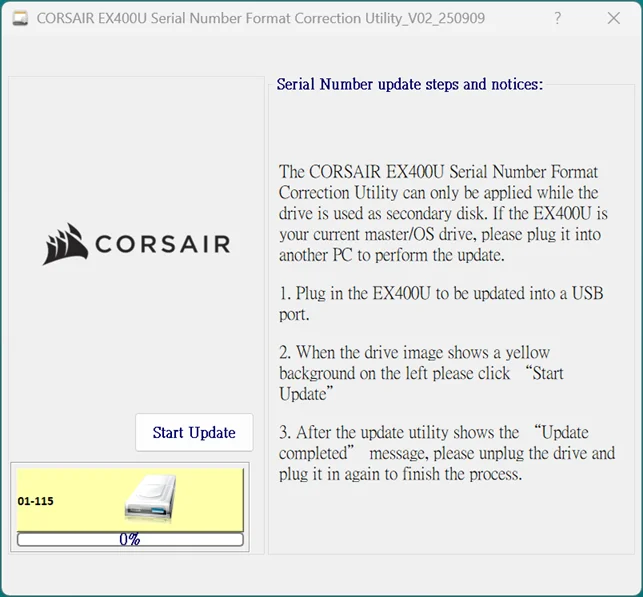
- Once the “Update completed” message appears, unplug the drive, reconnect it, and the update has been completed.
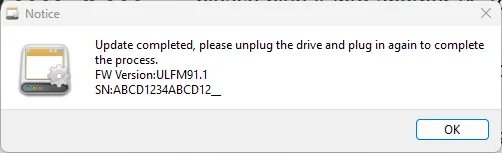
- After completing these steps, the EX400U should mount normally on macOS.
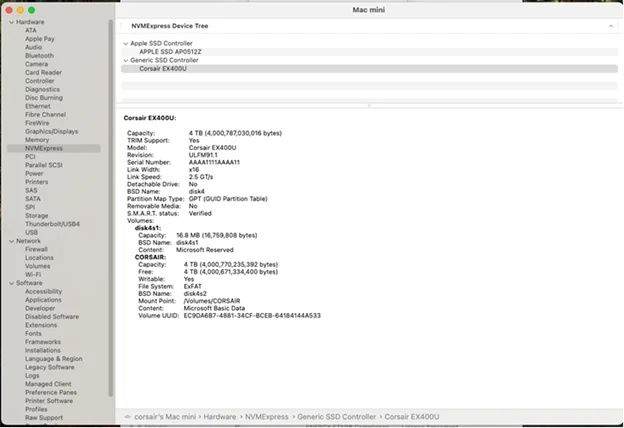
For MacOS, you can see the Firmware version in the MacOS System Information App, under NVMExpress:
For additional help, please get in touch with CORSAIR support.
JOIN OUR OFFICIAL CORSAIR COMMUNITIES
Join our official CORSAIR Communities! Whether you're new or old to PC Building, have questions about our products, or want to chat about the latest PC, tech, and gaming trends, our community is the place for you.