BLOG
CORSAIR RX fans vs LX: What's the Difference?
The CORSAIR iCUE LINK LX fans are the most recent addition to the CORSAIR iCUE LINK fan family. Marrying some of the best features of the CORSAIR QX and CORSAIR RX fans. But how does it stack up against them, and which would be best for you?
First, let’s quickly go over the benefits of iCUE LINK. The best word to describe iCUE LINK is simplicity. A single hub can power up to 14 devices. That could be fans, an RGB strip or even a custom water-cooling pump or lighting on CPU/GPU water block. All of these using a single type of cable reducing clutter to help solve the cable mess. Meaning no more cramming the cables and praying the side panel will stay shut.

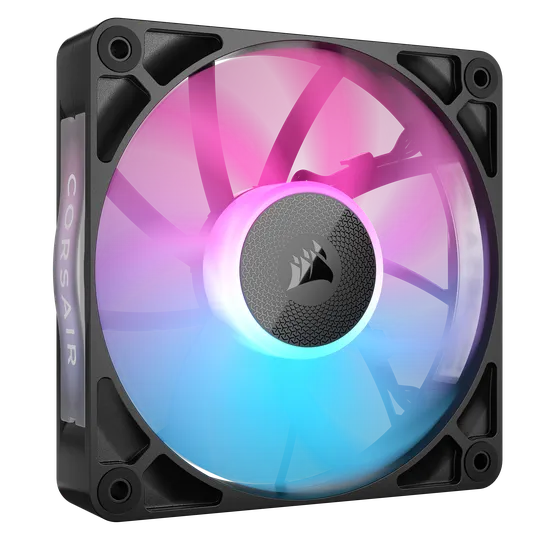
LX120
RX120
CORSAIR RX fans vs LX: Specs Compared
| LX120 RGB | RX120 RGB | |
| PWM Range | 0%, 20% - 100% | 0%, 20% - 100% |
| Airflow | 9.75 - 69.9 CFM | 10.5 – 74.2 CFM |
| Speed | 0, 480 - 2400 RPM ±10% | 0, 400 - 2100 RPM ±10% |
| Sound Level | 10 - 36 dBA | 10 - 36 dBA |
| Static Pressure | 0.13 - 5.22 mm-H20 | 0.12 - 4.38 mm-H2O |
| Number of RGB LEDs | 18 Individually Addressable | 8 Individually Addressable |
| Unique Lighting Features | Time Warp Effect | Side View |
| Bearing Type | Magnetic Dome | Magnetic Dome |
| Colorways | Black, White | Black, White |
| Warranty | 5 Years | 5 Years |
While we do offer both the LX and RX in 140mm size, we are comparing the the 120mm versions to keep this page from getting too complicated.
Noise Level
Both the LX and RX share a very similar noise profile due to having a very similar blade and AirGuide designs. This means they are both surprisingly quiet at high RPM, maxing out at 36 dBA. However, the LX fans can go 300 RPM faster than the RX, meaning that they will still have a different noise profile depending on the speed they're going at any given time.
You're unlikely to be able to discern a volume difference in most cases though, so realistically-speaking, they are about the same noise level, but if you really want to keep things as quiet as possible, the RX fans are the ones to go for here as they operate within a smaller RPM range.
However, if you're planning to use these on a radiator, then you might reconsider as the LX fans are better suited for this, so let's talk about static pressure.
Static Pressure
To explain static pressure very simply, it is a way to measure how much force a fan can produce to push air through a dense object like a heatsink or radiator. For this, the LX120 RGB pushes ahead of the RX120 RGB offering 0.84mm-H2O more pressure at maximum speed.
This means that the LX fans will be able to push air through an AIO more effectively at a given speed, which will result in quieter operation. Being able to push air harder is also beneficial if your case has a particularly fine dust filter.
But not all fan mounts have restrictive filters or radiators, meaning that raw airflow might be more pertinent, and in this case, the RX fans come out on top.
Airflow
Airflow is a far easier concept to get your head around. It is simply the amount of air the fan can move. We use the standard measurement of CFM which is Cubic Feet per Minute.
In terms of outright airflow, the RX wins against the LX by a little over 4 CFM at maximum speed. If you take a moment to conceptualize 4 cubic feet, then you'll realise that's a lot of air.
This means that the RX fans can take in and then exhaust more air than the LX fans, so all the air in your case gets refreshed at a higher rate, so the air which has been warmed by the components will get replaced by nice fresh air faster.
We wrote a whole article explaining the difference between static pressure and airflow, so read that if you're curious to learn more.
Reverse options
The LX Range of fans offer the LX-R which is a reverse blade fan. Reverse blade fans are normal fans, but with inverted blades meaning these push air in the opposite direction.
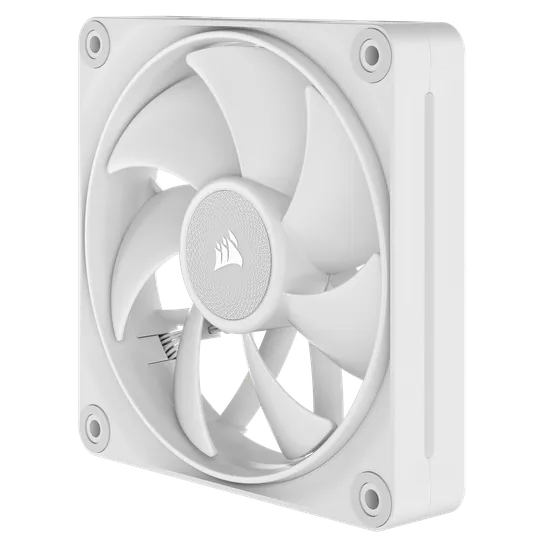
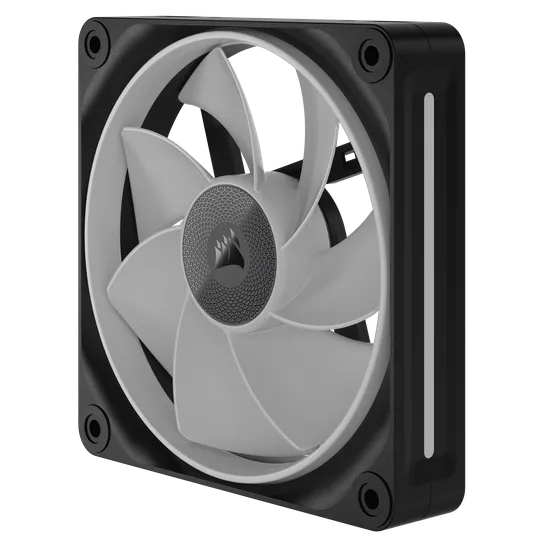
Regular LX120 fan
Reverse LX120-R fan. Notice how the blades are flipped, so even though it's rotating in the same way, the air is "scooped" in the opposite direction.
While there is no functional benefit for this, is an aesthetic one if your case requires intake fans in a visible spot. cases with intake fans along the bottom like the AIR 5400 are a perfect candidate for reverse fans.
Pricing
The RX fans will be slightly cheaper than the LX, this is partly due to the design choice with less lighting. however, they both still use the same hub and blade materials and share the same motor meaning no difference in quality between the two. Pricing will vary depending on your region though.
So, which should you get?
Both fans are excellent choices and will keep your PC running cool and quiet, but they are not identical, with each having their strong suites.
RX120
- Best for airflow
- Slightly lower cost
- Great all-rounder fan
- removable side fan covers
LX120
- Best for lighting
- Time Warp light effect
- Highest static pressure
- Reverse blade options
المنتجات في المادة
Stay up to date with CORSAIR. Get our latest News, Guides, and Product Updates in your Google feeds.
Add CORSAIR as a preferred source
JOIN OUR OFFICIAL CORSAIR COMMUNITIES
Join our official CORSAIR Communities! Whether you're new or old to PC Building, have questions about our products, or want to chat about the latest PC, tech, and gaming trends, our community is the place for you.