BLOG
K70 PRO MINI WIRELESS キーボード ショートカットガイド
If you have swapped out the stock keycaps for your K70 PRO MINI WIRELESS keyboard and need a reminder of what the keyboard shortcuts are, we have this article to help you out.
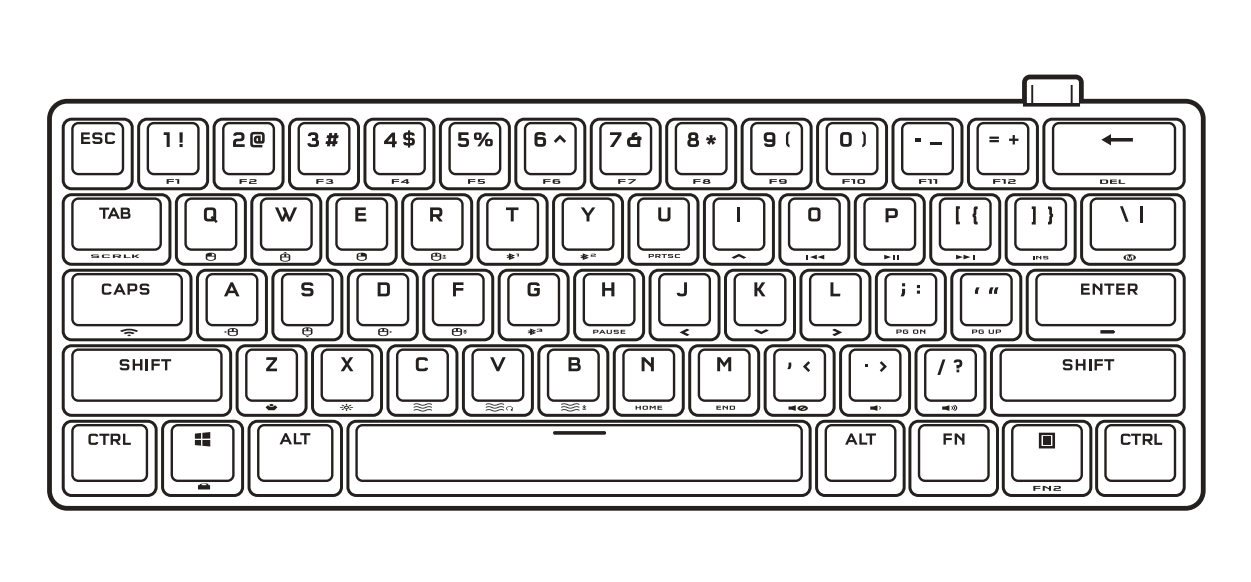
| Shortcut | Key Function |
| FN + Q | Left mouse click |
| FN + E | Right mouse click |
| FN + R | Increase cursor speed |
| FN + T (Press) | Switch to Bluetooth Host 1 Mode |
| FN + T (Hold) | Start Bluetooth Host 1 pairing |
| FN + Y (Press) | Switch to Bluetooth Host 2 Mode |
| FN + Y (Hold) | Start Bluetooth Host 2 pairing |
| FN + G (Press) | Switch to Bluetooth Host 3 Mode |
| FN + G (Hold) | Start Bluetooth Host 3 pairing |
| FN + U | Print screen |
| FN + I | Up arrow key |
| FN + J | Left arrow key |
| FN + K | Down arrow key |
| FN + L | Right arrow key |
| FN + O | Last track |
| FN + P | Play/Pause track |
| FN + [ | Next track |
| FN + ] | Insert |
| FN + \ | Record macro (see QSG for more instructions) |
| FN + CAPS (Press) | Switch to SLIPSTREAM Wireless Mode |
| FN + CAPS (Hold) | Start SLIPSTREAM adapter pairing |
| FN + A | Move cursor left |
| FN + S | Move cursor down |
| FN + W | Move cursor up |
| FN + D | Move cursor right |
| FN + F | Decrease cursor speed |
| FN + H | Pause break |
| FN + ; | Page down |
| FN + ' | Page up |
| FN + ENTER | Check battery level / charge level |
| FN + Z | Change profile |
| FN + X | Adjusts brightness in 20% decrements |
| FN + C | Cycle through basic lighting effects |
| FN + V | Change lighting effect direction |
| FN + B | Change lighting effect speed |
| FN + N | Home |
| FN + M | End |
| FN + , | Mute audio |
| FN + . | Decrease volume |
| FN + / | Increase volume |
| FN + WIN | Win Lock |
| FN + MENU | Function 2 (FN2) |
記事内の製品
JOIN OUR OFFICIAL CORSAIR COMMUNITIES
Join our official CORSAIR Communities! Whether you're new or old to PC Building, have questions about our products, or want to chat about the latest PC, tech, and gaming trends, our community is the place for you.