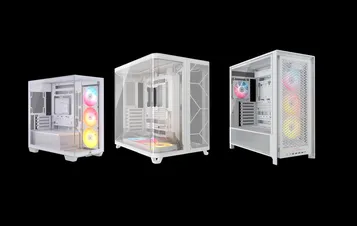
快速启动指南
CORSAIR FRAME 4000 系列
MODULAR MID-TOWER CASE
机箱规格
|
PCI插槽配置 |
水平7个/垂直3个 |
|
主板兼容性 |
Mini-ITX、Micro-ATX、ATX、E-ATX ( 305毫米x 277毫米) |
|
HDDs |
|
|
SSDs |
|
|
可选颜色 |
|
|
左侧板材料 |
钢化玻璃 |
|
前板材料 |
|
|
后部电缆空间 |
37mm |
|
灰尘滤网 |
Front, Side, Bottom |
|
前端I/O |
Standard FPIO (FRAME 4000D, FRAME 4000D WOOD, FRAME 4000X):
ELITE FPIO (FRAME 4000D LCD, FRAME 4000D Vault SERIES):
|
1. 风扇位置
NOTE: No fans are included with the FRAME 4000D or FRAME 4000D Vault Series.
| FRAME 4000D RS/RS ARGB | ||||||
|
正面 |
顶部 |
后部 |
侧面 |
PSU 散热罩 | Bottom | |
|
3×120毫米 2x 140毫米 2×200毫米 |
3×120毫米 2x 140毫米
|
1x 120毫米 1x 140毫米
|
3×120毫米 2x 140毫米
|
2x 120毫米 |
None |
|
|
FRAME 4000D LCD, FRAME 4000D WOOD, FRAME 4000X |
||||||
|
Front |
Top |
Rear |
Side |
PSU Shroud | Bottom | |
|
3x 120mm 2x 140mm 2x 200mm |
3x 120mm 2x 140mm
|
1x 120mm 1x 140mm
|
3x 120mm 2x 140mm
|
2x 120mm |
1x 120mm |
|
2. 包含风扇与控制器
|
FRAME 4000D |
FRAME 4000D RS | FRAME 4000D RS ARGB |
FRAME 4000D WOOD, FRAME 4000X |
FRAME 4000 LCD
|
|
|
无 |
3x RS120 (Pre-installed) |
3x RS120 ARGB (Pre-installed) |
4x RS120 (Pre-installed) |
4x RS120 ARGB (Pre-installed) |
|
NOTE: Fans and lighting controllers are not included. ARGB lighting can be controlled through your motherboard or with a separate fan controller.
3. 散热器兼容性
|
正面 |
顶部 |
后部 |
侧面 |
PSU 散热罩 |
|
240毫米 280毫米 360毫米 |
240毫米 280毫米 360毫米 |
120毫米 140毫米 |
240毫米 280毫米 360毫米 |
无 |
4. 箱体尺寸
| 尺寸 |
487mm x 239mm x 486mm |
|
GPU最大长度 |
430 公釐 |
|
CPU冷却器最大高度 |
170mm |
|
PSU最大长度 |
220mm |
配件套装内容
1x 侧风扇安装支架
1x 反向连接器磁条
12x InfiniRail Fan Mounts
(Pre-Installed on Select Cases)
1x Solid Side Insert
(Select Models)
1x GPU Anti-sag Stabilization Arm Mini Mount
1x GPU Anti-sag Stabilization Arm Rubber Spacer
12-28x Self-Tapping Fan Screws
(Qty varies by model)
8-12x Long Fan Screws (6-32 UNC; 30mm)
(Qty varies by model)
18颗主板/硬盘螺丝(6-32 UNC;6毫米)
8-16x SSD Screws (M3 x 0.5; 5mm)
(Qty varies by model)
1x 备用主板支架
2x 垂直安装支架
InfiniRail Fan Mount Lock Screws
(Pre-Installed on Select Models)
1x 前置I/O适配器线缆
3x or 4x RS120 / RS 120 ARGB Fans
(Pre-Installed on Select Models)
12x QuikTurn® Fan Screws
(Select Models)
CASE EXPANDED VIEWS
FRAME 4000D RS/RS ARGB
| A.四分之三侧玻璃面板 | H.侧风扇滤网 |
| B. PCI板 | I.前板 |
| C.标准钢制主板托盘 | J.前风扇滤网 |
| D.顶板 | K.PSU风扇滤网 |
| E.驱动器/控制器板 | L.PSU护罩 |
| F. Cable Shroud with GPU Anti-sag Stabilization Arm | M.半透明侧插入件 |
| G.钢制侧板 | N.四分之一网格侧板 |
FRAME 4000D LCD
| B. PCI Plate | J. Front Fan Filter |
| C. Standard Steel Motherboard Tray | K. PSU Fan Filter |
| D. Top Panel | O. Front Panel I/O |
| E. Drive / Controller Plate | P. Compact PSU Shroud |
| F. Cable Shroud with GPU Anti-sag Stabilization Arm | Q. Two-Thirds Side Glass Panel |
| G. Steel Side Panel | R. LCD Screen Mounting Bracket |
| H. Side Fan Filter | S. XENEON EDGE LCD Touchscreen |
| I. Front Panel |
FRAME 4000X
| B. PCI Plate | J. Front Fan Filter |
| C. Standard Steel Motherboard Tray | K. PSU Fan Filter |
| D. Top Panel | O. Front Panel I/O |
| E. Drive / Controller Plate | P. Compact PSU Shroud |
| F. Cable Shroud with GPU Anti-sag Stabilization Arm | T. RGB FLOW Front Panel |
| G. Steel Side Panel | U. Full Tempeed Side Glass Panel |
| H. Side Fan Filter |
FRAME 4000D WOOD
| B. PCI Plate | J. Front Fan Filter |
| C. Standard Steel Motherboard Tray | K. PSU Fan Filter |
| D. Top Panel | O. Front Panel I/O |
| E. Drive / Controller Plate | P. Compact PSU Shroud |
| F. Cable Shroud with GPU Anti-sag Stabilization Arm | U. Full Tempered Glass Side Panel |
| G. Steel Side Panel | V. Wood Front Panel |
| H. Side Fan Filter |
FRAME 4000D Vault Series
| B. PCI Plate | I. Front Panel |
| C. Standard Steel Motherboard Tray | J. Front Fan Filter |
| D. Top Panel | K. PSU Fan Filter |
| E. Drive / Controller Plate | O. Front Panel I/O |
| F. Cable Shroud with GPU Anti-sag Stabilization Arm | P. Compact PSU Shroud |
| G. Steel Side Panel | U. Full Tempered Side Glass Panel |
| H. Side Fan Filter |
面板安装/拆卸
警告:本产品含有钢化玻璃,请小心使用。
- 为防止损坏或受伤,请避免将箱体放置或存放在硬质表面上,例如陶瓷或瓷质地砖、石材、砖石结构或混凝土。
- 海盗船强烈建议在将机箱放置于坚硬表面或开始组装前,务必卸下所有钢化玻璃侧板。
- 若必须将成品放置于坚硬表面,请将机箱抬高或隔离,以最大限度降低意外接触、损坏或人身伤害的风险。
更换面板可通过www.corsair.com 获取。如需任何帮助,请联系help.corsair.com。
1. 侧板拆卸
NOTE: This case is available with different left side panel designs (full glass or split glass/steel). Depending on your model, you may have one or multiple panels to remove. The removal method is the same for all variants.
- To remove the left side panel(s), loosen the thumbscrews at the rear of the case, then swing the panel(s) outward from the back and lift them off the front mounting tabs.
NOTE: On models equipped with the Quarter Mesh Side Panel (N), two optional inserts are included to customize the look and function of your build. A Translucent Side Insert (M) comes pre-installed, allowing RGB lighting to shine through while partially concealing cables. Alternatively, you can install the Solid Side Insert (4) for full coverage, or leave the panel open for maximum airflow. Inserts slide under the long edges of the panel for quick installation and removal.
- 要拆卸钢制侧板(G),请先拧开机箱背面的固定螺丝,然后将侧板从卡扣处向机箱前方方向翻转取下。
TIP: For removal or use of accessory side panels, please reference these Quick Start Guides for more in-depth information:
2. 前面板拆卸
- Pull the Front Panel outward. It's secured by two ball snaps at the top and bottom.
3. 顶板拆卸
- 拧下后部的两个固定式旋钮螺丝,拉出橡胶带即可拆下顶盖(D)。
WARNING: The rubber pull-grip on the Top Panel (D) is designed to assist in removing the top panel from the case.
此处并非用于提起机箱或设备的提手。若通过此拉手提起机箱,可能导致电脑、机箱及自身遭受严重损伤。
4.1 STANDARD PSU SHROUD REMOVAL (FRAME 4000D, FRAME 4000D RS / RS ARGB)
- FRAME 4000D
- FRAME 4000D RS
- FRAME 4000D RS ARGB
The PSU Shroud (L) is held in with a screw in the front of the case along the side and two screws in the rear panel of the case.
- Remove these three screws and the shroud will lift out.
4.2 COMPACT PSU SHROUD REMOVAL
- FRAME 4000D LCD
- FRAME 4000X
- FRAME 4000D WOOD
- FRAME 4000D Vault Series
The Compact PSU Shroud (P) is held in with a screw in the front of the case along the side and two screws in the rear panel of the case.
- Remove the three screws.
- Slide the Compact PSU Shroud (P) forward to release the clips located at its bottom front and the shroud will lift out.
5. 电缆护罩或侧风扇支架拆卸
- Unscrew the screw at the top and tip the Side Fan Mounting Bracket (1) or Cable Shroud (F) out of the side. Repeat this in reverse to reinstall the part of your choice.
NOTE: The side mount has two positions for mounting. If using a radiator or 200mm fans, we recommend using the position closest to the motherboard.
6. 主板托盘拆卸
标准钢制主板托盘(C)通过托盘背面的4颗螺丝固定。
- Unscrew these four screws.
- Tilt the tray outward and lift it out.
7. 前面板I/O接口拆卸
The Front Panel I/O (O) is held in with two screws on the bottom of the case.
- To remove it, simply unscrew these two screws, and the entire Front Panel I/O (O) assembly can be lifted out.
- To reinstall the Front Panel I/O (O) or to install a new one, place the assembly back in position and secure it with the same two screws.
主板安装
安装主板
The FRAME 4000 supports mITX, mATX, ATX, and E-ATX motherboards, including ASUS BTF, MSI Project Zero, and GIGABYTE Project Stealth with reversed connections.
- 将主板对准支架,并用随附的主板螺丝(9)将其固定。
注意:安装前,请确保主板I/O挡板已正确安装到位(如需使用)。
提示:若预装的支架与主板上的孔位不匹配,请移除未使用的支架,并重新定位以匹配主板上的开放安装点。
OPTIONAL MOTHERBOARD TRAY CONFIGURATIONS
The FRAME 4000 Series includes a standard motherboard tray, with additional tray options available (sold separately) to customize your build:
| a. FRAME Standard Steel Motherboard Tray | c. FRAME ELITE Motherboard Tray |
| b. FRAME RapidRoute 2.0 Motherboard Tray |
NOTE: FRAME ELITE motherboard tray (CNC Aluminum) is designed for use with NVMe SSDs. You will lose the HDD/SSD tray that installs on the back of the steel motherboard tray that is included with FRAME 4000 Series cases. Text for SPY & GPU on the ELITE MB Tray is to assist in assembling as a standalone test bench. Ignore text during use with FRAME 4000 Series.
前置I/O线缆安装
1. 标准英特尔主板
- 将FPANEL插头连接至主板前面板I/O接口,确保对准键位布局。该接口在某些主板上通常标注为JFP1。
提示:若您的电脑无法开机或使用FPANEL插头时出现问题,请尝试使用随附的前置I/O适配器线缆(14),确保与主板接口正确连接。
注意:此机箱未配备硬盘LED指示灯或重置开关,因此尽管这些接口出现在前置I/O适配器线缆(14)上,但它们无法正常工作,且已刻意保留为未安装状态。
2. AMD 或 非标准英特尔主板
- 使用随附的顶部安装式前面板I/O适配器(14),将FPANEL插头连接至各个前面板I/O接头引脚。
3. FRONT PANEL 5V ARGB CONNECTION (FRAME 4000X only)
- Run the +5V ARGB cable through the passthrough filter and into your case.
- Plug the +5V ARGB cable into your motherboard for easy ARGB control or use a COMMANDER DUO for full iCUE synchronization.
NOTE: For standard FRAME 4000D configurations without the passthrough hole in the front panel I/O, you must use the front fan filter included with the front panel and route the ARGB cable through the bottom right edge to pass it into the chassis. This wire is able to be split in half for easier routing during installation.
4. FRONT I/O EXPLANATION
- FRAME 4000D
- FRAME 4000D RS
- FRAME 4000D RS ARGB
- FRAME 4000X
| a.电源按钮 + LED | c.2个USB 3.2 Gen 1 Type-A接口(5 Gbps) |
| b.耳机/麦克风组合接口 | d.1个 USB 3.2 Gen 2x2 Type-C 接口(20 Gbps) |
- FRAME 4000D 液晶屏 RS-485 接口 ARGB 背光
- FRAME 4000D 保险库系列
| a.电源按钮 + LED | c.2个USB 3.2 Gen 1 Type-C接口(5 Gbps) |
| b.耳机/麦克风组合接口 | d.1个 USB 3.2 Gen 2x2 Type-C 接口(20 Gbps) |
5. FRONT I/O CONNECTIONS
| a. HD Audio (Headphone, Microphone) | d. USB 3.2 Type-E (20 Gbps) |
| b. FPANEL (Power LED, Power Button) | e. +5V ARGB (FRAME 4000X only)* |
| c. USB 3.0 |
6. SWAPPING FRONT PANEL BUTTON POWER KEY SWITCH
The power button of the ELITE Front Panel I/O used in the FRAME 4000D LCD case utilizes a standard MX-Style key switch. This key switch is removable and replaceable to customize the look and feel of your power button.
- Simply pop off the plastic bezel on the front panel I/O and extract the key switch. Replace with a switch of your choice.
磁条安装
FRAME 4000 包含一个反向连接器磁条(2),其设计用于覆盖主板托盘中反向连接器孔的可见边缘。
- 将反向连接器磁条(2)对准支架,左右调整以填补主板上的间隙。
1. 带反向连接器的主板
若您安装的主板配备反向接口,可使用反向接口磁吸条(2)填补24针ATX接口周围的空隙,从而呈现更整洁美观的外观。
2. 配备标准连接器的主板
安装标准主板时,可将反向连接器磁吸条(2)滑入主板后方,对齐主板托盘上的螺丝孔位,以此覆盖反向连接器插槽,并隐藏沿主板托盘布线的线缆,营造更整洁的外观。
TIP: The magnetic strip features cut-out slots, allowing you to install it simultaneously with a GPU anti-sag stabilization arm mini mount.
风扇安装
| FRAME 4000D RS/RS ARGB | ||||||
|
Front |
Top |
Rear |
Side |
PSU Shroud | Bottom | |
|
3x 120mm 2x 140mm 2x 200mm |
3x 120mm 2x 140mm
|
1x 120mm 1x 140mm
|
3x 120mm 2x 140mm
|
2x 120mm |
None |
|
|
FRAME 4000D LCD, FRAME 4000D WOOD, FRAME 4000X |
||||||
|
Front |
Top |
Rear |
Side |
PSU Shroud | Bottom | |
|
3x 120mm 2x 140mm 2x 200mm |
3x 120mm 2x 140mm
|
1x 120mm 1x 140mm
|
3x 120mm 2x 140mm
|
2x 120mm |
1x 120mm |
|
USING THE INFINIRAIL™ FAN MOUNTING SYSTEM
CORSAIR's InfiniRail™ is an innovative fan and radiator mounting system designed to offer exceptional flexibility and ease of use in PC case builds. Unlike traditional cases with fixed mounting points, InfiniRail utilizes adjustable steel rails that allow users to slide and position fans and radiators precisely where needed.
FRAME 4000 配备两套 InfiniRail 系统:一套位于顶部,另一套位于正面。
NOTE: Determine the size and placement of your fans before configuring the rails. You do not have to fully remove the InfiniRail Phillips head screws.
调整机箱前部的导轨
- Loosen the Phillips head screw on both ends of the InfiniRails.
- 根据机箱上的标记调整风扇的两条前导轨。
NOTE: If using 200mm fans in front, you may need to remove the PSU shroud depending on your version of FRAME 4000 Series.
调整箱体顶部的导轨
- Loosen the Phillips head screw on both ends of the InfiniRail.
- 根据机箱上的标记调整风扇的顶部导轨。
重要提示:采用非标准螺钉头形状的螺钉不可拆卸。
2. 在车头安装风扇
安装120毫米或140毫米风扇
要使用前置InfiniRail风扇安装系统安装120毫米或140毫米风扇,需安装InfiniRail风扇支架(3个)。每个风扇需安装四个支架,在导轨两侧各安装两个。
注意:某些机箱可能已预装InfiniRail风扇支架。
- 将InfiniRail风扇支架(3个)固定在导轨上:先将每个支架的内侧边缘固定到位,再将外侧边缘卡入定位。
- 将支架沿导轨滑动,使其与风扇安装点对齐。
- 将风扇对准支架上的安装卡扣,并用自攻风扇螺丝(7)拧紧固定。
- 对齐后,可使用InfiniRail风扇支架锁紧螺丝(13)将安装结构固定到位。
安装200毫米风扇
200毫米风扇可直接拧入InfiniRail支架,无需使用塑料风扇支架。若机箱已预装支架,请将其拆除。
- 将风扇对准InfiniRails上的安装槽,并用自攻风扇螺丝(7)拧入风扇框架进行固定。
注意:部分200毫米风扇可能需要拆卸电源罩才能安装。
NOTE: When installing 200 mm front fans, the side fan bracket or cable cover must be mounted in the secondary position (towards the motherboard tray) to provide sufficient clearance.
3. 在顶部安装风扇
- 将风扇对准InfiniRail风扇安装槽,并使用自攻风扇螺钉(7)拧入风扇框架进行固定。
4. 在侧面安装风扇
要在侧面安装风扇,请确保已安装侧面风扇安装支架(1)。
- 将风扇对准风扇安装槽,并用自攻风扇螺钉(7)拧入风扇框架进行固定。
提示:使用侧风扇安装支架(1)上标记的圆点作为定位中心线。
5. 在电源罩上安装风扇
- Align your fans to the fan mounting holes on the PSU Shroud.
- 使用长风扇螺丝(8)固定风扇。
6. 在后部安装风扇
- 将风扇对准风扇安装孔。
- 使用自攻风扇螺钉(7)拧紧风扇。
7. INSTALLING FANS IN THE BOTTOM
- Align your fans to the fan mounting holes.
- Secure the fans with Long Fan Screws (8).
NOTE: Not all FRAME 4000 Series variants can install a bottom fan. Refer to the fan location table for your particular case.
HYDRO X 定制冷却支持
The FRAME 4000 has fill / drain ports pre-punched in the top and bottom panels for a Hydro X open loop liquid cooling setup.
- 用平头螺丝刀轻轻撬开端口盖将其取下。
散热器安装
FRAME 4000机箱提供多个散热器安装位置以支持液体冷却系统,其中前部和顶部位置配备可调节的InfiniRail风扇支架。有关InfiniRail风扇安装系统的使用详情,请参阅"风扇安装"章节。
提示:为获得最佳噪音、散热性能和可靠性,使用一体式水冷时请确保散热器安装位置高于水泵。
|
正面 |
顶部 |
后部 |
侧面 |
PSU 散热罩 |
|
240毫米 280毫米 360毫米 |
240毫米 280毫米 360毫米 |
120毫米 140毫米 |
240毫米 280毫米 360毫米 |
无 |
顶部安装可实现最佳降噪效果,但您也可根据装机偏好选择其他安装方式。更多使用技巧与最佳实践建议,请参阅散热器产品手册。
1. OPTIMAL RADIATOR MOUNTING CONFIGURATION
注意:为使散热器居中,可能需要卸下其中一颗散热器固定螺丝。使用十一颗螺丝仍能提供足够的固定点,确保散热器和风扇稳固安装。
存储设备与控制器的安装
FRAME 4000 Series cases include up to two Combination Drive Plates - with each capable of mounting one HDD or two SSDs.
1. 组合驱动板拆卸
- 拧下固定组合驱动板(E)的旋钮螺钉,然后取下该板。
2. 固态硬盘在组合驱动器板上的安装
- 将固态硬盘(s)安装到组合驱动器板(E)上,使用随附的固态硬盘螺丝(10)将其固定在板底。
3. 硬盘驱动器在组合驱动器板上的安装
- 将硬盘驱动器安装到组合驱动器板(E)上,使用随附的硬盘驱动器螺钉(9)将其固定在板底。
组合驱动板(E)也可作为iCUE LINK系统集线器控制器的安装位置(若使用该控制器)。
4. 固定组合驱动板
将组合驱动板(E)重新插入机箱的指定插槽,然后顺时针拧紧拇指螺丝将其固定。
电源安装
1. 标准电源供应器安装
- 将电源供应器安装时,风扇朝下。
- 使用机箱背面的两个自锁螺钉将电源固定在机箱上。
- 为增强安全性,请使用两颗主板螺丝(9)将电源供应器固定在后面板的两个角落处。
2. 海盗船SHIFT电源安装
FRAME 4000 完全兼容所有 SHIFT 电源,其安装方式与标准 ATX 电源完全相同。
显卡安装
随附的PCI支架使FRAME 4000能够支持水平和垂直两种GPU安装配置。
提示:为便于组装,请将显卡作为最后一步安装。
1. 以标准方向安装显卡
- 拧下PCIe插槽盖并将其取下。
- 将卡插入PCIe插槽,直至卡与PCIe插槽的锁定机构卡入到位。
- 将支架对准PCIe插槽,并将显卡固定在机箱上。
2. 使用GPU防下垂稳定臂
GPU防下垂稳定支架可支撑显卡,防止其在散热器重量作用下弯曲或下垂。这不仅有助于保护显卡和PCIe插槽,还能让整机外观更整洁、更专业。
- 松开朝前的旋钮螺丝,上下滑动调整GPU防下垂支架。
注意:若您的显卡风扇或其他部件与橡胶支架发生接触,请使用配件盒内附的防下垂稳定支架橡胶垫片(6)确保与任何活动部件保持间隙。
- 将自粘式防下垂稳定臂橡胶垫片(6)安装至GPU防下垂臂上。
提示:若决定将线缆护罩(F)替换为侧面风扇安装支架(1),可将显卡防下垂稳定臂移至防下垂稳定臂迷你支架(5),同时保持防下垂功能。
3. 垂直安装显卡
FRAME 4000 支持垂直安装显卡,需配合随附的 PCI 背板 (B) 及 PCIe 转接卡(需另行购买)。
- 卸下机箱后部的三颗螺丝,即可拆卸PCI板(B)。
注意:PCI板的翼形螺钉为自锁式,无需完全卸下。
- 将PCI板(B)逆时针旋转90度,使PCIe插槽盖板的旋钮螺丝朝上。
- 重新安装PCI板(B),并拧紧手旋螺丝。
- Install the Vertical Mount Standoffs (12) from the accessory box to the top of the PSU shroud. There are two locations for standoffs, so choose the location that best suits the size of your GPU in relation to how far it is from the side panel.
- Mount the PCIe Riser Card (sold separately) to the Vertical Mount Standoffs (12) using two of the included Motherboard Screws (9).
- 将显卡插入PCI卡槽,将其牢固地安装到扩展卡上直至听到咔嗒声,然后用旋钮螺丝固定。
连接你的粉丝
1. CONNECTING AND CONTROLLING RS FANS
- FRAME 4000D RS
- FRAME 4000D WOOD RS
- FRAME 4000X
请参阅海盗船RS系列快速入门指南,了解风扇安装说明。
2. CONNECTING AND CONTROLLING RS ARGB FANS
- FRAME 4000D RS ARGB
- FRAME 4000D LCD RS ARGB
请参阅海盗船RS ARGB系列快速入门指南,了解风扇安装说明。
维护
1. 清洁您的箱式过滤器
FRAME 4000配备三个可拆卸式防尘滤网:底部为电源滤网,侧面为磁性滤网,正面为塑料/尼龙滤网。
- 要拆卸前置风扇滤网(J),请将塑料滤网框朝机箱顶部倾斜,从底部向外拉出。
- 要拆卸磁吸式侧风扇滤网(H),请从中心处拉动使框架弯曲,随后将两端从锁定点解锁,最后提起滤网即可取下。
- 要拆卸电源风扇滤网(K),请将其从机箱中拉出。
注意:滤芯可用加压空气或水进行清洁。若需冲洗滤芯,请确保滤芯完全干燥后再重新安装。
2. 线缆管理技巧
FRAME 4000 还包含其他多种线缆管理功能,例如:
- 箱体后部配备可调节的内/外魔术贴绑带。
- 魔术贴绑带配备多个安装位置,可适配标准或反向连接器主板。
- 扎带固定点经过精心布局,用于将电源线缆引导至特定设备。
- iCUE LINK线缆挂钩可固定于顶板,牢固收纳LINK线缆且无需永久固定。
- Supports most reverse connector motherboards (MSI, ASUS, GIGABYTE) that feature connectors on the rear of the board for a build with no visible motherboard cables.
- 专为您的iCUE LINK系统中心设计的专用位置。
- 若您不愿花太多时间整理线缆,且不希望线缆从底部网状侧板处显露,可将半透明插件替换为配件盒内附的同色遮蔽插件。
质保声明

CORSAIR FRAME 4000系列机箱提供2年保修。
PRODUCT CHANGES
|
January 2025 |
Initial Release |
|
March 2026 |
Thicker steel side panels 200mm fan compatibility PSU shroud cut Various case rigidity improvements |
AVAILABLE ACCESORIES
CC-8900917 FRAME 4000 3D-Y Airflow Front Panel - Black
CC-8900918 FRAME 4000 3D-Y Airflow Front Panel - White
CC-8901149 FRAME 4000 RGB FLOW Front Panel - Black
CC-8901150 FRAME 4000 RGB FLOW Front Panel - White
CC-8901151 FRAME 4000 Series WOOD Front Panel - Black/Walnut
CC-8901152 FRAME 4000 Series WOOD Front Panel - White/Oak
CC-8901153-WW FRAME 4000 Series ELITE WOOD Front Panel - Black/Walnut
CC-8901154-WW FRAME 4000 Series ELITE WOOD Front Panel - White/Oak
CC-8901155 FRAME 4000 Series Flat Glass Front Panel - Black
CC-8901156 FRAME 4000 Series Flat Glass Front Panel - White
CC-8901157 FRAME 4000 Series Pixel Glass Front Panel - Black
CC-8901158 FRAME 4000 Series Pixel Glass Front Panel - White
CC-8901208 FRAME 4000 Glass + Mesh Side Panels - Black
CC-8901209 FRAME 4000 Glass + Mesh Side Panels - White
CC-8901147 FRAME 4000 Full Tempered Glass Side Panel - Black
CC-8901148 FRAME 4000 Full Tempered Glass Side Panel - White
CC-8901048-WW FRAME 4000 Series LCD Mounting Kit - Black
CC-8901049-WW FRAME 4000 Series LCD Mounting Kit - White
CC-8901142-WW FRAME 4000 Series Cold Air Intake Kit - Black
CC-8901143-WW FRAME 4000 Series Cold Air Intake Kit - White
CC-8901171 FRAME 4000 Series - Flat Steel Panel - Black
CC-8901172 FRAME 4000 Series - Flat Steel Panel - White
CC-8900966 FRAME Standard Steel Motherboard Tray - Black
CC-8900967 FRAME Standard Steel Motherboard Tray - White
CC-8901022 FRAME RapidRoute 2.0 Motherboard Tray - Black
CC-8901023 FRAME RapidRoute 2.0 Motherboard Tray - White
CC-8901146-WW FRAME ELITE Motherboard Tray - Meteorite Aluminum
CC-8900937 FRAME 4000 Full Length PSU Shroud - Black
CC-8900938 FRAME 4000 Full Length PSU Shroud - White
CC-8901161 FRAME 4000/4500 Compact PSU Shroud - Black
CC-8901162 FRAME 4000/4500 Compact PSU Shroud - White
CC-8900919 FRAME 4000 Standard FPIO - Black (2xA; 1xC)
CC-8900920 FRAME 4000 Standard FPIO - White (2xA; 1xC)
CC-8901159-WW FRAME 4000 Series ELITE Front Panel I/O - Black (3xC + ARGB Cherry MX Style PWR Button)
CC-8901160-WW FRAME 4000 Series ELITE Front Panel I/O - White (3xC + ARGB Cherry MX Style PWR Button)
SPARE PARTS LISTING
|
CC-8900917 |
FRAME 4000D 3D-Y Airflow Front Panel, Black |
|
CC-8900918 |
FRAME 4000D 3D-Y Airflow Front Panel, White |
|
CC-8900919 |
FRAME 4000D Replacement Front I/O, Black |
|
CC-8900920 |
FRAME 4000D Replacement Front I/O, White |
|
CC-8900921 |
FRAME 4000D Replacement Front Bezel Assembly, Black |
|
CC-8900922 |
FRAME 4000D Replacement Front Bezel Assembly, White |
|
CC-8900923 |
FRAME 4000D Replacement Top Panel, Black |
|
CC-8900924 |
FRAME 4000D Replacement Top Panel, White |
|
CC-8900925 |
FRAME 4000D Replacement Three-Quarter Side Glass, Black |
|
CC-8900926 |
FRAME 4000D Replacement Three-Quarter Side Glass, Black |
|
CC-8900927 |
FRAME 4000D Replacement Y-Mesh Quarter Panel, Black |
|
CC-8900928 |
FRAME 4000D Replacement Y-Mesh Quarter Panel, White |
|
CC-8900929 |
FRAME 4000D Accessory Box, Black |
|
CC-8900930 |
FRAME 4000D Accessory Box, White |
|
CC-8900931 |
FRAME 4000D Replacement PCI Bracket, Black |
|
CC-8900932 |
FRAME 4000D Replacement PCI Bracket, White |
|
CC-8900933 |
FRAME 4000D Replacement Top InfiniRail, Black |
|
CC-8900934 |
FRAME 4000D Replacement Top InfiniRail, White |
|
CC-8900935 |
FRAME 4000D Replacement Front InfiniRail (Single), Black |
|
CC-8900936 |
FRAME 4000D Replacement Front InfiniRail (Single), White |
|
CC-8900937 |
FRAME 4000D Replacement PSU Shroud, Black |
|
CC-8900938 |
FRAME 4000D Replacement PSU Shroud, White |
|
CC-8900939 |
FRAME 4000D Replacement Drive/Controller Plate, Black |
|
CC-8900940 |
FRAME 4000D Replacement Drive/Controller Plate, White |
|
CC-8900941 |
FRAME 4000D Replacement Cable Cover, Black |
|
CC-8900942 |
FRAME 4000D Replacement Cable Cover, White |
|
CC-8900943 |
FRAME 4000D Replacement InfiniRail Fan Mounts (12pcs), Black |
|
CC-8900944 |
FRAME 4000D Replacement InfiniRail Fan Mounts (12pcs), White |
|
CC-8900945 |
FRAME 4000D Replacement Strap Kit, Black |
|
CC-8900946 |
FRAME 4000D Replacement Strap Kit, White |
|
CC-8900947 |
FRAME 4000D Replacement PSU Filter, Black |
|
CC-8900948 |
FRAME 4000D Replacement PSU Filter, White |
|
CC-8900949 |
FRAME 4000D Replacement Front Filter, Black |
|
CC-8900950 |
FRAME 4000D Replacement Front Filter, White |
|
CC-8900951 |
FRAME 4000D Replacement Side Filter, Black |
|
CC-8900952 |
FRAME 4000D Replacement Side Filter, White |
|
CC-8900953 |
FRAME Series GPU Anti-Sag Assembly, Black |
|
CC-8900954 |
FRAME Series GPU Anti-Sag Assembly, White |
LEGAL
©2026 CORSAIR MEMORY, Inc. All rights reserved. CORSAIR and the sails logo are registered trademarks of CORSAIR in the United States and/or other countries. All other trademarks are the property of their respective owners. Product may vary slightly from those pictured.
相关内容