If you have been well-tapped in the PC industry or gaming, you’ve probably seen graphics cards improve significantly over the years. They now offer higher processing power, more cores, higher clock speeds, and improved rendering, providing more immersive graphics and smoother gameplay.

Just like other PC components, high-performance GPUs need a lot of power. That’s why, in 2022, the PCIe 5.0 12VHPWR (12-Volt High Power) connector was introduced, around the same time NVIDIA launched the GeForce RTX 40-series graphics cards. Since then, NVIDIA has released graphics cards that meet the new ATX 3.0 power standards, which include the 12VHPWR connector.
A year later, the 12VHPWR was updated to a 12V-2x6 connector to align with PCIe 5.1, which is now seen on most high-end graphics cards from both NVIDIA and some AMD cards. That said, there are still GPUs that rely on an 8-pin PCIe power connector.
AMD Video Cards with 3x 8-pin PCIe Connectors
Keep in mind that not all high-end video cards have transitioned to the 12V-2x6 power connector, notably AMD cards. In fact, most of their mainstream to high-end GPUs still use 8-pin PCIe power connectors, usually requiring two or three 8-pin connectors, making traditional 8-pin PCIe connectors common but not exclusive.
The ASUS TUF Gaming Radeon RX 9070 XT and the XFX Speedster MERC310 RX 7900XTX are among the AMD Radeon cards that require three 8-pin PCIe connectors. There are a few more models out there, so it’s good to check the power connection requirements of the video card if you’re building a new system or upgrading your existing one.
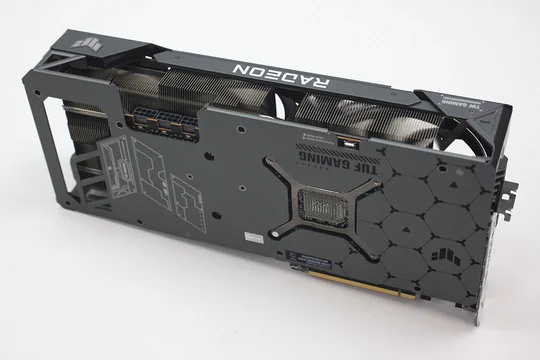
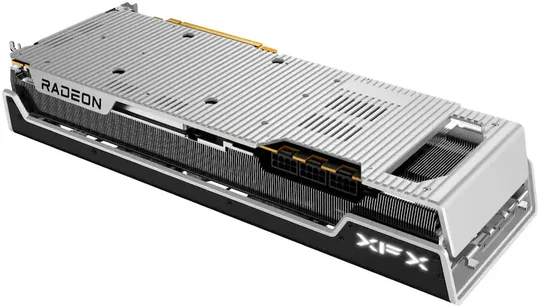
Image Credit to TechPowerUp
Image credit to XFX
Now, on the PSU side, as mentioned earlier, most modern PC power supplies, such as the latest CORSAIR PSUs, already incorporate the 12V-2x6 connector natively to comply with the new ATX 3.1 power standard. And, like new video cards, PSUs also come in different 12V-2x6 configurations. Some PSUs have one 12V-2x6 connector, while others have two, depending on their wattage.
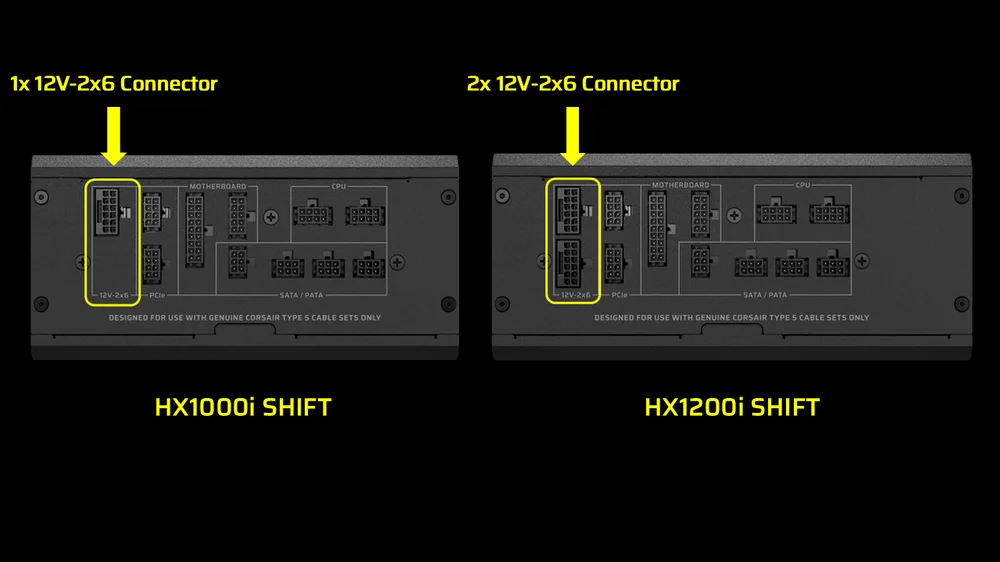
To give a visual comparison between two PSUs: one has a native 12V-2x6 connector (on the left), while the other has two (on the right).
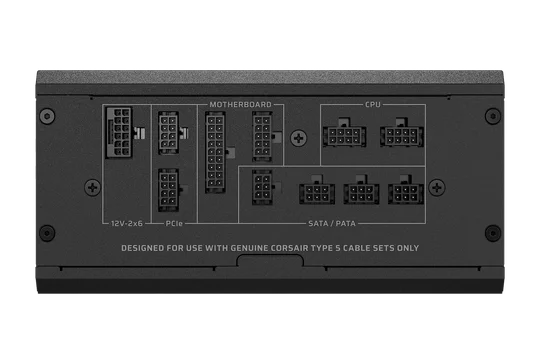

HX1000i and HX1200i SHIFT models feature a single 12v-2x6 connector (HX1000i SHIFT Pictured)
HX1500i Features two 12v-2x6 connections.
If you have one of the AMD Radeon video cards that requires 3x 8-pin PCIe cables and have a PSU that only has one 12v-2x6 connector, such as the CORSAIR HX1000i SHIFT, you might be a little confused about how to configure your 8-pin PCIe cables to power your video card.
How to Use a 12V-2x6 to 8-pin Connection for an AMD Radeon GPU
We’ll show you how to connect all the right cables to your video card properly. Note that this setup applies to most modern ATX 3.1 PSUs, but if you have a CORSAIR PSU, rest assured that all the cables you need will be included in the box.
In this guide, we will be using the CORSAIR HX1000i SHIFT PSU. First, identify the 12V-2x6 and PCIe connectors on your PSU.
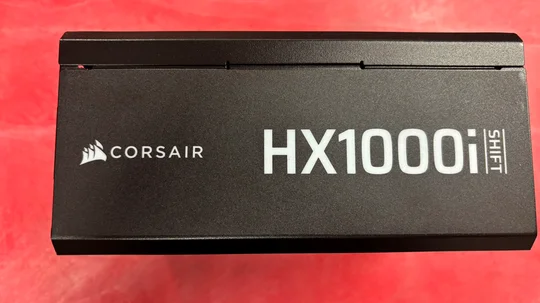
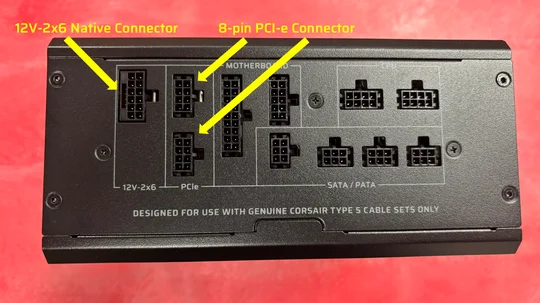
In the bag of cables, you will need the 12V-2x6 to 2x 8-pin PCIe cable and the 8-pin to 8-pin PCIe cable.

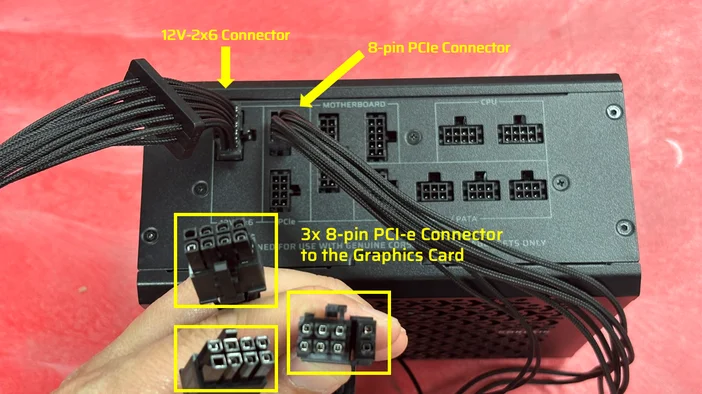
If you look at the connectors on the 12V-2x6 cable, you will see on one end the actual 12V-2x6 connector that plugs into your PSU, and at the end, it splits into two 8-pin PCIe connectors that plug into your video card.

Now, on the 8-pin to 8-pin PCIe cable, you will see that both connectors have 8 pins. The connector that doesn’t split goes to your PSU, while the other that breaks into 6-pin and 2-pin connectors goes to your video card.
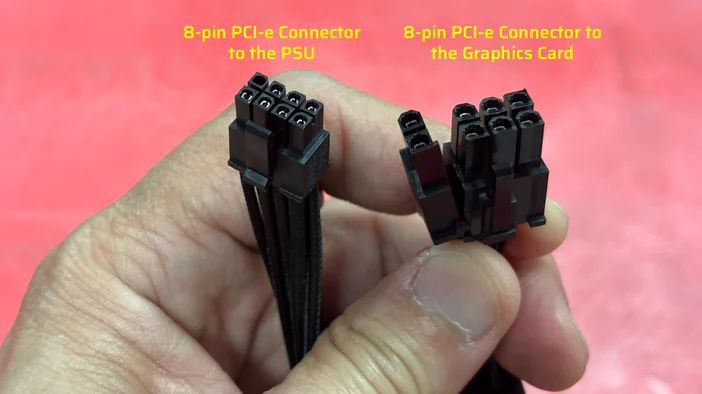
The 2x 8-pin PCIe connectors from the 12V2x6 cable and the 1x 8-pin PCIe connector from the 8-pin PCIe cable will need to be plugged into the video card - that’s a total of 3x 8-pin PCIe connectors for the video card to be properly powered.
CORSIAR offers a wide variety of power supplies with different wattage options and feature sets for different types of PC builds. The CORSAIR PSU Calculator is also a great tool to find the right PSU for your build.
PRODUCTS IN ARTICLE
JOIN OUR OFFICIAL CORSAIR COMMUNITIES
Join our official CORSAIR Communities! Whether you're new or old to PC Building, have questions about our products, or want to chat about the latest PC, tech, and gaming trends, our community is the place for you.