What if your PC could do more than just game, stream, and crunch spreadsheets? What if it could actually think for you? OpenClaw is a free, open-source AI assistant that lives right on your machine and connects to the apps you already use every day.
Whether you're managing your schedule through WhatsApp, automating file organization on your desktop, or having it draft emails in the background, OpenClaw turns your setup into a genuinely intelligent workstation.
Originally created by developer Peter Steinberger in late 2025, OpenClaw has since become the fastest-growing open-source project in history, surpassing 346,000 GitHub stars in under five months. Here's everything you need to know about what it does, how to set it up, and why it's worth your time.

What Is OpenClaw?
OpenClaw is a self-hosted, open-source AI agent runtime that turns your computer into a full-blown personal assistant. Think of it as having a second brain running alongside your OS. It connects to the messaging platforms you already use daily, including WhatsApp, Telegram, Slack, Discord, Signal, iMessage, Microsoft Teams, and over a dozen more, so you can talk to your AI assistant the same way you talk to your friends.
Under the hood, OpenClaw is model-agnostic, meaning you can power it with Claude, GPT-4, Gemini, or even fully local models through Ollama if you prefer to keep everything offline. Your data stays on your machine, your API keys stay in your control, and there's zero vendor lock-in. It's MIT-licensed, community-driven, and completely free.

Getting Started: How to Install OpenClaw
Setting up OpenClaw is surprisingly straightforward, even if you’ve never self-hosted anything before. OpenClaw runs on macOS, Windows (via WSL2), and Linux, so virtually any modern PC or laptop will work. You’ll need Node.js version 22 or higher installed as a prerequisite. From there, you have several options:
- Quick install script: Just open your terminal and run "curl -fsSL https://openclaw.ai/install.sh | bash".
- npm: Install it globally with "npm i -g openclaw" and then run "openclaw onboard --install-daemon" to walk through a guided setup. The onboarding wizard handles everything from configuring your gateway and workspace to connecting your first messaging channel and installing your first skills.
- Clone from GitHub: For power users who want to tinker with the source code directly, you can clone the repository from GitHub and run it from there.
- macOS companion app: There’s a macOS companion menu bar app in beta for those on macOS 15 or later, plus companion nodes for iOS and Android that extend functionality to your mobile devices.
What Can OpenClaw Actually Do?
This is where OpenClaw really shines. With over 100 preconfigured AgentSkills and more than 50 integrations, the list of things it can handle is massive.
- Productivity: OpenClaw can manage your calendar, organize tasks across Apple Notes, Notion, Obsidian, and Trello, all from a single conversation in WhatsApp or Telegram. It can draft emails through Gmail, set up scheduled reminders, and browse the web on your behalf.
- Developer tools: It integrates with GitHub, runs shell commands, manages files, and executes code.
- Smart home: It works with Philips Hue, Spotify, and other connected devices.
- Voice: Wake word detection on macOS and iOS, continuous voice on Android, and TTS through ElevenLabs.
- Persistent memory: OpenClaw remembers. It learns your preferences and habits over time, so the more you use it, the more useful it becomes.
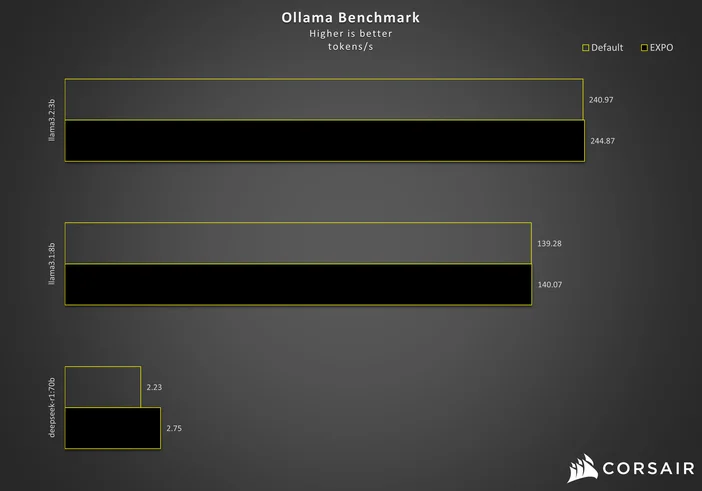
The Best Local Models for Running OpenClaw Offline
One of OpenClaw’s biggest draws is the ability to run entirely offline using a local AI model through Ollama. Not every model works well for this, though. OpenClaw needs strong tool-calling support and at least 64,000 tokens of context length to manage its agent tasks effectively. Here are the best options by hardware tier as of early 2026:
- 24–32GB VRAM (RTX 4090 or 32GB Mac): Qwen3 Coder 32B is the community’s top pick, delivering rock-solid tool calling and handling complex agent tasks beautifully. A newer challenger is Qwen 3.5 27B, which matches GPT-5 mini on coding benchmarks while fitting into 24GB of VRAM and offering a massive 262,000-token native context window.
- 16GB setups: Qwen3 14B or DeepSeek-R1-Distill-Qwen-14B are your best bets for strong performance on mid-range hardware.
- 8GB entry-level hardware: The new Qwen 3.5 9B punches well above its weight with working tool calling, vision support, and 262K context.
- 48GB or more: Llama 3.3 70B or Qwen3 72B will get you closest to cloud-model quality.
- Other solid options: GLM-4.7 for general-purpose tasks and GPT-OSS 20B for agent-focused workflows.
A popular power-user combo is Qwen3 Coder 32B as your primary model with GLM-4.7-Flash as a fast backup. Keep in mind that models under 14B tend to struggle with tool-calling stability, and local inference is slower than cloud APIs. But the tradeoff is total privacy, zero API costs, and complete independence from any external service.
Privacy, Security, and What You Should Know
Because OpenClaw is self-hosted, your data never leaves your machine unless you explicitly choose a cloud-based AI model. That is a huge advantage over cloud-only assistants. OpenClaw also uses DM pairing by default on major platforms, requiring approval codes before it processes messages from unknown senders. However, with the project's explosive growth came an equally explosive security crisis. In February and March 2026, security researchers identified more than 135,000 publicly exposed OpenClaw instances across 82 countries, with roughly 63 percent running with zero authentication. Multiple CVEs were disclosed in quick succession, including CVE-2026-25253, a critical one-click remote code execution flaw (CVSS 8.8) caused by unvalidated WebSocket origin handling, and CVE-2026-32922, a privilege escalation issue. Here are the key takeaways:
- Update immediately: Always run the latest OpenClaw version, as the maintainers patched the most serious vulnerabilities throughout March and April 2026.
- Never expose it directly to the internet: Keep your instance behind a firewall or VPN, and avoid binding to 0.0.0.0 unless you know exactly what you are doing.
- Require authentication: Set up authentication on your gateway and treat your gateway token like an API key.
- Go fully local for maximum privacy: Running a local model through Ollama means no data is sent to external servers at all, regardless of which messaging platforms you connect.
Is OpenClaw Right for You?
If you are comfortable running a terminal command and want an AI assistant that truly belongs to you, OpenClaw is hard to beat. It is free, open source, and endlessly customizable. Whether you want a smart home controller, a productivity copilot, or a developer tool that lives inside your messaging apps, OpenClaw can handle it. The community is massive and growing fast, which means new skills, integrations, and improvements land almost daily. Just remember to keep your instance updated, stay on top of security best practices, and start small. Pick one or two skills, get them working, and build from there. Before long, you will wonder how you ever managed without it.
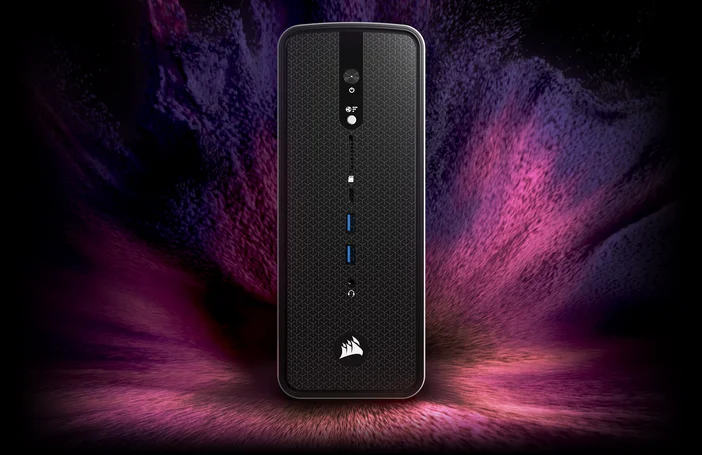
The Perfect Hardware for Running OpenClaw Locally
If you want to run OpenClaw with the most powerful local models and never worry about VRAM limits, the CORSAIR AI WORKSTATION 300 is built for exactly that. Powered by the AMD Ryzen AI Max+ 395 processor with an integrated AMD Radeon 8060S iGPU, it delivers up to 96GB of unified VRAM and 128GB of LPDDR5X memory in a compact 4.4-liter form factor. That is enough horsepower to run Qwen3 72B, Llama 3.3 70B, or even multiple models simultaneously without breaking a sweat.
- 96GB of unified VRAM: Run the largest open-source models at full precision with no quantization compromises.
- 128GB of LPDDR5X-8000MT/s memory: Handles massive context windows and multi-agent workflows with ease.
- AMD XDNA 2 NPU with 50 TOPS: Dedicated AI acceleration for always-on background tasks.
- Compact 4.4L desktop footprint: Sits quietly on your desk while running a fully private AI assistant 24/7.
Pair the AI WORKSTATION 300 with Ollama and Qwen3 Coder 32B or Qwen3 72B, and you have a completely self-contained, always-on AI workstation that never sends a single byte to the cloud. For anyone serious about local AI, it is the ideal companion to OpenClaw.
المنتجات في المادة
Stay up to date with CORSAIR. Get our latest News, Guides, and Product Updates in your Google feeds.
Add CORSAIR as a preferred source
JOIN OUR OFFICIAL CORSAIR COMMUNITIES
Join our official CORSAIR Communities! Whether you're new or old to PC Building, have questions about our products, or want to chat about the latest PC, tech, and gaming trends, our community is the place for you.