CORSAIR is back again for COMPUTEX 2026 to announce a bunch of cool products we’ve been cooking up. Computex is held annually in Taipei, the beautiful capital of Taiwan, but because not everyone can travel there in person, we make sure to talk about our new announcements right here too.
Below you’ll find the key information you need to know about all the new products we’ve unveiled at COMPUTEX 2026, and each one has its own dedicated article you can click through to for a more in-depth look. Let’s go.
WARTHOG
A long time ago, we made a case called the Vengeance C70, a military-inspired case that resembled an ammo case with a power and reset button straight out of a nuclear submarine (kinda.) And after 14 long years, it finally has a successor, the CORSAIR WARTHOG.
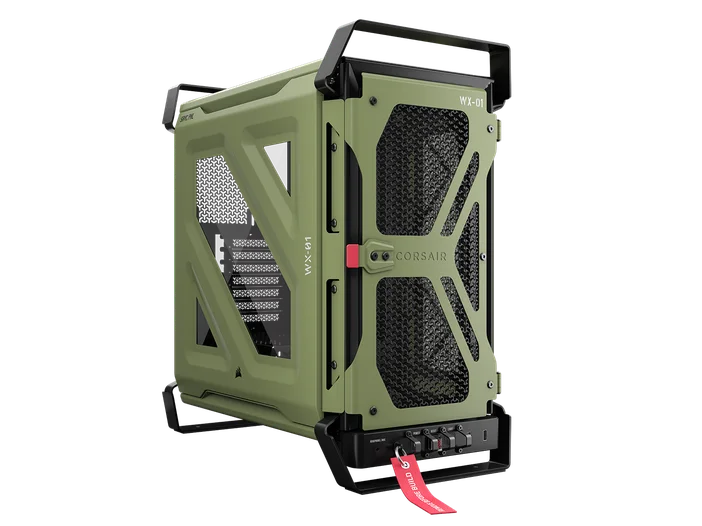
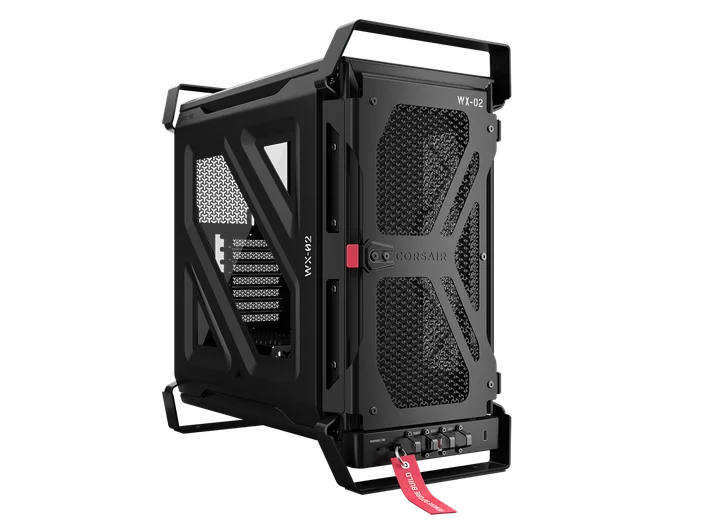
The WARTHOG provides a revamped more contemporary military aesthetic, updated with all the convenient build features we’ve developed in the time since. It’s based on the chassis of the popular FRAME 4000D, so you get InfiniRail fan/rad mounting, integrated GPU anti-sag, and the RapidRoute 2.0 motherboard tray.
Additionally, you get jet-inspired blockers between the front I/O controls, and even a “Remove Before Build” tab to yank out, so you can feel like Tom Cruise when he steals the enemy fighter jet in Top Gun: Maverick. Read more about it in our main CORSAIR WARTHOG article if you feel the need for speed.
HX1000i SHIFT CRYSTAL
Next up is a really cool one, and we actually showed a prototype of this at COMPUTEX 2025, the CORSAIR HX1000i SHIFT CRYSTAL. This is a 1,000W PSU with side-mounted connections, a built-in iCUE LINK System Hub, and of course, a transparent side casing. The casing is particularly fun for those who miss that early 2000s era when electronics had a moment where they had translucent or transparent externals.
We miss that era too, and we’re keen to bring it back. A PSU is a fun candidate for this as there’s a lot of cool electronic components to look at. Additionally, we’ve made the PCB white and color-matched the capacitors and a few other parts. There’s also a 140mm RGB fan inside to illuminate it all. It’s also one of our first PSUs to include PinProtect+, which is our built-in OCP technology (more on that later.) If you covet a wall-mounted pegboard style build, there is no better showpiece for that than the HX1000i SHIFT Crystal. Read the HX1000i SHIFT CRYSTAL article for more info about this spectacular power supply.
iCUE LINK TITAN II ULTRA 360 LX LCD AIO
We’ve also created successors to our TITAN AIOs, and the iCUE LINK TITAN II ULTRA 360 LCD AIO is the jewel of the new lineup, performing significantly better than any of our previous AIOs. This performance jump comes primarily from two improvements as compared to the original TITAN AIOs: A dual-layer, cross-flow radiator, and the second-generation FlowDrive pump.
The crossflow radiator sends the coolant through two paths, instead of a single route. This basically means that the coolant contacts much more radiator surface, so more heat can be conducted to the radiator, and then expelled through the fans. This does result in a radiator that’s thicker than typical AIOs (40mm vs the standard 27mm,) but if your case can house this radiator, then it will perform better than any of our previous AIOs. The FlowDrive 2 pump is an advancement from our previous pumps, too, delivering a better flow rate at a lower noise level. You can read more about it in our iCUE LINK TITAN II ULTRA 360 LCD AIO article.
iCUE LINK TITAN II 360 RX RGB / LCD AIO
The reason the TITAN II ULTRA is the jewel of the new lineup is because it has a thicker radiator, but if your case cannot accommodate a 40mm thick radiator, then the TITAN II 360 RGB or LCD is the next best option.
TITAN II Radiator
TITAN II ULTRA Radiator
It’s got everything the ULTRA has, but with a regular 27mm thick single layer radiator. We cover more of the details in our TITAN II 360 RX AIO page.
NIGHTSWORD v2 WIRELESS SD
The NIGHTSWORD v2 WIRELESS SD is a hugely upgraded sequel to the original. While preserving the classic NIGHTSWORD ergonomics and shape, we’ve also added StreamDeck functionality.
This means that with the touch of the SD button, you can access Virtual Stream Deck, allowing a basically limitless number of functionalities, any of which can be mapped to each of the 8 buttons on the NIGHTSWORD v2 WIRELESS SD. It’s also got an optical sensor that goes up to 33,000 DPI, 2.4GHz and Bluetooth 5.2 wireless connectively, and fast charging. Read our NIGHTSWORD v2 WIRELESS SD article for more information.
AX1600i SHIFT
The AX1600i SHIFT is the long-awaited follow up to our AX1600i PSU, which was our most powerful consumer PSU. However, PSU standards and technology have come a long way since then, so it was time for an updated model.
Our new AX1600i SHIFT uses convenient side-mounted connections, has two native 12V-2x6 ports, and it’s only 170mm long, so even users with regular mid-tower cases can now fit a 1600W PSU without issue.
Additionally, the AX1600i SHIFT has a wealth of control and monitoring options via iCUE, so whether you connect it to an iCUE LINK System Hub, or to an internal USB header, you’ll be able to see and adjust what your PSU is doing in real-time. More information can be found in the main AX1600i SHIFT article.
PinProtect and PinProtect+
With GPUs growing ever more powerful, some additional safety features won’t go amiss, providing peace of mind and extra protection for your precious gaming PC. We already released the ThermalProtect cable, which adds OTP (over-temperature protection) to any system that using a 12V-2x6 cable, but soon we’re coming out with two levels of built-in solution: PinProtect and PinProtect+.
The PinProtect technologies are built into the PSU, and they monitor the current flowing through all the pins of a 12V-2x6 connection. So, if the current through any one or multiple pins is too high for too long, the PSU will drop the current, shutting down the GPU, preventing damage.
PinProtect+ accomplishes the same objective, but the + means that you can monitor the current for the pins via iCUE and even change the threshold at which the PSU shuts down the GPU if you want some additional control. We’ve got individual articles that explain ThermalProtect, PinProtect, and PinProtect+ if you want more information, and an article that directly compares the three so you can see which one suits your needs.
PinProtect and PinProtect+ will be added to various CORSAIR PSUs soon, and ThermalProtect is already available and works with any PSU that uses a 12V-2x6 cable.
2026 RM1200e
The CORSAIR RM1200e will be one of the first PSUs to feature PinProtect, making it one of the safest power supplies for modern high-wattage GPUs.
In addition to that, it’s a solid PSU in its own right, with Cybenetics Gold efficiency, a compact 160mm length, and Zero-RPM mode, which makes it totally silent at low workloads. You can find out more by reading the main CORSAIR RM1200e article.
CLIPPER PRO MINI 60
The CLIPPER PRO MINI 60 is the most performance-focused, pared-down gaming keyboard we’ve made to date. The 60% form factor maximizes mouse space, and the CORSAIR MGX HYPERDRIVE CORE magnetic switches are so fast that your movement will be as snappy as you need.
Each key is individually adjustable in 0.1mm increments from 0.2mm to 3.8mm for maximum responsiveness, and because the switches are magnetic, you can also use functions like Smart Tap, Multi Action, and Tap Lock, all of which can be customized via CORSAIR Web Hub. Read more about it at the CORSAIR CLIPPER PRO MINI 60 Article.
HS35 v3
This is the newest iteration of our lightweight, affordable gaming headset. Available in wired and wireless variants, the HS35 v3 is widely-compatible, comfortable, and has an emphasis on microphone clarity.
Read about both versions in the CORSAIR HS35 v3 article for more information.
FRAME 5000D WOOD RS
In April 2026, we produced a wood variant of the FRAME 4000D, so it was only fair that we extend the same arboreal treatment to its big brother, the FRAME 5000D. You can get the FRAME 5000D WOOD RS in a clean white oak, or a darker walnut finish. We’ve also modernized the front I/O, replacing the USB Type-A ports with USB Type-C. Additionally, the side panel has been changed - now it’s an all-glass affair, instead of the 3/4th coverage window on the regular FRAME 5000D.
If you’ve already bought the regular FRAME 5000D and feel left out, don’t worry, as you can buy the wood front panels, upgraded front I/O, and new glass side panel separately. We break it all down in our main FRAME 5000D WOOD RS page.
iCUE LINK LX360 and RX360 UNIFIED FRAME Fans
Over the years, fan placement in PC cases has become largely standardized, with most mid and full-tower cases these days positioning fans in groups of three. This begs the question: Why not just make three fans into one?
Hence, the iCUE LINK LX360 and RX360 UNIFIED FRAME fans. These combine three LX120 fans or three RX120 fans into a single unit, respectively. This makes installation easier, cable management simpler, and provides a cleaner aesthetic.
There are a few variants of the UNIFIED FRAME fans. RX360 is more airflow focused, whereas the LX360 would be better for static pressure applications like forcing air through a radiator. Additionally, the LX360 has a reverse version, the LX360-R. Reverse rotor fans have the blades oriented opposite from usual, so you can use them as an intake, with the pretty side visible from the interior of the case.
This is perfect for cases where there’s a bank of intakes in the floor of the case firing up into the GPU, like our AIR 5400, for example. You can find the specs and more in the iCUE LINK LX360 and RX360 UNIFIED FRAME Fans article.
ICUE LINK RX II RGB Fans
We’ve also updated our regular iCUE LINK RX fans, with a few key improvements over the first generation. This design reduces noise a little, without compromising cooling performance. We’ve also made it so the RX II fans can run as slow as 400 RPM for the 120mm size, and 300 RPM for the 140mm.
Additionally, each RX II fan contains a temperature sensor that you can monitor in iCUE. You can even bind the fan’s behaviour to the temperature, so you can speed each individual fan up or down or even change the lighting depending on the temps. This can be used to really dial in a perfect airflow setup and fans curve for your whole system.
The RX II fans are available in 140mm, 120mm, with both sizes coming in black or white, and you can find the full specs in the RX II article.
TC80 Gaming Chair
The CORSAIR TC80 is our newest gaming chair, which will be coming in at an accessible price point, without losing a focus on lasting comfort and effective ergonomics.
Comprehensive adjustability, built-in lumbar support, and a detachable neck pillow take care of the ergonomics, and we’ve made the choice to use fabric on the high-wear sections, bordered by leatherette. Fabric is less prone to drying out and won’t crack, so the parts that see heavy use will last longer, and the leatherette edges keep the aesthetic modern and professional. We cover the TC80 fully in its own article, so read that if you’re keen for a new seat.
iCUE LINK 5-inch LCD Screen Module
If you’re enticed by the screen on the iCUE LINK TITAN II ULTRA 360 LX LCD AIO, but are happy with your current AIO, then you’ll be able to simply buy the module. As long as your CORSAIR AIO is CapSwap-compatible, this is a drop in upgrade.
It’s far larger than our previous screens, so you can see more of your stats, widgets, or memes. Additionally, it connects to your PC via DisplayPort. This means that the screen is a lot more versatile, much like the XENEON EDGE. You can read the full specs in the 5-inch LCD Module article.
XENEON EDGE Smoke and Crystal Colorways
Speaking of the XENEON EDGE, we’re also announcing two new colorways at Computex 2026: Smoke, and Crystal. The XENEON EDGE Crystal is has a totally clear, transparent casing and stand, whereas the Smoke colorway uses a darker tinted and frosted material for the case and stand.
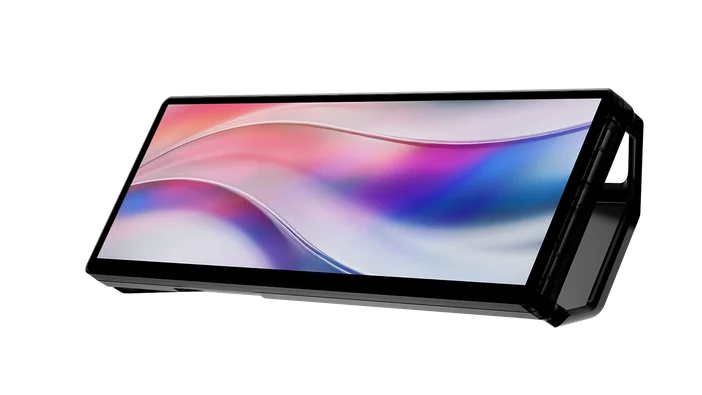
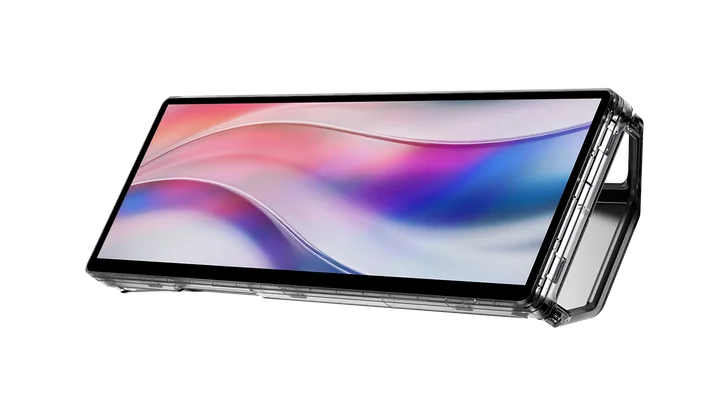
All colorways of the XENEON EDGE are identical in function, so you get access to all the widgets, iCUE integration, and extra utility that this display brings. So pick your favorite color and enjoy. Go read the main XENEON EDGE Smoke and Crystal article for more imagery of these new colorways.
Stay up to date with CORSAIR. Get our latest News, Guides, and Product Updates in your Google feeds.
Add CORSAIR as a preferred sourceWas this article helpful?
Feedback received
Thanks for helping us improve this article.
JOIN OUR OFFICIAL CORSAIR COMMUNITIES
Join our official CORSAIR Communities! Whether you're new or old to PC Building, have questions about our products, or want to chat about the latest PC, tech, and gaming trends, our community is the place for you.