HOW TO
VANGUARD PRO 96 Hall Effect Feature Update
The VANGUARD PRO 96 has been CORSAIR’s premium Hall Effect keyboard alongside the MAKR PRO 75 and the new addition, the CLIPPER PRO MINI 60. With the release of the CLIPPER PRO MINI 60, CORSAIR’s suite of Hall Effect features has advanced with new and upgraded functions. These features include Multi-Action, Smart Tap, and Tap Lock. Now that these features are implemented onto the CLIPPER PRO MINI 60, they are added to the VANGUARD PRO 96 and eventually the MAKR PRO 75.
This article will describe the steps needed to implement these new features on VANGUARD PRO 96 and explain each feature in detail.
CORSAIR Firmware Update Utility
To access the new features for the VANGUARD PRO 96, a firmware update is required. To update the firmware, go to the CORSAIR Firmware Update Utility and follow the steps below:
1) Open Firmware Update Utility and Click Add Device
2) Click VANGUARD PRO 96 and Connect
3) Click Update
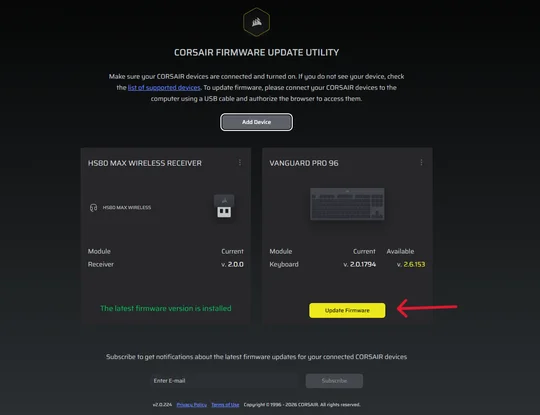
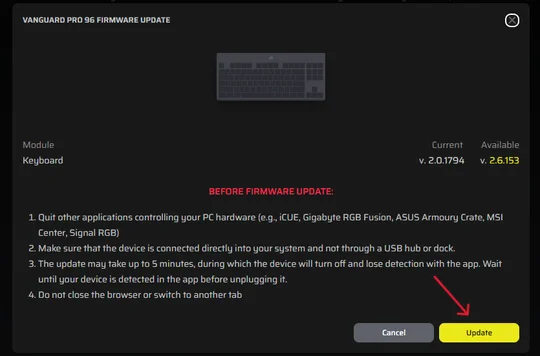
4) Once complete, VANGUARD PRO 96 will be ready to configure
5) Navigate to CORSAIR Web Hub
Once in Web Hub, the VANGUARD PRO 96 will be ready to configure with all new features.
New Features
Now that VANGUARD PRO 96 has been updated to the latest firmware, here is a breakdown of each feature.
1) Multi Action
Multi Action is the upgraded version of Dual Actuation. Where Dual Actuation allowed two actions to be assigned to a single key, one at the halfway point and one at the full press, Multi Action expands this to four actions at four distinct points:
- Half-press
- Full press
- Half-release
- Full release
With Multi Action, a single key can now trigger four different actions, opening up more precise in-game inputs. Users can execute ability combos, fighting combos, movement commands, and more, all from one key. Multi Action is an extensive feature; to learn how to set it up, check out "What is Multi Action?"
2) Tap Lock
Tap Lock is a new feature that turns a standard key into a toggle. Rather than holding a key continuously during gameplay, users can tap the key once to toggle it on and tap again to toggle it off. Tap Lock does not remove normal hold behavior, if a key is held, it will respond as usual and only remain active while held.
With Tap Lock, users can access other keys instead of holding a key down enabling more precise gameplay. The article, “What is Tap Lock?” goes into further detail and provides a setup tutorial in CORSAIR Web Hub.
3) Smart Tap
Smart Tap is the third advanced feature being added to VANGUARD PRO 96. It allows a key to perform two different actions depending on whether the key is tapped or held. This differs from Multi Action, which triggers actions based on the key's travel depth, Smart Tap instead responds to the behavior of the key press itself.
Smart Tap is particularly useful on compact keyboards like the CLIPPER PRO MINI 60 and VANGAURD PRO 96, where keys can be configured to output arrow keys on a tap and Shift on a hold. This effectively adds key functions without adding physical keys to any keyboard, making a small form factor keyboard into a full-size keyboard. Check out "What is Smart Tap?" to learn more and follow an in-depth setup tutorial.
ENREGISTREMENT DU PRODUIT
Stay up to date with CORSAIR. Get our latest News, Guides, and Product Updates in your Google feeds.
Add CORSAIR as a preferred source
JOIN OUR OFFICIAL CORSAIR COMMUNITIES
Join our official CORSAIR Communities! Whether you're new or old to PC Building, have questions about our products, or want to chat about the latest PC, tech, and gaming trends, our community is the place for you.