Nowadays, with many more people getting into computers and consoles, quality of display has become a much more important point of satisfaction, and that is where anti-aliasing comes in. But to understand anti-aliasing, you first must understand the concept of aliasing.
What is Aliasing?
Aliasing is, in simple terms, when a curve is rendered and it looks more like a set of stairs. This is because the square pixels that make up the panel on a monitor are only able to approximate a diagonal or a curve. The discrepancy only gets worse when the image is up close and at lower resolutions.
How does Anti-Aliasing Work?
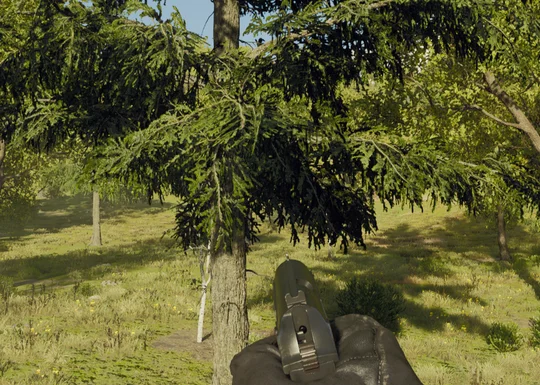
Anti-aliasing smooths out the jagged edges to make a more realistic looking image, blending the colors and pixels together to create an easy on the eyes display. It can make games, images, and videos so much more enjoyable for any person looking for a cleaner experience.
There are many types of anti-aliasing and it can be overwhelming to try to understand which is best for different wants and needs. Each of the types and those questions will be addressed in this article.
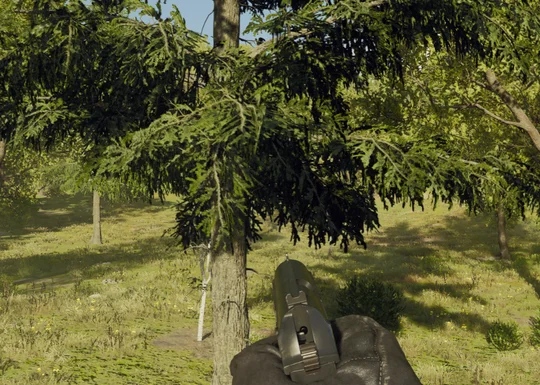
Without Anti-Aliasing
With FSR 3
The Most Common Types
The most common types of anti-aliasing found in today's games are SSAA, MSAA, FXAA, and TAA.
- SSAA (Super Sampling Anti-Aliasing) is the most computationally intensive form of AA though it produces the highest-quality images by downsizing a higher-resolution image.
- MSAA (Multisampling Anti-Aliasing) only applies to the edges, lowering performance cost while still making a difference.
- FXAA (Fast Approximate Anti-Aliasing) is a less intensive but less clear anti-aliasing technology that works by smoothing edges while being very fast.
- TAA (Temporal Anti-Aliasing) is a good choice if you want good results with a relatively low impact on your frames and works by using previous frames to smooth edges.

Popular Anti-Aliasing Technologies
There are also other options out there like DLDSR (NVIDIA), VSR (AMD), FSR (AMD), and more that can utilize these different technologies while adding on new features. They are more popular on newer titles and higher-end computer hardware, with some features barred if you do not have the newest equipment.
- DLDSR (Deep Learning Dynamic Super Resolution) is a new technology that utilizes AI to modify an image to what it is supposed to look like.
- VSR (Virtual Super Resolution) is a type of SSAA that AMD made for games that don't have inbuilt SSAA support. It can also be used with other AA types in-game.
- FSR (FidelityFX Super Resolution) uses TAA to enhance image quality. There are also multiple versions, version one that uses spatial upscaling, version two that temporally upscales, and version 3 that incorporates frame generation technology for high-quality games.
Which Anti-Aliasing Option is Best?
If you only care about what will be the least taxing on your computer, we have ranked a few anti-aliasing techniques, including some not mentioned in this article, by decreasing efficiency below. (The lower the option is on this list, the harder it makes your PC work)
- SSAA
- TXAA
- MSAA
- TAA
- SMAA
- FXAA
If you want the best gaming experience, then anti-aliasing is a must. Knowing your options with your specific PC is important for your frames, enjoyment, and performance.
JOIN OUR OFFICIAL CORSAIR COMMUNITIES
Join our official CORSAIR Communities! Whether you're new or old to PC Building, have questions about our products, or want to chat about the latest PC, tech, and gaming trends, our community is the place for you.