HyperVisor-protected Code Integrity (HVCI), also called Memory Integrity, is a Windows security feature that helps protect PCs from malware. It works by using Virtualization-Based Security (VBS) to create a secure space inside your system where critical checks are carried out. Think of it as a safe space where Windows can verify that everything running at the lowest level is safe.
In case you were wondering, the Windows kernel is a fundamental component of your operating system that controls how hardware and software interact. If something malicious gets into the kernel, it can take over your entire machine. HVCI stops that happening by making sure only trusted, digitally signed code can run at this level. If a driver or system component doesn’t pass the check, it never loads.
To run HVCI efficiently, you need reasonably modern hardware. Microsoft recommends Intel Kaby Lake (2016) or newer and AMD Zen 2 (2019) or more up-to-date CPUs, along with a compatible motherboard. Older systems can still enable it, but they rely on software emulation, which adds more overhead. HVCI is enabled by default in Windows 11 and is also supported in Windows 10, so most new systems already have it running without any extra steps.

How HVCI Works
HVCI uses the same technology as virtual machines do, creating a secure environment inside your PC. Here’s what happens in simple terms:
- Creates a Protected Space – Windows uses a lightweight hypervisor to separate security checks from the rest of the operating system. This means even if malware gets admin rights, it cannot tamper with these checks.
- Verifies Drivers and Code – Every time a driver or kernel-level component loads, HVCI checks its digital signature in this protected space. If the code is not trusted, it is blocked before it can run.
- Locks Down Memory – HVCI enforces strict memory rules so that malicious code cannot sneak in and execute where it shouldn’t. Modern CPUs make this process fast and efficient, while older CPUs rely on software emulation to achieve the same result, which uses more resources.
In short, HVCI acts like a security guard at the deepest level of Windows, making sure nothing suspicious gets through.
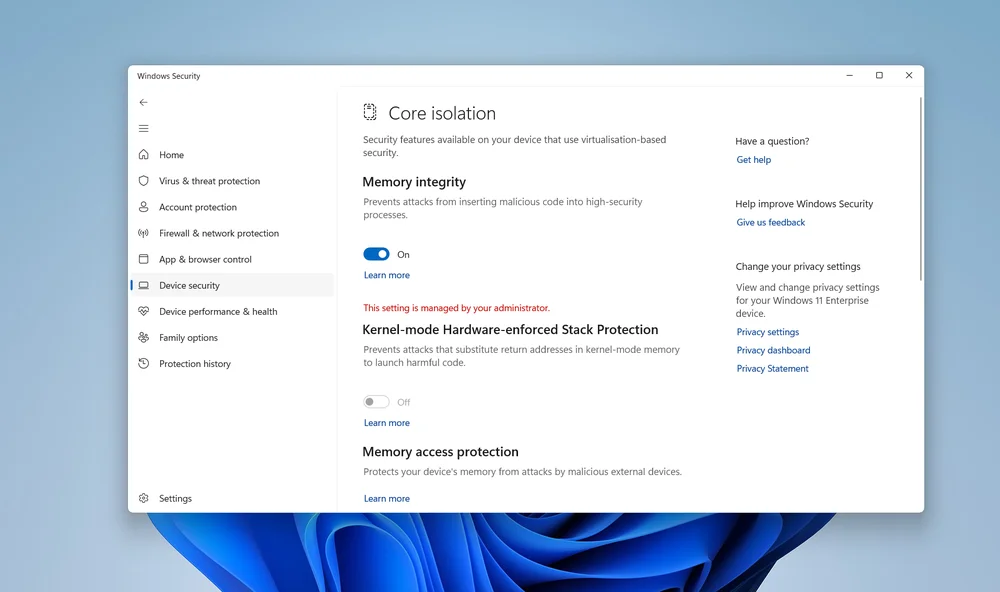
You can turn off Memory Integrity in System -> Privacy & security -> Device security -> Core Isolation.
What HVCI Means for Gamers
HVCI prevents malicious drivers and code from running at the kernel level, but this protection uses extra CPU cycles and memory bandwidth to achieve. That can impact performance, especially on older systems. Microsoft has optimized the feature, so on modern hardware the difference is minimal and hard to notice during normal gameplay. But for those that crave every frame, it’s annoying.
The security benefits, however, are significant. Systems with HVCI enabled are far less likely to experience malware infections or kernel-level exploits. For gamers, this matters because many modern titles rely on anti-cheat systems that require secure environments to function properly. Games such as Valorant and Battlefield 6 require these protections to be active and disabling them can stop these games from launching. We've written a separate article on everything you need for Battlefield 6.
Could you turn HVCI off for a small performance boost? Technically yes, but it is not worth the effort or the risk. Disabling it involves multiple steps, a system restart, and leaves your PC more vulnerable to advanced attacks. For most gamers, the performance difference is too small to justify that. If you are running up-to-date hardware, you will barely notice any change, and you will keep your system protected against threats that target the deepest layers of Windows.

JOIN OUR OFFICIAL CORSAIR COMMUNITIES
Join our official CORSAIR Communities! Whether you're new or old to PC Building, have questions about our products, or want to chat the latest PC, tech, and gaming trends, our community is the place for you.