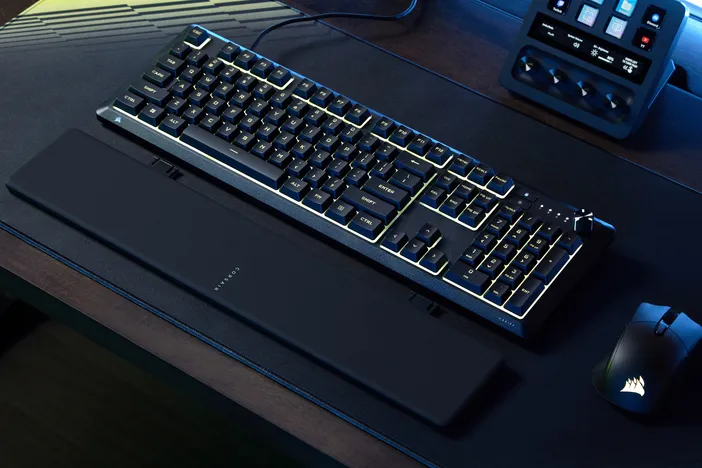
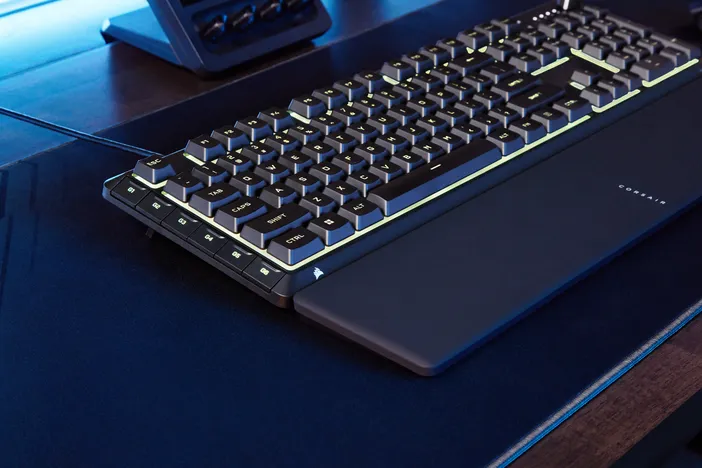
Welcome to CORSAIR's newest gaming keyboards: SKIFF 100 and SKIFF 100 PLUS. These are two new membrane keyboards designed for gamers who are starting out in their gaming setups and want a keyboard that is reliable and responsive for all tasks. With one version including 6 G-keys, both featuring adjustable volume controls, an IP53 rating, and 10-zone RGB lighting, the SKIFF 100 series is built for everyday gamers.
SKIFF 100 & SKIFF 100 Plus Specs
| SKIFF 100 | SKIFF 100 Plus | |
| Form Factor | Full Size | |
| Switch Type | Membrane/Rubber Dome | |
| Backlighting | 10-Zone RGB | |
| IP Rating | IP53 | |
| Connectivity | Wired USB | |
| Onboard Memory | 1 Profile | |
| Adjustable Height | Yes | |
| G-Keys | 0 Keys | 6 Keys |
| Detachable Wrist Rest | Yes | |
| Media Controls | Yes, Rotary Dial | |
| Compatibililty | PC, Mac, Xbox One, Xbox Series X|S, PS4, PS5 | |
| Software | Web Hub, iCUE (Coming Soon) | |
| Warranty | 2 Years | |
Membrane Switches Explained
Membrane switches are common on many gaming keyboards, and the technology behind them is simple to understand. Rather than individual mechanical components like mechanical switches, membrane switches use three flexible layers. The top layer and bottom layer both have conductive traces, and a middle separator keeps the two layers from making constant contact. When pressing a key down, the bottom layer makes contact with the top layer, creating an input that is registered by the computer.
The main tradeoff with membrane switches is that there is no tactile feedback like mechanical switches provide. Without a physical mechanism actuating a keypress, membrane keyboards feel softer and lack the distinct bump of mechanical switches. Membrane keyboards are typically suited to everyday typers, general users, and gamers who are just getting into the gaming scene.
IP53 Rating
The SKIFF 100 and SKIFF 100 Plus both carry an ingress protection rating of IP53, which tells you exactly how well the keyboards hold up against dust and water. The first digit 5, means the keyboard is protected from dust, blocking enough dust to prevent any buildup that could interfere with performance. The second digit 3, means the keyboards can handle water sprayed at up to a 60-degree angle without issue. In practical terms, an IP53 rating means the keyboard is built to handle the realities of daily use without compromising performance. Note that the keyboard is not waterproof, but it can protect against accidental splashes.
Built-In Accessibility
SKIFF 100 and SKIFF 100 Plus both offer great accessibility for all users. With the rotary dial, users have full control over both volume and media playback directly from the keyboard. In Volume Mode, rotate the dial clockwise or counterclockwise to adjust volume, or press it to mute and unmute. In Media Mode, hold FN and rotate to skip to the next or previous track, or hold FN and press the dial to play and pause.
Both keyboards also come with a detachable soft-touch wrist rest and one-stage tilt legs. The wrist rest offers great comfort when typing and can snap onto the keyboard for easy portability, while the tilt legs allow users to adjust the keyboard angle to find the most comfortable typing position for long sessions.
For those who game across multiple platforms, both the SKIFF 100 and SKIFF 100 Plus are compatible with PC, Mac, Xbox One, Xbox Series X|S, PS4, and PS5, making them a versatile option regardless of your setup.
SKIFF 100 vs SKIFF 100 Plus
As shown above, both keyboards share the same core features for a great gaming experience. However, there is one key difference. SKIFF 100 Plus includes 6 G-keys, while SKIFF 100 does not. These 6 G-keys allow for custom macros to be set and saved directly onto the keyboard, enabling macro recording and key assignments that extend the functionality of the keyboard further.
The SKIFF 100 also supports macro recording and remappable keys; however, macros cannot be assigned to dedicated G-keys. Instead, macro recording can be set to any regular key on the keyboard, though doing so removes that key's primary function.
Software
Both the SKIFF 100 and SKIFF 100 Plus use CORSAIR Web Hub and, post-launch, CORSAIR iCUE as their primary software platforms.
Web Hub
In CORSAIR Web Hub, users can adjust RGB lighting, set up macro recording, and alter device settings for both keyboards. All users have to do is plug in the keyboard, access Web Hub, and start configuring for a fully customized setup.
Game Hard, Live Easy
For gamers who want a beginner-friendly keyboard and are starting to experiment with PC gaming, SKIFF 100 or SKIFF 100 Plus is the right choice. Both keyboards offer comfort, efficiency, and customizability without sacrificing the features that make a real difference in your setup. They're also a great fit for everyday users, offering strong accessibility, quick responsiveness, and quiet typing for office environments. Overall, SKIFF 100 and SKIFF 100 Plus are excellent keyboards for those starting out, while still delivering the full CORSAIR keyboard experience.
PRODUCTS IN ARTICLE
Stay up to date with CORSAIR. Get our latest News, Guides, and Product Updates in your Google feeds.
Add CORSAIR as a preferred sourceWas this article helpful?
Feedback received
Thanks for helping us improve this article.
JOIN OUR OFFICIAL CORSAIR COMMUNITIES
Join our official CORSAIR Communities! Whether you're new or old to PC Building, have questions about our products, or want to chat about the latest PC, tech, and gaming trends, our community is the place for you.