The XENEON EDGE is more than a secondary display. It can become a space for the information you want in view most often. iCUE includes a set of built-in widgets, but you can also create your own. Whether you want a custom system monitor, a weather display, or something more specialized, building a widget is more approachable than it may seem.
This guide covers how custom widgets work, where to find the full technical reference, what you need before you start, and how AI coding tools can speed up the process dramatically.
Building a Custom Widget
Custom widgets are built with HTML, CSS, and JavaScript, and run on a Chromium-based rendering engine (QtWebEngine).
At a structural level, every widget is a folder with two required files:
- index.html: the widget's entry point (markup, styles, and scripts).
- manifest.json: metadata describing the widget, including name, version, supported devices, and required plugins.
Optional files include additional CSS and JavaScript, image assets, and a translation.json for localization.
Rather than restating the full specification here, the complete reference for the manifest format, the available user-configurable control types (sliders, color pickers, sensor selectors, and so on), the plugin APIs for sensors and media, and the runtime hooks for connecting to iCUE all live in the official Elgato documentation. That's the canonical source and stays in sync with the framework as it evolves.
Official Documentation
The WidgetBuilder Kit
CORSAIR provides a WidgetBuilder Kit to make the process easier. It includes both the WidgetBuilder CLI and a Skill for AI coding agents.
The WidgetBuilder CLI (icuewidget) is a command-line tool that scaffolds a new widget folder, validates your manifest and HTML, and packages the result into an .icuewidget file ready to import into iCUE.
The Skill is designed for coding agents such as Claude Code, Codex, Gemini CLI, Augie, OpenCode, and similar tools. It primes the agent on the widget specification, the device sizes and resolutions for the XENEON EDGE, the Pump LCD, and the Keyboard LCD, and the conventions for layout, manifest, and plugin use.
Together they cover the whole loop: scaffold, generate, validate, package. Find the download for the WidgetBuilder Kit below.

Before You Start
Make sure you have these ready before development:
- XENEON EDGE connected
- iCUE 5 installed, version 5.44 or above
- The WidgetBuilder CLI installed from the WidgetBuilder Kit
- A coding agent installed, such as Claude Code, Codex, Gemini CLI, Augie, OpenCode, or another tool you prefer
Using AI to Help Build Your Widget
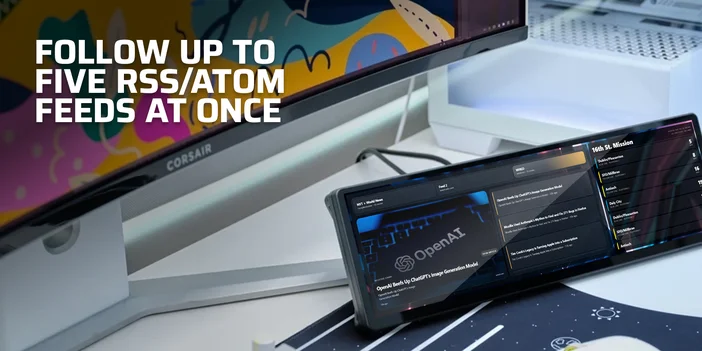
You don't need to be a web developer to build a custom HTML widget. AI coding agents like Claude Code, Codex, Gemini CLI, Augie, OpenCode, or similar tools can generate working widget code from a plain-language description.
Upload the Skill from the WidgetBuilder Kit to your coding agent of choice. The Skill primes the model on the widget specification, the device sizes and resolutions for the XENEON EDGE, the Pump LCD, and the Keyboard LCD, and the conventions for layout, manifest, and plugin use.
Once the Skill is loaded, describe what you want. Something like:
- "Create a widget for the XENEON EDGE that shows my CPU and GPU temperatures with a dark background, colored gauges that go from green to red based on temperature, and let me customize the warning thresholds in the settings panel."
- The AI coding agent will produce the index.html, manifest.json, icon, and other supporting files. The Skill walks the model through a structured workflow: it asks clarifying questions, designs the layout, generates the code, and helps you test and package the result.
Tips for Getting Good Results
Be specific about what data you want displayed and how it should look. Mention which devices you're targeting (XENEON EDGE, keyboard LCD, pump LCD, or all three). If you want user-configurable settings, describe what should be adjustable. And if your widget needs external data (weather, stock prices, anything pulled from an API), mention that upfront so the AI can guide you through source selection.
Once the AI generates your files, run them through the WidgetBuilder CLI to validate the output and package the result into an .icuewidget file. If something isn't quite right, tell the AI what to change. It's an iterative loop that makes widget creation accessible without coding experience.
Even though LLMs advance quickly, the process may take a couple of iterations. Building a nice, unique widget still requires craft, testing, and attention to detail.
Importing Your Widget
Once your widget is packaged, import it into iCUE by clicking the "+" button in the Widgets panel and selecting the file. You can also just double-click the .icuewidget file on your system. iCUE verifies the file, and if everything checks out, your widget appears in the widget list for all supported devices.
Best Practices
A few things to keep in mind whether you're writing code by hand or generating widgets with AI:
- Keep it glanceable. The best widgets convey their most important information within a couple of seconds. If someone has to study your widget to figure out what it's showing, it's too complex. Put the key data front and center.
- Design for multiple states. If your widget depends on network data or sensor readings, think about what happens when that data isn't available. Show a loading state while things initialize, a clear error message if something goes wrong, and ideally keep showing the last known good data with an offline indicator rather than going blank.
- Respect the screen size. The XENEON EDGE's widget slots range from Small (840x344 horizontal) to Extra Large (2536x696 horizontal). If your widget targets multiple sizes, make the layout responsive. Don't just scale everything up. Use the extra space on larger sizes to show more information or improve readability.
- Test on the actual device. What looks good in a browser preview can render differently on the XENEON EDGE itself. Import your widget and check it on real hardware before calling it done.
Share Your Creation
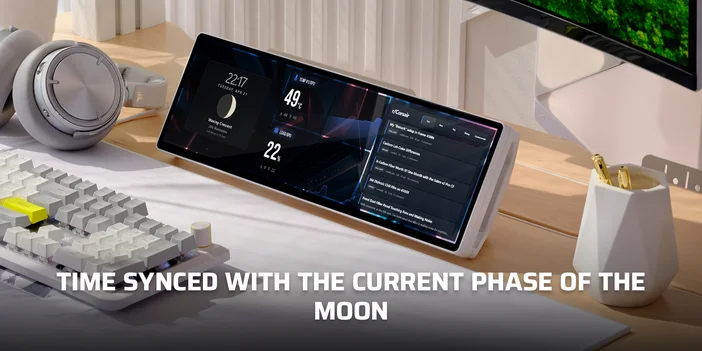
Once you've built something you're proud of, you have a few options for getting it in front of other people. The simplest is to export it as an .icuewidget file and share it directly with friends or community members.
A creators portal is on the way that will let widget builders publish directly to the Elgato Marketplace, with support for both free and paid widgets. That gives designers and developers a clear way to reach the broader XENEON EDGE community.
A CIKKBEN SZEREPLŐ TERMÉKEK
JOIN OUR OFFICIAL CORSAIR COMMUNITIES
Join our official CORSAIR Communities! Whether you're new or old to PC Building, have questions about our products, or want to chat about the latest PC, tech, and gaming trends, our community is the place for you.