-
SPECIFICAȚIILE CAZULUI
-
CONȚINUTUL KITULUI DE ACCESORII
-
CASE EXPANDED VIEWS
-
INSTALAREA / ÎNDEPĂRTAREA PANOULUI
-
INSTALAREA PLĂCII DE BAZĂ
-
INSTALAREA CABLURILOR I/O FRONTALE
-
INSTALAREA BENZII MAGNETICE
-
INSTALAREA VENTILATORULUI
-
SUPORT DE RĂCIRE PERSONALIZAT HYDRO X
-
INSTALAREA RADIATORULUI
-
INSTALAREA DISPOZITIVELOR DE STOCARE ȘI A CONTROLERELOR
-
INSTALARE SURSE DE ALIMENTARE
-
INSTALAREA PLĂCII VIDEO
-
CONECTAREA FANILOR TĂI
-
ÎNTREȚINERE
-
DECLARAȚIE DE GARANȚIE
-
PRODUCT CHANGES
-
AVAILABLE ACCESORIES
-
SPARE PARTS LISTING
-
LEGAL
- CONȚINUT CONEX
MANUAL | GHID DE START RAPID
CORSAIR FRAME Seria 4000
MODULAR MID-TOWER CASE
Versiunea în limba engleză este disponibilă aici - English
Dacă aveți alte probleme, vă rugăm să contactați asistență pentru clienți
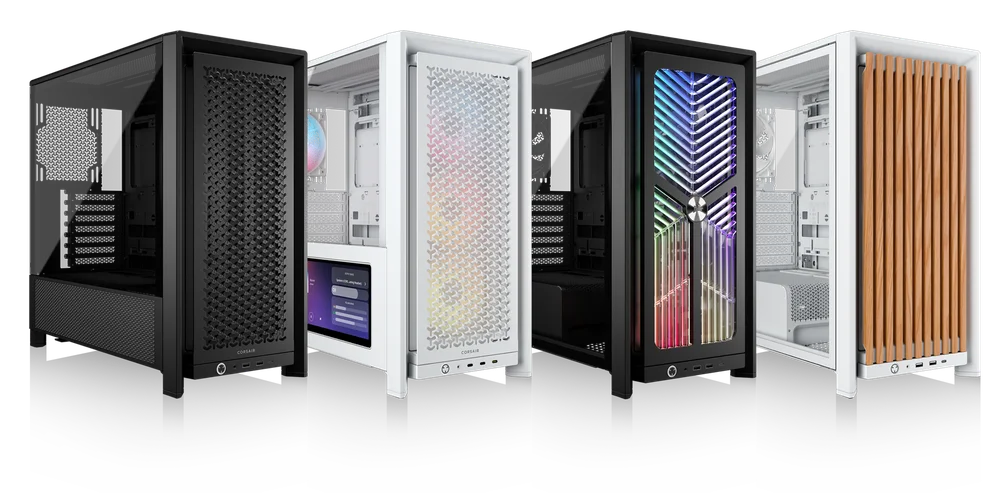
SPECIFICAȚIILE CAZULUI
|
Configurarea sloturilor PCI |
7 orizontale / 3 verticale |
|
Compatibilitatea plăcii de bază |
Mini-ITX, Micro-ATX, ATX, E-ATX (305mm x 277mm) |
|
HDD-uri |
|
|
SSD-uri |
|
|
Culori disponibile |
|
|
Material panou lateral stânga |
Sticlă călită |
|
Material panou frontal |
|
|
Spațiu pentru cabluri spate |
37 mm |
|
Filtre de praf |
Front, Side, Bottom |
|
I/O frontal |
Standard FPIO (FRAME 4000D, FRAME 4000D WOOD, FRAME 4000X):
ELITE FPIO (FRAME 4000D LCD, FRAME 4000D Vault SERIES):
|
1. LOCALIZAREA VENTILATOARELOR
NOTE: No fans are included with the FRAME 4000D or FRAME 4000D Vault Series.
| FRAME 4000D RS/RS ARGB | ||||||
|
Față |
Sus |
Spate |
Lateral |
Carcasă PSU | Bottom | |
|
3x 120 mm 2x 140 mm 2x 200 mm |
3x 120 mm 2x 140 mm
|
1x 120 mm 1x 140 mm
|
3x 120 mm 2x 140 mm
|
2x 120 mm |
None |
|
|
FRAME 4000D LCD, FRAME 4000D WOOD, FRAME 4000X |
||||||
|
Front |
Top |
Rear |
Side |
PSU Shroud | Bottom | |
|
3x 120mm 2x 140mm 2x 200mm |
3x 120mm 2x 140mm
|
1x 120mm 1x 140mm
|
3x 120mm 2x 140mm
|
2x 120mm |
1x 120mm |
|
2. VENTILATOARE ȘI CONTROLERE INCLUSE
|
CADRU 4000D |
CADRU 4000D RS | CADRU 4000D RS ARGB |
FRAME 4000D WOOD, FRAME 4000X |
FRAME 4000 LCD
|
|
|
Niciuna |
3x RS120 (Pre-installed) |
3x RS120 ARGB (Pre-installed) |
4x RS120 (Pre-installed) |
4x RS120 ARGB (Pre-installed) |
|
NOTE: Fans and lighting controllers are not included. ARGB lighting can be controlled through your motherboard or with a separate fan controller.
3. COMPATIBILITATEA RADIATORULUI
|
Față |
Sus |
Spate |
Lateral |
Carcasă PSU |
|
240 mm 280 mm 360 mm |
240 mm 280 mm 360 mm |
120 mm 140 mm |
240 mm 280 mm 360 mm |
Niciuna |
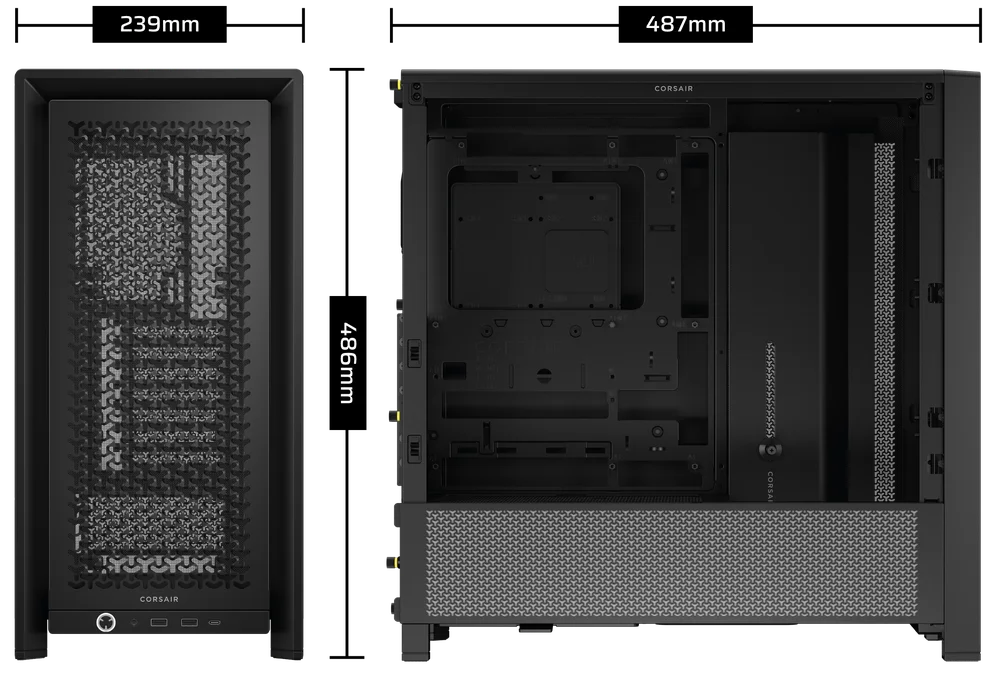
4. DIMENSIUNILE CARCASEI
| Dimensiuni |
487mm x 239mm x 486mm |
|
Lungimea maximă GPU |
430 mm |
|
Înălțimea maximă a răcitorului CPU |
170mm |
|
Lungimea maximă a PSU |
220mm |
CONȚINUTUL KITULUI DE ACCESORII
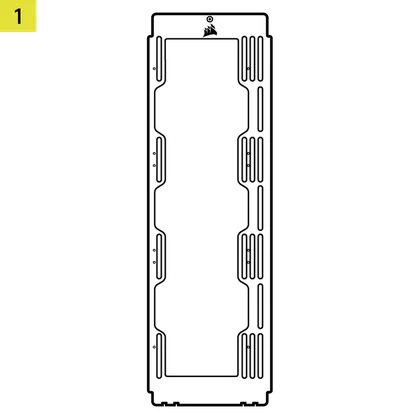
1x Suport de montare pentru ventilator lateral
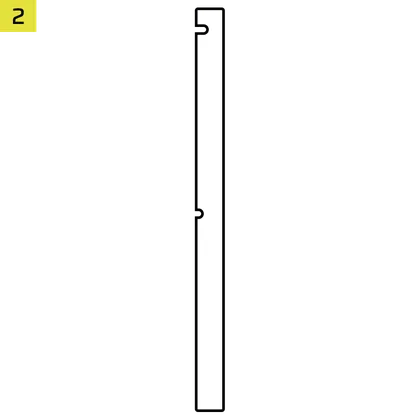
1x Bandă magnetică cu conector inversat
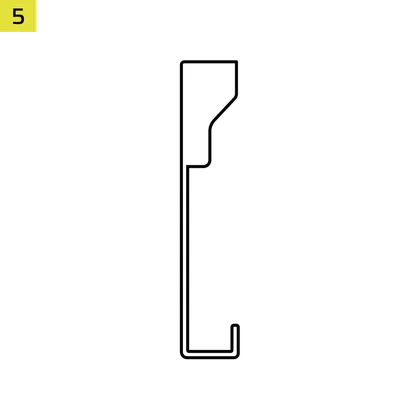
12x InfiniRail Fan Mounts
(Pre-Installed on Select Cases)
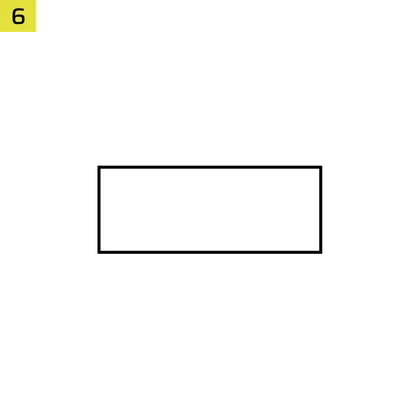
1x Solid Side Insert
(Select Models)
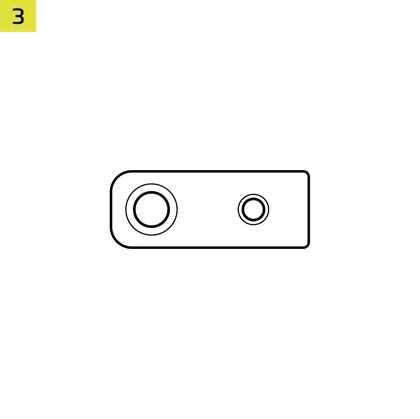
1x GPU Anti-sag Stabilization Arm Mini Mount
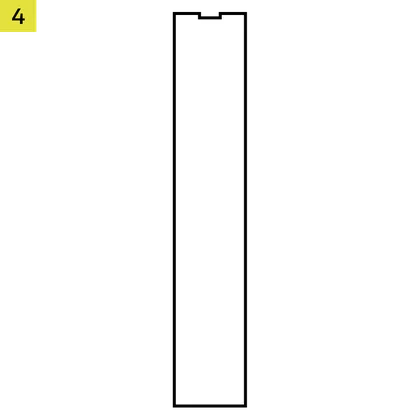
1x GPU Anti-sag Stabilization Arm Rubber Spacer
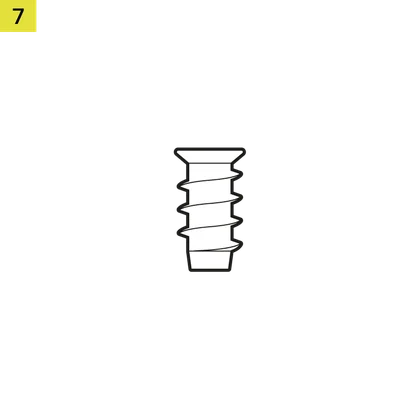
12-28x Self-Tapping Fan Screws
(Qty varies by model)
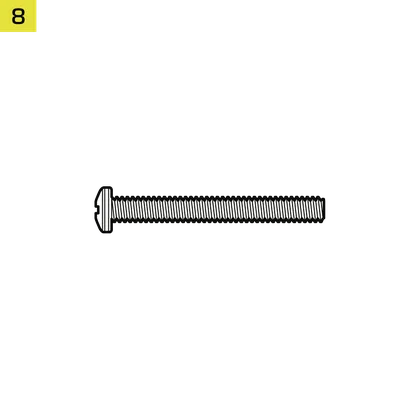
8-12x Long Fan Screws (6-32 UNC; 30mm)
(Qty varies by model)
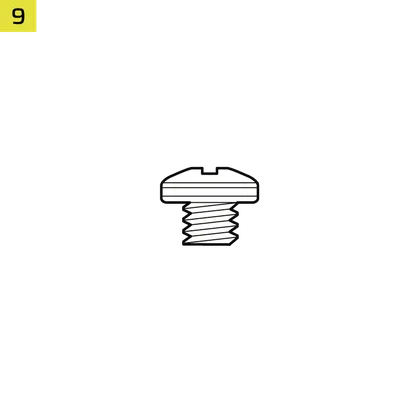
18 șuruburi pentru placă de bază/HDD (6-32 UNC; 6 mm)
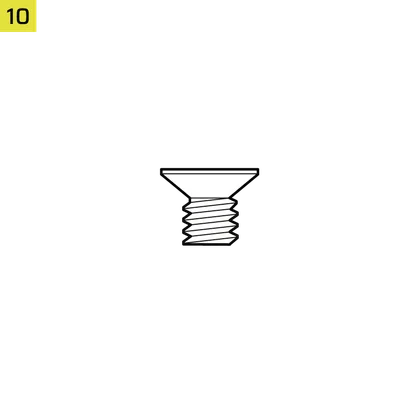
8-16x SSD Screws (M3 x 0.5; 5mm)
(Qty varies by model)
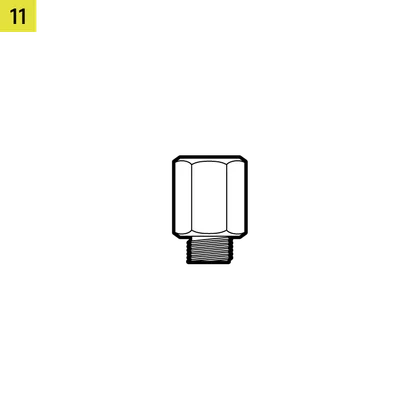
1x Suport de rezervă pentru placa de bază
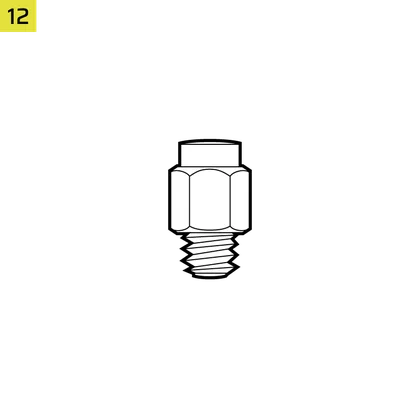
2x distanțiere pentru montare verticală
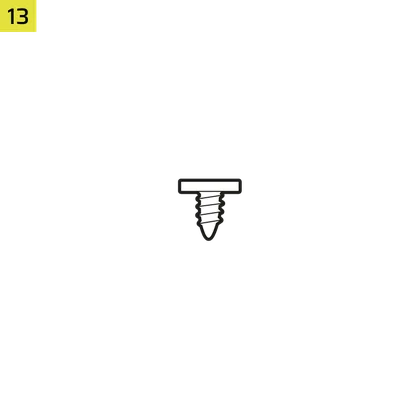
InfiniRail Fan Mount Lock Screws
(Pre-Installed on Select Models)
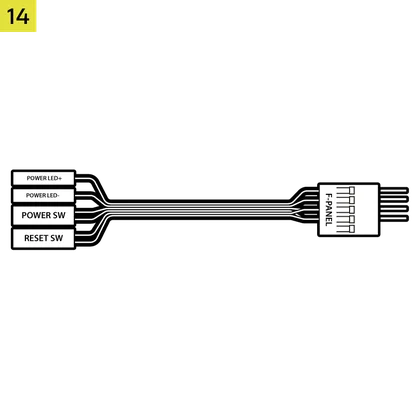
1x cablu adaptor I/O frontal
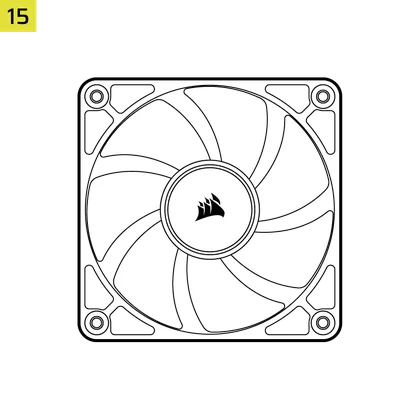
3x or 4x RS120 / RS 120 ARGB Fans
(Pre-Installed on Select Models)
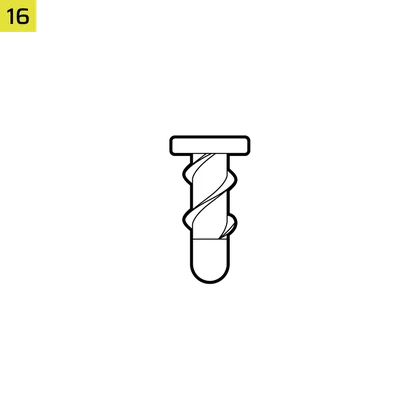
12x QuikTurn® Fan Screws
(Select Models)

CASE EXPANDED VIEWS
FRAME 4000D RS/RS ARGB

| A. Trei sferturi de geam lateral | H. Filtru ventilator lateral |
| B. Placa PCI | I. Panou frontal |
| C. Tavă standard din oțel pentru plăci de bază | J. Filtru ventilator frontal |
| D. Panou superior | K. Filtru ventilator PSU |
| E. Placa de acționare / controler | L. PSU Shroud |
| F. Cable Shroud with GPU Anti-sag Stabilization Arm | M. Inserție laterală translucidă |
| G. Panou lateral din oțel | N. Panou lateral Quarter-Mesh |
FRAME 4000D LCD
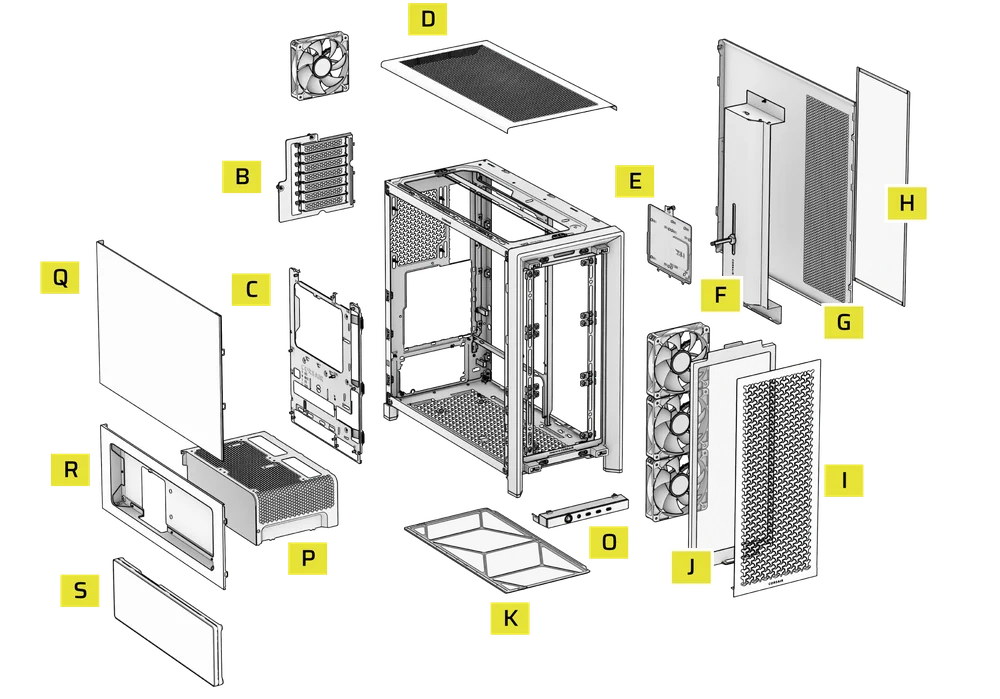
| B. PCI Plate | J. Front Fan Filter |
| C. Standard Steel Motherboard Tray | K. PSU Fan Filter |
| D. Top Panel | O. Front Panel I/O |
| E. Drive / Controller Plate | P. Compact PSU Shroud |
| F. Cable Shroud with GPU Anti-sag Stabilization Arm | Q. Two-Thirds Side Glass Panel |
| G. Steel Side Panel | R. LCD Screen Mounting Bracket |
| H. Side Fan Filter | S. XENEON EDGE LCD Touchscreen |
| I. Front Panel |
FRAME 4000X
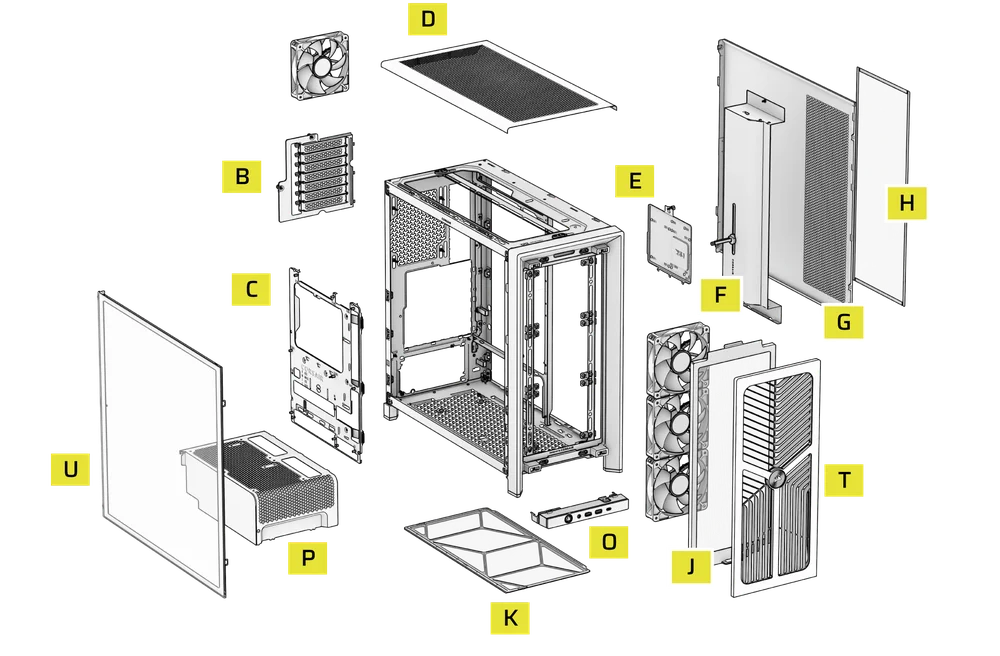
| B. PCI Plate | J. Front Fan Filter |
| C. Standard Steel Motherboard Tray | K. PSU Fan Filter |
| D. Top Panel | O. Front Panel I/O |
| E. Drive / Controller Plate | P. Compact PSU Shroud |
| F. Cable Shroud with GPU Anti-sag Stabilization Arm | T. RGB FLOW Front Panel |
| G. Steel Side Panel | U. Full Tempeed Side Glass Panel |
| H. Side Fan Filter |
FRAME 4000D WOOD
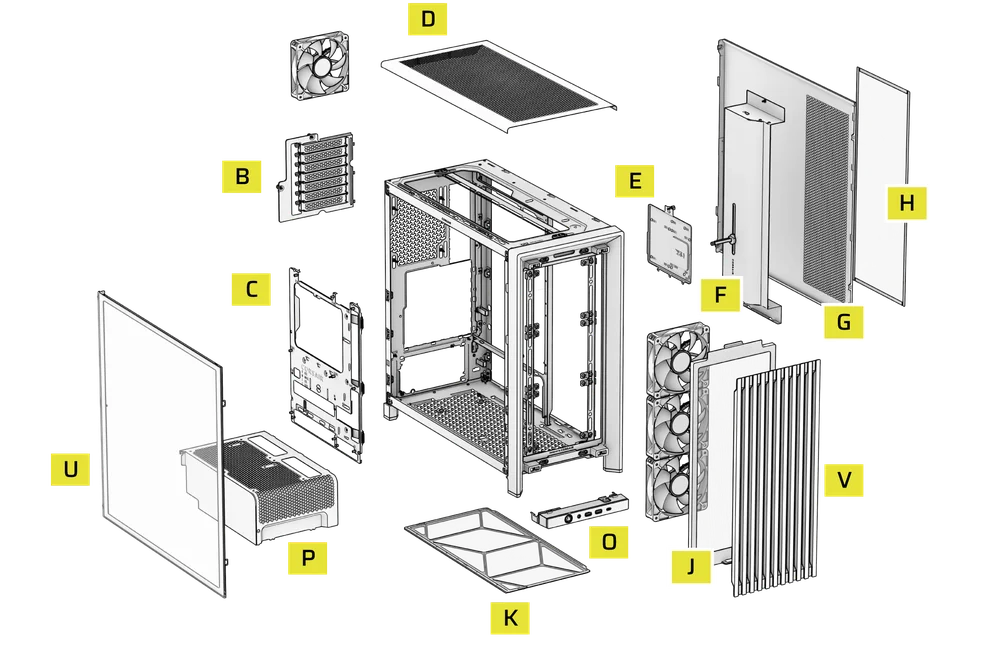
| B. PCI Plate | J. Front Fan Filter |
| C. Standard Steel Motherboard Tray | K. PSU Fan Filter |
| D. Top Panel | O. Front Panel I/O |
| E. Drive / Controller Plate | P. Compact PSU Shroud |
| F. Cable Shroud with GPU Anti-sag Stabilization Arm | U. Full Tempered Glass Side Panel |
| G. Steel Side Panel | V. Wood Front Panel |
| H. Side Fan Filter |
FRAME 4000D Vault Series
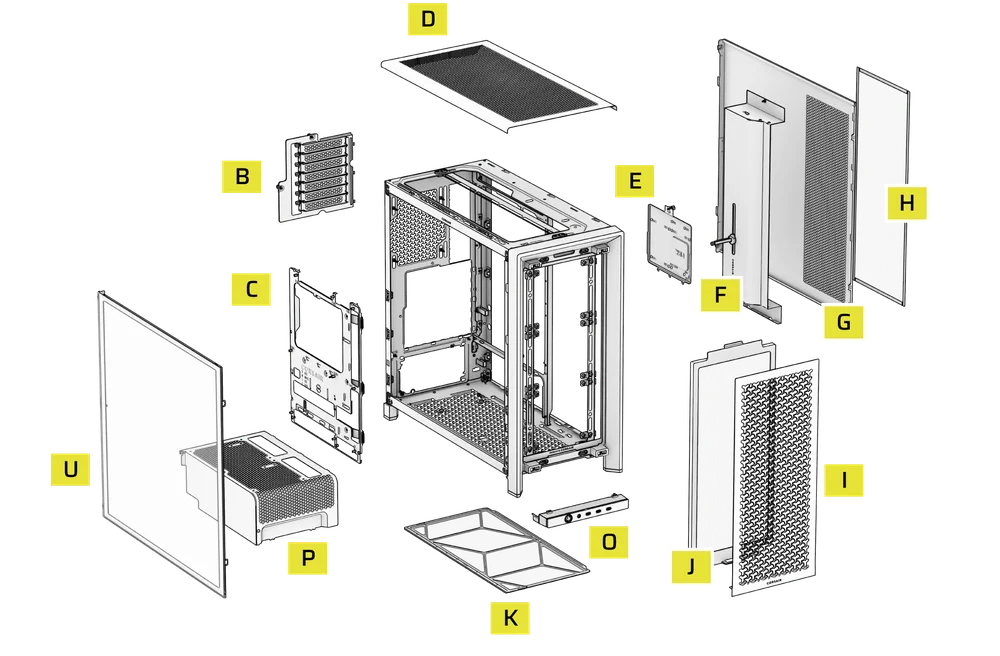
| B. PCI Plate | I. Front Panel |
| C. Standard Steel Motherboard Tray | J. Front Fan Filter |
| D. Top Panel | K. PSU Fan Filter |
| E. Drive / Controller Plate | O. Front Panel I/O |
| F. Cable Shroud with GPU Anti-sag Stabilization Arm | P. Compact PSU Shroud |
| G. Steel Side Panel | U. Full Tempered Side Glass Panel |
| H. Side Fan Filter |
INSTALAREA / ÎNDEPĂRTAREA PANOULUI
ATENȚIE: Acest produs conține sticlă securizată. Manipulați cu grijă.
- Pentru a preveni deteriorarea sau rănirea, evitați să așezați sau să depozitați carcasa pe suprafețe dure, cum ar fi gresie sau faianță, piatră, zidărie sau beton.
- CORSAIR recomandă insistent să îndepărtați toate panourile laterale din sticlă temperată înainte de a poziționa carcasa sau de a începe asamblarea pe o suprafață dură.
- Dacă trebuie să așezați produsul finit pe o suprafață dură, ridicați sau izolați carcasa pentru a minimiza riscul de contact accidental, deteriorare sau vătămare corporală.
Panourile de schimb sunt disponibile la www.corsair.com. Pentru asistență, contactați help.corsair.com.
1. DEMONTAREA PANELURILOR LATERAL
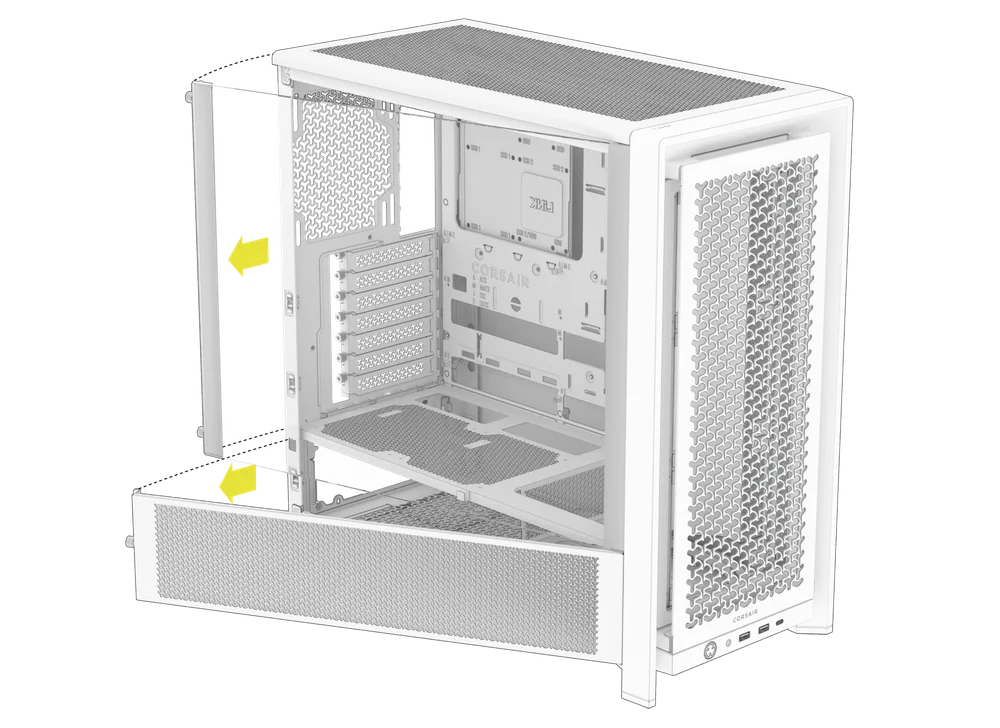
NOTE: This case is available with different left side panel designs (full glass or split glass/steel). Depending on your model, you may have one or multiple panels to remove. The removal method is the same for all variants.
- To remove the left side panel(s), loosen the thumbscrews at the rear of the case, then swing the panel(s) outward from the back and lift them off the front mounting tabs.
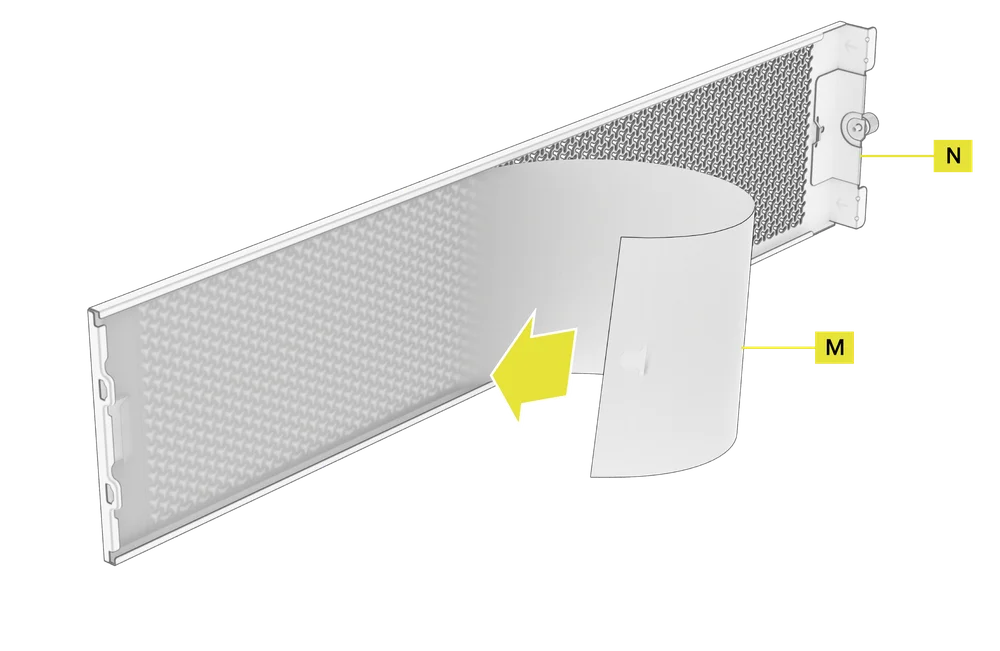
NOTE: On models equipped with the Quarter Mesh Side Panel (N), two optional inserts are included to customize the look and function of your build. A Translucent Side Insert (M) comes pre-installed, allowing RGB lighting to shine through while partially concealing cables. Alternatively, you can install the Solid Side Insert (4) for full coverage, or leave the panel open for maximum airflow. Inserts slide under the long edges of the panel for quick installation and removal.
- Pentru a scoate panoul lateral din oțel (G), deșurubați panoul din partea din spate a carcasei și rotiți panoul în afară din clemele din partea din față a carcasei.
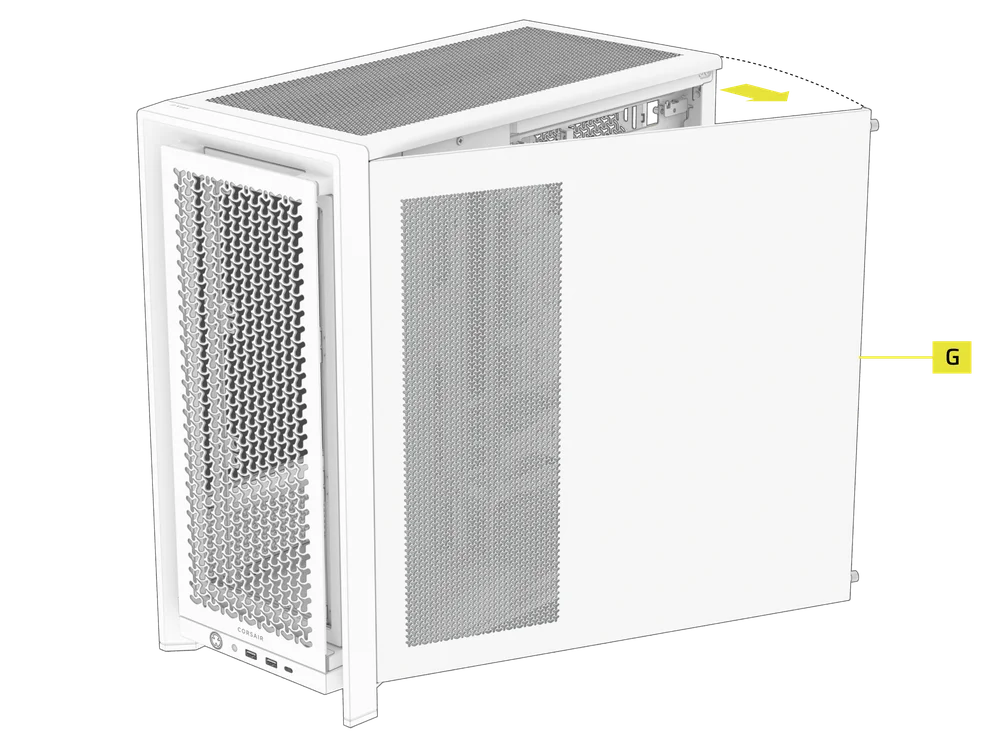
TIP: For removal or use of accessory side panels, please reference these Quick Start Guides for more in-depth information:
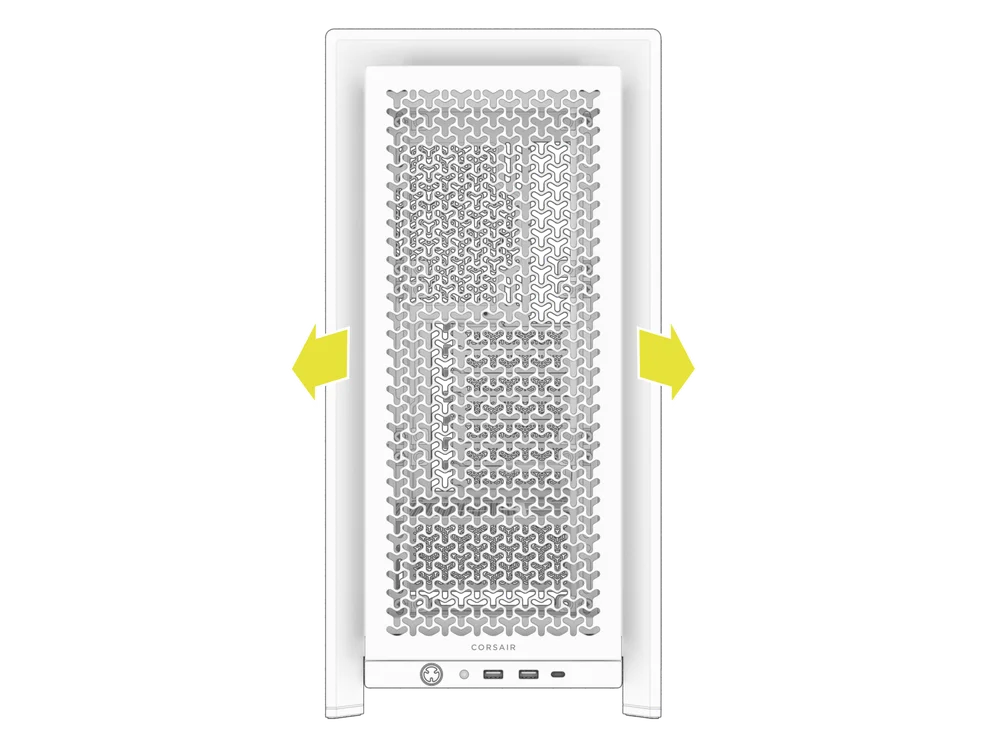
2. DEMONTAREA PANELULUI FRONTAL
- Pull the Front Panel outward. It's secured by two ball snaps at the top and bottom.
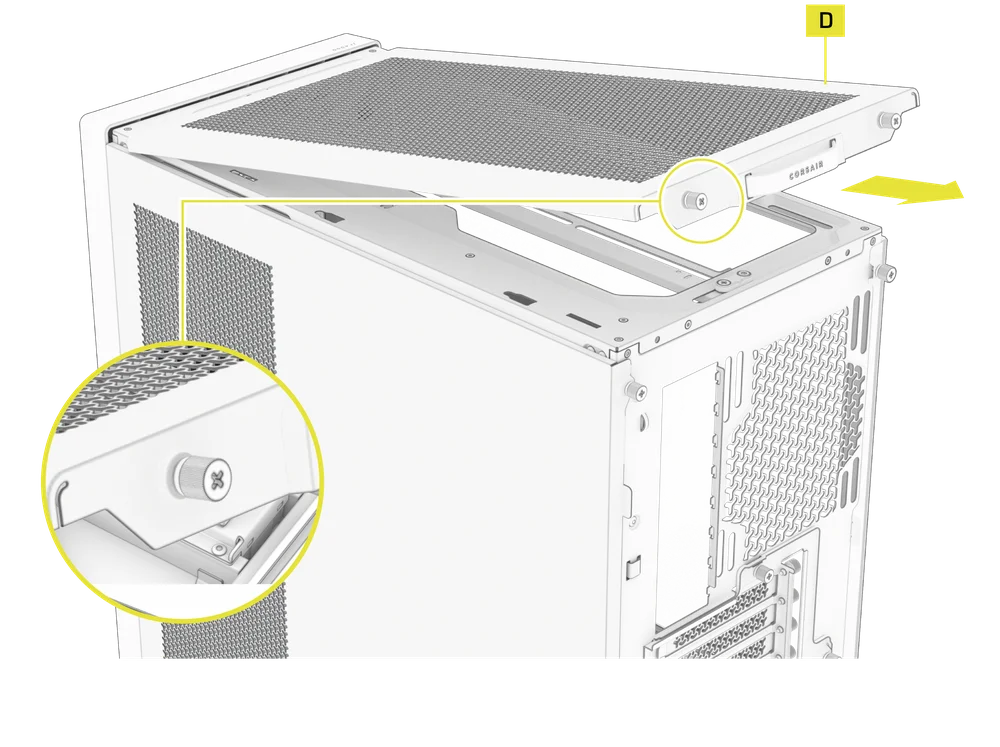
3. DEMONTAREA PANELULUI SUPERIOR
- Deșurubați cele două șuruburi captive din spate și trageți de cureaua cauciucată pentru a scoate panoul superior (D).
WARNING: The rubber pull-grip on the Top Panel (D) is designed to assist in removing the top panel from the case.
Acesta nu este un mâner pentru ridicarea carcasei sau a sistemului. Dacă ridicați carcasa folosind acest mâner, riscați să provocați daune grave computerului, carcasei și dvs.
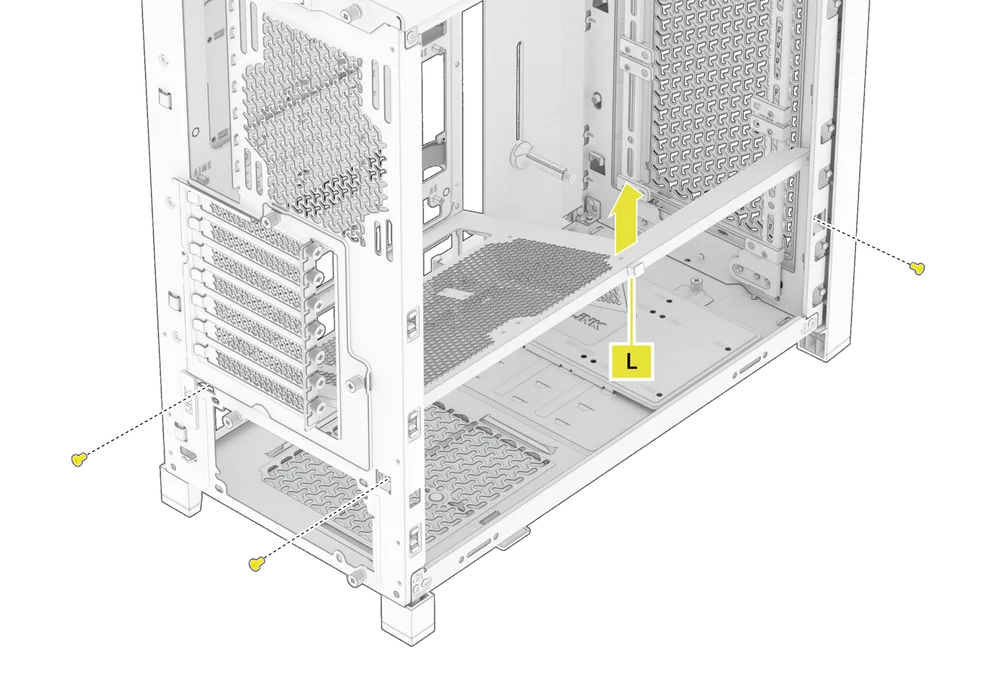
4.1 STANDARD PSU SHROUD REMOVAL (FRAME 4000D, FRAME 4000D RS / RS ARGB)
- FRAME 4000D
- FRAME 4000D RS
- FRAME 4000D RS ARGB
The PSU Shroud (L) is held in with a screw in the front of the case along the side and two screws in the rear panel of the case.
- Remove these three screws and the shroud will lift out.
4.2 COMPACT PSU SHROUD REMOVAL
- FRAME 4000D LCD
- FRAME 4000X
- FRAME 4000D WOOD
- FRAME 4000D Vault Series
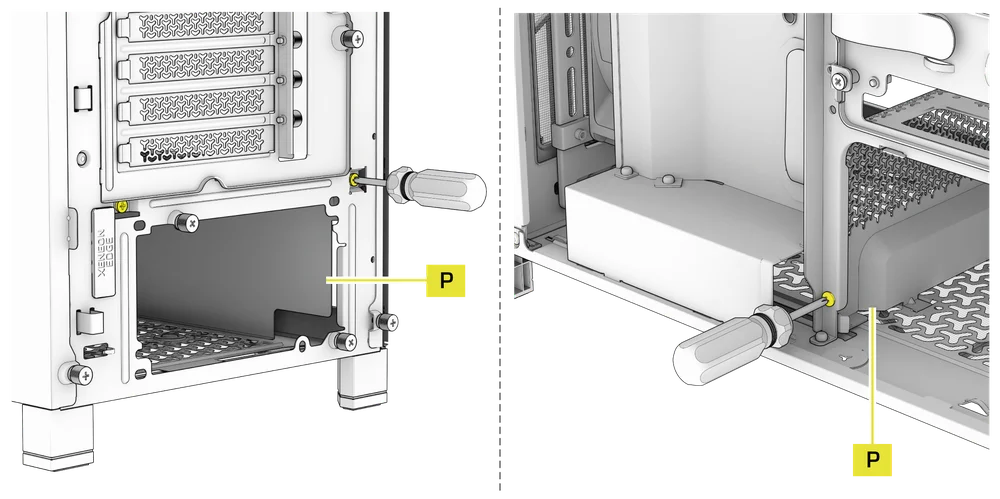
The Compact PSU Shroud (P) is held in with a screw in the front of the case along the side and two screws in the rear panel of the case.
- Remove the three screws.
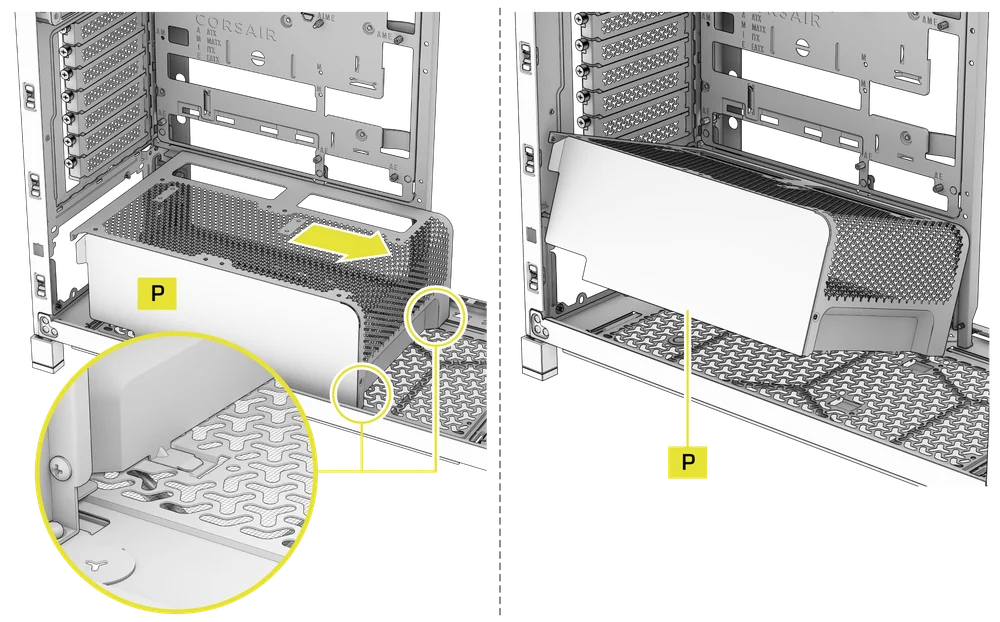
- Slide the Compact PSU Shroud (P) forward to release the clips located at its bottom front and the shroud will lift out.
5. DEMONTAREA CARCASEI CABLULUI SAU A SUPORTULUI VENTILATORULUI LATERAL
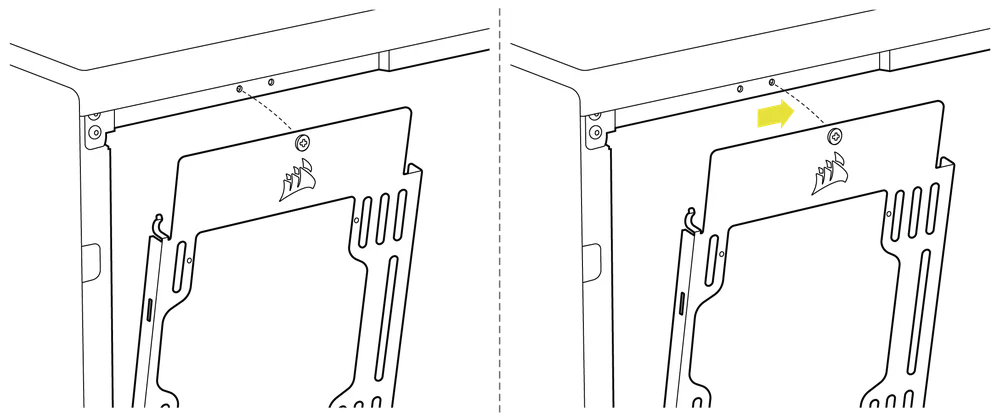
- Unscrew the screw at the top and tip the Side Fan Mounting Bracket (1) or Cable Shroud (F) out of the side. Repeat this in reverse to reinstall the part of your choice.
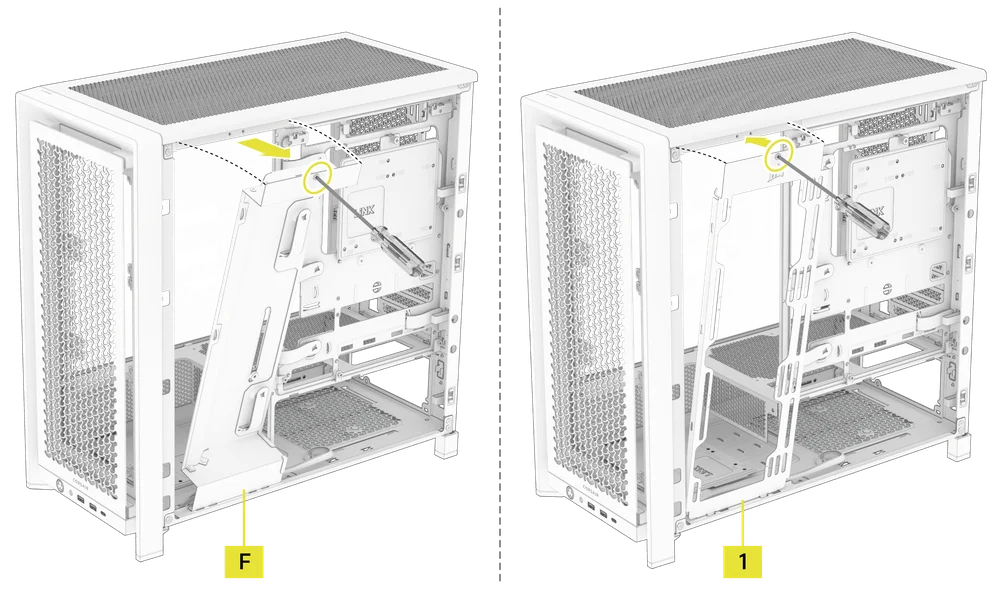
NOTE: The side mount has two positions for mounting. If using a radiator or 200mm fans, we recommend using the position closest to the motherboard.
6. DEMONTAREA SUPORTULUI PLĂCII DE BAZĂ
Tava standard din oțel pentru placa de bază (C) este fixată cu 4 șuruburi în partea din spate a tăvii.
- Unscrew these four screws.
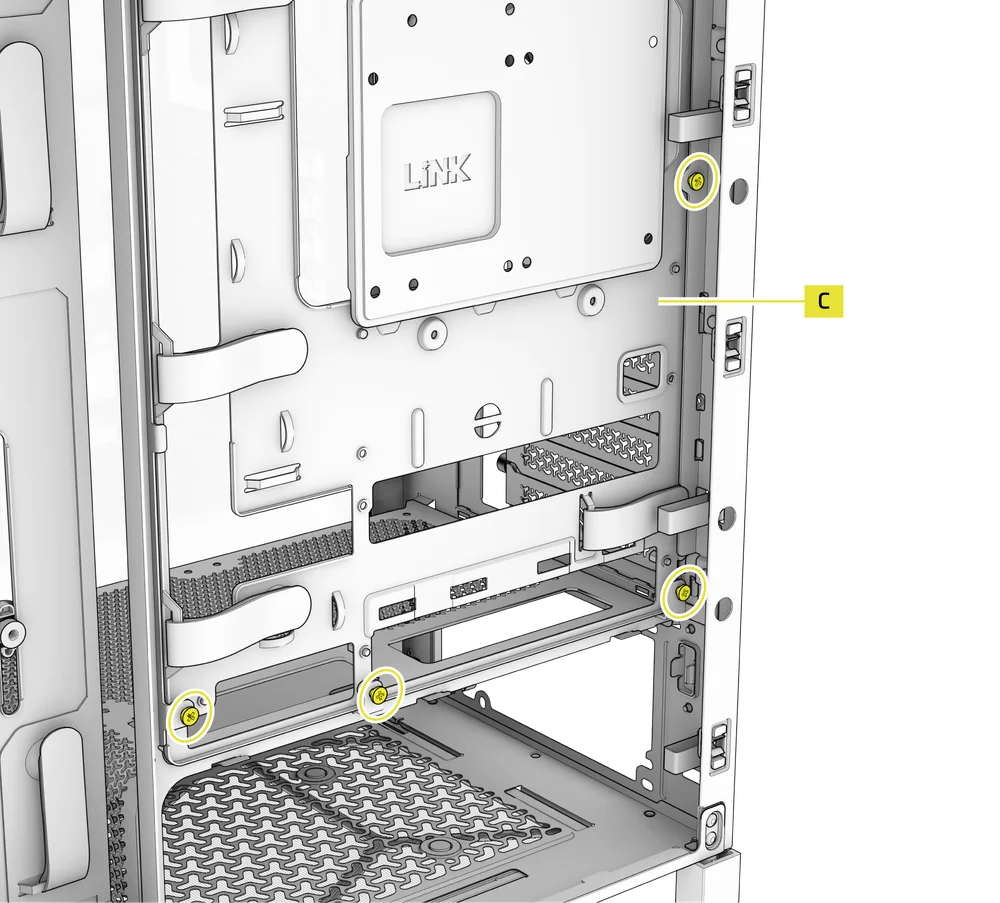
- Tilt the tray outward and lift it out.
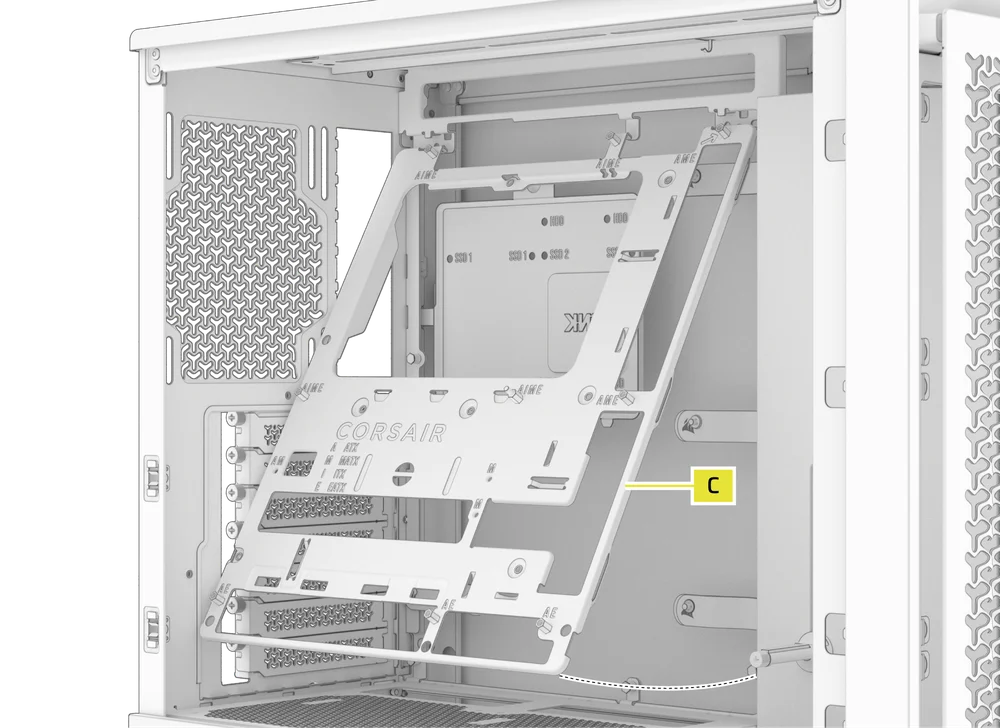
7. DEMONTAREA PANELULUI FRONTAL I/O
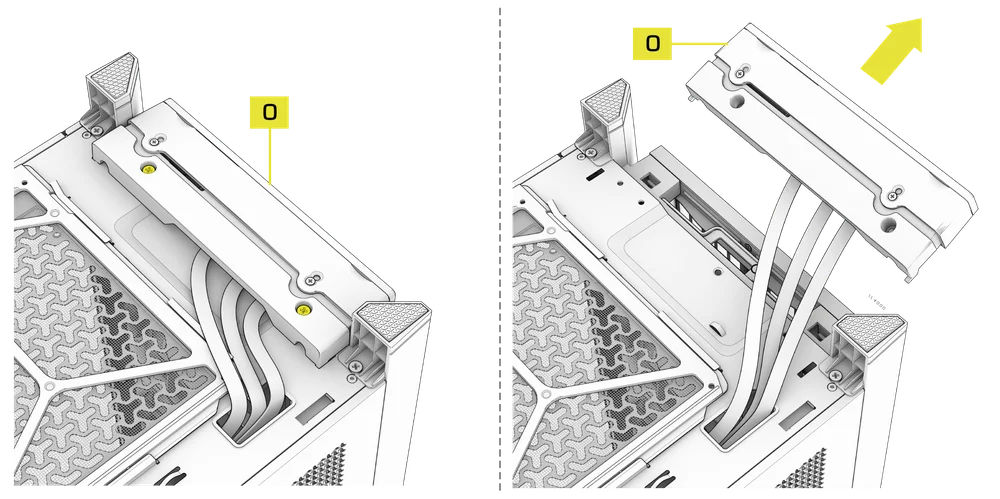
The Front Panel I/O (O) is held in with two screws on the bottom of the case.
- To remove it, simply unscrew these two screws, and the entire Front Panel I/O (O) assembly can be lifted out.
- To reinstall the Front Panel I/O (O) or to install a new one, place the assembly back in position and secure it with the same two screws.
INSTALAREA PLĂCII DE BAZĂ
INSTALAREA UNEI PLĂCI DE BAZĂ
The FRAME 4000 supports mITX, mATX, ATX, and E-ATX motherboards, including ASUS BTF, MSI Project Zero, and GIGABYTE Project Stealth with reversed connections.
- Aliniați placa de bază cu distanțierele și fixați-o cu șuruburile pentru placa de bază furnizate (9).
NOTĂ: Înainte de instalare, asigurați-vă că placa de bază I/O este la locul ei, dacă este necesar.
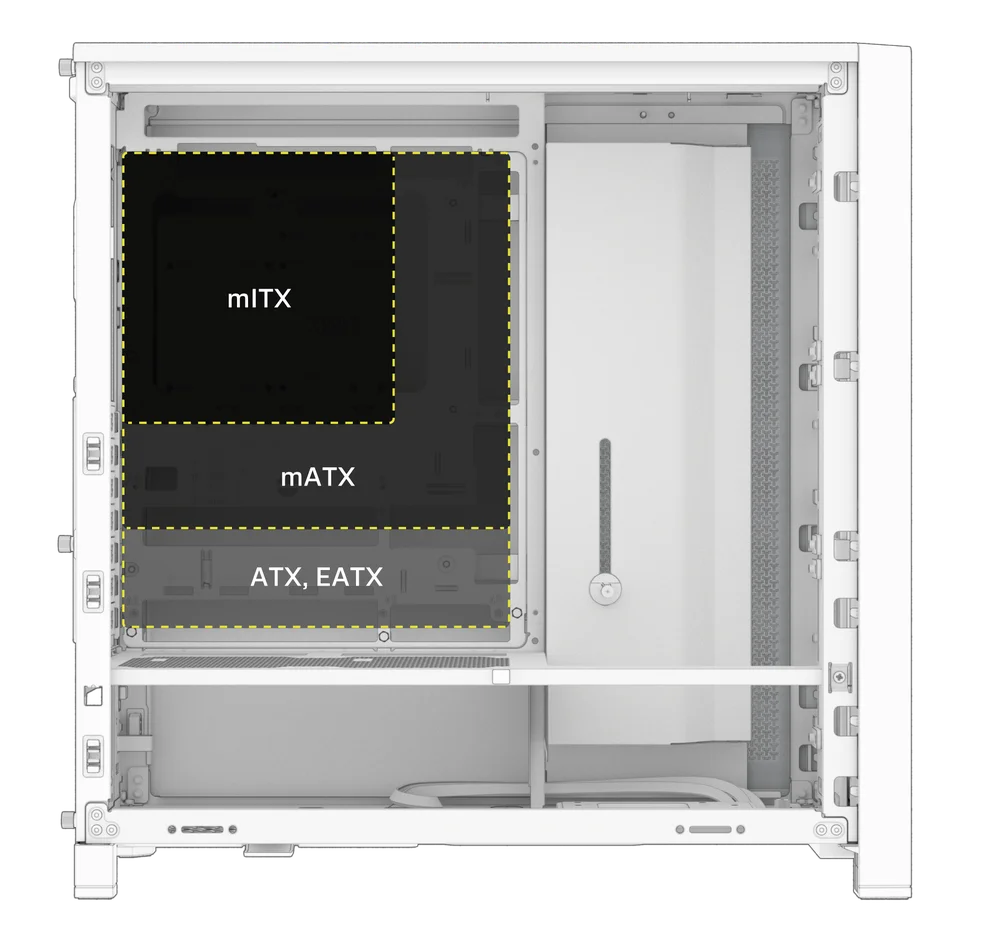
SFAT: Dacă distanțierele preinstalate nu se aliniază cu orificiile de pe placa de bază, îndepărtați-le pe cele neutilizate și repoziționați-le astfel încât să se potrivească cu punctele de montare deschise de pe placa de bază.
OPTIONAL MOTHERBOARD TRAY CONFIGURATIONS
The FRAME 4000 Series includes a standard motherboard tray, with additional tray options available (sold separately) to customize your build:
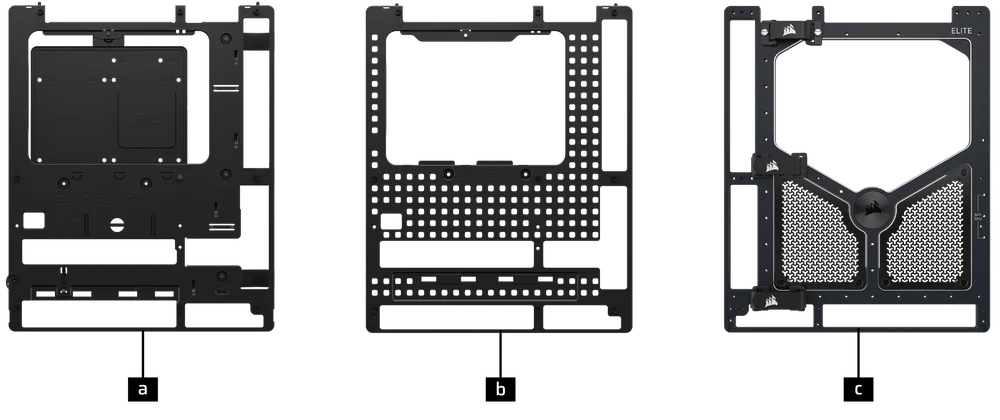
| a. FRAME Standard Steel Motherboard Tray | c. FRAME ELITE Motherboard Tray |
| b. FRAME RapidRoute 2.0 Motherboard Tray |
NOTE: FRAME ELITE motherboard tray (CNC Aluminum) is designed for use with NVMe SSDs. You will lose the HDD/SSD tray that installs on the back of the steel motherboard tray that is included with FRAME 4000 Series cases. Text for SPY & GPU on the ELITE MB Tray is to assist in assembling as a standalone test bench. Ignore text during use with FRAME 4000 Series.
INSTALAREA CABLURILOR I/O FRONTALE
1. PLĂCI DE BAZĂ STANDARD INTEL
- Conectați mufa FPANEL la conectorul I/O din panoul frontal al plăcii de bază, aliniind-o cu dispunerea marcată. Acest conector este adesea etichetat JFP1 pe unele plăci de bază.
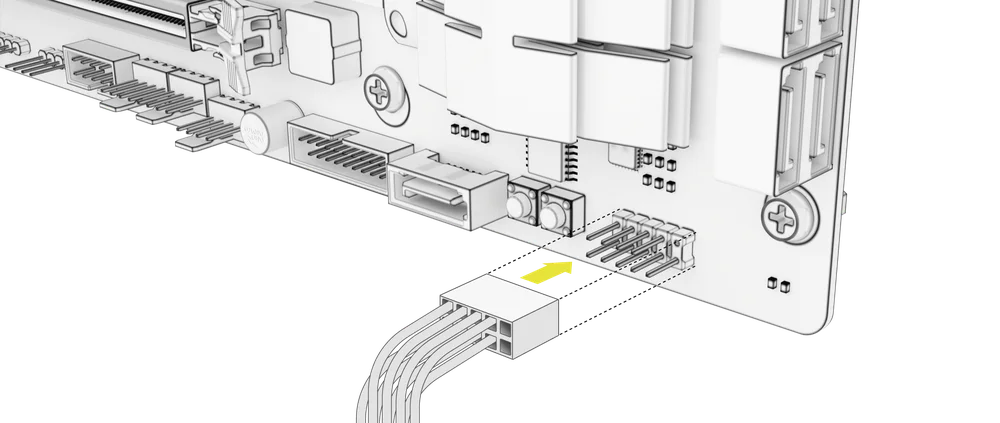
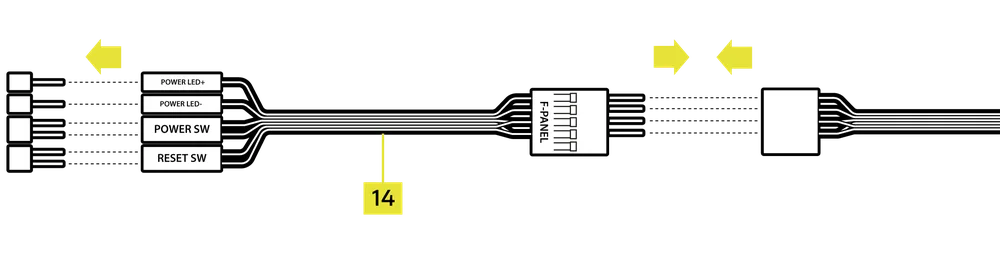
SFAT: Dacă PC-ul nu pornește sau prezintă probleme la utilizarea mufei FPANEL, încercați să utilizați cablul adaptor I/O frontal (14) inclus pentru a asigura conectarea corectă la conectorul plăcii de bază.
NOTĂ: Acest carcasă nu include un LED HDD sau un comutator de resetare, astfel încât, deși aceste conectori apar pe cablul adaptorului I/O frontal (14), aceștia nu sunt funcționali și au fost lăsați intenționat neocupați.
2. PLĂCI DE BAZĂ AMD SAU INTEL NON-STANDARD
- Utilizați adaptorul I/O frontal montat în partea superioară (14) inclus pentru a conecta mufa FPANEL la pinii individuali ai conectorului I/O din panoul frontal.
3. FRONT PANEL 5V ARGB CONNECTION (FRAME 4000X only)
- Run the +5V ARGB cable through the passthrough filter and into your case.
- Plug the +5V ARGB cable into your motherboard for easy ARGB control or use a COMMANDER DUO for full iCUE synchronization.
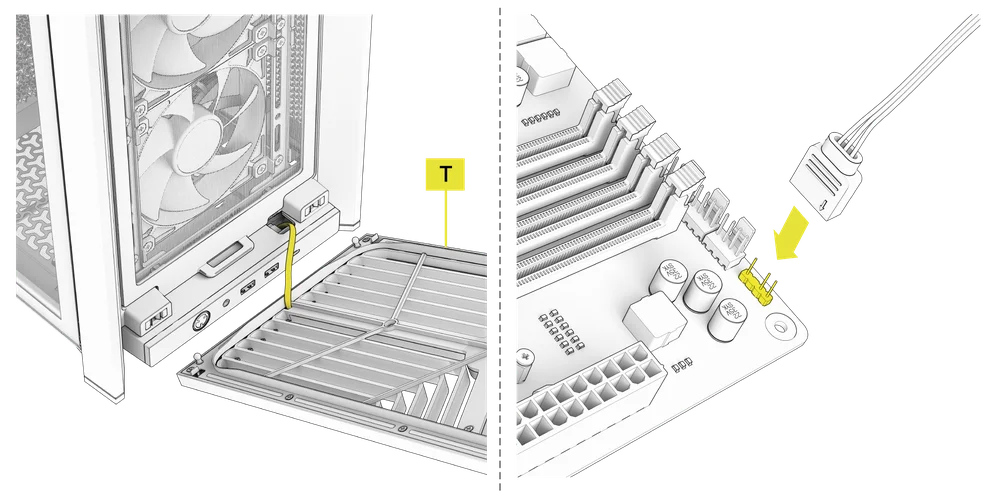
NOTE: For standard FRAME 4000D configurations without the passthrough hole in the front panel I/O, you must use the front fan filter included with the front panel and route the ARGB cable through the bottom right edge to pass it into the chassis. This wire is able to be split in half for easier routing during installation.
4. FRONT I/O EXPLANATION
- CADRU 4000D
- CADRU 4000D RS
- CADRU 4000D RS ARGB
- FRAME 4000X
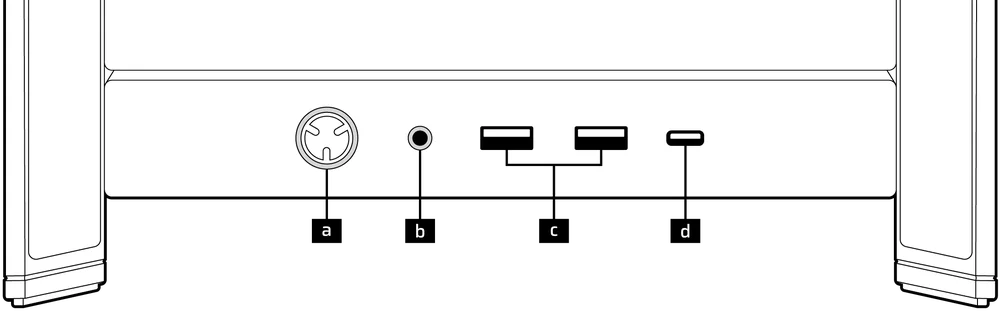
| a.Butonul de pornire + LED | c.2x USB 3.2 Gen 1 Tip-A (5 Gbps) |
| b.Mufă combinată pentru căști/microfon | d.1x USB 3.2 Gen 2x2 tip C (20 Gbps) |
- CADRU 4000D LCD RS ARGB
- SERIA FRAME 4000D VAULT
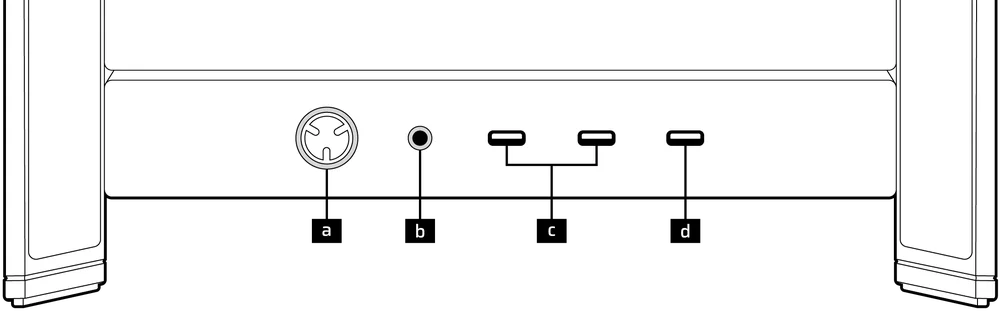
| a.Butonul de pornire + LED | c. 2x USB 3.2 Gen 1 Tip C (5 Gbps) |
| b.Mufă combinată pentru căști/microfon | d.1x USB 3.2 Gen 2x2 tip C (20 Gbps) |
5. FRONT I/O CONNECTIONS
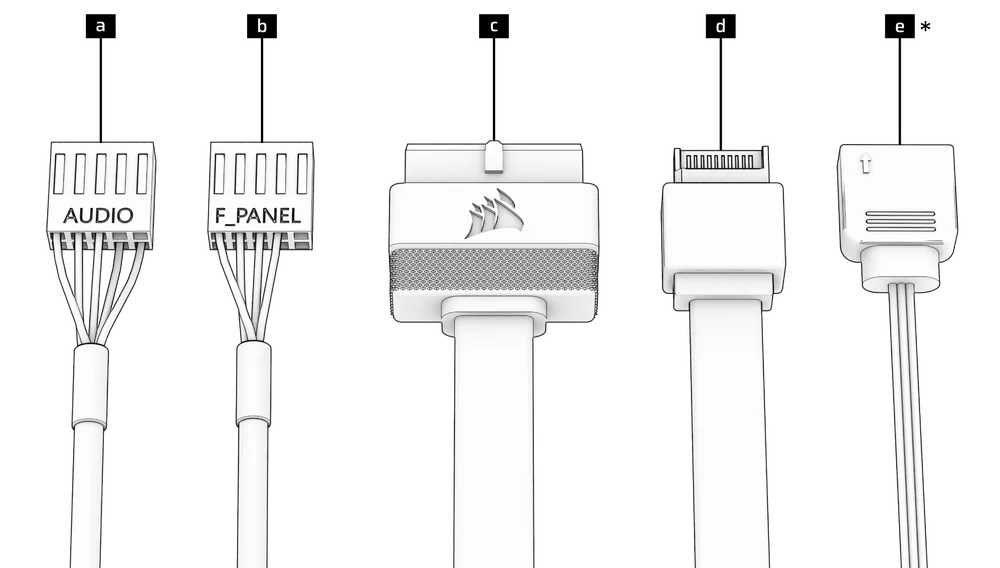
| a. HD Audio (Headphone, Microphone) | d. USB 3.2 Type-E (20 Gbps) |
| b. FPANEL (Power LED, Power Button) | e. +5V ARGB (FRAME 4000X only)* |
| c. USB 3.0 |
6. SWAPPING FRONT PANEL BUTTON POWER KEY SWITCH
The power button of the ELITE Front Panel I/O used in the FRAME 4000D LCD case utilizes a standard MX-Style key switch. This key switch is removable and replaceable to customize the look and feel of your power button.
- Simply pop off the plastic bezel on the front panel I/O and extract the key switch. Replace with a switch of your choice.
INSTALAREA BENZII MAGNETICE
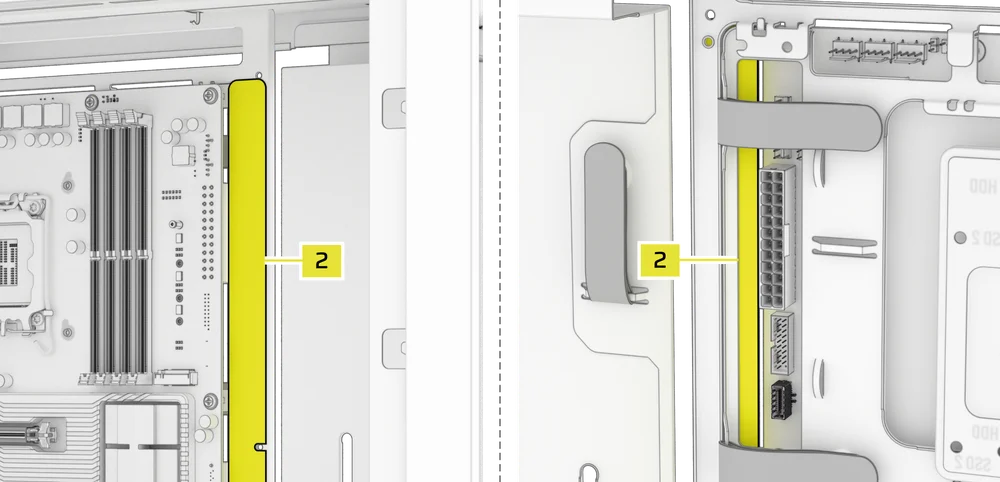
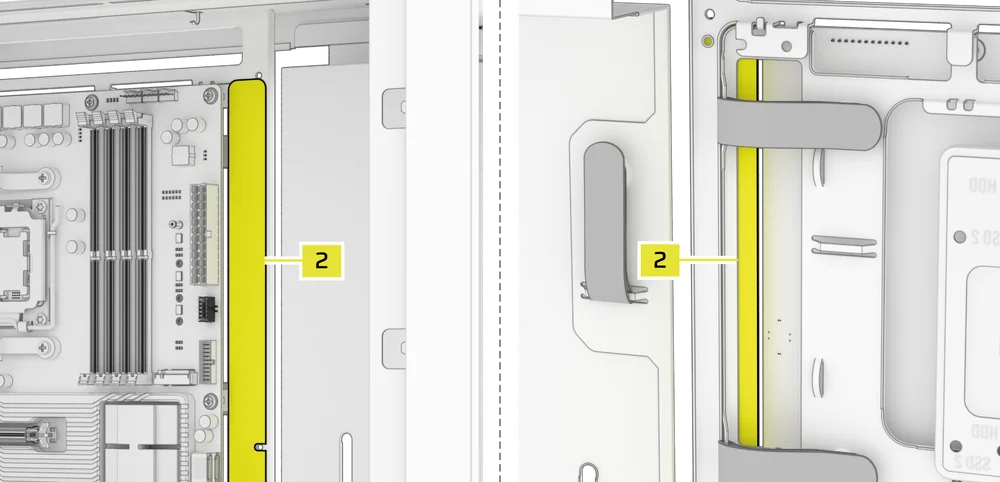
FRAME 4000 include o bandă magnetică pentru conector invers (2) concepută pentru a acoperi marginea vizibilă a orificiilor conectorului invers din tava plăcii de bază.
- Aliniați banda magnetică a conectorului invers (2) la distanțiere și reglați lateral pentru a închide spațiul de pe placa de bază.

1. PLACĂ DE BAZĂ CU CONECTORI INVERSAȚI
Dacă instalați o placă de bază cu conectori inversați, banda magnetică pentru conectori inversați (2) poate fi utilizată pentru a umple spațiul liber din jurul portului ATX cu 24 de pini, oferind un aspect mai curat și mai elegant.
2. PLĂCI DE BAZĂ CU CONECTORI STANDARD
Când instalați o placă de bază standard, puteți glisa banda magnetică a conectorului invers (2) în spatele plăcii, aliniind-o cu orificiile pentru șuruburi de-a lungul tăvii plăcii de bază, pentru a acoperi slotul conectorului invers și a ascunde orice cabluri care trec de-a lungul tăvii plăcii de bază, pentru un aspect mai curat.
TIP: The magnetic strip features cut-out slots, allowing you to install it simultaneously with a GPU anti-sag stabilization arm mini mount.
INSTALAREA VENTILATORULUI
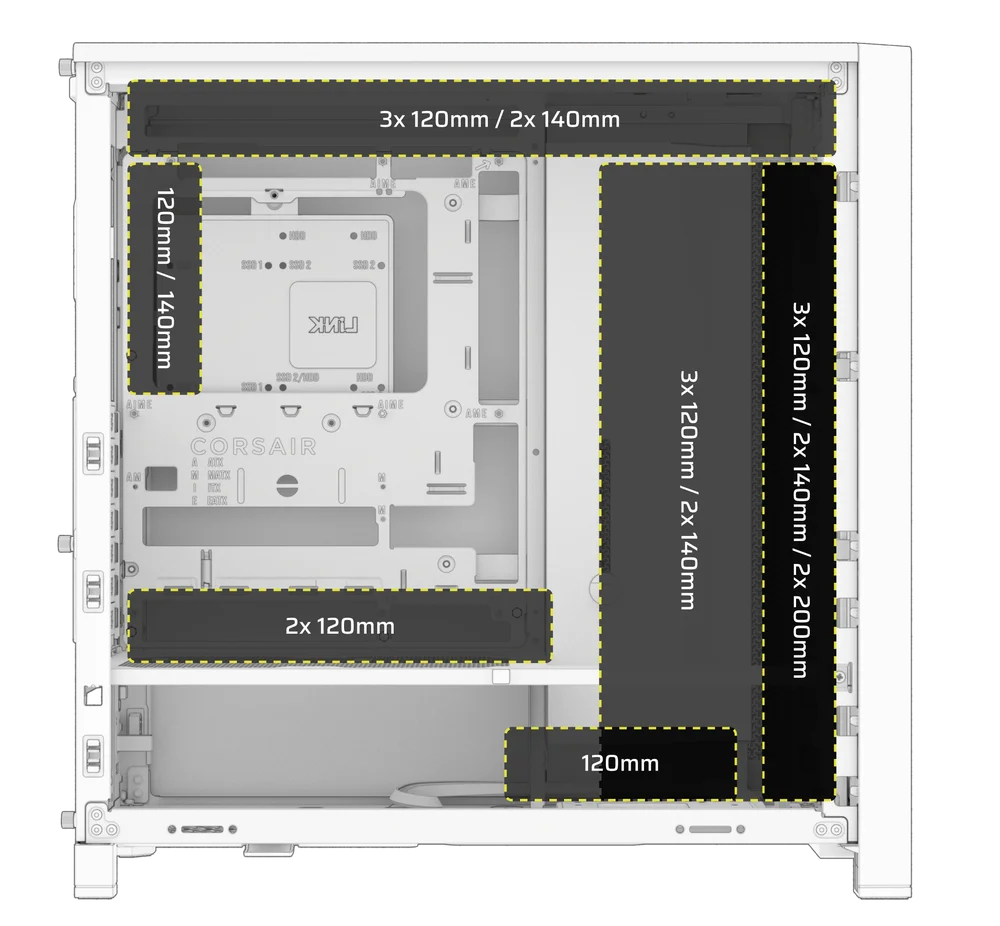
| FRAME 4000D RS/RS ARGB | ||||||
|
Front |
Top |
Rear |
Side |
PSU Shroud | Bottom | |
|
3x 120mm 2x 140mm 2x 200mm |
3x 120mm 2x 140mm
|
1x 120mm 1x 140mm
|
3x 120mm 2x 140mm
|
2x 120mm |
None |
|
|
FRAME 4000D LCD, FRAME 4000D WOOD, FRAME 4000X |
||||||
|
Front |
Top |
Rear |
Side |
PSU Shroud | Bottom | |
|
3x 120mm 2x 140mm 2x 200mm |
3x 120mm 2x 140mm
|
1x 120mm 1x 140mm
|
3x 120mm 2x 140mm
|
2x 120mm |
1x 120mm |
|
USING THE INFINIRAIL™ FAN MOUNTING SYSTEM
CORSAIR's InfiniRail™ is an innovative fan and radiator mounting system designed to offer exceptional flexibility and ease of use in PC case builds. Unlike traditional cases with fixed mounting points, InfiniRail utilizes adjustable steel rails that allow users to slide and position fans and radiators precisely where needed.
FRAME 4000 dispune de două astfel de sisteme InfiniRail: unul în partea superioară și unul în partea frontală.
NOTE: Determine the size and placement of your fans before configuring the rails. You do not have to fully remove the InfiniRail Phillips head screws.
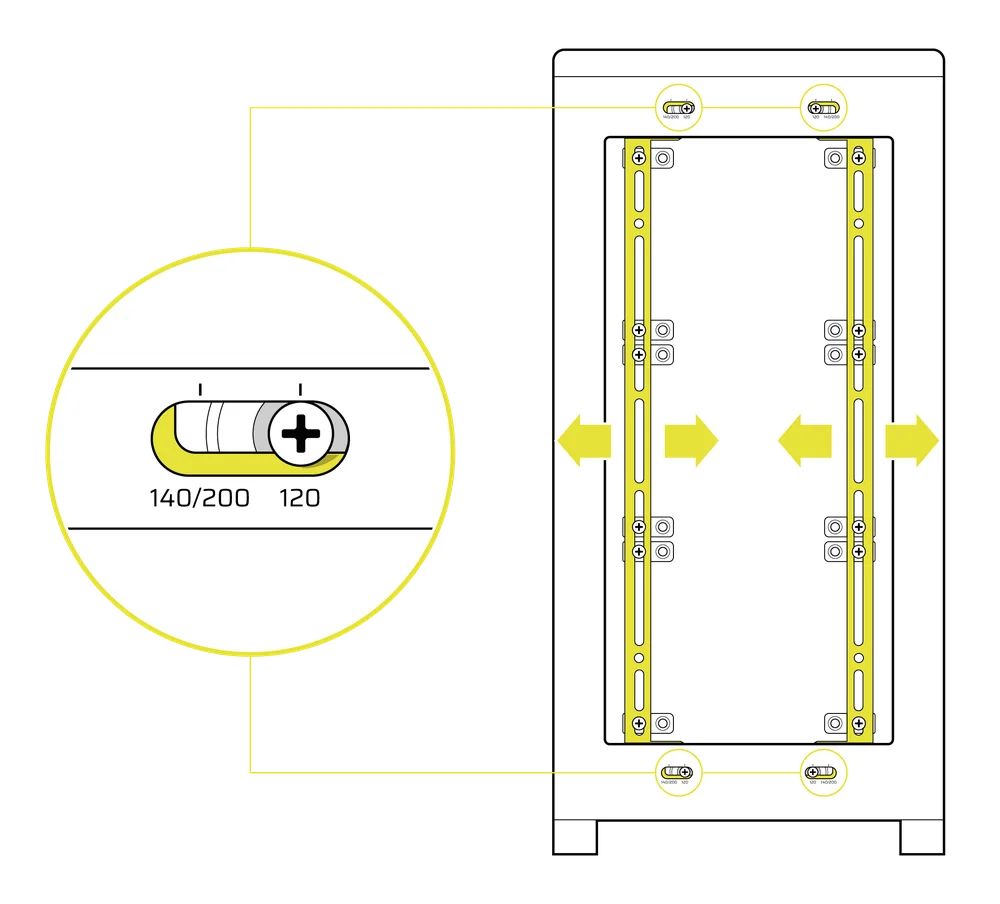
Reglarea șinelor din partea frontală a carcasei
- Loosen the Phillips head screw on both ends of the InfiniRails.
- Reglați ambele șine frontale pentru ventilatoare în conformitate cu marcajele de pe carcasă.
NOTE: If using 200mm fans in front, you may need to remove the PSU shroud depending on your version of FRAME 4000 Series.
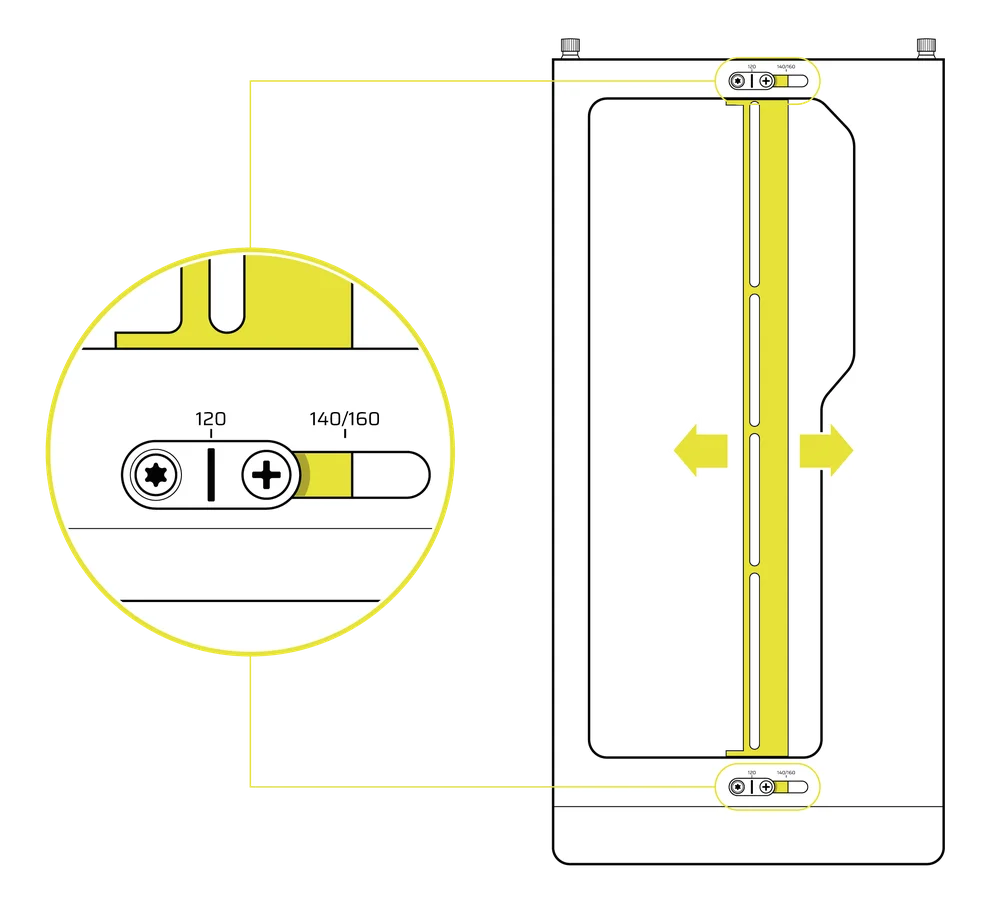
Reglarea șinei din partea superioară a carcasei
- Loosen the Phillips head screw on both ends of the InfiniRail.
- Reglați șina superioară pentru ventilatoare în conformitate cu marcajele de pe carcasă.
IMPORTANT: Șuruburile cu capuri non-standard nu trebuie să fie îndepărtate.
2. INSTALAREA VENTILATOARELOR ÎN PARTEA DIN FAȚĂ
Instalarea ventilatoarelor de 120 mm sau 140 mm
Pentru a instala ventilatoare de 120 mm sau 140 mm utilizând sistemul de montare a ventilatoarelor InfiniRail din față, trebuie să instalați suporturile pentru ventilatoare InfiniRail (3). Utilizați patru suporturi pentru fiecare ventilator, două pe fiecare parte a șinelor.
NOTĂ: Unele carcase pot fi livrate cu suporturi pentru ventilatoare InfiniRail preinstalate.
- Fixați suporturile pentru ventilator InfiniRail (3) pe șine, ancorând mai întâi marginea interioară a fiecărui suport, apoi fixând marginea exterioară în poziție.
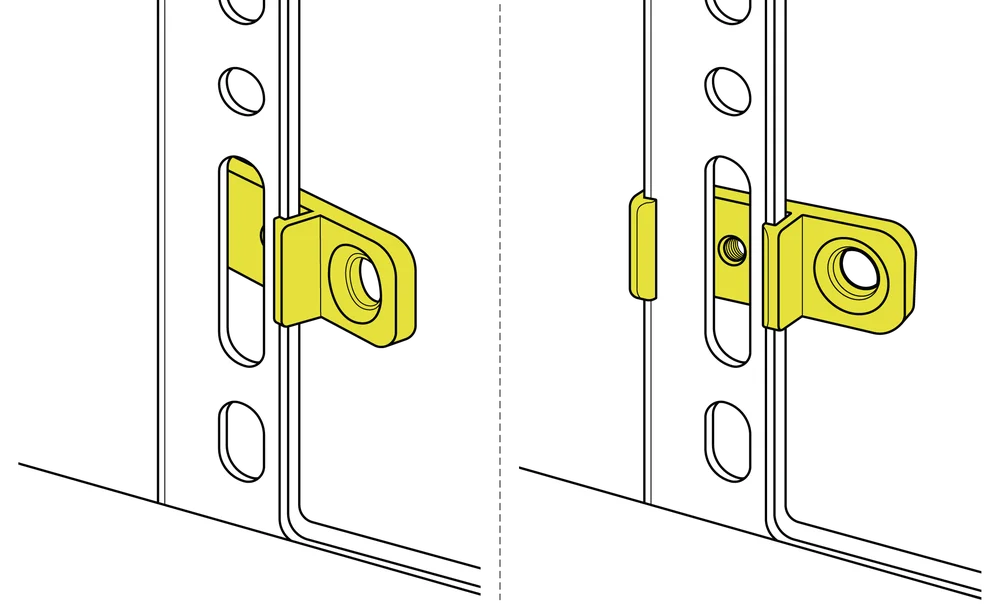
- Glisați suporturile de-a lungul șinelor pentru a le alinia cu punctele de montare ale ventilatorului.
- Aliniați ventilatoarele la clemele de montare de pe suporturi și fixați-le înșurubând șuruburile autofiletante pentru ventilatoare (7).
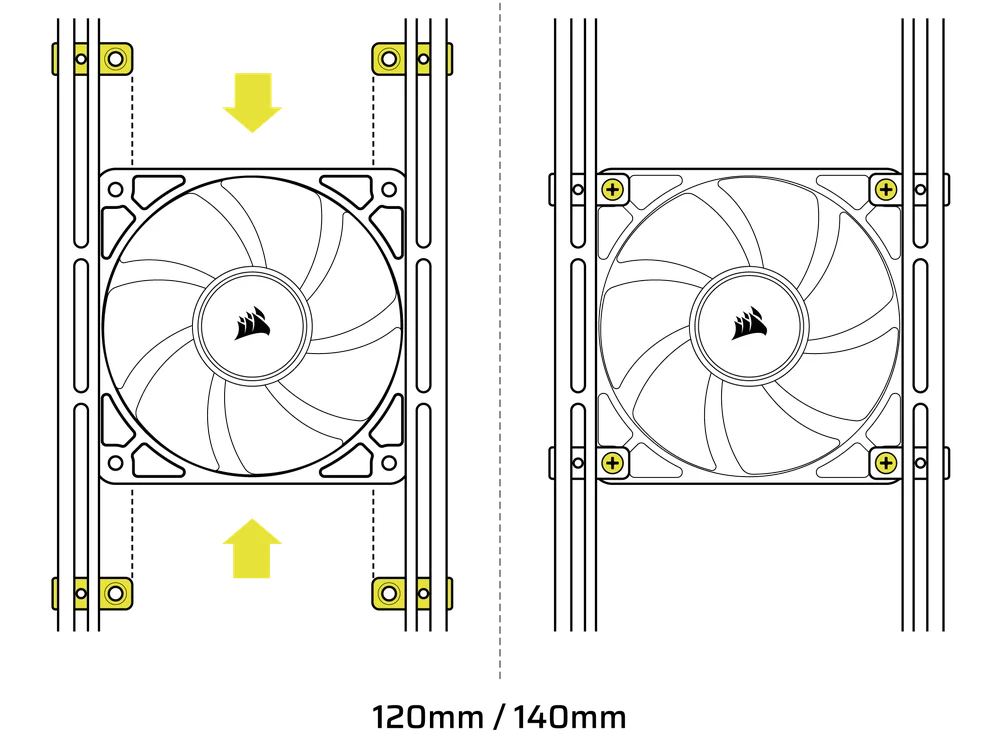
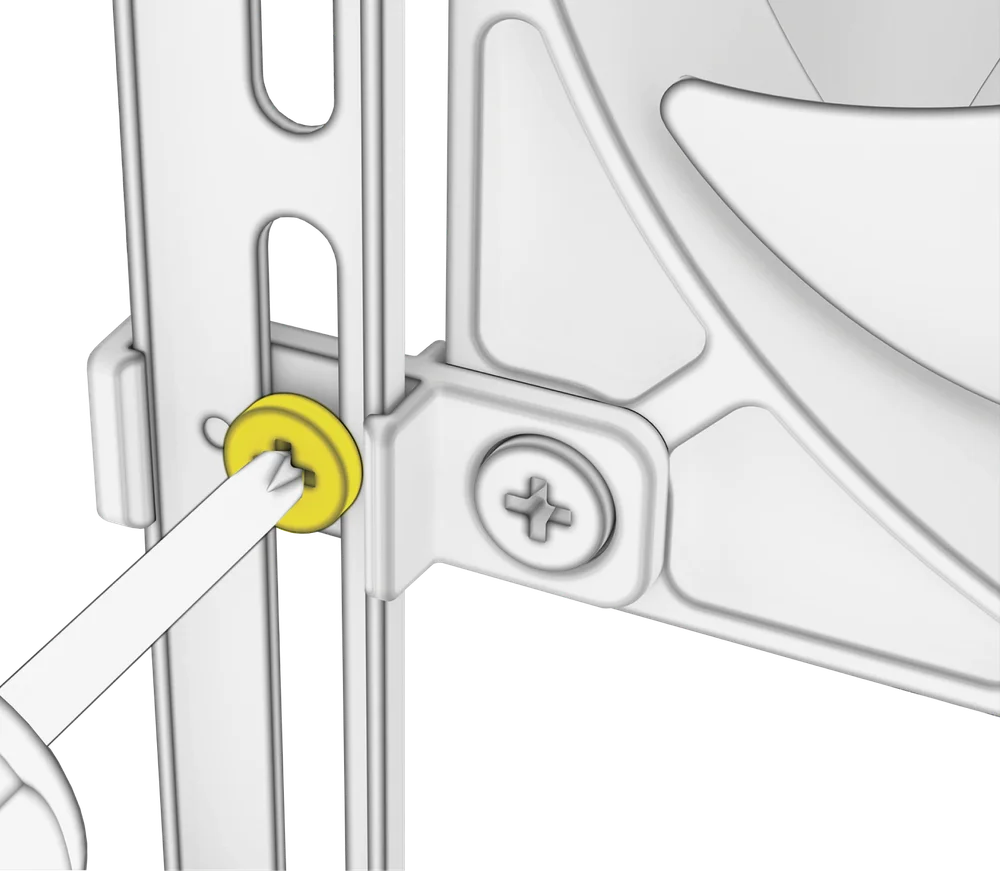
- Odată aliniat, puteți fixa configurația în poziție cu ajutorul șuruburilor de fixare pentru suportul ventilatorului InfiniRail (13).
Instalarea ventilatoarelor de 200 mm
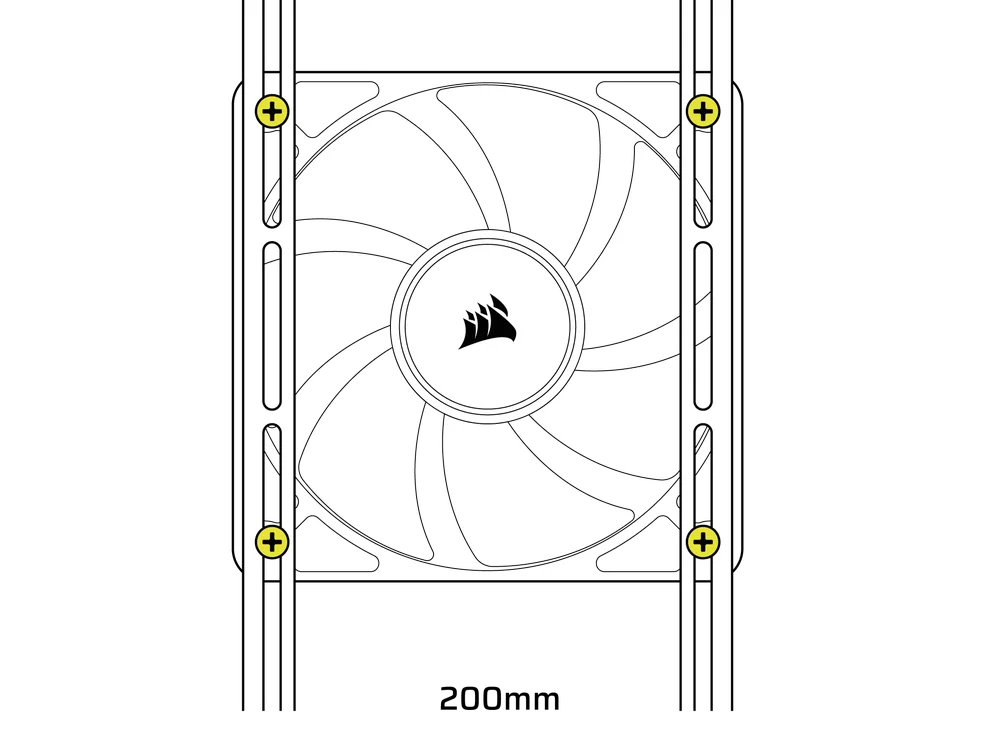
Ventilatoarele de 200 mm se vor înșuruba direct în suporturile InfiniRail fără suporturile din plastic pentru ventilatoare. Îndepărtați suporturile dacă acestea erau preinstalate pe carcasa dvs.
- Aliniați ventilatoarele la sloturile de montare de pe InfiniRails și fixați-le înșurubând șuruburile autofiletante pentru ventilatoare (7) în cadrul ventilatorului.
NOTĂ: Anumite ventilatoare de 200 mm pot necesita îndepărtarea capacului sursei de alimentare pentru a putea fi montate.
NOTE: When installing 200 mm front fans, the side fan bracket or cable cover must be mounted in the secondary position (towards the motherboard tray) to provide sufficient clearance.
3. INSTALAREA VENTILATOARELOR PE PARTEA SUPERIOARĂ
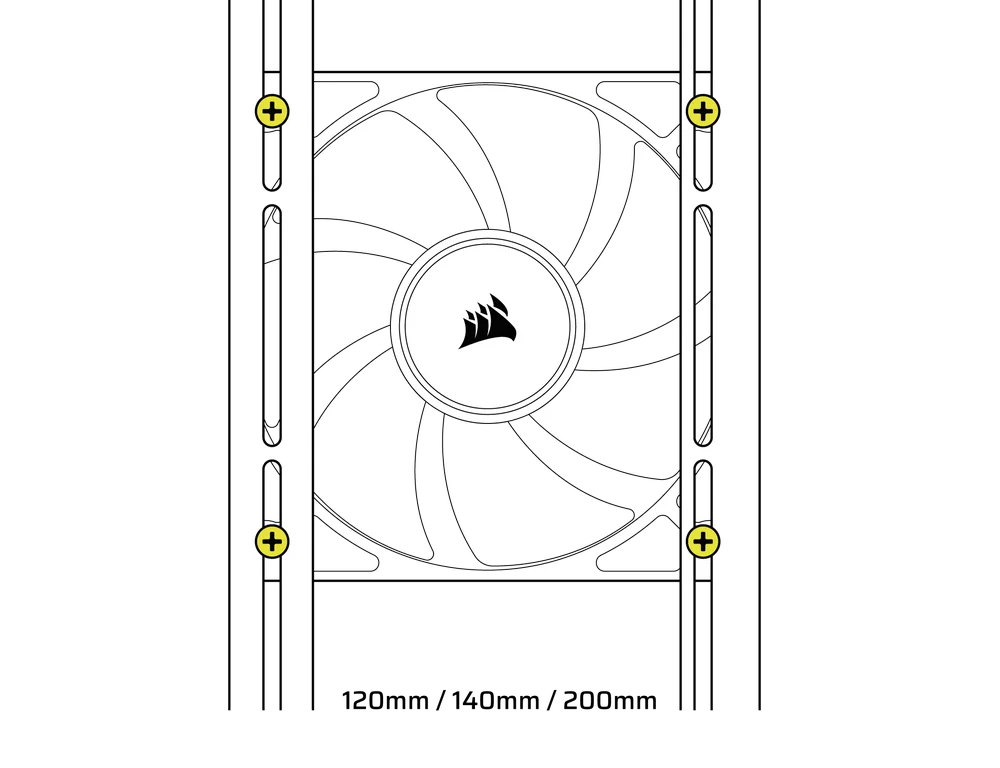
- Aliniați ventilatoarele la sloturile de montare InfiniRail și fixați-le înșurubând șuruburile autofiletante pentru ventilatoare (7) în cadrul ventilatorului.
4. INSTALAREA VENTILATOARELOR PE PARTEA LATERALĂ
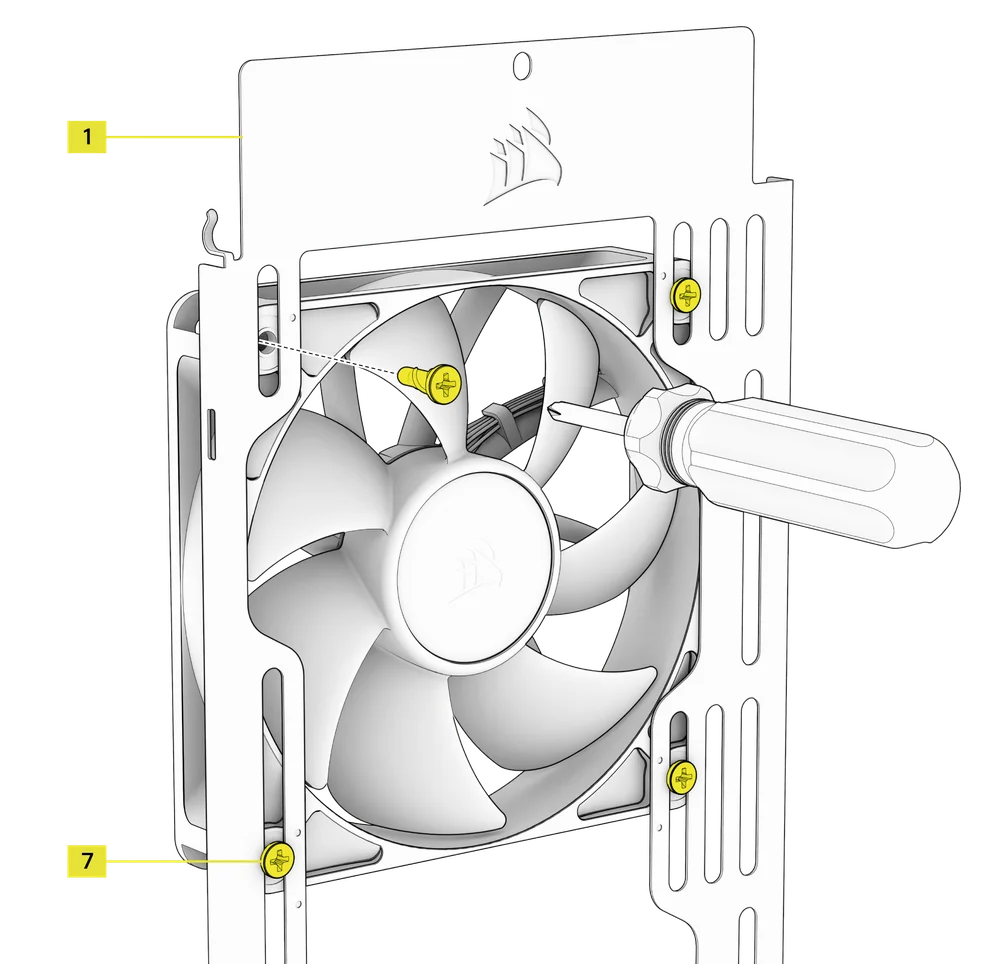
Pentru a instala ventilatoare pe lateral, asigurați-vă că aveți montat suportul de montare pentru ventilator lateral (1).
- Aliniați ventilatoarele la sloturile de montare ale ventilatoarelor și fixați-le înșurubând șuruburile autofiletante pentru ventilatoare (7) în cadrul ventilatorului.
SFAT: Utilizați punctele marcate pe suportul lateral de montare a ventilatorului (1) ca ghidaje de centrare.
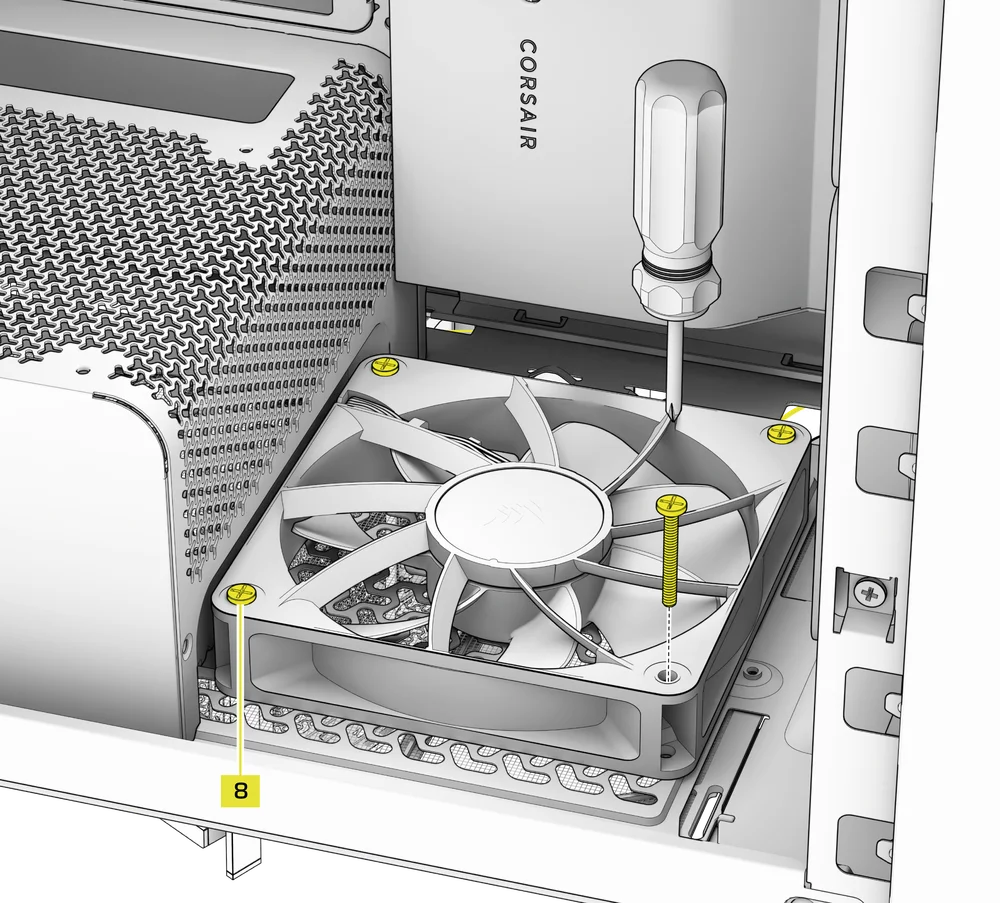
5. INSTALAREA VENTILATOARELOR PE CAPOTA PSU
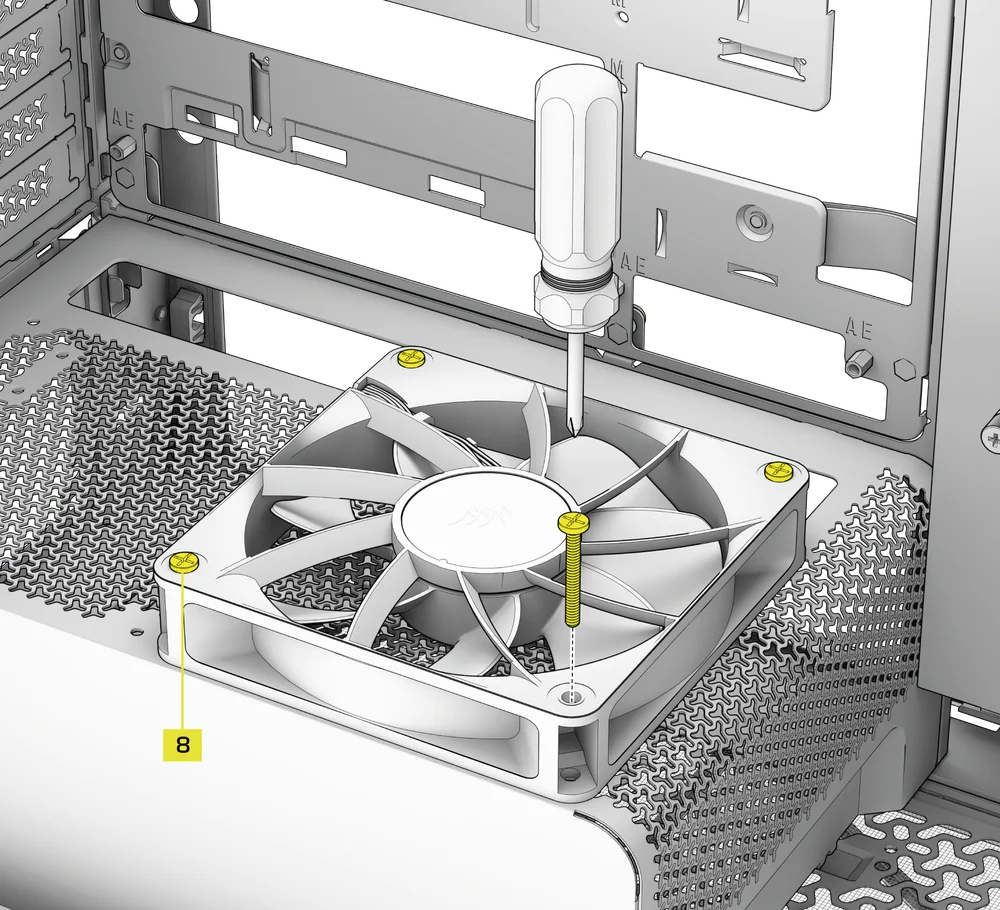
- Align your fans to the fan mounting holes on the PSU Shroud.
- Fixați ventilatoarele cu șuruburi lungi pentru ventilatoare (8).
6. INSTALAREA VENTILATOARELOR ÎN PARTEA DIN SPATE
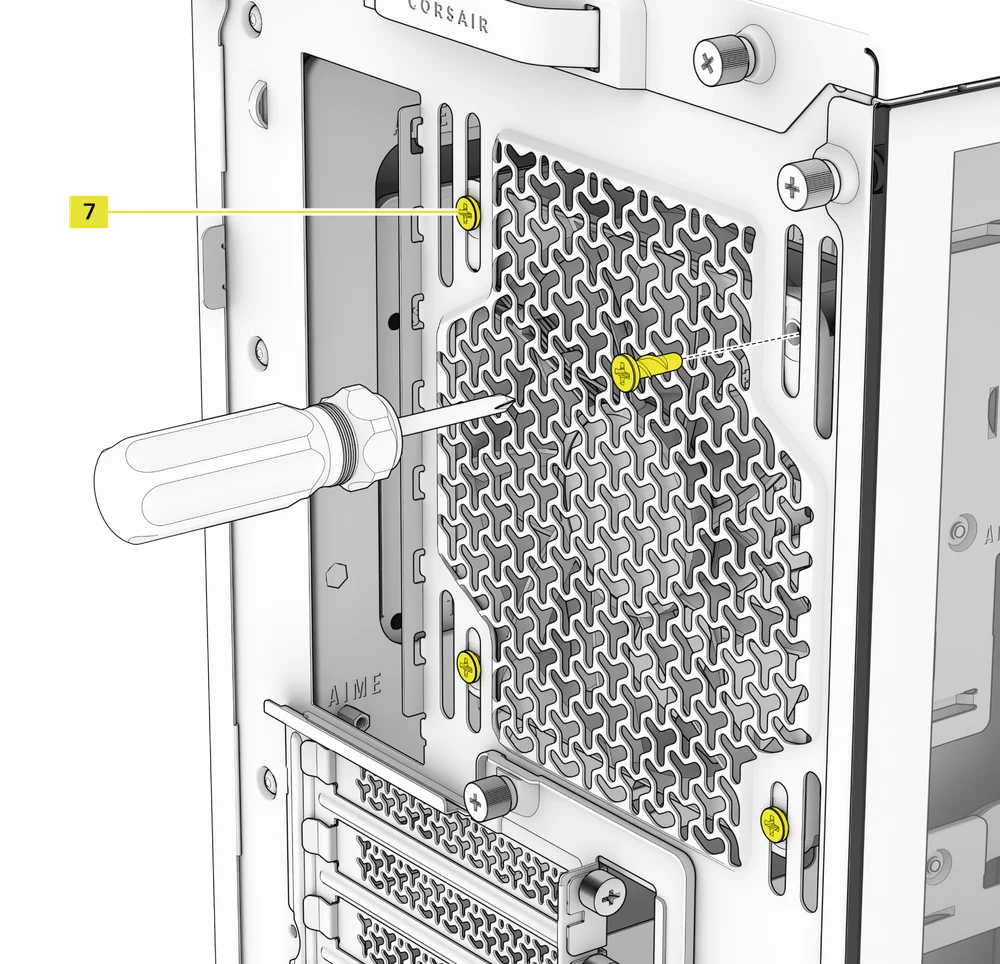
- Aliniați ventilatorul la orificiile de montare ale ventilatorului.
- Fixați ventilatorul înșurubând șuruburile autofiletante pentru ventilatoare (7).
7. INSTALLING FANS IN THE BOTTOM
- Align your fans to the fan mounting holes.
- Secure the fans with Long Fan Screws (8).
NOTE: Not all FRAME 4000 Series variants can install a bottom fan. Refer to the fan location table for your particular case.
SUPORT DE RĂCIRE PERSONALIZAT HYDRO X
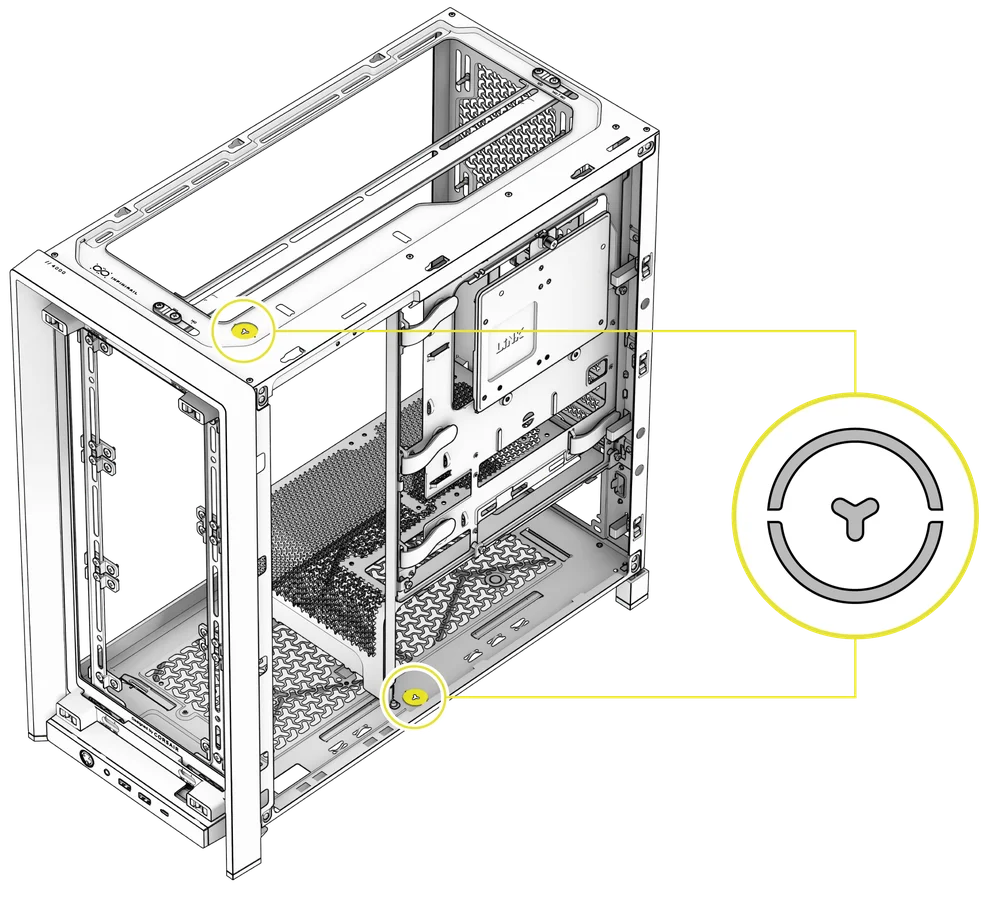
The FRAME 4000 has fill / drain ports pre-punched in the top and bottom panels for a Hydro X open loop liquid cooling setup.
- Scoateți capacele porturilor, ridicându-le ușor cu o șurubelniță plată.
INSTALAREA RADIATORULUI
FRAME 4000 oferă mai multe locații pentru montarea unui radiator pentru răcire cu lichid, locațiile din față și din partea superioară fiind dotate cu un suport reglabil pentru ventilator InfiniRail. Pentru detalii privind utilizarea sistemului de montare a ventilatorului InfiniRail, consultați secțiunea Instalarea ventilatorului.
SFAT: Pentru un zgomot optim, performanță termică și fiabilitate, asigurați-vă că radiatorul este montat mai sus decât pompa atunci când utilizați un AIO.
|
Față |
Sus |
Spate |
Lateral |
Carcasă PSU |
|
240 mm 280 mm 360 mm |
240 mm 280 mm 360 mm |
120 mm 140 mm |
240 mm 280 mm 360 mm |
Niciuna |
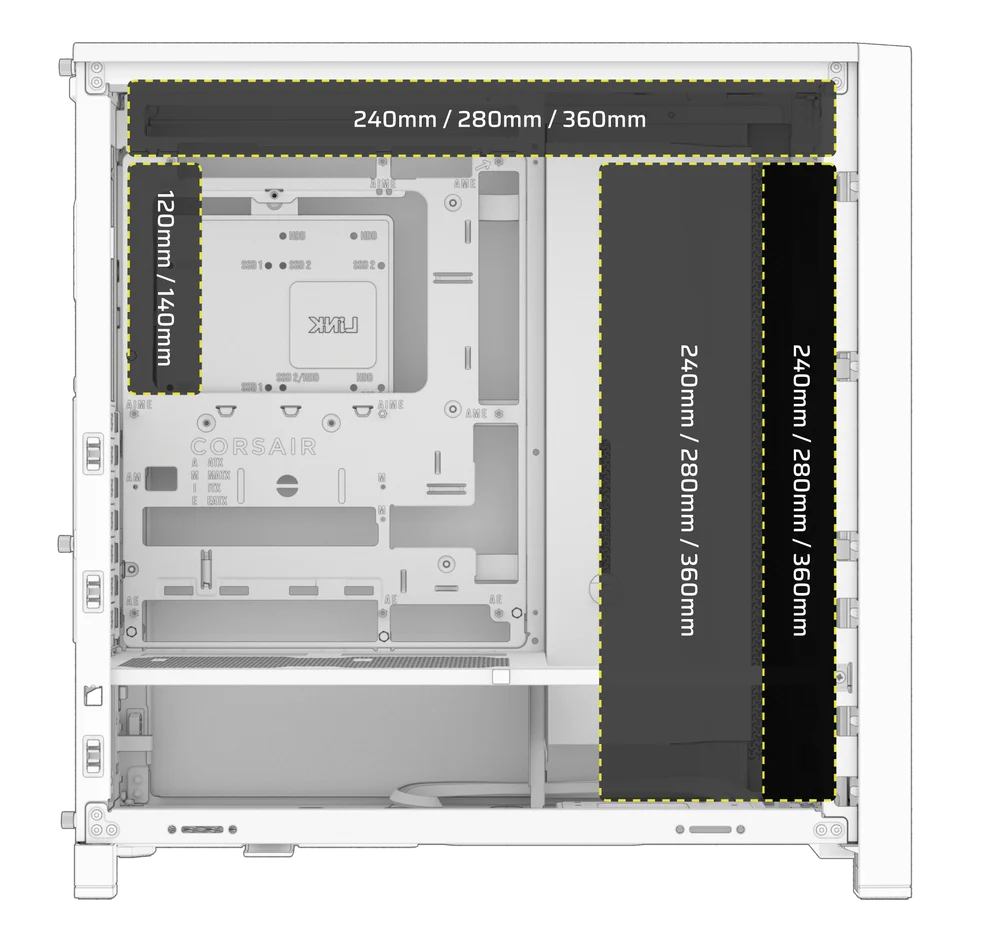
Montarea în partea superioară asigură o performanță optimă în ceea ce privește zgomotul, dar pot fi utilizate și alte tipuri de montare, în funcție de preferințele dvs. Consultați manualul produsului pentru mai multe sfaturi privind utilizarea și cele mai bune practici.
1. OPTIMAL RADIATOR MOUNTING CONFIGURATION

NOTĂ: Pentru a centra radiatorul, poate fi necesar să scoateți unul dintre șuruburile de fixare ale radiatorului. Utilizarea a unsprezece șuruburi oferă în continuare suficiente puncte de fixare pentru a instala în siguranță radiatorul și ventilatoarele.
INSTALAREA DISPOZITIVELOR DE STOCARE ȘI A CONTROLERELOR
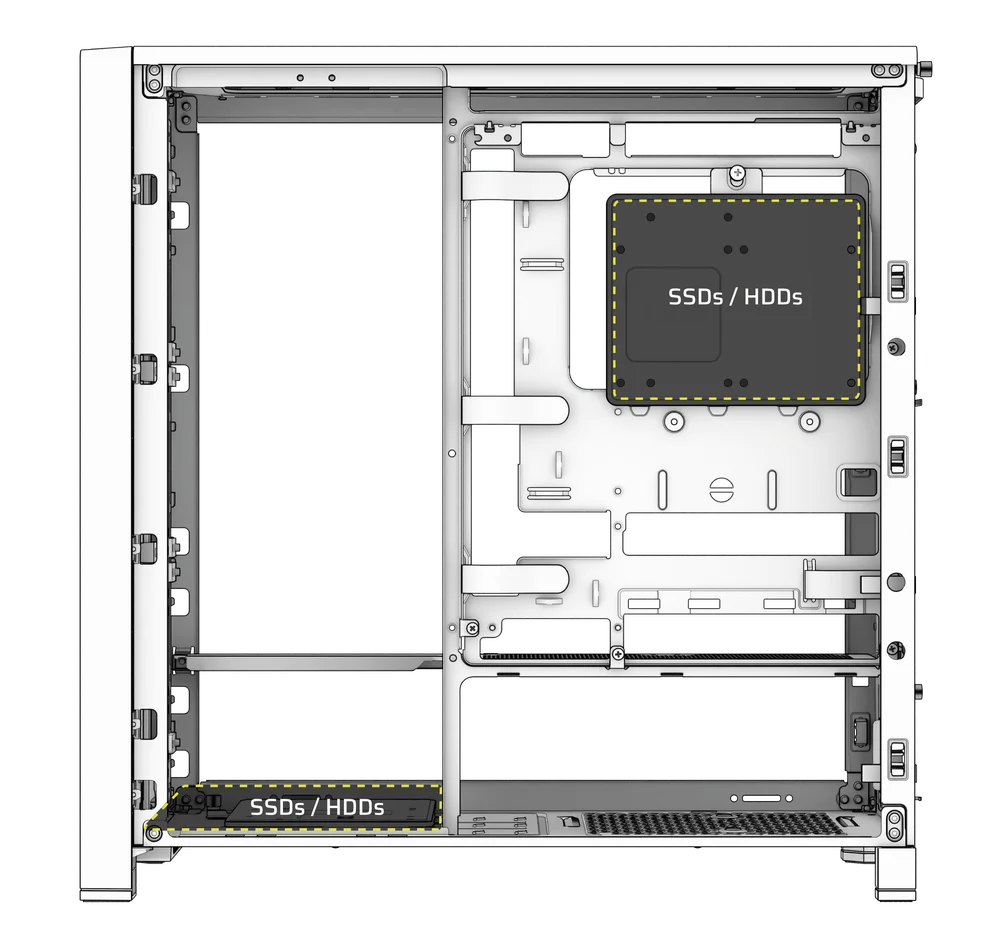
FRAME 4000 Series cases include up to two Combination Drive Plates - with each capable of mounting one HDD or two SSDs.
1. DEMONTAREA PLĂCII DE TRANSMISIE COMBINATE
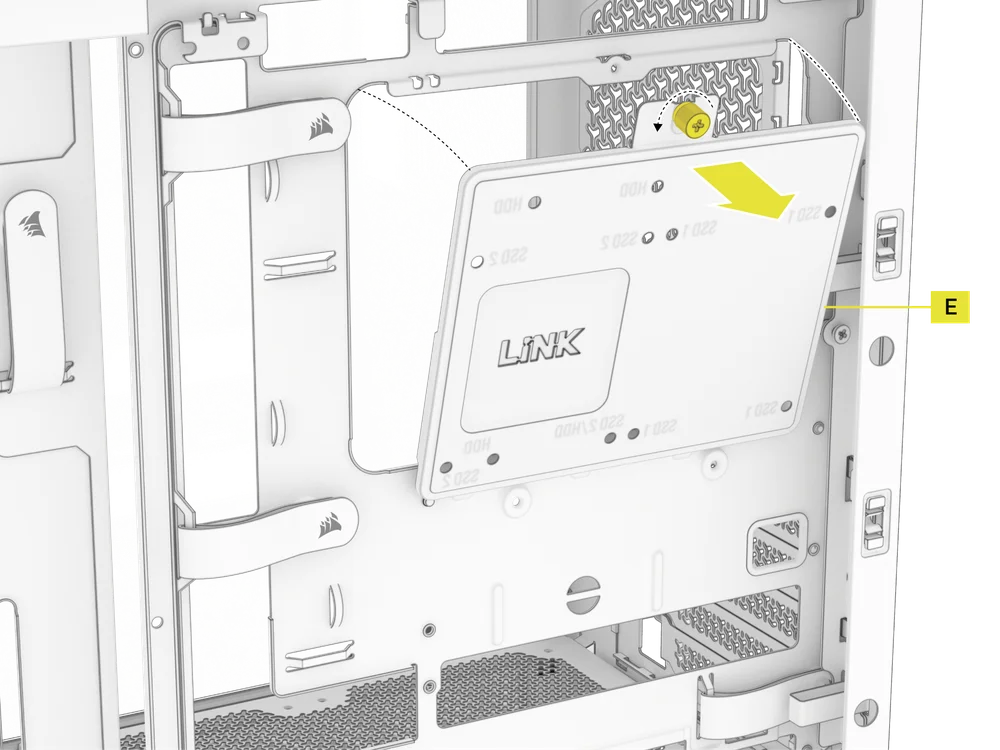
- Deșurubați șurubul cu capul în cruce care fixează placa de acționare combinată (E), apoi scoateți placa.
2. INSTALAREA SSD PE PLACA DE COMBINARE A UNITĂȚII
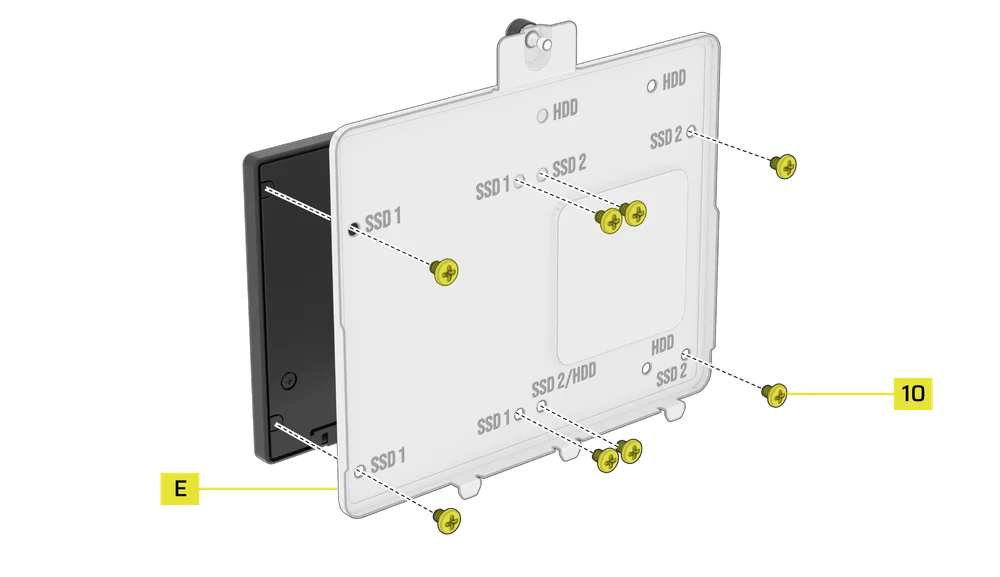
- Instalați SSD-ul (SSD-urile) pe placa combinată a unității (E), fixându-l (le) în partea inferioară a plăcii cu ajutorul șuruburilor SSD incluse (10).
3. INSTALAREA HDD-ULUI PE PLACA DE COMBINARE A UNITĂȚII
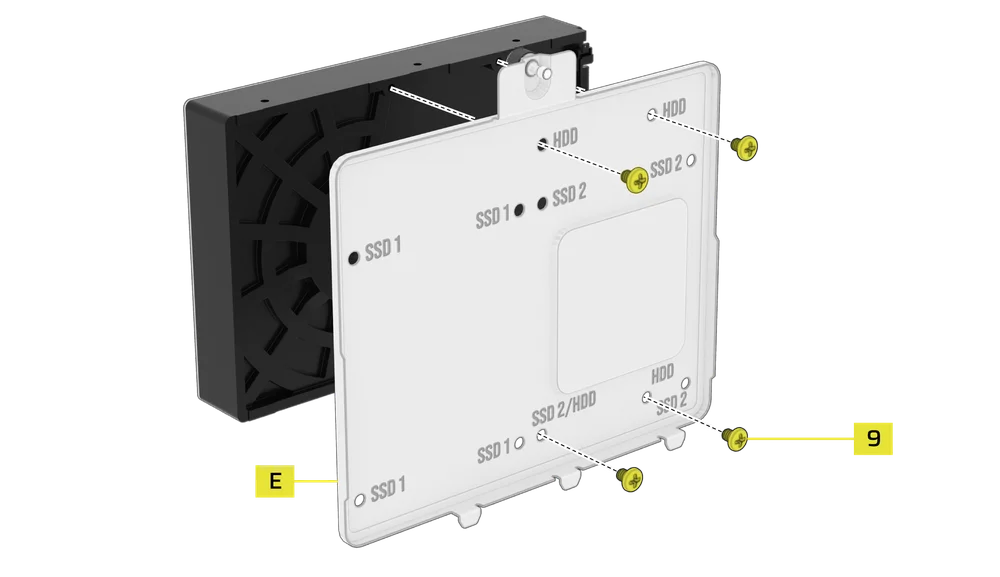
- Instalați HDD-ul pe placa combinată a unității (E), fixându-l în partea inferioară a plăcii cu ajutorul șuruburilor HDD incluse (9).
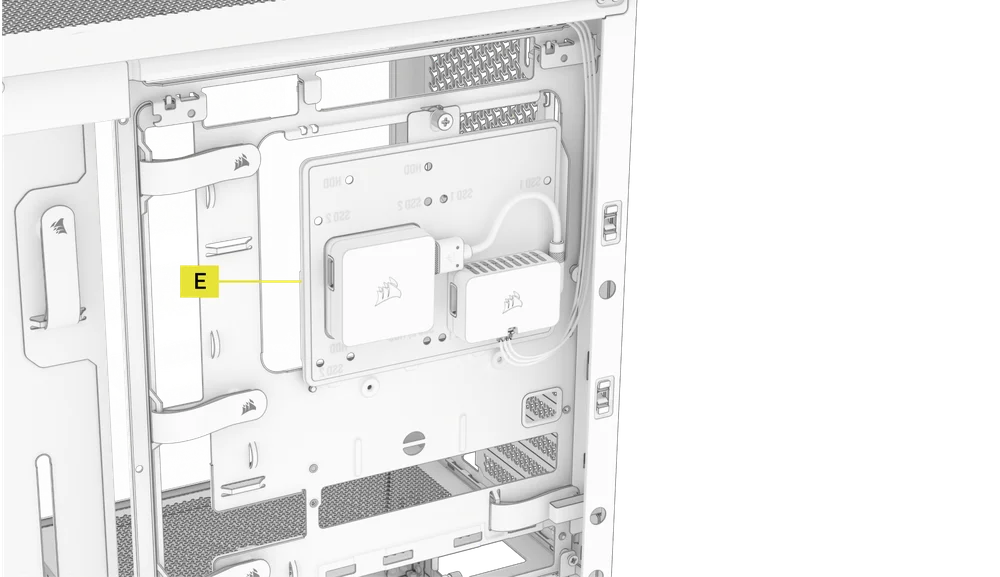
Placa de acționare combinată (E) servește și ca loc de montare pentru un controler iCUE LINK System Hub, dacă se utilizează unul.
4. ASIGURAREA PLĂCII DE ACȚIUNE COMBINATE
Reintroduceți placa de acționare combinată (E) în slotul destinat din carcasă, apoi fixați-o strângând șurubul cu capul rotund în sensul acelor de ceasornic.
INSTALARE SURSE DE ALIMENTARE
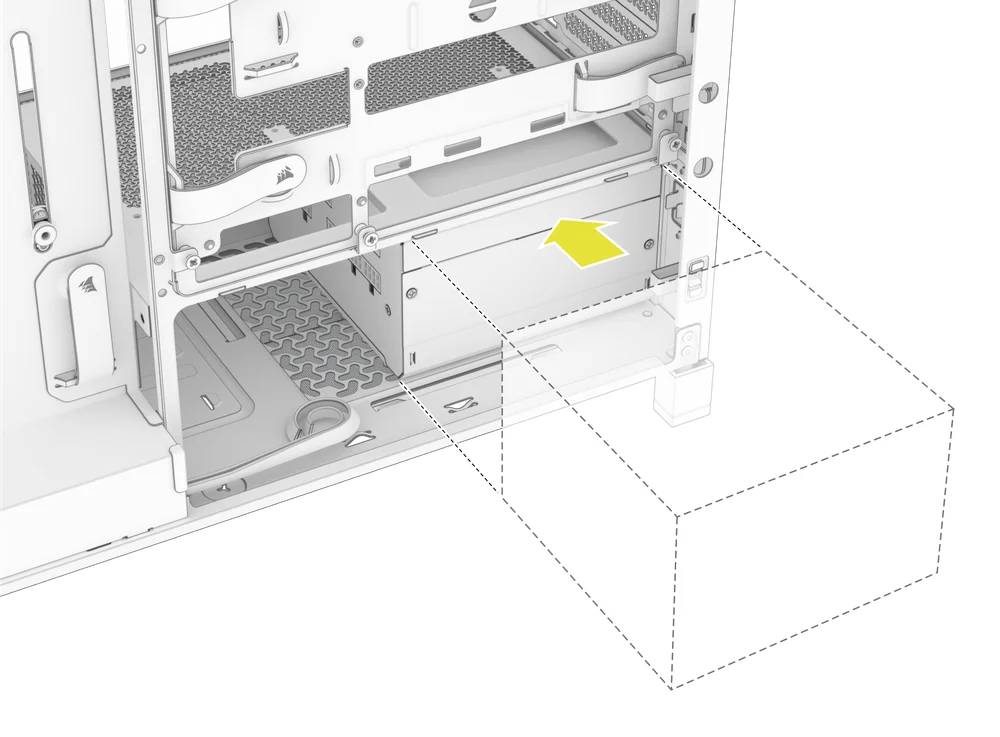
1. INSTALARE STANDARD A SURSEI DE ALIMENTARE
- Instalați sursa de alimentare cu ventilatorul orientat în jos.
- Fixați sursa de alimentare la șasiu cu ajutorul celor două șuruburi captive situate în partea din spate a carcasei.
- Pentru o siguranță suplimentară, fixați sursa de alimentare folosind două șuruburi pentru placa de bază (9) în colțurile panoului din spate.
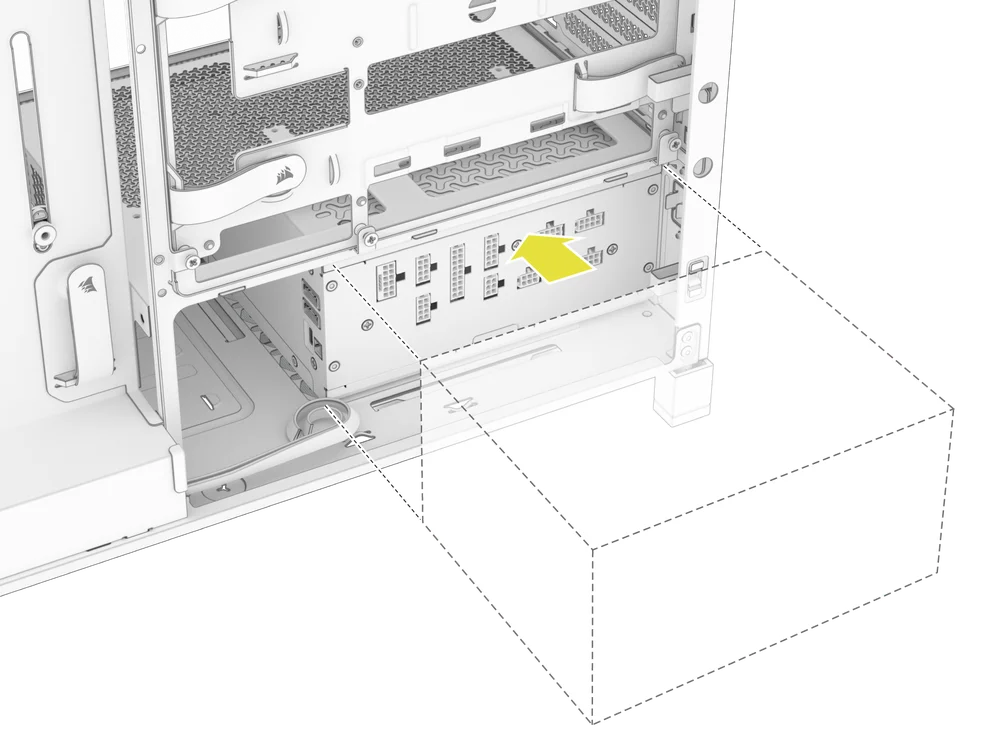
2. INSTALAREA SURSEI DE ALIMENTARE CORSAIR SHIFT
FRAME 4000 este complet compatibil cu toate sursele de alimentare SHIFT și se instalează identic cu o sursă de alimentare ATX standard.
INSTALAREA PLĂCII VIDEO
Suportul PCI inclus permite FRAME 4000 să suporte atât configurații de montare orizontală, cât și verticală a GPU-ului.
SFAT: Pentru o asamblare mai ușoară, instalați GPU-ul ca ultim pas.
1. INSTALAREA UNEI PLĂCI VIDEO ÎN ORIENTARE STANDARD
- Deșurubați capacele sloturilor PCIe și îndepărtați-le.
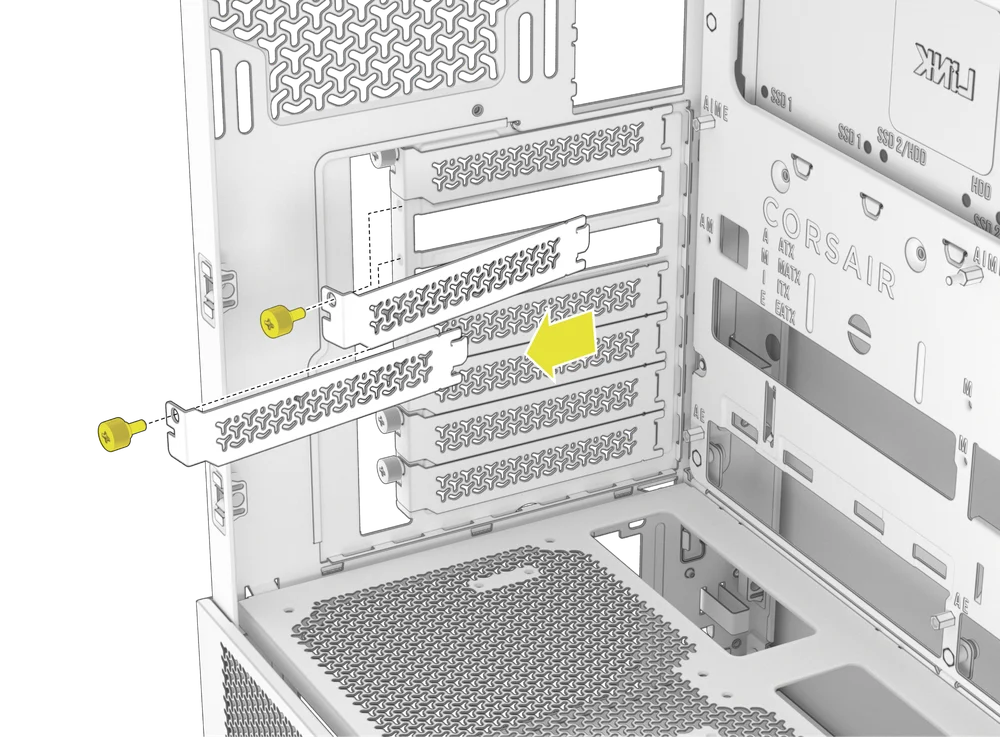
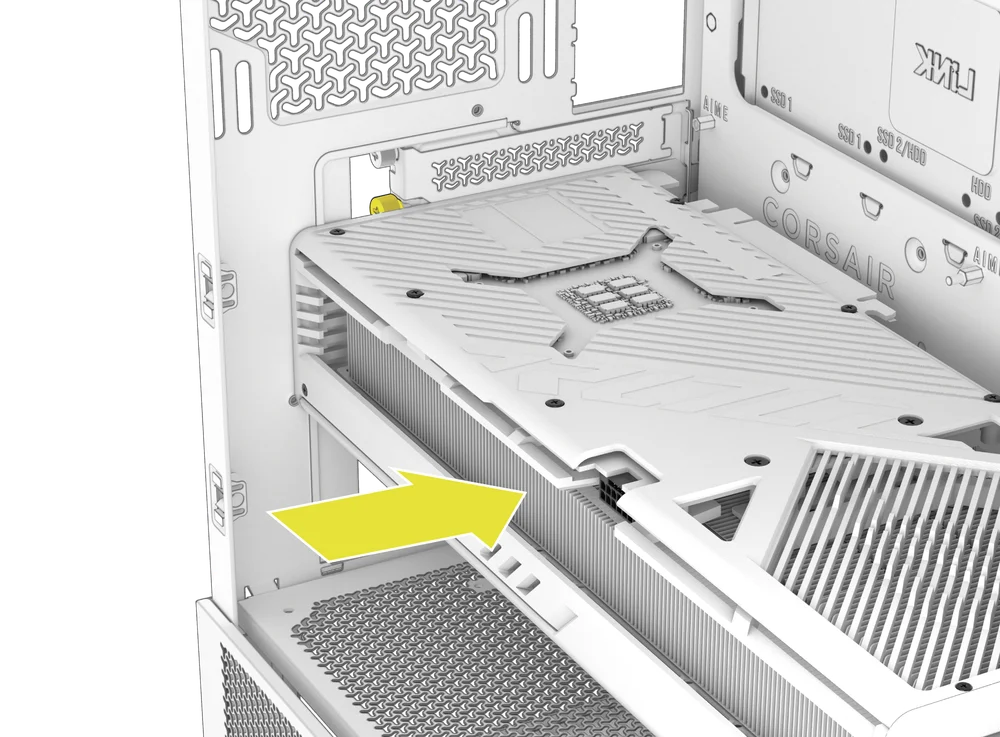
- Introduceți cardul în slotul PCIe până când se fixează în poziție cu ajutorul mecanismului de fixare al slotului PCIe.
- Aliniați suportul cu sloturile PCIe și fixați placa în carcasă.
2. UTILIZAREA BRAȚULUI DE STABILIZARE ANTI-CĂDERE GPU
Brațul de stabilizare anti-coborâre GPU susține placa grafică, împiedicând-o să se îndoaie sau să se lase sub greutatea radiatorului. Acest lucru nu numai că ajută la protejarea plăcii grafice și a slotului PCIe, dar contribuie și la o construcție mai curată și mai profesională.
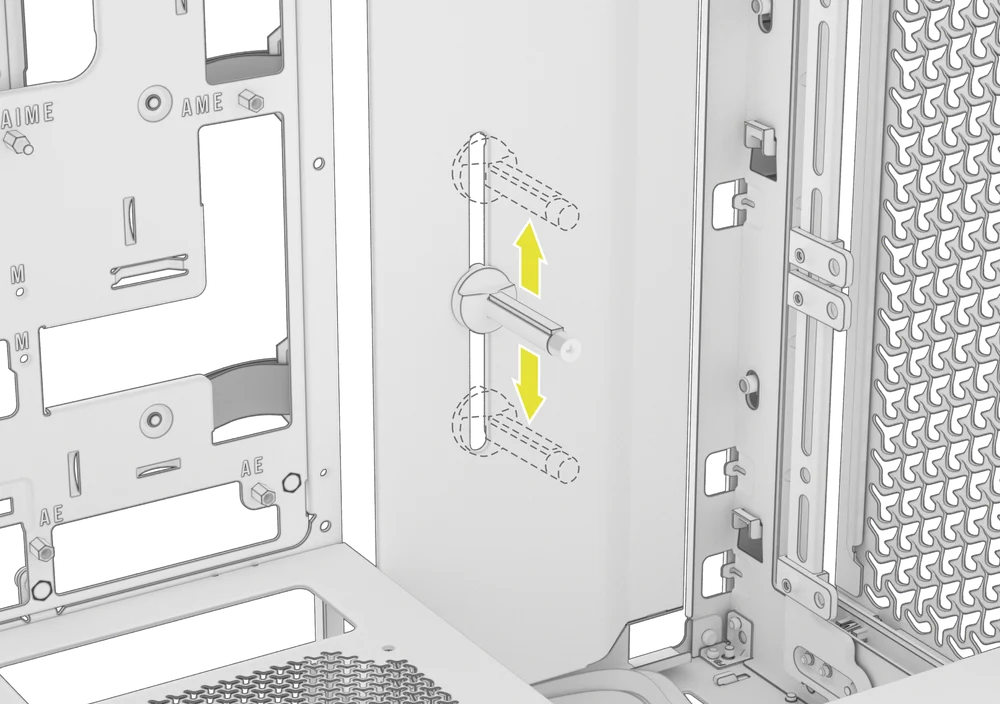
- Reglați brațul anti-coborâre GPU slăbind șurubul cu cap rotund din față și glisându-l în sus sau în jos.
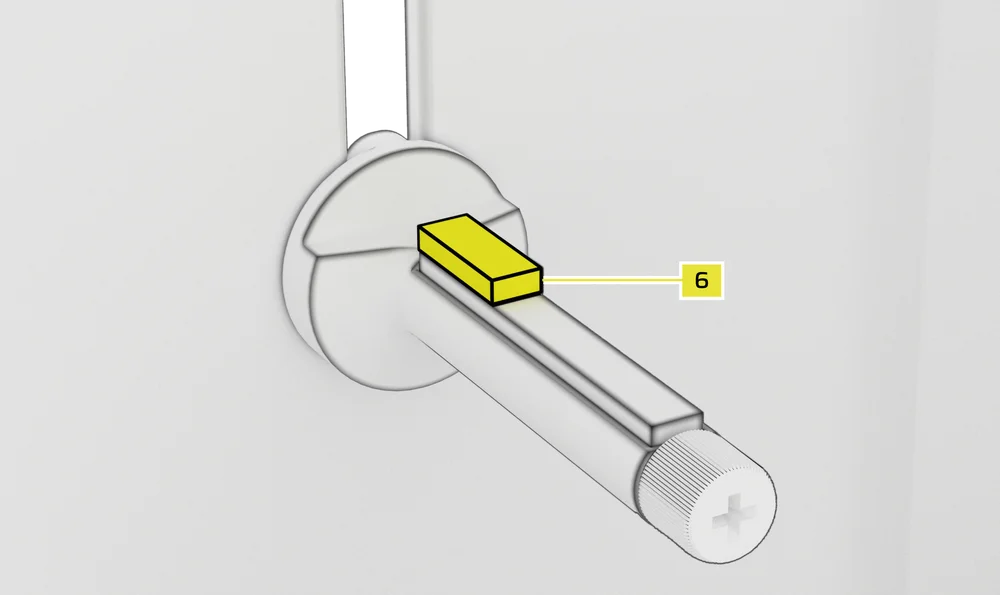
NOTĂ: Dacă ventilatorul GPU-ului sau alte componente intră în contact cu brațul din cauciuc, utilizați distanțierul din cauciuc pentru brațul de stabilizare anti-coborâre (6) inclus în cutia cu accesorii pentru a asigura distanța față de orice componente mobile.
- Atașați distanțierul autoadeziv din cauciuc pentru brațul de stabilizare anti-coborâre (6) la brațul anti-coborâre GPU.
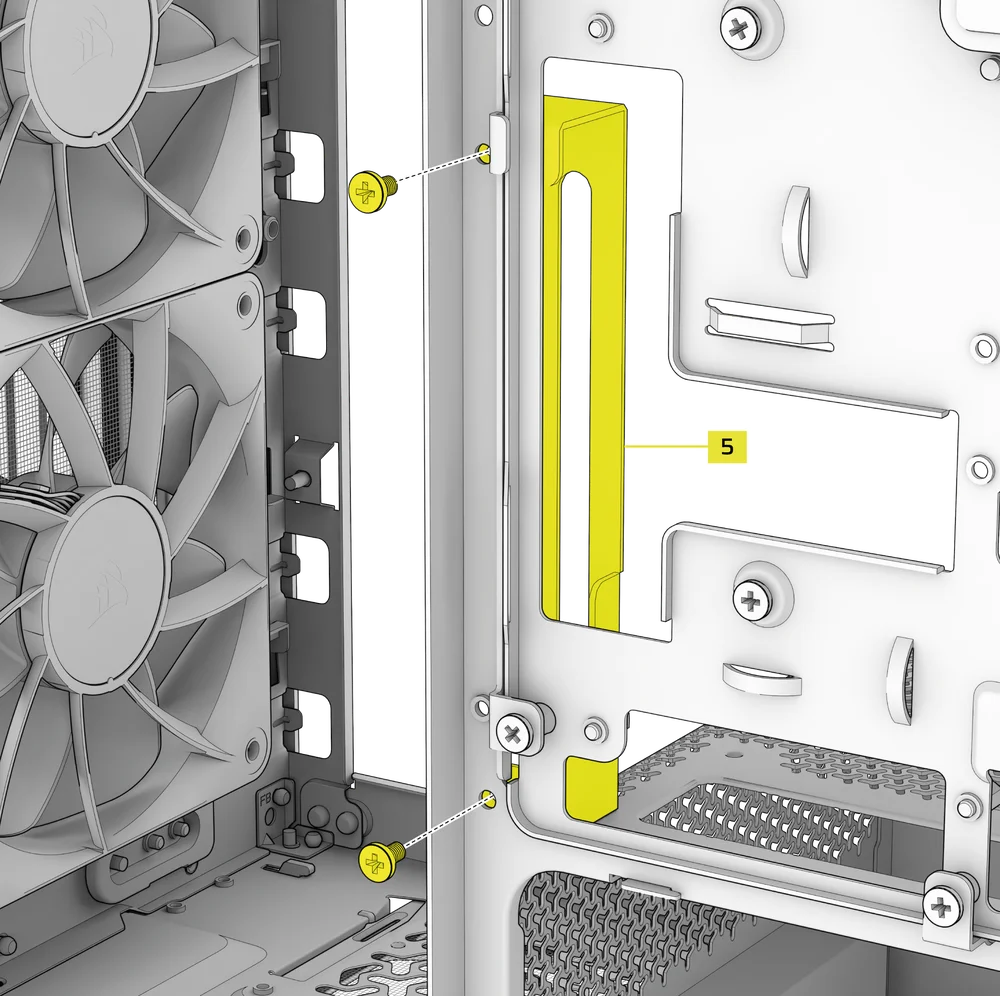
SFAT: Dacă decideți să înlocuiți protecția cablului (F) cu suportul lateral de montare a ventilatorului (1), puteți muta brațul de stabilizare anti-coborâre al GPU-ului pe mini-suportul brațului de stabilizare anti-coborâre (5) și păstra funcționalitatea anti-coborâre.
3. INSTALAREA UNUI GPU ÎN ORIENTARE VERTICALĂ
FRAME 4000 acceptă montarea verticală a GPU-ului cu placa PCI inclusă (B) și o placă PCIe Riser (vândută separat).
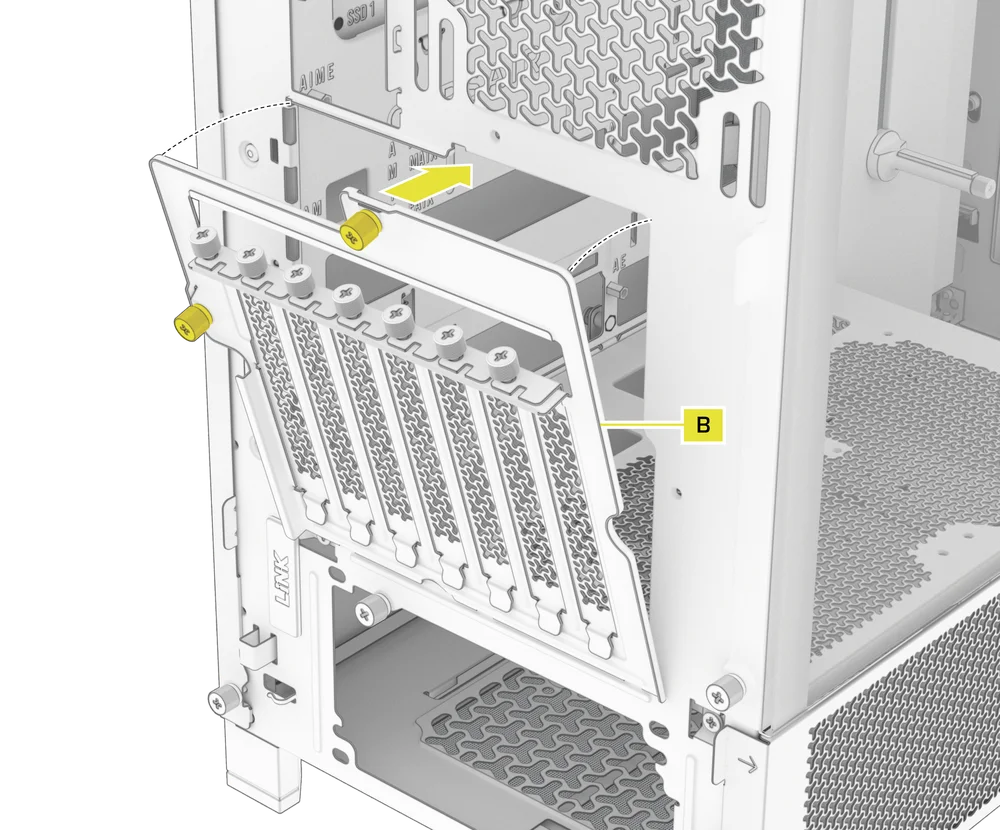
- Dezinstalați placa PCI (B) prin îndepărtarea celor trei șuruburi din partea din spate a carcasei.
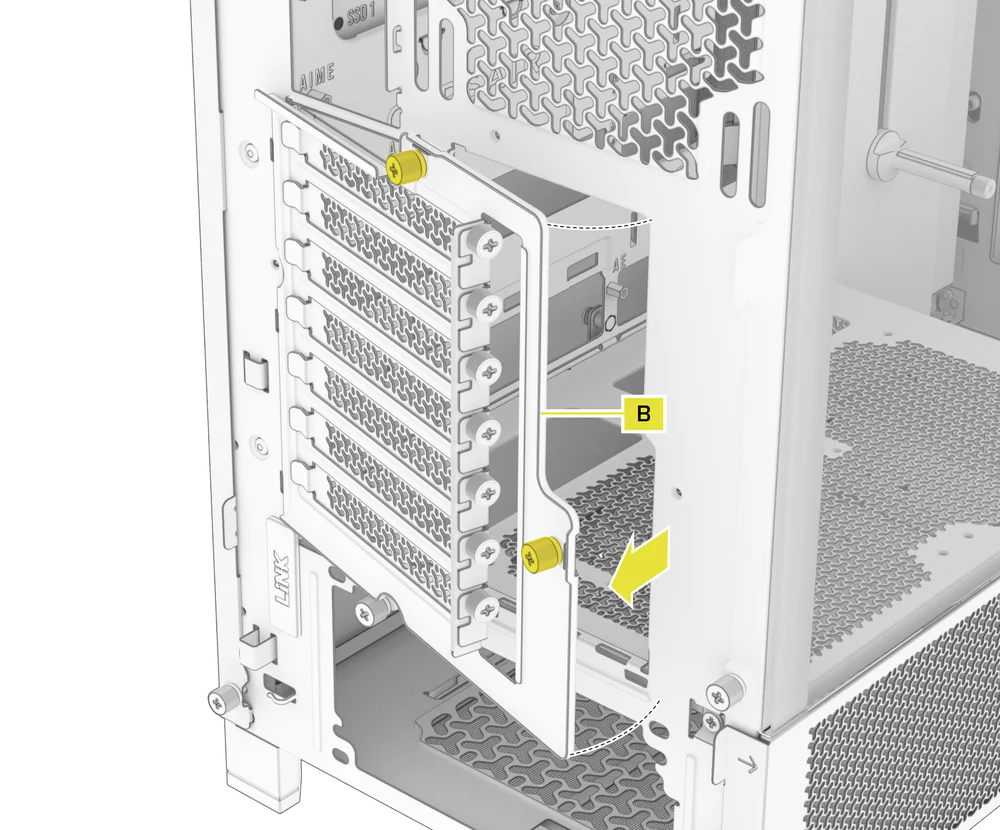
NOTĂ: Șuruburile cu cap rotund ale plăcii PCI sunt captive și nu trebuie îndepărtate complet.
- Rotiți placa PCI (B) cu 90 de grade în sens antiorar, astfel încât șuruburile cu cap rotund ale capacului slotului PCIe să fie orientate în sus.
- Reatașați placa PCI (B) și fixați șuruburile cu cap rotund.
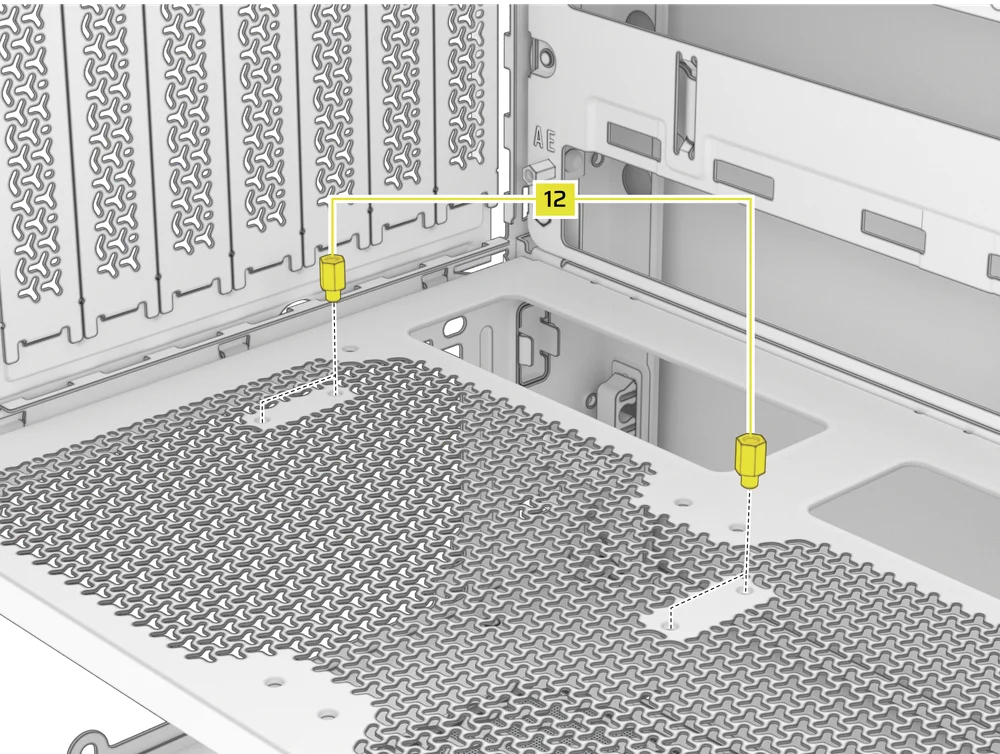
- Install the Vertical Mount Standoffs (12) from the accessory box to the top of the PSU shroud. There are two locations for standoffs, so choose the location that best suits the size of your GPU in relation to how far it is from the side panel.
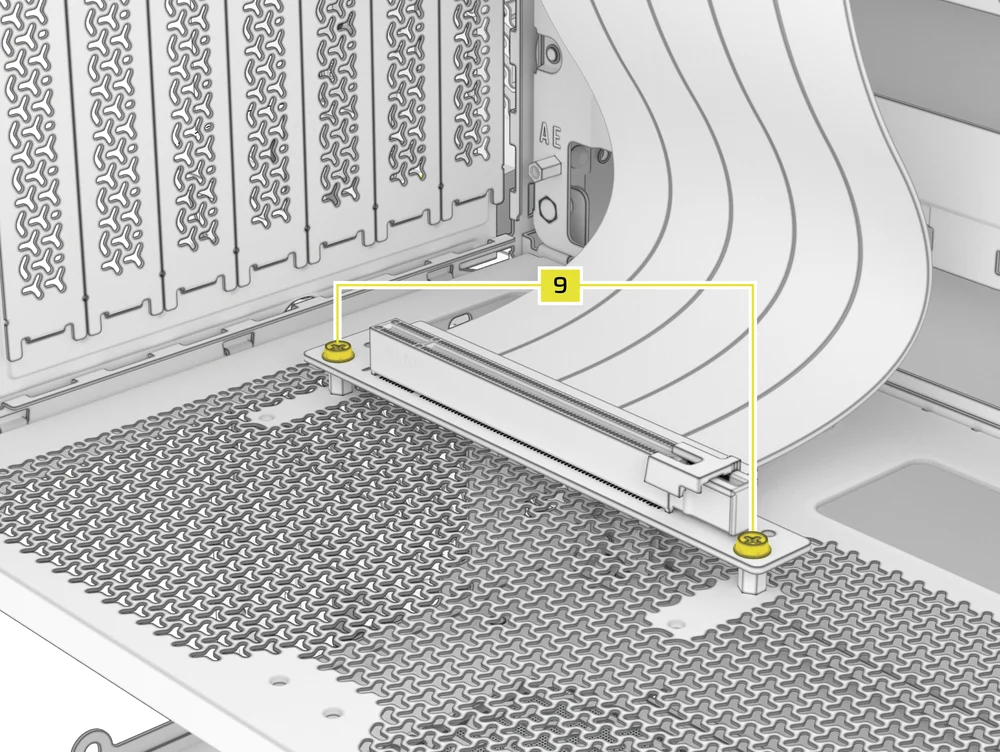
- Mount the PCIe Riser Card (sold separately) to the Vertical Mount Standoffs (12) using two of the included Motherboard Screws (9).
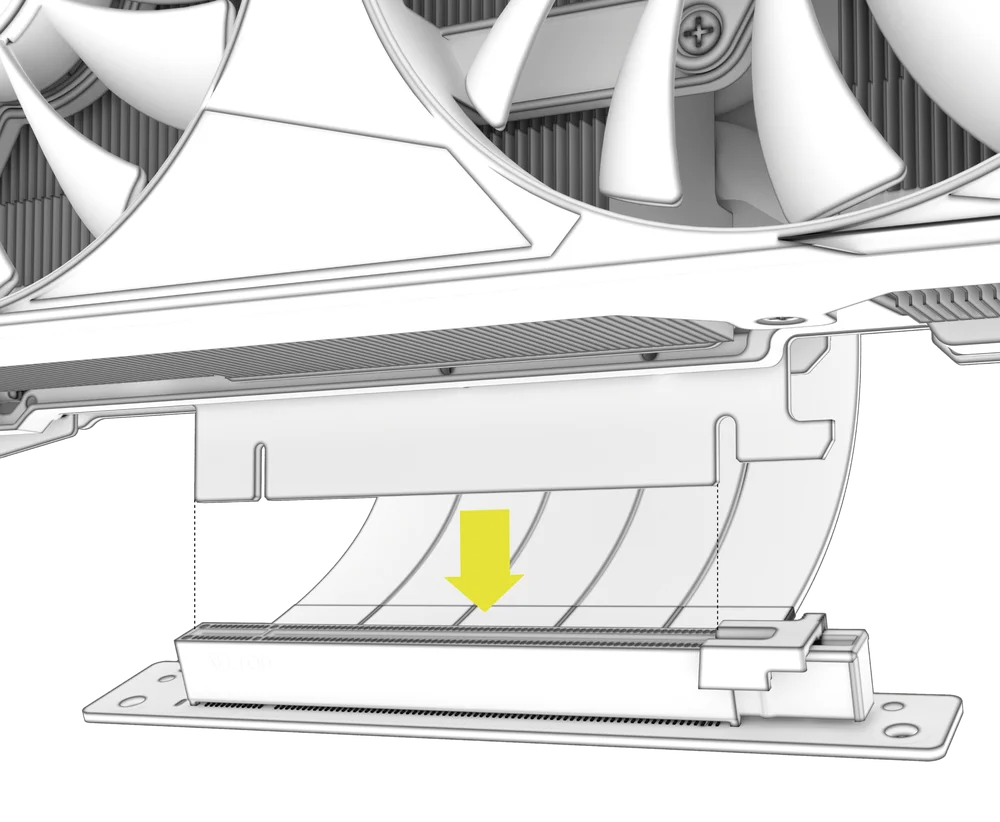
- Montați GPU-ul în suportul PCI, fixându-l ferm în placa riser până când se aude un clic, apoi fixați-l cu șuruburi cu cap rotund.
CONECTAREA FANILOR TĂI
1. CONNECTING AND CONTROLLING RS FANS
- FRAME 4000D RS
- FRAME 4000D WOOD RS
- FRAME 4000X
Vă rugăm să consultați Ghidul de pornire rapidă pentru seria CORSAIR RS pentru instrucțiuni privind instalarea ventilatorului.
2. CONNECTING AND CONTROLLING RS ARGB FANS
- FRAME 4000D RS ARGB
- FRAME 4000D LCD RS ARGB
Vă rugăm să consultați Ghidul de pornire rapidă pentru seria CORSAIR RS ARGB pentru instrucțiuni privind instalarea ventilatorului.
ÎNTREȚINERE
1. CURĂȚAREA FILTRELOR CARCASEI
FRAME 4000 are trei filtre de praf detașabile. Un filtru de alimentare cu energie electrică în partea inferioară, un filtru magnetic în lateral și un filtru din plastic/nailon în partea frontală.
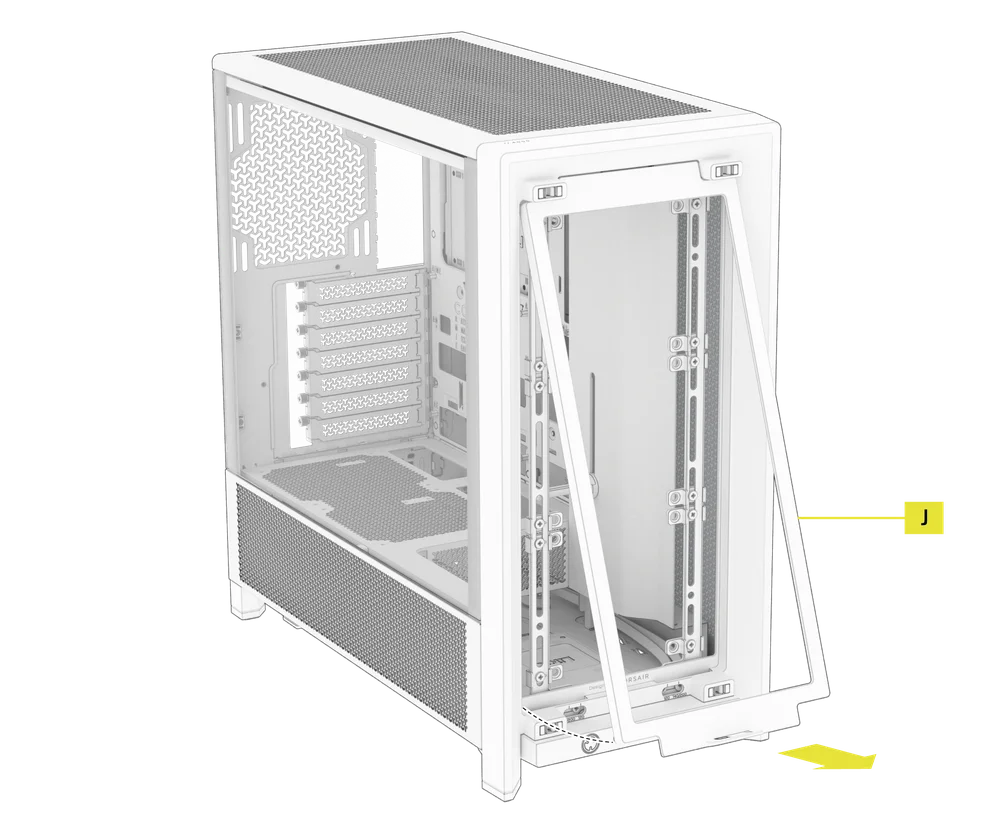
- Pentru a scoate filtrul ventilatorului frontal (J), înclinați cadrul filtrului din plastic spre partea superioară a carcasei, trăgând din partea inferioară.
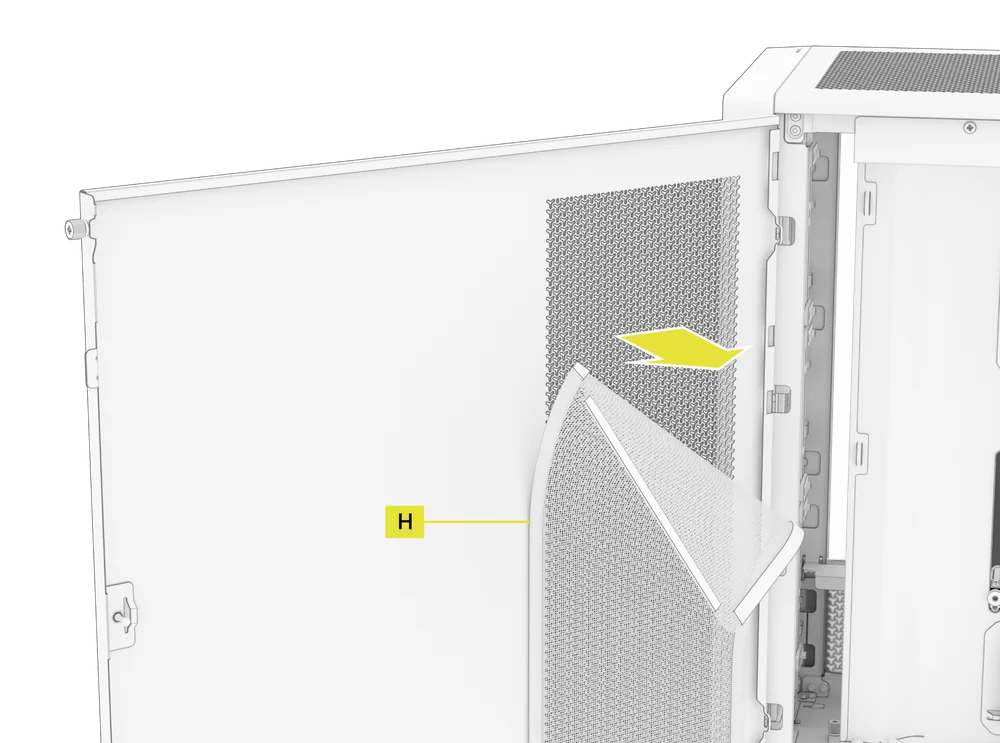
- Pentru a scoate filtrul magnetic al ventilatorului lateral (H), trageți de centru pentru a îndoi cadrul, apoi detașați capetele de punctele de blocare și ridicați filtrul.
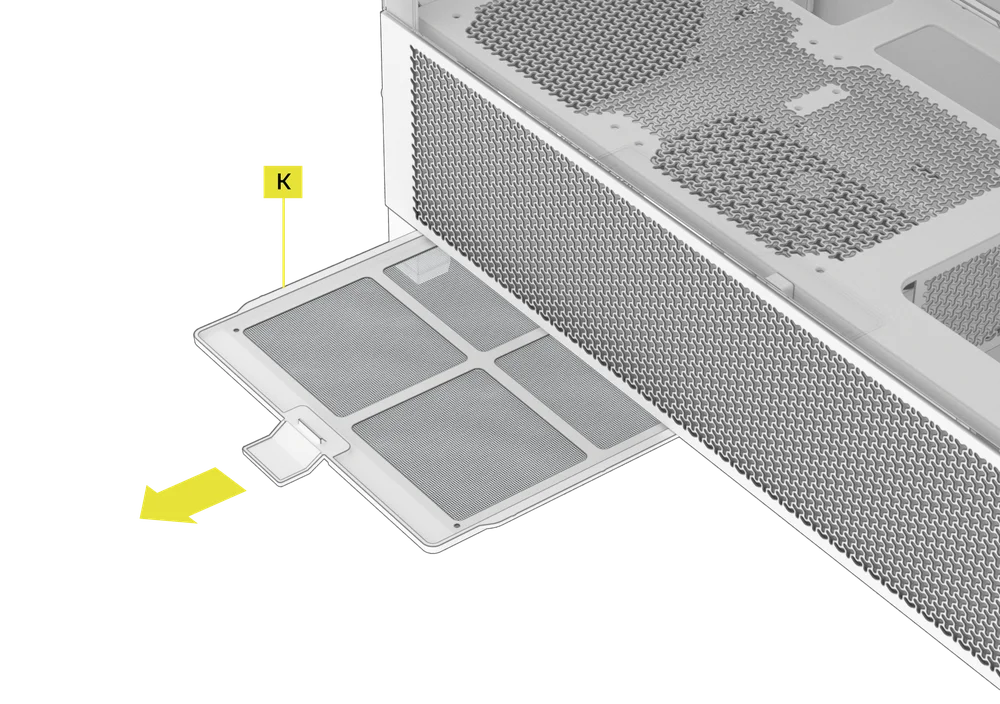
- Pentru a scoate filtrul ventilatorului PSU (K), trageți-l în afară din carcasă.
NOTĂ: Filtrele pot fi curățate cu aer comprimat sau apă. Dacă clătiți filtrul, asigurați-vă că acesta este complet uscat înainte de a-l reinstala.
2. SFATURI PENTRU GESTIONAREA CABLURILOR
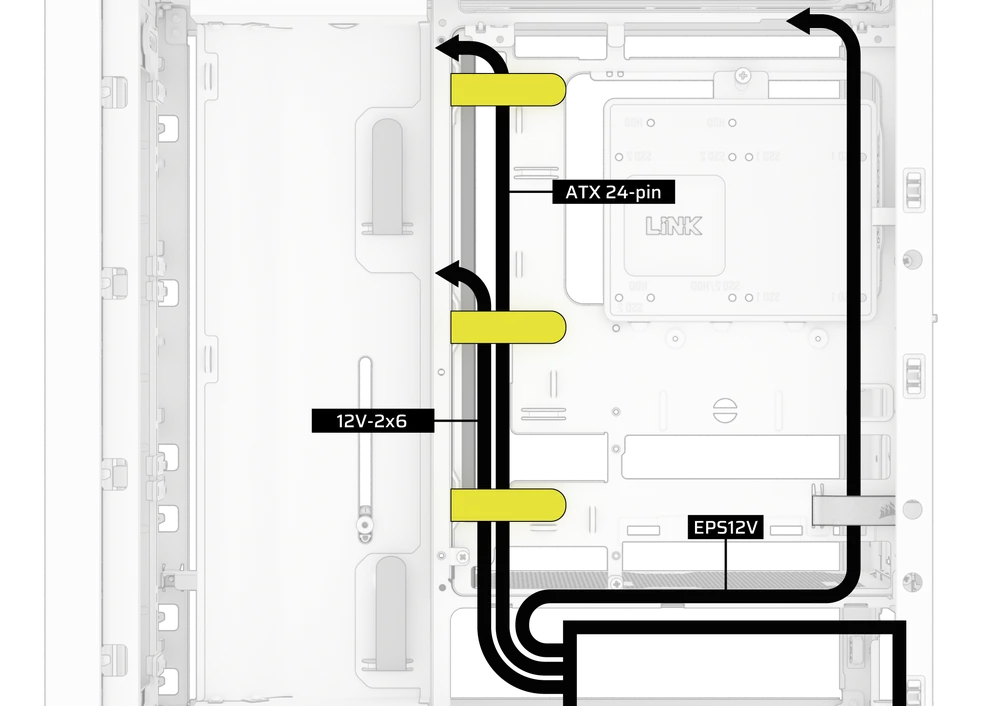
FRAME 4000 include și alte funcții de gestionare a cablurilor, cum ar fi:
- Curele variabile interne/externe cu velcro pentru partea din spate a carcasei.
- Mai multe poziții pentru curele cu cârlige și bucle pentru a se potrivi cu plăci de bază standard sau cu conector inversat.
- Punctele de fixare cu coliere de plastic sunt amplasate strategic pentru a dirija cablurile de alimentare către dispozitive specifice.
- Cablul iCUE LINK se prinde în panoul superior pentru a fixa cablurile LINK în siguranță, fără a fi nevoie de o fixare permanentă.
- Supports most reverse connector motherboards (MSI, ASUS, GIGABYTE) that feature connectors on the rear of the board for a build with no visible motherboard cables.
- Un loc special pentru hub-ul sistemului iCUE LINK.
- Dacă nu doriți să pierdeți mult timp cu organizarea cablurilor și nu doriți ca acestea să fie vizibile prin panoul inferior din plasă, înlocuiți inserția translucidă cu inserția opacă de aceeași culoare inclusă în cutia cu accesorii.
DECLARAȚIE DE GARANȚIE

Carcasele din seria CORSAIR FRAME 4000 au o garanție de 2 ani.
PRODUCT CHANGES
|
January 2025 |
Initial Release |
|
March 2026 |
Thicker steel side panels 200mm fan compatibility PSU shroud cut Various case rigidity improvements |
AVAILABLE ACCESORIES
CC-8900917 FRAME 4000 3D-Y Airflow Front Panel - Black
CC-8900918 FRAME 4000 3D-Y Airflow Front Panel - White
CC-8901149 FRAME 4000 RGB FLOW Front Panel - Black
CC-8901150 FRAME 4000 RGB FLOW Front Panel - White
CC-8901151 FRAME 4000 Series WOOD Front Panel - Black/Walnut
CC-8901152 FRAME 4000 Series WOOD Front Panel - White/Oak
CC-8901153-WW FRAME 4000 Series ELITE WOOD Front Panel - Black/Walnut
CC-8901154-WW FRAME 4000 Series ELITE WOOD Front Panel - White/Oak
CC-8901155 FRAME 4000 Series Flat Glass Front Panel - Black
CC-8901156 FRAME 4000 Series Flat Glass Front Panel - White
CC-8901157 FRAME 4000 Series Pixel Glass Front Panel - Black
CC-8901158 FRAME 4000 Series Pixel Glass Front Panel - White
CC-8901208 FRAME 4000 Glass + Mesh Side Panels - Black
CC-8901209 FRAME 4000 Glass + Mesh Side Panels - White
CC-8901147 FRAME 4000 Full Tempered Glass Side Panel - Black
CC-8901148 FRAME 4000 Full Tempered Glass Side Panel - White
CC-8901048-WW FRAME 4000 Series LCD Mounting Kit - Black
CC-8901049-WW FRAME 4000 Series LCD Mounting Kit - White
CC-8901142-WW FRAME 4000 Series Cold Air Intake Kit - Black
CC-8901143-WW FRAME 4000 Series Cold Air Intake Kit - White
CC-8901171 FRAME 4000 Series - Flat Steel Panel - Black
CC-8901172 FRAME 4000 Series - Flat Steel Panel - White
CC-8900966 FRAME Standard Steel Motherboard Tray - Black
CC-8900967 FRAME Standard Steel Motherboard Tray - White
CC-8901022 FRAME RapidRoute 2.0 Motherboard Tray - Black
CC-8901023 FRAME RapidRoute 2.0 Motherboard Tray - White
CC-8901146-WW FRAME ELITE Motherboard Tray - Meteorite Aluminum
CC-8900937 FRAME 4000 Full Length PSU Shroud - Black
CC-8900938 FRAME 4000 Full Length PSU Shroud - White
CC-8901161 FRAME 4000/4500 Compact PSU Shroud - Black
CC-8901162 FRAME 4000/4500 Compact PSU Shroud - White
CC-8900919 FRAME 4000 Standard FPIO - Black (2xA; 1xC)
CC-8900920 FRAME 4000 Standard FPIO - White (2xA; 1xC)
CC-8901159-WW FRAME 4000 Series ELITE Front Panel I/O - Black (3xC + ARGB Cherry MX Style PWR Button)
CC-8901160-WW FRAME 4000 Series ELITE Front Panel I/O - White (3xC + ARGB Cherry MX Style PWR Button)
SPARE PARTS LISTING
|
CC-8900917 |
FRAME 4000D 3D-Y Airflow Front Panel, Black |
|
CC-8900918 |
FRAME 4000D 3D-Y Airflow Front Panel, White |
|
CC-8900919 |
FRAME 4000D Replacement Front I/O, Black |
|
CC-8900920 |
FRAME 4000D Replacement Front I/O, White |
|
CC-8900921 |
FRAME 4000D Replacement Front Bezel Assembly, Black |
|
CC-8900922 |
FRAME 4000D Replacement Front Bezel Assembly, White |
|
CC-8900923 |
FRAME 4000D Replacement Top Panel, Black |
|
CC-8900924 |
FRAME 4000D Replacement Top Panel, White |
|
CC-8900925 |
FRAME 4000D Replacement Three-Quarter Side Glass, Black |
|
CC-8900926 |
FRAME 4000D Replacement Three-Quarter Side Glass, Black |
|
CC-8900927 |
FRAME 4000D Replacement Y-Mesh Quarter Panel, Black |
|
CC-8900928 |
FRAME 4000D Replacement Y-Mesh Quarter Panel, White |
|
CC-8900929 |
FRAME 4000D Accessory Box, Black |
|
CC-8900930 |
FRAME 4000D Accessory Box, White |
|
CC-8900931 |
FRAME 4000D Replacement PCI Bracket, Black |
|
CC-8900932 |
FRAME 4000D Replacement PCI Bracket, White |
|
CC-8900933 |
FRAME 4000D Replacement Top InfiniRail, Black |
|
CC-8900934 |
FRAME 4000D Replacement Top InfiniRail, White |
|
CC-8900935 |
FRAME 4000D Replacement Front InfiniRail (Single), Black |
|
CC-8900936 |
FRAME 4000D Replacement Front InfiniRail (Single), White |
|
CC-8900937 |
FRAME 4000D Replacement PSU Shroud, Black |
|
CC-8900938 |
FRAME 4000D Replacement PSU Shroud, White |
|
CC-8900939 |
FRAME 4000D Replacement Drive/Controller Plate, Black |
|
CC-8900940 |
FRAME 4000D Replacement Drive/Controller Plate, White |
|
CC-8900941 |
FRAME 4000D Replacement Cable Cover, Black |
|
CC-8900942 |
FRAME 4000D Replacement Cable Cover, White |
|
CC-8900943 |
FRAME 4000D Replacement InfiniRail Fan Mounts (12pcs), Black |
|
CC-8900944 |
FRAME 4000D Replacement InfiniRail Fan Mounts (12pcs), White |
|
CC-8900945 |
FRAME 4000D Replacement Strap Kit, Black |
|
CC-8900946 |
FRAME 4000D Replacement Strap Kit, White |
|
CC-8900947 |
FRAME 4000D Replacement PSU Filter, Black |
|
CC-8900948 |
FRAME 4000D Replacement PSU Filter, White |
|
CC-8900949 |
FRAME 4000D Replacement Front Filter, Black |
|
CC-8900950 |
FRAME 4000D Replacement Front Filter, White |
|
CC-8900951 |
FRAME 4000D Replacement Side Filter, Black |
|
CC-8900952 |
FRAME 4000D Replacement Side Filter, White |
|
CC-8900953 |
FRAME Series GPU Anti-Sag Assembly, Black |
|
CC-8900954 |
FRAME Series GPU Anti-Sag Assembly, White |
LEGAL
©2026 CORSAIR MEMORY, Inc. All rights reserved. CORSAIR and the sails logo are registered trademarks of CORSAIR in the United States and/or other countries. All other trademarks are the property of their respective owners. Product may vary slightly from those pictured.
CONȚINUT CONEX


